Push Button Alert System for Deaf People: The Call-for-Attention Solution

A push-button alert system is one of the most flexible and underused tools available to deaf and hard-of-hearing people. It works as a doorbell, a bedside call button, a caregiver signal, and a portable attention device - all on the same wrist receiver. Here's everything you need to know.
A push-button alert system for deaf people lets caregivers, family members, or visitors press a button that instantly triggers a wrist vibration and icon alert on the receiver - usable as a doorbell, a call button, or a portable attention signal. Setup requires no tools, no wiring, and no technical knowledge, and the button transmitter can be placed or carried anywhere in the home.
What a Push Button Alert System Actually Is
Most people discover push button alert systems when looking for a doorbell solution - and then realize the button does far more than answer the front door. At its core, a push-button alert system is simple: a portable transmitter button that anyone can press, paired with a receiver that alerts you instantly through vibration and a visual icon.
Unlike an acoustic doorbell transmitter, which listens for the sound of a chime, a push button transmitter is an active device - someone deliberately presses it to send a direct signal. There's no chime to detect, no existing doorbell infrastructure to work around, and no ambiguity about whether the alert fired. When the button is pressed, the alert goes out immediately.
That deliberate, direct trigger is what makes the push button so versatile. It doesn't have to be at the front door. It doesn't have to be used by a visitor. It can sit on a nightstand, attach to a caregiver's lanyard, live in a workshop, or be mounted at the back gate. Wherever someone needs to say "I need your attention right now," the push button covers it.
How It Works: Button, Bridge, Wrist
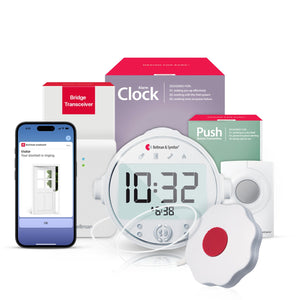
The Bellman Push Button System with Bluetooth Bridge and Watch Receiver has three components that work in sequence.
Push Button Transmitter
A compact, portable button device. Anyone - a family member, a caregiver, a visitor at the door - presses it to send an instant Bluetooth signal to the Bridge. The button can be placed on a surface, mounted on a wall with the included hardware, or carried. It requires no internet connection and no app to operate. Pressing it is all that's needed.
Bluetooth Bridge
Plugged into any standard wall outlet, the Bellman Bluetooth Bridge receives the signal from the push button transmitter and relays it simultaneously to all paired receivers. It's the hub that connects every transmitter in your home - doorbell, smoke, baby monitor, push button - to a single wrist receiver, with no Wi-Fi required for the core alert chain.
Watch Receiver
Worn on your wrist. The Bellman Bluetooth Watch Receiver vibrates and displays a distinct icon when the push button fires - a different icon from the doorbell, smoke, or baby alert, so you know exactly what kind of attention is needed. No need to check your phone. No need to be in a particular room. The alert follows you wherever you go.
Smartphone App (Optional)
The Bellman Connect app can receive a simultaneous push notification to your smartphone when the button is pressed - useful when your phone is with you. As always, the wrist alert is the primary channel: it works without internet, without the phone being nearby, and without any app. Smartphone notifications are a convenient secondary layer, not a dependency.
The Bluetooth Bridge supports multiple paired transmitters simultaneously. If you add a doorbell transmitter, a smoke detector transmitter, or a baby monitor transmitter alongside the push button, your Watch Receiver shows a distinct icon for each type. One wrist receiver handles your entire home alert infrastructure - no separate receivers for separate alert types.
This is one of the most practical aspects of the Bellman ecosystem. You can start with just the push button system today and expand to a full whole-home alert setup over time - all on the same bridge and the same watch receiver you already own.
Eight Real-World Uses for a Push Button Alert
The push button transmitter is the most flexible component in the Bellman alert ecosystem - because it doesn't need a chime to detect or a door to be near. Here are the most common ways people actually use it.
-
As a doorbell - when there's no existing chime
For homes with no wired doorbell, older properties without a chime unit, or rental apartments where installing a doorbell isn't an option, a push button at the front door acts as a full replacement. Visitors press it, your wrist receiver vibrates. No chime required, no wiring needed, no landlord conversation to have.
-
Bedside call button for a caregiver or partner
One of the most valuable overnight uses: a push button on the nightstand lets a person with mobility limitations, an elderly parent, or anyone who needs nighttime assistance press a button to alert a caregiver or partner in an adjacent room or elsewhere in the house. The Watch Receiver vibrates immediately - no shouting, no missed calls.
-
Workshop or garage button - where background noise drowns everything out
Power tools, fans, and machinery make it impossible to hear a doorbell or phone ringing. A push button in the workshop - pressed by a family member inside the house who needs your attention - sends an instant wrist alert that cuts through any level of ambient noise. The wrist vibration reaches you regardless of what you're doing with your hands or ears.
-
Garden or outdoor signal
When you're working in the garden, mowing the lawn, or in a shed, you're often completely cut off from every alert inside the house - doorbell, phone, or calling voice. A push button at the back door or garden gate lets family members signal you from inside the house. You feel the wrist alert and know it's time to come in.
-
Second entrance - back door, side gate, garage
Most doorbell systems only cover the front door. A push button gives you a second alert point - placed at the back door, the garage entrance, or a side gate - without requiring a second chime or additional wiring. It uses the same Bridge and Watch Receiver, just showing a button icon alongside the doorbell icon on the watch face.
-
In-home care and assisted living
For people with hearing loss who also have mobility challenges, a push button alert gives them a way to call for help that doesn't rely on being heard. For professional caregivers working in a client's home, it provides a reliable way to alert the person receiving care that attention is needed. It functions as a simple personal emergency response signal without the subscription costs of monitored systems.
-
Home office - alert from another room
When you're in a dedicated home office with the door closed and headphones on, you're effectively isolated from the rest of the house. A push button outside the office door lets a family member - or the front door - signal you without interrupting a call or a work session. You feel the wrist vibration, glance at the icon, and know whether to stop or continue.
-
Child-to-parent signaling
A push button in a child's room gives children a way to alert a deaf or hard-of-hearing parent without having to shout from another room or come and find them. The parent feels the wrist alert immediately - at night, in the shower, in the garden, wherever they happen to be. Simple, reliable, and easy enough for a young child to use.
Push Button vs Doorbell Transmitter: Which Do You Need?
Bellman offers two different transmitter types for the front-door use case specifically - the acoustic doorbell transmitter (which listens for your existing chime) and the push button transmitter (which someone presses directly). Understanding which one fits your situation helps you choose the right starting point.
| Factor | Acoustic Doorbell Transmitter | Push Button Transmitter |
|---|---|---|
| Requires existing chime | Yes - listens for chime sound | No - works with no existing doorbell |
| Visitors need to do anything different | No - they use your existing bell | Press the push button instead of a traditional bell |
| Usable as a bedside call button | No - fixed near chime unit | Yes - portable, place anywhere |
| Usable in workshop / garden / second room | No - chime-location dependent | Yes - portable, use anywhere in range |
| Can be carried by a person | No | Yes - compact and portable |
| Risk of false alerts from background sounds | Low - detects specific chime pattern | None - only fires when deliberately pressed |
| Works in apartments with no wired doorbell | Only if there is a chime to detect | Yes - fully self-contained |
| Best for | Homes with existing doorbell infrastructure | Homes without a doorbell; multi-use alert scenarios |
For many households, both transmitters are useful simultaneously - the acoustic doorbell transmitter at the front chime for visitor alerts, and a push button elsewhere in the home for caregiver signaling or secondary entrance coverage. Because both connect to the same Bridge and the same Watch Receiver, adding a second transmitter later costs nothing extra in terms of receivers.
For a full comparison of wired vs wireless doorbell alerting approaches and when each is appropriate, see our guide: Wired vs wireless deaf doorbell: which is better for your home?
Setup: Simpler Than Any Other Alert System
If you've ever avoided setting up a "smart" device because of complicated pairing instructions, app logins, and router configurations, the Bellman push button system will be a relief. There is no app required, no Wi-Fi password to enter, and no technical knowledge assumed. The entire process takes about five to eight minutes.
From unboxing to working wrist alert in under 10 minutes
No tools. No electrician. No Wi-Fi. No technical experience required.
- Take out the three components: push button transmitter, Bluetooth Bridge, and Watch Receiver
- Insert batteries into the push button transmitter and Watch Receiver (no screwdriver needed)
- Plug the Bluetooth Bridge into any standard wall outlet in a central location
- Follow the simple pairing steps in the booklet to link the push button transmitter to the Bridge (about 1–2 minutes)
- Follow the pairing steps to link the Watch Receiver to the Bridge (about 1–2 minutes)
- Press the push button - the Watch Receiver should vibrate and show a button icon within 1–2 seconds
- Place or mount the push button wherever it will be used - door, nightstand, workshop, or carry it with you
- Optionally: download the Bellman Connect app and pair your smartphone for simultaneous push notifications
That's it. No electrician visit, no drilling, no tools beyond a fingernail to open the battery compartment. If you decide to move the push button to a different location - bedside at night, back door during the day - you just pick it up and place it there. The pairing stays in memory. Nothing needs to be reconfigured.
For a detailed walkthrough of the pairing process and placement tips that apply to all Bellman transmitters, see our full installation guide: How to install a doorbell alert system for hearing impaired: no electrician needed.
Who Benefits Most from a Push-Button System
The push button alert system is useful for a wide range of people - not just those who are profoundly deaf. Here's who it serves most effectively.
Profoundly Deaf Individuals
When no auditory alert channel is available, a wrist vibration is the most reliable way to receive attention signals. The push button gives every person in the home - family, caregivers, and visitors - a direct way to reach you wherever you are, regardless of hearing aid use.
Older Adults with Hearing Loss
Age-related hearing loss (presbycusis) affects roughly one in three adults over 65. Many in this group remove hearing aids at home for comfort or during rest. A push-button system - with a receiver worn on the wrist - fills the alert gap during those times without any ongoing technical management required.
Homes Without a Wired Doorbell
Older homes, apartments, and converted properties often lack a functional doorbell. The push button transmitter gives these homes a complete doorbell alert solution without running any new wiring - just a button by the door and a wrist receiver on your person.
Caregiving Households
In households where one person supports another with mobility limitations, cognitive impairment, or significant hearing loss, a push button creates a reliable, low-effort call signal. The person needing help presses the button; the caregiver feels the wrist alert regardless of where they are in the house - no raised voice, no missed signal, no delay.
People Who Work in High-Noise Environments at Home
Woodworkers, musicians, hobbyists, and anyone who regularly uses hearing protection or works in a noisy space at home can benefit from a wrist alert system. The vibration on your wrist reaches you when nothing else can - even through ear protection, even over machinery, even through noise-canceling headphones.
Active People Who Move Around the House
If you're regularly in different parts of your home - garden, basement, attic, detached building - a room-fixed strobe or amplified chime can't follow you. A wrist receiver can. The push button system gives every person in the home a consistent way to reach you regardless of where you've gone.
Overnight and Sleep Alerting with a Push Button
The push button system's overnight use case is one of its most valuable - and most overlooked. When hearing aids are out, and you're asleep, a bedside call button on a partner's or care recipient's nightstand becomes a genuine lifeline.
During the day, the Watch Receiver, worn on your wrist handles the alert. At night, when the watch comes off, you have two options: continue wearing the watch (many people find this comfortable after a few nights), or switch to a bed shaker as the primary overnight alert method.
Bellman's sleep bundles pair the Bluetooth Bridge and a transmitter with an Alarm Clock that includes a built-in bed shaker - an under-mattress vibrator that wakes you through physical sensation rather than sound. The push button bundle is specifically designed for this overnight care scenario:
- Bridge + Push Button + Alarm Clock (with bed shaker) - the complete overnight call-for-attention solution: a bedside button for the person needing help, a bed-shaking alarm clock for the person providing care
For daytime use, the Watch Receiver can be added separately - wear it during waking hours for on-wrist alerts and rely on the bed shaker overnight when the watch comes off. The same Bridge handles both, simultaneously if needed.
- Hearing aids out at night = no auditory alerts of any kind reach you
- A caregiver calling from another room cannot be heard by a profoundly deaf person
- Strobe lights require eyes open and line of sight - ineffective during sleep
- Smartphone notifications don't penetrate deep sleep reliably
- Wrist vibration works overnight but may not wake heavy sleepers
- A bed shaker under the mattress is the most reliable overnight wake method available
Expanding Your System: Push Button + Doorbell + Smoke
The push button system is the right starting point for many households - particularly those without an existing doorbell, or those where the primary need is a bedside call signal rather than a door alert. But the Bellman ecosystem is designed to grow with you, and the Bridge you plug in today supports every expansion you might add later.
For people who want complete home alert coverage, the natural progression is: start with the push button system for call-for-attention and door alerting needs, then add a smoke detector transmitter for fire safety coverage, and optionally a bed shaker bundle for overnight reliability. Every addition pairs to the same Bridge and shows up as a distinct icon on the same Watch Receiver - no new hubs, no new receivers, no additional complexity.
For a full picture of how the entire Bellman ecosystem fits together - including doorbell transmitters, smoke alerting, baby monitors, and door alarms - see our complete guide: Best Doorbell Systems for Deaf & Hard of Hearing People: Complete Buyer's Guide (2026).
The push button is the one component I recommend to almost every household I work with - regardless of hearing level. It closes alert gaps that a doorbell alone can never reach.
Hearing Loss Association of America (HLAA) - Assistive Technology ResourceFrequently Asked Questions
Can the push button be used outdoors?
The Bellman push-button transmitter is designed primarily for indoor use, but many users place it at covered entryways, porches, or just inside a back door. For permanent outdoor placement, protect the button from direct rain and extreme temperature exposure. For a fully weather-exposed front door button, the acoustic doorbell transmitter paired with your existing doorbell button is typically the better solution - see our guide on wired vs wireless deaf doorbells for more context.
Can I have the push button and a doorbell transmitter on the same system?
Yes - this is a common and useful combination. The Bluetooth Bridge supports multiple paired transmitters simultaneously. Your Watch Receiver will show the button icon for the push button and the doorbell icon for the acoustic chime transmitter - you always know which alert type has fired. There is no interference or conflict between multiple transmitters on the same Bridge.
Is the push button hard to press? Can someone with limited hand strength use it?
The Bellman push button transmitter uses a large, low-force button surface designed to be accessible for people with reduced grip strength or dexterity limitations. It does not require a firm press - a light touch activates the transmitter reliably.
What is the range between the push button and the Bridge?
The push button transmitter communicates via Bluetooth to the Bridge, with a practical range of approximately 20–30 metres in standard residential conditions (through typical walls and floors). For most single-family homes, a centrally placed Bridge provides coverage from any room in the house to the transmitter. For very large homes, positioning the Bridge between the transmitter location and the areas where you spend most time maximizes coverage.
Does the push button work if the internet goes down?
Yes - completely. The alert chain (push button → Bridge → Watch Receiver) operates via Bluetooth and requires no internet connection whatsoever. Your wrist alert works even if your router is off, your internet service is down, or your smartphone is out of battery. Internet is only needed for the optional Bellman Connect app smartphone notifications.
How many push buttons can I pair to one Bridge?
The Bellman Bluetooth Bridge supports multiple paired transmitters. If you want push buttons in multiple locations - bedside, back door, workshop, home office - you can pair more than one button transmitter to the same Bridge. Each press from any button triggers the same wrist alert with the button icon, so you know it's a push button signal regardless of which one was pressed.
I already have the Bellman doorbell system. Can I add a push button without buying a new Bridge or Watch Receiver?
Yes - if you already have a Bellman Bluetooth Bridge and Watch Receiver from the doorbell system, you can add a push button transmitter as an additional paired device to your existing Bridge. The Watch Receiver will alert on button presses with its own icon alongside the doorbell icon. Contact Bellman support or browse the Bridge accessories to confirm compatibility with your specific model.
A button by the door. A vibration on your wrist. Simple as that.
The Bellman Push Button System with Bluetooth Bridge and Watch Receiver - the most flexible call-for-attention solution for deaf and hard-of-hearing people.
Sources and references: National Institute on Deafness and Other Communication Disorders (NIDCD) - Quick Statistics About Hearing (2026); Age-Related Hearing Loss · World Health Organization (WHO) - Deafness and Hearing Loss Fact Sheet (2026) · Hearing Loss Association of America (HLAA) - Assistive Technology for People with Hearing Loss; Hearing Loss Facts and Statistics · Americans with Disabilities Act (ADA) - Accessible Design Standards for Alerting Systems · Bellman & Symfon - Push Button System with Bluetooth Bridge and Watch Receiver; Bluetooth Bridge; Watch Receiver product specifications (us.bellman.com).
This article is for informational purposes only and does not constitute professional safety, medical, or legal advice. For clinical guidance on hearing loss and assistive devices, consult a licensed audiologist or healthcare provider.

Push Button Alert System for Deaf People: The Call-for-Attention Solution
This guide breaks down the practical choices, features, and considerations behind this topic. Use it to identify a setup that fits the listener, the environment, and the everyday moments that matter most.
The featured products below are current Bellman options discussed in the article or closely matched to its use case.