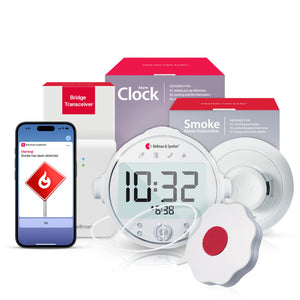
No Wi-Fi Hearing Alert Systems: Why Offline Bluetooth Beats Smart Home Devices

Wi-Fi-dependent smart home alert systems fail silently - and for deaf and hard-of-hearing people, a silent failure is a safety failure. This guide explains exactly why no-Wi-Fi hearing alert systems are more reliable, what makes offline Bluetooth a stronger foundation for safety-critical notifications, and why the Bellman system requires no internet connection, no cellular data after setup, and no subscription to protect your home around the clock.
No Wi-Fi hearing alert systems use direct Bluetooth communication between transmitters and a bridge transceiver to deliver wrist vibration and visual alerts - making them more reliable than Wi-Fi-dependent smart home devices that fail during internet outages, router disruptions, and power events. The Bellman Bluetooth Bridge and Watch Receiver operate entirely on 433 MHz RF and Bluetooth 5 - no Wi-Fi network, no cloud server, and no cellular data required after initial app setup. Alerts reach your wrist and your smartphone through the free Bellman Assistant app on iOS and Android, regardless of internet status.
For deaf and hard of hearing people, a missed alert is not an inconvenience - it can be a visitor you cannot respond to, a smoke alarm you cannot hear, a baby you cannot reach, or an emergency you cannot act on in time. An alert system that fails during precisely the conditions most likely to accompany an emergency is not a safety system. It is a convenience feature with a critical gap. Understanding when and why Wi-Fi-dependent systems fail is essential for anyone making this decision.
The Hidden Problem With Wi-Fi-Dependent Alert Systems
Smart home alert systems for hearing loss that depend on Wi-Fi have a specific, predictable failure pattern. They work perfectly under normal conditions - stable internet, functioning router, adequate signal strength throughout the home. They fail silently the moment any link in that chain breaks. And the moments when that chain is most likely to break are disproportionately the moments when reliable alerts matter most.
This is not a theoretical concern. Internet service outages in the United States average several per year per household, with individual outages lasting minutes to hours. Router restarts - triggered by firmware updates, power fluctuations, and ISP-side changes - happen without warning. Storms, utility failures, and other emergency-adjacent events frequently disrupt internet service. A Wi-Fi smart smoke alarm or doorbell system that depends on a cloud server to route its alerts may be sending notifications to a server that cannot be reached at exactly the moment a fire has started or a family member has arrived in an emergency.
For people with normal hearing, a failed Wi-Fi alert system is backed up by the sound of the original alarm - the doorbell they can hear, the smoke detector they can hear, and the phone ringing they can hear. For deaf and hard-of-hearing people, the alert system is the backup. There is no audio fallback. When the alert system fails, the warning is simply gone.
Seven Ways Wi-Fi Alert Systems Fail - and When They Fail Most
Understanding the specific failure modes of Wi-Fi-dependent alert systems is not a technical exercise - it is the basis for a safety decision. Here are the seven most common failure scenarios, with particular attention to when they occur relative to emergencies.
Power Outage - The Most Dangerous Failure
A house fire often begins with a brief power surge or outage before smoke reaches alarm levels. If your Wi-Fi router loses power before the smoke alarm triggers, your internet-dependent alert system is already offline when the fire notification tries to route through it. The Bellman Bridge and transmitters operate on battery backup - the smoke alarm transmitter fires its 433 MHz signal to the Bridge, which relays via Bluetooth to the Watch, all without any mains power at any point in the chain.
ISP Outage
Your ISP goes down - a fiber cut, a regional network failure, a maintenance window. Your router is on, your home network is on, but there is no path to the cloud server that routes smart home notifications. Every Wi-Fi-dependent alert device in your home is now silent, with no indication that it has failed. The Bellman system notices nothing - it never touched the internet to begin with.
Router Restart or Firmware Update
Routers restart for firmware updates, after power fluctuations, after ISP changes, and for no apparent reason at all. During a restart - typically 1 to 3 minutes - the home network is offline. Wi-Fi alert devices reconnect after the router recovers, but any alert that fires during the restart window is lost. This is a known, recurring failure mode that most smart home device manufacturers acknowledge in their fine print.
Weak Wi-Fi Signal in Specific Rooms
Wi-Fi signal strength varies significantly across a home - laundry rooms, basements, garages, and rooms far from the router often have a marginal signal. A smoke alarm transmitter or doorbell device placed in a weak signal zone may appear connected but deliver delayed or dropped notifications. RF at 433 MHz penetrates walls and floors reliably without the signal-strength sensitivity of Wi-Fi 2.4 GHz or 5 GHz bands.
Cloud Server Outage
Smart home notification platforms - from the largest technology companies to dedicated IoT alert services - experience server outages that prevent notification delivery. These outages are documented, periodic, and often affect thousands of users simultaneously. When the cloud service is down, your locally functioning smart home device cannot deliver its alert anywhere. The Bellman system has no cloud dependency - alerts move from transmitter to Bridge to Watch entirely within your home.
Wi-Fi Password or Network Change
Changing your Wi-Fi password - after a security incident, a provider change, or a router replacement - disconnects all Wi-Fi-dependent smart home devices until they are manually reconnected. If a device is in an out-of-the-way location (a smoke alarm in the basement, a doorbell at the back entrance), it may remain disconnected for days before anyone notices. The Bellman system has no Wi-Fi credential to expire - it pairs once and works indefinitely.
Cellular Data Dependency After Setup
Some Wi-Fi alert apps switch to cellular data routing when the home Wi-Fi is unavailable - which appears to maintain coverage but introduces cellular signal dependency. In rural areas, basements, and buildings with poor cellular penetration, this fallback can also fail. The Bellman Assistant app communicates with the Bridge via Bluetooth when you are at home - it does not route through cellular data after initial setup, meaning no cellular coverage is needed for in-home alerts to reach your smartphone.
Storm and Emergency Conditions
Severe weather events - the conditions most likely to produce fires (lightning), CO emergencies (generator use), and security events (people checking on vulnerable household members) - are also the conditions most likely to disrupt internet service and power. The reliability hierarchy matters most precisely when reliability is most critical. A system that works during normal conditions but fails during emergencies is designed for the wrong use case.
How the Bellman Offline Bluetooth System Works Instead
The Bellman alerting system replaces every internet-dependent link in the smart home alert chain with a direct, local wireless connection. Here is the full signal path from an alert event to your wrist - with no internet involved at any point.
433 MHz RF: Transmitter to Bridge
Every Bellman transmitter - the Door Transmitter, Smoke Alarm Transmitter, Baby Monitor Transmitter, Telephone Transmitter, Push Button Transmitter - communicates with the Bluetooth Bridge on the 433 MHz radio frequency band. This frequency is specifically chosen for home alerting use: it penetrates walls, floors, and ceilings reliably without line-of-sight requirements, and it operates completely independently of your home's Wi-Fi network, router, and internet connection. For a complete technical explanation of how the Bridge processes these signals, see our plain-English guide to how the Bellman Bluetooth Bridge works.
Bluetooth 5: Bridge to Watch Receiver
The Bellman Bridge converts the incoming 433 MHz signal from each transmitter into a Bluetooth 5 signal and relays it directly to the paired Watch Receiver. This is a peer-to-peer Bluetooth connection - no router, no internet, no cloud server. The Bridge speaks directly to the Watch. With a range of up to 650 feet in an open field, this connection covers the entire home and yard from a single centrally-placed Bridge.
Bluetooth: Bridge to Smartphone App
When your smartphone is at home and within Bluetooth range of the Bridge, the free Bellman Assistant app (iOS and Android) receives the same alert simultaneously with the Watch - over a direct Bluetooth connection to the Bridge, not through the internet. After the initial app setup and pairing, no cellular data or Wi-Fi is required for the app to receive in-home Bridge alerts. The app works as a simultaneous second alert channel alongside the Watch: wrist vibration and phone notification at the same instant, both from the same Bridge, both over Bluetooth, both without touching the internet.
The Bellman Assistant app communicates with the Bridge via Bluetooth when you are in the home. This means that once the initial setup is complete, the app does not require an active cellular data connection to deliver in-home alerts. This matters in two specific scenarios: homes in areas with unreliable cellular coverage, and situations where cellular service is disrupted (storms, network congestion, emergency events). The Bluetooth connection between the app and the Bridge is entirely local and remains fully functional regardless of cellular signal status.
Direct Comparison: No-Wi-Fi Bluetooth vs. Wi-Fi Smart Home Alert Devices
| Factor | Wi-Fi Smart Home Alert Devices | Bellman No-Wi-Fi Bluetooth System |
|---|---|---|
| Internet required | Yes - alerts fail silently during ISP outages, router restarts, and cloud server downtime | No - 433 MHz RF and Bluetooth 5 operate entirely within the home |
| Cellular data required | Often, many systems fall back to cellular routing when Wi-Fi is unavailable | Not after initial setup - Bellman Assistant app uses Bluetooth for in-home alerts, no cellular needed |
| Works during power outage | No - router loses power; cloud routing breaks; Wi-Fi devices go offline | Yes - Bridge and transmitters have battery backup; 433 MHz RF + Bluetooth operate independently of mains power |
| Works during storms | Unreliable - storms commonly disrupt internet and power simultaneously | Yes - local RF and Bluetooth are unaffected by internet or power disruptions |
| Wrist vibration alert | Via smartwatch app - requires phone connectivity and active pairing | Direct Bluetooth to Watch Receiver - no phone required; independent wrist alert channel |
| Subscription or account | Often required - cloud notification delivery tied to service plans | None - no account, no subscription, no monthly fee |
| Wi-Fi password changes | Disconnects all devices - requires manual reconnection per device | Irrelevant - Bellman system has no Wi-Fi credentials to expire or reconnect |
| Rural / low-signal areas | Cellular fallback may also fail in low-coverage rural areas | Full functionality regardless of cellular coverage - Bluetooth operates entirely locally |
| Cloud server dependency | Yes - smart home notification platforms experience periodic outages affecting all users | No cloud server - alert path is transmitter → Bridge → Watch/App, entirely within the home |
| Setup complexity | Network configuration, account creation, app pairing, cloud authorization | Plug in Bridge, activate transmitters, pair Watch - under 10 minutes, no network configuration |
Where the Reliability Difference Is Life-Critical
The technical case for no-Wi-Fi alerting is straightforward. The practical case is more compelling: the scenarios where the system must perform are disproportionately the same scenarios where Wi-Fi-dependent systems are most likely to fail. Here are three specific safety contexts where this distinction matters most.
Smoke and Fire Alerts Overnight
A house fire that starts overnight is particularly dangerous because of the combination of darkness, sleep, and - for deaf and hard-of-hearing people - the absence of hearing aids. The same storm or electrical event that could start a fire may also disrupt internet service before the smoke alarm fires. If your smoke alert system routes through Wi-Fi and the router has lost power, the alert chain is broken before it begins. The Bellman smoke alerting system uses the Smoke Alarm Transmitter's 433 MHz signal to reach the Bridge, which uses Bluetooth to reach the Watch and the Alarm Clock Receiver - none of which requires internet connectivity at any step. For complete overnight fire safety coverage with the Alarm Clock Receiver's bed shaker and flashing lights, the Bridge + Smoke + Alarm Clock bundle is the correct no-Wi-Fi configuration. The Watch Receiver can be added separately for daytime wrist alerts. See our complete guide on Bluetooth smoke alarms for hearing-impaired people for full coverage.
Carbon Monoxide Emergencies
Carbon monoxide events often accompany power disruptions - a generator brought indoors during a storm, a furnace malfunction after a cold-snap power surge. CO is odorless and colorless; there is no secondary sensory cue that might prompt awareness without the alert system. If the alert system is Wi-Fi-dependent and the power disruption that triggered the CO event has also disrupted the router, the alert system and the hazard have the same cause. The Bellman CO alerting chain is entirely offline - the CO Transmitter fires to the Bridge, the Bridge fires to the Watch, with no internet step that could share a failure mode with the CO event itself.
Emergency Situations in Rural and Low-Connectivity Areas
In rural areas with limited or unreliable internet service, a Wi-Fi-dependent alert system has a fundamentally weaker baseline reliability than it does in a well-connected urban home. Cellular fallback options - when Wi-Fi fails, route through 4G/5G - also fail in areas with poor cellular coverage. The Bellman system's local Bluetooth and RF design provides the same alert reliability in a rural home with no cellular service as it does in a city apartment with a fiber connection. The system is indifferent to connectivity infrastructure because it does not use any of it. For people in areas where internet reliability is genuinely uncertain, this is not a minor preference - it is the reason the system works when others do not.
The Push Button: Two-Way Safety Without Any Network
One of the most practically important examples of why no-Wi-Fi alerting matters is the push button use case - a scenario that is easy to overlook when evaluating alert systems but that comes up frequently in caregiving and assistive contexts.
The Push Button System with Bluetooth Bridge and Watch Receiver lets a family member, patient, or person in need press a button that sends an immediate alert to the caregiver's Watch Receiver - wherever they are in the home. This is a life-safety use case: a fall, a medical event, a moment of urgent need where the person cannot call out verbally and needs to signal for help.
In a Wi-Fi-dependent system, this alert would route through the internet to a notification service and then to a smartphone. If the internet is down - precisely the scenario most common during severe weather events that can also cause falls and medical emergencies - the alert fails to arrive. In the Bellman system, the Push Button Transmitter fires its 433 MHz signal to the Bridge, which relays via Bluetooth to the Watch in moments. No internet is involved. The alert arrives regardless of connectivity status. For a person in distress, the difference between an alert that arrives in two seconds and one that never arrives because the router lost power is not a matter of convenience.
Delivers secure, long-range radio signals - no Wi-Fi or complicated setup required. Long-lasting batteries and backup power keep the system running during outages.
Bellman & Symfon - Receiver System Design PrinciplesNo Cellular Data After Setup: What That Means in Practice
This is a detail that matters more than it initially appears - and it matters most for specific household situations that are more common than people realize.
Some hearing alert apps - and many general smart home apps - use cellular data as a fallback when home Wi-Fi is unavailable, or as the primary routing method when away from home. In areas with poor cellular coverage (rural homes, basement rooms, concrete buildings, areas with network congestion during emergencies), this fallback fails. In households where a data plan has a monthly cap, alert delivery may be throttled or interrupted. The reliability of the alert system is now tied to the reliability of cellular infrastructure - a dependency with its own failure modes.
The Bellman Assistant app communicates with the Bridge via Bluetooth when you are at home. After the initial pairing and setup, which does require an internet connection to download the app, no cellular data is required for the app to receive in-home Bridge alerts. In a house with poor cellular signal, spotty data coverage, or no active data plan on the household device, the app continues delivering alerts normally over Bluetooth. The alert chain runs from transmitter to Bridge to app over local wireless connections that are entirely independent of cellular infrastructure.
This matters most for three groups: households in rural areas where cellular coverage is unreliable; older users on limited or no-data mobile plans who use the app on a Wi-Fi-only tablet or older smartphone; and any household where emergency conditions - storms, network congestion, infrastructure disruptions - may reduce cellular reliability at exactly the moment when reliable alerts are most important.
No-Wi-Fi Reliability Across Every Alert Type
The offline Bluetooth architecture applies uniformly across every alert type in the Bellman system. Here is how the no-Wi-Fi design benefits each specific use case - and which published guides cover each in detail.
Doorbell
The Door Transmitter detects your existing chime acoustically and fires its RF signal to the Bridge. The Watch vibrates with the doorbell icon. No internet, no cloud, no router restart can interrupt this path. For buyers evaluating doorbell alert options and comparing offline vs. Wi-Fi approaches, see our guide on Bluetooth doorbell alerts for deaf people.
Smoke and Fire
The Smoke Alarm Transmitter fires its 433 MHz signal the moment smoke or heat is detected. The Bridge relays to the Watch and Alarm Clock Receiver - including the bed shaker for overnight alerting - over Bluetooth with no internet dependency. The Bridge + Smoke + Alarm Clock bundle covers the complete two-shift setup. See the smoke alarm guide for full details.
Baby Monitor
The Baby Monitor Transmitter detects infant sounds and sends RF to the Bridge, which relays via Bluetooth to the Watch. Parents in areas with unreliable internet or cellular coverage get the same response reliability as parents in city apartments with fiber broadband. See our baby monitor guide for deaf parents.
Landline Phone
The Telephone Transmitter detects the ring voltage on the landline electrically and fires its RF signal to the Bridge. An ISP outage may disrupt internet-based phone services, but a traditional landline and the Bellman alert chain both operate independently of the internet. Your phone rings, the Watch vibrates, even when the broadband is down. See the landline phone alert guide for the full picture.
Push Button
The Push Button Transmitter fires its RF signal to the Bridge immediately on press. The Push Button System with Bridge and Watch Receiver delivers caregiver alerts in moments over local Bluetooth - with no internet dependency at any step. In caregiving situations where the push button may be pressed during a fall or medical event, this reliability is not negotiable.
The Watch Receiver Itself
The Watch Receiver pairs directly to the Bridge over Bluetooth 5. It requires no phone, no app, no internet, and no cellular data to receive alerts. The Watch is the purest expression of the offline Bluetooth design: a wearable alert receiver that works because of local wireless, not because of infrastructure that may or may not be available. See our full Watch Receiver guide.
The Whole-Home Offline Alerting System: One Bridge, Every Alert, No Internet
The no-Wi-Fi reliability of the Bellman system scales with the system itself. One Bridge handles every transmitter type - doorbell, smoke, baby, phone, push button, CO - simultaneously, over the same 433 MHz RF and Bluetooth chain, with the same offline reliability for each. Adding a new transmitter does not introduce a new Wi-Fi dependency or a new cloud account. The system remains entirely local regardless of how many transmitters are in use.
This matters for the practical trajectory of how most households adopt a home alerting system. You start with the most urgent need - a doorbell you keep missing, a smoke alarm you cannot hear at night - and expand from there. Each addition uses the same Bridge, the same Watch, and the same offline Bluetooth architecture. The Watch Receiver vibrates with distinct icons for every new alert type automatically. The free Bellman Assistant app on iOS and Android shows the same notifications over its local Bluetooth connection to the Bridge. Neither requires any network configuration or account changes when you expand the system.
What to Verify Before Trusting Any Hearing Alert System With Your Safety
Run through each question for any system you are evaluating - Bellman or otherwise. The answers reveal where the failure modes are.
- Does the alert chain include any internet-dependent step?
- Does the system continue alerting during a router restart?
- Does the system continue alerting during an ISP outage?
- Does the system continue alerting during a power outage?
- Is there a cloud server in the notification path that can go down?
- Does changing the Wi-Fi password disconnect any alert devices?
- Does the smartphone app require cellular data to deliver in-home alerts?
- Does the system work in areas with poor cellular coverage?
- Are there ongoing subscription fees tied to notification delivery?
- Does the smoke alert share a power/internet failure mode with the fire event itself?
For the Bellman system, the answer to every one of these questions favors reliability: no internet step, no cloud server, no Wi-Fi dependency, no cellular data after setup, no subscription, no shared failure mode between the alerting system and the emergencies it is designed to catch. For a complete overview of how all of this fits together as a whole-home system, see The Complete Guide to Bluetooth Alerting Systems for Deaf & Hard of Hearing People.
Alerts that work - even when the internet does not.
The Bellman Bluetooth alerting system runs entirely on local RF and Bluetooth. No Wi-Fi. No cellular data after setup. No subscription. Wrist vibration via the Watch Receiver and simultaneous notification via the free Bellman Assistant app on iOS and Android - every time, regardless of internet status.
Sources and references: Bellman & Symfon - Bluetooth Bridge Transceiver: 433 MHz RF receiver, Bluetooth 5 output, battery backup, no Wi-Fi required at any point in the signal chain (us.bellman.com/collections/bluetooth-bridge) · Bellman & Symfon - Bluetooth Watch Receiver BE3330: Bluetooth 5, 650 ft open field range, up to 1 week battery life, pairs directly to Bridge (us.bellman.com/products/bluetooth-watch-receiver) · Bellman & Symfon - Push Button System with Bluetooth Bridge and Watch Receiver (us.bellman.com/products/push-button-system-with-bluetooth-bridge-and-watch-receiver) · Bellman & Symfon - Receiver system design principles: "Delivers secure, long-range radio signals - no Wi-Fi or complicated setup required. Long-lasting batteries and backup power keep the system running during outages." (programs.bellman.com/us/va/receivers) · Bellman & Symfon - Bellman Assistant App: free for iOS 15+ and Android 8.0+; communicates with Bridge via Bluetooth for in-home alerts; no cellular data required after initial setup · Bellman & Symfon - Smoke/Fire Alarm System with Bluetooth Bridge and Alarm Clock (us.bellman.com/products/smoke-fire-monitoring-system-with-bluetooth-bridge-and-alarm-clock) · National Fire Protection Association - residential fire statistics noting that nearly half of fire deaths occur during sleeping hours, many accompanying power disruption events · U.S. Energy Information Administration - residential power outage frequency data; American households experience multiple outages per year averaging several hours of total downtime.
This article is for informational purposes only. Product specifications are subject to change; refer to current product pages at us.bellman.com for the most up-to-date technical details.

No Wi-Fi Hearing Alert Systems: Why Offline Bluetooth Beats Smart Home Devices
This guide breaks down the practical choices, features, and considerations behind this topic. Use it to identify a setup that fits the listener, the environment, and the everyday moments that matter most.
The featured products below are current Bellman options discussed in the article or closely matched to its use case.