Doorbell Alert for Elderly Hearing Impaired: Help Seniors Never Miss the Door

A missed doorbell is never just an inconvenience for a senior with hearing loss - it can mean a missed medication delivery, a locked-out family member, or an unanswered welfare check. This guide explains how modern vibrating and visual doorbell alert systems work, what to look for, and how to choose the right setup for a loved one aging at home.
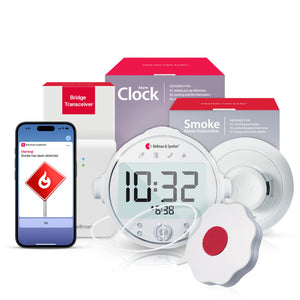
A doorbell alert for elderly hearing impaired people detects the existing doorbell chime and sends a gentle wrist vibration and visitor icon to a paired Watch Receiver - keeping seniors aware of visitors without missing deliveries, guests, or help. The Bellman Doorbell System with Bluetooth Bridge and Watch Receiver connects to any existing wired doorbell without rewiring and delivers silent, wrist-level alerts in moments - no Wi-Fi or smartphone required.
Why Seniors with Hearing Loss Miss the Door - and Why It Matters More Than You Think
For most people, a missed doorbell is a minor frustration. For a senior with hearing loss living independently, it is a recurring problem that compounds over time in ways that are easy to underestimate.
Consider what a missed doorbell actually means: a prescription delivery left on the porch in the rain, a family member who drives 40 minutes only to leave without making contact, a neighbor checking in after a concern who assumes nobody is home, or a home health aide unable to enter. These are not rare edge cases - they are regular occurrences for the estimated 48% of adults over 75 who live with significant hearing loss in the United States.
The conventional workarounds - turning up the doorbell volume, leaving a note asking visitors to call ahead, or keeping a phone nearby at all times - have real limitations. Volume increases help only if the senior is in a nearby room. Phone dependency requires the senior to hear or notice the call. Neither solution addresses what actually happens: the senior is in the kitchen, the backyard, the bathroom, or simply in a room where the doorbell sound cannot reach.
A dedicated doorbell alert system for hearing-impaired elderly people solves this problem at the hardware level, not at the behavior level. It does not ask the senior to change what they do or where they go. It delivers the alert wherever they are - on their wrist, in their field of vision, or through the flashing of a lamp - the moment someone presses the doorbell.
How Doorbell Alert Systems for Hearing Impaired Elderly People Actually Work
There is a wide range of doorbell alert products marketed toward people with hearing loss, and they work in meaningfully different ways. Understanding the technology helps you choose the right system - and avoid the ones that look promising but underperform in daily use.
Type 1 - Sound-Detecting Transmitters (No Rewiring)
The most common and easiest-to-install approach. A small wireless transmitter sits next to the existing doorbell chime box inside the home. When the doorbell is pressed, the chime sounds as it always has - and the transmitter detects that sound using an internal microphone, then broadcasts a wireless alert signal. This approach works with virtually any existing wired or wireless doorbell without touching any wiring. The Bellman Doorbell System uses this principle - the transmitter listens for the chime and relays the signal wirelessly to the Bluetooth Bridge, which then delivers a vibrating alert to the Watch Receiver.
Type 2 - Electromagnetic (Contact-Based) Detectors
Some transmitters detect the electrical signal from a wired doorbell button directly, rather than detecting the chime sound. These are slightly more reliable in very noisy environments because they trigger on the electrical event rather than on sound, but they require the home to have a wired doorbell system and may need basic installation near the doorbell wiring.
Type 3 - Smart Video Doorbells (Wi-Fi Dependent)
Products like Ring and Nest send alerts to a smartphone app over Wi-Fi. These have a wide feature set - video, two-way audio, motion detection - but they depend entirely on a working internet connection and a smartphone in the senior's hands. For many elderly users with hearing loss, this introduces more failure points than it eliminates. If Wi-Fi goes down, the router needs restarting, or the phone is in another room with notifications silenced, the alert is missed. We cover the differences between smart doorbells and dedicated hearing alert systems in our guide to home safety alert systems for seniors with hearing loss.
Type 4 - Wrist Vibration Systems (Dedicated Alert Receivers)
The most reliable category for seniors with moderate to severe hearing loss. A transmitter detects the doorbell and sends a signal to a hub - in the Bellman system, the Bluetooth Bridge - which then delivers a distinct vibration pattern and icon to a wearable Watch Receiver. Because the alert comes directly to the wrist, it reaches the senior regardless of which room they are in, whether they are wearing their hearing aids, or whether they are looking at a screen.
A doorbell alert system for hearing-impaired elderly people should work where the senior is, not where the senior happens to be standing when someone knocks. Wrist delivery solves this because the alert travels with the person, not with the room.
Bellman & Symfon - Assistive Alerting Design PrinciplesThe Bellman Doorbell Alert System: How It Works Step by Step
The Bellman Doorbell System with Bluetooth Bridge and Watch Receiver is the primary doorbell alert solution in the Bellman lineup. Here is exactly what happens from the moment a visitor presses the button to the moment the senior knows someone is at the door.
- The visitor presses the doorbell button. The existing doorbell chime sounds inside the home, exactly as it always has. Nothing changes for the visitor - there is no new button, no new hardware outside the front door.
- The Doorbell Transmitter detects the chime. A small, battery-powered transmitter placed near the existing chime box detects the sound and immediately sends a 433 MHz wireless alert signal. This happens in a fraction of a second.
- The Bluetooth Bridge receives the signal. The Bellman Bluetooth Bridge - plugged into a standard wall outlet somewhere in the home - receives the 433 MHz signal from the transmitter and converts it to Bluetooth.
- The Watch Receiver vibrates on the senior's wrist. The Bellman Watch Receiver receives the Bluetooth signal and delivers a distinct vibration pattern. A clear doorbell icon appears on the watch face so the senior immediately knows - without any ambiguity - that someone is at the door, not that the phone is ringing or the smoke alarm is sounding.
- The Bellman Assistant app notifies the smartphone (optional). If the senior's smartphone is paired to the Bridge via the free Bellman Assistant app, the same doorbell notification appears on the phone screen simultaneously - a useful backup if the Watch is charging.
The Bellman doorbell alert system operates entirely over Bluetooth and 433 MHz RF - no home internet connection required. This means the alert fires reliably during internet outages, router restarts, or any network disruption. For a senior living independently, this offline reliability is a genuine safety advantage, not just a convenience feature. The system works the day it is set up and continues working regardless of what happens to the home's internet service.
Who Benefits Most From a Doorbell Alert for Hearing Impaired Elderly People
Doorbell alert systems are broadly recommended for anyone with hearing loss, but certain situations make the need especially clear. Understanding the most common use cases helps caregivers, family members, and seniors themselves identify whether a dedicated system is the right solution.
Seniors Aging in Place Independently
For a senior living alone, missed doorbells mean missed medication deliveries, missed grocery drop-offs, missed welfare checks from neighbors and family, and missed healthcare appointments. A wrist alert system closes this gap without requiring any change in the senior's routine or any reliance on another person's schedule.
Users with Moderate to Profound Hearing Loss
For seniors with hearing aid use, the doorbell problem is especially acute in the evening when hearing aids are removed. A vibrating watch alert continues to work regardless of whether hearing aids are in - and unlike a smartphone notification, it delivers the alert on the wrist rather than requiring the user to notice a screen.
Families Who Visit Regularly
Family members who drop by to help with meals, housekeeping, or companionship are often frustrated by the doorbell problem. Installing a vibrating doorbell alert removes the recurring problem of the senior not answering the door - and reduces the instinct to call ahead every single time, which can feel intrusive and infantilizing.
Multi-Room Homes and Larger Properties
In a single-room apartment, a loud doorbell might be enough even for someone with mild hearing loss. In a two-bedroom or larger home with a backyard, garage, or laundry room, there is almost no audio-only doorbell that reaches everywhere. A wrist alert travels with the senior wherever they go on the property.
Home Health and Pharmacy Delivery Recipients
Prescription deliveries, medical equipment drops, and home health aide arrivals are time-sensitive. Missing these deliveries often means a phone call and a rescheduled appointment. A reliable doorbell alert system ensures these arrivals are never missed - even when the senior is resting, in the bathroom, or in the backyard.
Those Who Remove Hearing Aids During the Day
Many seniors remove their hearing aids for rest periods, naps, or quiet time during the day - not just at night. During these periods, even a very loud doorbell may not register. A vibrating wrist alert is not dependent on hearing aid use and does not require any change in the senior's habits.
Real-Life Scenarios: When a Doorbell Alert System Makes the Difference
Abstract explanations of doorbell alert technology can miss the concrete reality of why this matters. These are the situations where the system earns its place in a senior's home.
Scenario A - The Medication Delivery
Margaret, 79, has her blood pressure medications delivered by her pharmacy every two weeks. Twice in the past month, the driver left a notice because she did not answer the door - she was in the back bedroom with the television on. On both occasions, she had to arrange a pickup from the pharmacy, which required a ride. After her son installed the Bellman doorbell alert system, the vibration on her watch means she answers the door within seconds of any visitor arriving, regardless of where she is in the house.
Scenario B - The Daily Caregiver Arrival
Donald, 84, has a home health aide who arrives at 9 AM every weekday. Before getting a doorbell alert system, the aide would ring the bell and wait, sometimes for several minutes, before Donald became aware someone was there. In winter, this was not just inconvenient - it was a concern. The vibrating watch alert means Donald is at the door within moments of the aide's arrival, every morning.
Scenario C - The Family Drop-In
Ruth's three adult children take turns dropping by to check on her. All three have called ahead to let her know they are coming, only to find she did not answer the door when they arrived because she had fallen asleep in the living room chair with her hearing aids out. The vibrating wrist alert wakes Ruth before her children have time to become concerned, even during rest periods.
Scenario D - The Expected Package
Online grocery delivery, medication refills, and packages from family members are now a significant part of daily life for many seniors. A missed delivery attempt adds a day or more to the wait - or requires the senior to arrange a pickup, navigate a website, or ask for help. A reliable doorbell alert system turns every expected delivery into an answered door.
Comparing Doorbell Alert Options for Elderly Hearing Impaired Users
Not every doorbell alert product on the market is equally well-suited for seniors with significant hearing loss. The differences in how alerts are delivered, how reliable the system is, and how easy it is to use day-to-day make a real difference in practice.
| Feature | Standard Loud Doorbell / Chime | Bellman Doorbell Alert System |
|---|---|---|
| Alert delivery | Sound only - requires the user to be within earshot of the chime | Wrist vibration + icon on Watch Receiver - reaches the user anywhere in the home |
| Works without hearing aids | No - audible alerts depend on residual hearing | Yes - vibration is independent of hearing ability |
| Wi-Fi or internet required | No | No - operates via Bluetooth and 433 MHz RF with no internet dependency |
| Whole-home coverage | Limited - sound fades across rooms, floors, and walls | Yes - 650 ft Bluetooth range; Watch travels with the user |
| Expandable to other alerts | No - single-purpose device | Yes - same Bridge and Watch receive smoke alarms, phone calls, push buttons, baby monitors |
| Rewiring required | Sometimes | No - transmitter detects existing chime sound; no wiring changes needed |
| Smartphone required | No | No - Watch Receiver works independently; app is optional backup |
| Monthly subscription | No | No - no subscription, no cloud account required |
| Alert specificity | Sound only - user cannot distinguish doorbell from other household sounds | Distinct doorbell icon on Watch - immediately distinguishable from smoke, phone, and other alerts |
Smart Doorbells vs. Dedicated Hearing Alert Systems: An Honest Comparison
When families begin researching doorbell alert options for an elderly parent with hearing loss, smart video doorbells often come up first because of their mainstream visibility. It is worth being direct about where they work well and where they fall short for this specific use case.
Alerts sent to a smartphone app over Wi-Fi. Requires the senior to have a smartphone, to notice the notification, and to be within reach of a working internet connection. If the router is down, the phone is on silent, or the senior's notification settings are misconfigured, the alert is missed. Video and two-way audio add features that many seniors with hearing loss cannot use effectively. Monthly subscription may be required for full functionality. Not designed specifically for hearing loss - designed for security and convenience for users without hearing limitations.
Alert delivered directly to a wearable Watch Receiver via Bluetooth - no smartphone needed, no internet required, no subscription. Works when the router is down, when the phone is in another room, or when the senior has removed their hearing aids. Designed from the ground up for people with hearing loss. The Watch displays a clear doorbell icon, distinguishable from other alert types, so there is never ambiguity about what triggered the alert. No monthly fee. No account setup.
For caregivers and family members choosing a system for an elderly parent, the core question is: what happens when something goes wrong with the technology? With a Wi-Fi-dependent smart doorbell, a router outage means no alerts. With the Bellman system, there is no router in the signal path - the alert travels directly from the transmitter to the Bridge to the Watch via radio frequency and Bluetooth, two technologies that function independently of the home's internet service.
This is not to say smart doorbells have no place - for younger users who are comfortable managing app notifications and who want video functionality, they can be useful. But for a senior with significant hearing loss who needs a system that simply works every time, a dedicated hearing alert system with wrist delivery is the more reliable choice.
What to Look for When Choosing a Doorbell Alert for an Elderly Hearing Impaired Parent
If you are buying a doorbell alert system as a caregiver or family member, these are the factors that actually matter in daily use - not the ones most prominently featured in marketing materials.
- Wrist delivery - not just a flashing lamp or loud chime
- Works without internet or Wi-Fi - reliability first
- No monthly subscription required for core functionality
- No rewiring of existing doorbell system
- Clear, distinct alert icon - not just a generic buzz
- Easy setup - ideally under 10 minutes without a technician
- Expandable to smoke, phone, and other alert types later
- Long Watch battery life - ideally several days per charge
- Smartphone app as optional backup, not a requirement
- Range that covers the full size of the home
Wrist Delivery vs. Lamp Flashers - Which Is Better?
Lamp flashers and strobe lights are useful supplements for hearing-impaired alert systems - particularly in rooms where the user spends most of their time. But they have a fundamental limitation: they only work in the room where they are installed, and only when the user is looking in the direction of the light. A senior who is in the kitchen, facing the stove, will not see a lamp flash in the living room.
The Bellman Watch Receiver solves this by bringing the alert to the user's body rather than to a fixed point in the room. For whole-home coverage with a mobile senior, wrist delivery is the more comprehensive solution. Lamp flashers remain a valuable addition for fixed locations - a bedside flasher for nighttime awareness, or a living room lamp flasher for supplemental visual coverage - but they should be understood as supplements, not substitutes, for wrist-level delivery.
Range Considerations for Larger Homes
The Bellman system uses 433 MHz RF for communication between transmitters and the Bridge (excellent wall penetration, effective across most home sizes) and Bluetooth 5 for the Bridge-to-Watch link (up to 650 feet open field, typically 100–200 feet through typical home construction). For a standard two- or three-bedroom home, a single Bridge placed centrally provides whole-home coverage. Larger homes, homes with concrete or masonry construction, or properties with detached garages may benefit from Bridge placement experimentation to optimize coverage.
Expandability: The Long-Term Value of a Unified System
A doorbell alert is often the first alerting need a senior or caregiver identifies - but rarely the only one. Once a Bridge and Watch Receiver are in place, adding a smoke alarm transmitter, a phone transmitter, or a push button call-for-help transmitter requires only the purchase of the additional transmitter, with no changes to the existing system. The same Watch receives all alert types with distinct icons. This expandability makes the Bellman system a significantly better long-term investment than a collection of standalone single-purpose devices. Learn more about how a complete system comes together in our home safety alert systems guide for seniors with hearing loss.
Setting Up the Bellman Doorbell Alert System: A Step-by-Step Guide for Caregivers
One of the most common concerns from family members and caregivers is whether a hearing alert system will be easy enough to set up without professional installation. The Bellman doorbell system is designed for straightforward self-installation - here is exactly what it takes.
- Unbox and locate the chime box. The existing doorbell chime - typically a small box mounted on a wall inside the home, often near the front door or in a hallway - is where the transmitter will sit. In most homes, this is easy to find by pressing the doorbell and listening for where the sound comes from inside.
- Position the Doorbell Transmitter. Attach the battery-powered transmitter near the chime box using the included mounting options. The transmitter's microphone needs to be close enough to the chime to detect the sound clearly - typically within 1–3 feet, though exact positioning may take a brief test. No wiring, no drilling required in most cases.
- Plug in the Bluetooth Bridge. Place the Bellman Bluetooth Bridge in a central location in the home and plug it into a standard wall outlet. It powers on automatically.
- Pair the Watch Receiver to the Bridge. Follow the pairing sequence in the included instructions - typically, a button hold on each device. Once paired, the Watch is ready to receive alerts.
- Test the full signal path. Press the doorbell button from outside (or have a helper do so) and confirm the Watch vibrates with a doorbell icon. If the Watch does not respond, check transmitter placement relative to the chime box and Bridge placement relative to the transmitter.
- Install the optional Bellman Assistant app. For families who want the senior to also receive notifications on their smartphone, download the free app (iOS 15+ / Android 8.0+), pair it to the Bridge via Bluetooth, and enable push notifications.
If the doorbell chime is very quiet (common in homes where the chime volume has been reduced) or is an electronic chime rather than a mechanical one, position the transmitter as close to the chime speaker as possible and test before finalizing placement. Some electronic chimes produce a brief tone that is easy to miss at a distance. A simple tap-and-test approach takes under five minutes and ensures reliable triggering before mounting is finalized.
Everything to Confirm Before Calling It Done
Run through each item after installation to verify the full signal path is working.
- Chime box located and accessible
- Doorbell Transmitter positioned near chime
- Transmitter batteries installed and fresh
- Bluetooth Bridge plugged in and powered on
- Watch Receiver paired to Bridge - confirmed
- Full doorbell-to-Watch test completed
- Watch icon confirmed as doorbell (not a generic alert)
- Bellman Assistant app installed and paired (optional)
- App notification settings enabled on phone
- Senior has worn Watch for a trial period and is comfortable with the alert
Daytime vs. Nighttime Doorbell Alerts: Covering Both Scenarios
Most doorbell presses happen during the day - but not all. An early-morning delivery, a neighbor checking in before work, or a family member stopping by unexpectedly can all happen before the senior is fully up and wearing their Watch. Understanding how to cover both daytime and nighttime scenarios makes for a more complete system.
Daytime Coverage
The Bellman Watch Receiver is the primary daytime solution. Worn on the wrist throughout the day, it delivers doorbell alerts anywhere in the home, in the backyard, or in a detached garage - anywhere within Bluetooth range of the Bridge. The Watch's long battery life (several days per charge) means it does not need daily charging and will not run out during the day if charged overnight. For seniors who also want smartphone backup, the Bellman Assistant app provides a simultaneous notification on their phone.
Overnight and Early Morning Coverage
At night, when the Watch is charging and hearing aids are out, a different alerting layer is needed for early-morning doorbell presses. The Bridge + Doorbell + Alarm Clock bundle addresses this: the Alarm Clock Receiver delivers a 100 dB audible alert, flashing lights, and optionally a bed shaker when a doorbell press is detected - waking the senior from sleep if needed. The Watch Receiver can be added separately for daytime wrist coverage, giving the senior full 24-hour doorbell awareness through both devices working in complementary roles.
The Bellman Bridge + Doorbell + Alarm Clock bundle is designed for seniors who need overnight doorbell awareness in addition to daytime wrist alerts. The Alarm Clock Receiver - with its flashing light, loud audible alert, and bed shaker output - handles early-morning and nighttime scenarios when the Watch is charging. Add the Watch Receiver separately for daytime wrist notifications, and the combination provides complete 24-hour doorbell coverage with no gaps.
Beyond the Doorbell: Building a Complete Home Alert System for a Senior with Hearing Loss
The doorbell is almost always the first alert that prompts a family to investigate hearing loss notification systems - but it is rarely the only gap in a senior's home safety coverage. The practical advantage of the Bellman system is that the same Bridge and Watch Receiver that handles doorbell alerts can be expanded to cover every alerting need in the home without replacing any existing hardware.
Once the Bluetooth Bridge is in place, adding new alert types requires only adding the relevant transmitter. The Watch displays a different icon for each alert type, so the senior always knows immediately what triggered the alert - not just that something happened. This matters enormously in a household where multiple alerts are possible: a single generic buzz on the wrist could mean a doorbell or a smoke alarm, and that ambiguity is itself a safety issue. The Bellman system eliminates it.
Smoke & Fire Alerts
A Smoke Alarm Transmitter placed near an existing smoke detector sends an urgent wrist vibration and flame icon the moment smoke or CO is detected. For nighttime coverage, the Bridge + Smoke + Alarm Clock bundle adds a bed shaker and flashing light for sleeping hours. This is the most safety-critical alert type, and the one most families add alongside the doorbell system. Learn more in our guide to smoke alarms for seniors with hearing loss.
Phone Call Alerts
A Phone Transmitter connects to the landline telephone jack and detects ring signals electrically - not by sound - triggering a phone icon vibration on the Watch the moment a call comes in. For seniors who still use a landline for contact with family and healthcare providers, this ensures no call is missed, regardless of where the senior is in the home.
Push Button Call-for-Help
A push-button transmitter gives a senior the ability to summon a caregiver or family member from anywhere in the home by pressing a button. This works through the same Bridge and Watch, delivering a push-button icon alert to anyone wearing the Watch. It is a discreet, dignified way for a senior to signal that they need attention without shouting across the house. Read more in our dedicated guide to push button call systems for elderly people.
Emergency Preparedness Layer
For seniors with hearing loss, the combination of doorbell, smoke, and push-button alerts through a single system creates a meaningful safety net. A family that starts with the doorbell system is one transmitter purchase away from smoke alarm coverage, and one more away from a full call-for-help capability. The comprehensive view is covered in our guide to emergency preparedness for deaf and hard-of-hearing seniors.
Common Mistakes When Choosing a Doorbell Alert System for an Elderly Parent
After many conversations with families setting up hearing alert systems for the first time, the same missteps come up repeatedly. Knowing them in advance saves time, money, and frustration.
- Choosing a smartphone-dependent system for a non-smartphone user. Many popular smart doorbell systems send alerts exclusively through a smartphone app. If the senior does not use a smartphone reliably - which is common among adults over 75 - the entire alerting chain fails at the last step. Always verify that the chosen system can deliver alerts without requiring the senior to interact with a phone.
- Installing only a lamp flasher in one room. Lamp flashers are genuinely useful, but they only work in the room where they are installed and only when the senior is looking at them. A senior in the kitchen will not see a living room lamp flasher. Wrist delivery solves this problem; a single-room lamp flasher does not.
- Relying on internet-dependent systems without a backup plan. Wi-Fi outages, router failures, and ISP disruptions are routine. Any system that routes alerts through the internet should have a non-internet-dependent backup. The Bellman system operates entirely offline, so it functions as the reliable primary layer regardless of internet status.
- Forgetting to test the full signal path after installation. It is common to install the transmitter, set up the Bridge, and consider the job done without doing a full end-to-end test. Always press the actual doorbell button from outside the home and verify the Watch vibrates with the correct icon before considering the system operational.
- Buying a standalone doorbell alerter without thinking about the bigger picture. A single-purpose doorbell alerter solves one problem. If smoke alarms, phone calls, and a call-for-help button are going to be added later, starting with a system that can expand - like the Bellman Bridge-based system - is significantly more cost-effective than buying individual standalone devices for each alert type.
- Underestimating the importance of the watch battery life. A Watch Receiver that needs daily charging is a Watch Receiver that will frequently be found on the charger when an alert fires. Look for devices with several days of battery life per charge, and establish a regular overnight charging habit so the Watch is reliably available during the day.
Expert Tips for Getting the Most From a Doorbell Alert System
These are the practical details that make the difference between a system that works reliably and one that requires ongoing troubleshooting.
Tip 1 - Position the Transmitter, Not Just the Bridge
Most installation attention goes to placing the Bridge, but the Doorbell Transmitter placement is equally important. The transmitter needs to clearly hear the chime - position it with the microphone facing the chime speaker and within 1–3 feet. Test by pressing the doorbell and watching for the Watch to vibrate before finalizing the mount.
Tip 2 - Place the Bridge Where Coverage Is Symmetric
A Bridge placed at one end of the home works well for transmitters on that end and less well for transmitters on the far end. A central location - a hallway, living room, or central bedroom - maximizes coverage for all connected transmitters and for the Watch Receiver's Bluetooth link simultaneously.
Tip 3 - Use the App as a Caregiver Notification Tool
The Bellman Assistant app is not just for the senior - it can also be installed on a caregiver's or family member's smartphone. With both phones paired, a doorbell press generates an alert on the senior's Watch and on the caregiver's phone simultaneously, giving the caregiver visibility into whether the senior is answering the door without requiring any direct communication. This is a particularly useful setup for families who want to monitor without being intrusive.
Tip 4 - Establish a Watch Charging Routine
The single most common reason a hearing alert Watch fails to deliver an alert is a depleted battery. The simplest fix is a consistent overnight charging routine: The watch goes on the charger when hearing aids come out at night, and comes off the charger in the morning when hearing aids go back in. This creates a reliable daily cycle that keeps the Watch available throughout all waking hours.
Tip 5 - Label the Watch Icons When Getting Started
When a senior first receives the Watch, the different icons for different alert types (doorbell, smoke, phone, push button) may not be immediately intuitive. Spending ten minutes running through a test of each transmitter - pressing the doorbell, testing the smoke transmitter, pressing the push button - while narrating which icon corresponds to which event makes a significant difference in the senior's confidence and response accuracy going forward.
Tip 6 - Consider a Lamp Flasher as a Supplemental Alert in the Living Room
For seniors who spend significant time in one room - the living room, for example - a lamp flasher connected to the Bellman system provides a highly visible supplemental alert in their line of sight. This is not a substitute for the Watch, but it adds a visual layer in the room where the senior is most likely to be when a visitor arrives. It is especially useful for seniors who prefer not to wear the Watch during sedentary periods.
Frequently Asked Questions About Doorbell Alerts for Elderly Hearing Impaired People
No. The Bellman Doorbell Transmitter works with your existing doorbell chime. It detects the sound of the chime using an internal microphone and sends a wireless signal to the Bridge. No wiring changes, no new doorbell button, and no work on the existing system are required. The doorbell continues to function exactly as it did before - the transmitter simply adds an alerting layer on top of it.
The Doorbell Transmitter works with both mechanical (chime bar) and electronic (speaker-based) doorbell chimes. For electronic chimes, position the transmitter as close to the speaker as possible during initial setup and run a test before finalizing the mount. Some electronic chimes produce a brief tone - close placement ensures the transmitter captures it reliably.
Yes. The Bellman doorbell alert system operates entirely over Bluetooth and 433 MHz RF - no internet connection is used in the alert delivery path. Internet outages, router failures, and ISP disruptions have no effect on the system's ability to deliver doorbell alerts to the Watch Receiver. The Bellman Assistant app requires Bluetooth (not internet) when at home, so app notifications also continue to function during internet outages as long as the phone is within Bluetooth range of the Bridge.
Yes - this is one of the core advantages of the Bridge-based system. The same Watch Receiver that alerts for the doorbell can also receive alerts from a smoke alarm transmitter, a phone transmitter, a push button transmitter, and other Bellman Visit transmitters. Each alert type displays a distinct icon on the Watch face, so the senior always knows immediately what triggered the alert. This expandability means starting with the doorbell system is a long-term investment in a full home alert platform, not just a single-purpose device.
The signal path has two legs: the Doorbell Transmitter to the Bridge (433 MHz RF, up to 500 feet open field with strong wall penetration), and the Bridge to the Watch Receiver (Bluetooth 5, up to 650 feet open field). In a typical home, the combined range is more than sufficient for whole-home coverage from a single Bridge. Concrete or masonry construction may reduce effective range; central Bridge placement maximizes coverage across both legs.
No. The Watch Receiver operates completely independently of a smartphone. It pairs directly to the Bluetooth Bridge and receives doorbell alerts on its own - no phone, no app, no internet required. The Bellman Assistant app is an optional addition for seniors who do use a smartphone and want backup notifications on their phone, but it is not required for the core doorbell alert functionality.
For periods when the Watch is not being worn - daytime naps, rest periods, or time spent in a fixed location - a supplemental lamp flasher or the Alarm Clock Receiver provides a visual and audible alert in the room. These devices connect to the same Bridge and trigger simultaneously with the Watch alert, creating a redundant layer that covers the times the Watch is not in use. The Bellman Assistant app on a nearby smartphone also serves as a backup for these periods.
Yes - the Bellman doorbell alert system is one of the most consistently appreciated practical gifts for seniors with hearing loss because it solves a real, recurring daily problem rather than adding complexity. Because setup is straightforward and the system operates without ongoing smartphone or internet management, it is well-suited for older adults who prefer technology that works simply and reliably. The gift is even more meaningful when the giver offers to help with the initial setup. For more gift ideas in this category, see our guide to practical gifts for seniors with hearing loss.
Yes. The Bridge can be paired with multiple Watch Receivers simultaneously - both a senior and a spouse or live-in caregiver can each wear a Watch and receive the same doorbell alert at the same moment. The Bellman Assistant app can also be installed on multiple smartphones, allowing family members or remote caregivers to receive simultaneous notifications when the doorbell is pressed.
The Doorbell System with Watch Receiver is designed for daytime wrist-level alerts - the Watch travels with the senior and delivers the alert wherever they are. The Doorbell + Alarm Clock bundle is designed for overnight and early morning coverage - the Alarm Clock Receiver delivers 100 dB sound, flashing lights, and a bed shaker to wake the senior from sleep if a doorbell press occurs. For 24-hour coverage, both can be used together: the Watch handles daytime alerts, the Alarm Clock handles nighttime and early morning, and both run through the same Bridge.
A Caregiver's Practical Guide to Setting Up a Doorbell Alert System
If you are a caregiver or family member researching this on behalf of an elderly parent or loved one, this section is written specifically for you. Here is how to approach the process from initial conversation to completed installation.
Starting the Conversation
Many seniors with hearing loss are aware that they are missing the doorbell but have not raised it as a concern - either because they have adapted their behavior around it (staying in certain rooms, leaving a note for visitors) or because they do not want to draw attention to their hearing loss. Framing the conversation around convenience rather than disability - "I want to make sure you never miss a delivery" rather than "I'm worried you can't hear the doorbell" - tends to be better received and is equally accurate.
Involving the Senior in the Decision
Seniors who have a say in choosing and setting up their alert system use it more consistently than those who have a system installed for them without input. If possible, involve the senior in reviewing the options, choosing the Watch style they prefer, and being present during setup and testing. This investment in the first hour pays dividends in long-term compliance.
Planning for the Full Home Safety Picture
A doorbell visit is also a good time to assess whether the senior has adequate alerting coverage for smoke and fire, phone calls, and a way to call for help. A senior who lacks smoke alarm coverage is at significantly higher risk than someone who simply misses the doorbell. Our complete guide to home safety alert systems for seniors with hearing loss provides a structured framework for thinking through all of these needs together.
Planning for Ongoing Support
The most common ongoing issue with hearing alert systems for seniors is battery maintenance - either the Watch Receiver or the transmitter batteries need attention. Establishing a simple routine (Watch charges overnight, transmitter batteries checked every 3–6 months) and leaving written reminders in a visible place significantly reduces the chance of the system failing when it is needed most.
Ready to help your loved one never miss the door again?
The Bellman Doorbell System with Bluetooth Bridge and Watch Receiver sets up in under 10 minutes, works without Wi-Fi, and expands to cover smoke alarms, phone calls, and more.
Sources and references: National Institute on Deafness and Other Communication Disorders (NIDCD) - Hearing Loss in Adults prevalence data · Bellman & Symfon - Doorbell System with Bluetooth Bridge and Watch Receiver product specifications (us.bellman.com/products/doorbell-system-with-bluetooth-bridge-and-watch-receiver) · Bellman & Symfon - Bluetooth Bridge BE1521 transceiver specifications including 433 MHz RF, Bluetooth 5, 650 ft range (us.bellman.com/collections/bluetooth-bridge) · Bellman & Symfon - Bluetooth Watch Receiver BE3330 specifications (us.bellman.com/products/bluetooth-watch-receiver) · Bellman & Symfon - Doorbell Monitoring System with Bluetooth Bridge and Alarm Clock specifications including Alarm Clock Receiver 100 dB, bed shaker, and flashing light output (us.bellman.com/products/doorbell-monitoring-system-with-bluetooth-bridge-and-alarm-clock) · Bellman & Symfon - Bellman Assistant App compatibility (iOS 15+, Android 8.0+) · Bellman & Symfon - Visit Transmitter range and setup documentation: Doorbell Transmitter, 433 MHz wireless protocol, wall-penetrating RF coverage specifications.
This article is for informational purposes only. Product specifications are subject to change; refer to current product pages at us.bellman.com for the most up-to-date technical details.

Doorbell Alert for Elderly Hearing Impaired: Help Seniors Never Miss the Door
This guide breaks down the practical choices, features, and considerations behind this topic. Use it to identify a setup that fits the listener, the environment, and the everyday moments that matter most.
The featured products below are current Bellman options discussed in the article or closely matched to its use case.