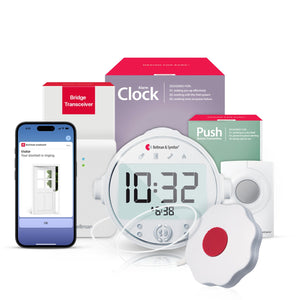
Bluetooth Doorbell Alert for Deaf People: What to Look for in 2026

A Bluetooth doorbell alert for deaf and hard-of-hearing people does one job: make sure you never miss a visitor, no matter where you are in your home. This guide explains exactly how these systems work, what separates a reliable setup from a frustrating one, and what to look for before you buy.
A Bluetooth doorbell alert for deaf people uses a door transmitter to detect your existing doorbell chime and sends an instant vibration and icon-based notification to a wrist receiver - with no Wi-Fi or subscription required. The Bellman Doorbell System with Bluetooth Bridge and Watch Receiver works this way: the Door Transmitter listens for your existing chime, signals the Bridge, and the Watch Receiver vibrates with a clear doorbell icon on your wrist - wherever you are in your home.
Why a Standard Doorbell Fails Deaf and Hard-of-Hearing People
The problem is simple and frustrating: a standard doorbell produces a sound. If you cannot hear that sound - because of hearing loss, because you have removed your hearing aids, because you are in a noisy room, or because you are in a different part of the house - you miss the visitor. They knock, wait, assume nobody is home, and leave. For a delivery, that is an inconvenience. For a family member, a caregiver, or an emergency responder, it is something more serious.
For decades, the standard fix was a lamp flasher - a receiver plugged into a wall outlet that flashes a connected lamp when the doorbell fires. That works, as long as you are in the room with the lamp, and as long as the lamp is in your line of sight, and as long as you happen to be looking at it at the right moment. Move to the kitchen, the backyard, the bathroom, or the bedroom, and that fixed receiver provides no coverage at all.
A Bluetooth doorbell alert system changes this by making the notification wearable. The alert travels with you rather than staying fixed to a wall. That shift - from room-based to person-based alerting - is what makes modern doorbell systems for deaf and hard-of-hearing people genuinely reliable rather than partially reliable.
How a Bluetooth Doorbell Alert System Actually Works
Understanding the signal path makes it much easier to set up these systems correctly and to troubleshoot them if something does not work as expected. There are three components doing three distinct jobs.
The Door Transmitter
The transmitter is a small device - roughly the size of a large matchbox - mounted near your existing doorbell chime, typically indoors near the chime speaker. It listens for the chime using a built-in microphone and, on some models, including the Bellman Door Transmitter, dual microphone technology for more reliable detection. It can also be triggered electromagnetically or via an external input, making it compatible with a wide range of doorbell types, including intercoms. When it detects the chime, it sends a wireless signal on the 433 MHz radio frequency band. This signal travels through walls and floors without needing line-of-sight to the receiver.
The Bridge
The Bellman Bluetooth Bridge receives the 433 MHz signal from the Door Transmitter and immediately converts it into a Bluetooth signal. This is the step that makes wrist-based and smartphone-based alerting possible - the Bridge translates the RF signal from the transmitter into a language that the Watch and your phone understand. No Wi-Fi is involved at any point. The Bridge communicates directly with the Watch Receiver and the Bellman Assistant app over Bluetooth, with a range of up to 650 feet in an open field. To understand more about how the Bridge handles this translation and what else it can do, see our plain-English explainer on how the Bellman Bluetooth Bridge works.
The Watch Receiver
The Bellman Watch Receiver vibrates with a distinct pattern and displays a doorbell icon the moment the Bridge relays the signal. You feel it on your wrist. You see what it is. You know someone is at the door - before the visitor has had time to wonder if anyone is home. At the same time, if your smartphone is paired via the free Bellman Assistant app (available on iOS and Android), your phone shows the same notification. You have two independent channels telling you the same thing simultaneously.
When a visitor rings, the Door Transmitter listens for your existing doorbell chime and sends a signal to the Bridge. The Watch Receiver then alerts you with gentle vibrations and clear on-screen icons that show the source of the alert.
Bellman & Symfon - Doorbell System Product DescriptionWhat to Look for in 2026: The Six Features That Matter
Not every doorbell alert system is built equally. Some work well for apartments; others are built for larger homes. Some require Wi-Fi; others work entirely offline. Some alert you only in fixed rooms; others follow you around the house. Here is what to evaluate before buying.
Detection Method
How the transmitter detects your doorbell matters more than most buyers realize. Microphone-based detection listens for the chime sound - reliable for most standard doorbells, but can occasionally miss a quiet chime or be confused by similar sounds. The Bellman Door Transmitter adds electromagnetic detection and an external input option, making it compatible with intercoms and a wider range of doorbell types. If your doorbell is unusual - a video doorbell, an intercom system, or a very quiet chime - check compatibility before buying.
Wireless Range Through Walls
Open-field range figures are useful for comparison but not for real-world planning. Walls, floors, and appliances all reduce the effective range. The Bellman Door Transmitter covers up to 260 feet open field - in a typical two-story home, that translates to reliable whole-home coverage from a single transmitter. For very large homes or homes with thick masonry walls, test transmitter placement carefully and consider the Bridge's central positioning for maximum reach.
Wearable vs. Fixed Receiver
This is the single most important choice in the whole category. A wearable receiver - specifically the Bellman Watch Receiver - delivers the alert wherever you are in the home and yard. A fixed receiver (lamp flasher, alarm clock) covers only the room where it is placed. For anyone who moves around during the day - which is almost everyone - a wearable receiver is the only configuration that provides genuinely reliable coverage. Fixed receivers are excellent as supplemental channels, especially for nighttime coverage.
Smartphone App Integration
A system that also delivers alerts to your smartphone gives you a built-in backup channel. The Bellman Assistant app (free, iOS and Android) receives the same doorbell notification as the Watch the moment the transmitter fires. If you put the Watch on to charge, step outside without it, or simply want a second confirmation, your phone catches it. This dual-channel approach - wrist plus phone - is the most reliable setup for daytime coverage.
Wi-Fi Independence
Wi-Fi-dependent doorbell alert systems - including many smart home integrations - fail when the internet goes down, when the router restarts, or when the network password changes. For a safety-critical alert like a doorbell, these failure modes are not acceptable. The Bellman system uses 433 MHz RF between the transmitter and Bridge, and Bluetooth between the Bridge and Watch - no Wi-Fi at any point in the signal chain. It works during internet outages, power fluctuations, and any other event that disrupts your home network.
Expandability
A doorbell alert system that cannot grow with your needs will be replaced. The Bellman system is designed to expand: the same Bridge and Watch Receiver that handles doorbell alerts can also receive smoke alarm notifications, baby monitor alerts, phone ring detection, and push button signals - with no additional pairing or reconfiguration. You add a transmitter, and it works. This matters because most households eventually want coverage for more than one alert type, and buying a dead-end system means starting over.
Chime Detection: The Detail Most Guides Skip
The most common point of failure in doorbell alert systems for deaf and hard-of-hearing people is not the receiver - it is the transmitter failing to reliably detect the chime. This happens for a predictable set of reasons, and understanding them makes placement and configuration much more straightforward.
Why Chime Detection Can Fail
- Distance between transmitter and chime speaker. If the transmitter's microphone is too far from the chime unit, ambient noise in the home can prevent reliable detection. The transmitter should be mounted close to the chime - typically within a foot or two of the speaker - not near the front door itself.
- Background noise at the threshold moment. A running dishwasher, a television, or a conversation in the same room can sometimes mask the chime from the transmitter's microphone. If you experience missed detections during noisy periods, repositioning the transmitter closer to the chime speaker usually resolves it.
- Non-standard chime types. Electronic doorbells, video doorbells, and intercom systems sometimes produce tones that a microphone-only transmitter does not recognize reliably. The Bellman Door Transmitter's electromagnetic detection option covers many of these cases - it detects the electrical signal in the doorbell wiring rather than the sound of the chime, eliminating the ambient noise problem entirely.
- Chime volume set too low. Some households turn the doorbell chime volume down to avoid disturbing sleeping children or light-sleeping household members. A quiet chime is harder for the transmitter to detect. If you rely on a doorbell alert system, keep the chime volume at a normal level - the transmitter needs to hear it to relay it.
How to Test Detection Reliably
Always test the complete signal chain before considering the setup done. Press the doorbell button, watch the Watch Receiver for the vibration and icon, and check the Bellman Assistant app for the notification. Do this multiple times from different positions to confirm consistency. Then repeat the test while a television or radio is running at normal volume in the adjacent room - this simulates real-world conditions and reveals any marginal placement issues before they become missed visitors.
Daytime vs. Nighttime Doorbell Coverage: Two Different Problems
Doorbell coverage during the day and doorbell coverage overnight require different configurations - and understanding this distinction prevents a common mistake: setting up a system that works perfectly while you are awake and wearing the Watch, then discovering it provides no coverage once you go to sleep.
During waking hours, the Watch Receiver is your primary notification channel. You wear it on your wrist, it vibrates with a doorbell icon, and you feel it regardless of which room you are in or what you are doing. The Bellman Assistant app on your smartphone provides a simultaneous backup notification. This combination - Watch plus app - is the most reliable daytime setup. The Watch has up to one week of battery life per charge, so daily removal for overnight charging still leaves you covered throughout the day.
At night, most people remove the Watch to charge, put down the smartphone, and sleep without hearing aids. A doorbell alert that only vibrates the Watch or sends an app notification will not wake a sleeping person reliably. For overnight doorbell coverage, the Bridge + Door + Alarm Clock bundle is the right configuration. The Alarm Clock Receiver delivers 100 dB sound, bright flashing lights, and a bed shaker that provides physical vibration through the mattress - waking you even from deep sleep without hearing aids. The Watch Receiver can then be added separately for daytime wrist notification.
For most households, the complete setup is: the Bridge + Doorbell + Alarm Clock bundle for nighttime coverage (with the bed shaker waking you if someone rings overnight), plus the Watch Receiver added separately for daytime wrist alerts. Both run off the same Bridge and the same Door Transmitter - no duplicate setup required.
Bluetooth vs. RF-Only vs. Wi-Fi Doorbell Alert Systems: A Direct Comparison
There are three main technology approaches to doorbell alerting for deaf and hard-of-hearing people in 2026. Understanding how they differ helps explain why the Bluetooth Bridge approach produces better coverage for most households than the alternatives.
| Feature | Wi-Fi Smart Doorbells | Bellman Bluetooth Bridge System |
|---|---|---|
| Wi-Fi required | Yes - alerts fail during outages | No - operates entirely on RF + Bluetooth |
| Wrist alert | Via smartwatch app - depends on phone connectivity | Direct vibration to Watch Receiver - no phone needed |
| Smartphone alert | Yes - via internet push notification | Yes - via Bluetooth through Bellman Assistant app |
| Works with existing doorbell | Sometimes - depends on wiring and doorbell type | Yes - Door Transmitter detects existing chime acoustically or electromagnetically |
| Expandable to other alerts | Limited - doorbell-only ecosystems are common | Yes - same Bridge handles smoke, baby, phone, push button |
| Subscription / monthly fee | Often, many require cloud storage plans | None - no account, no subscription, no cloud dependency |
| Nighttime coverage | App notification only - no bed shaker | Alarm Clock Receiver + bed shaker available for overnight alerts |
| Setup complexity | Network configuration, app pairing, and account creation | Plug in Bridge, mount transmitter, pair Watch - under 10 minutes |
Multi-Entry Homes and Apartments: Getting Coverage Right
A single Door Transmitter covers a single doorbell chime. Most apartments have one front door and one doorbell - one transmitter handles it. Houses with multiple entry points - a front door, a back door, a garage, a gate - need a transmitter for each one. The good news is that the Bellman system supports multiple transmitters on the same Bridge and the same Watch Receiver. Each transmitter type sends a distinct signal, and the Watch displays a specific icon for each alert type, so you always know which door is active.
Apartment Considerations
In apartments, the main challenge is not multiple entries but transmitter placement relative to the chime unit. Most apartment doorbells are small, embedded units near the front door with a quiet internal chime. Place the transmitter as close to the chime speaker as physically possible - in many apartments, this means the transmitter mounts directly on or beside the doorbell panel inside the unit. Test detection thoroughly before finalizing placement.
Houses with Multiple Entry Points
If you want alerts from both a front door chime and a back door push button, for example, the front door uses a Door Transmitter (which detects the existing chime) and the back door uses a Push Button Transmitter - both signal the same Bridge, both vibrate the same Watch Receiver with different icons, and both show distinct notifications on the Bellman Assistant app. No additional Bridge or Watch required.
If your home does not have a wired doorbell, or if you want an additional entry point covered without running new wiring, the Bellman Push Button Transmitter works as a wireless doorbell that visitors can press. It mounts outdoors with included hardware and is wearable on a lanyard as a call-for-attention button - making it useful as both a front door doorbell replacement and a portable assistance button for the household member with hearing loss. See the Push Button System with Bridge and Watch Receiver for the complete kit.
The Doorbell Alert as Part of a Whole-Home System
The most important thing to understand about a Bluetooth doorbell alert system in 2026 is that it does not have to be a standalone purchase. The Doorbell System with Bridge and Watch Receiver is designed as a starting point - or as one transmitter within a larger whole-home alerting setup that grows over time.
The same Bridge that handles doorbell alerts can receive signals from a Smoke Alarm Transmitter, a Baby Monitor Transmitter, a Telephone Transmitter, and a Push Button Transmitter - all simultaneously, all through the same Watch Receiver, all showing distinct icons so you always know what triggered the alert. This means the investment in a Bridge and Watch is not just a doorbell purchase - it is the foundation of a complete home alerting system.
- Add smoke and fire coverage: A Smoke Alarm Transmitter next to your existing smoke alarm means the Watch vibrates with a smoke icon - and the Bridge + Smoke + Alarm Clock bundle adds nighttime bed shaker coverage for sleeping hours.
- Add baby monitoring: A Baby Monitor Transmitter in the nursery sends wrist alerts when your baby stirs - the Bridge + Baby + Alarm Clock bundle extends this to overnight monitoring with the Alarm Clock Receiver.
- Add landline phone alerts: The Phone System with Bridge and Watch Receiver connects to your landline via RJ11 and sends a phone icon vibration to your wrist whenever a call comes in - no sound needed.
- Add a call-for-attention button: A Push Button Transmitter - wearable on a lanyard - lets a family member or caregiver send a direct alert to your Watch from anywhere in the home. The Bridge + Push + Alarm Clock bundle includes overnight coverage for this as well.
One Bridge, one Watch, multiple transmitters - the system grows with you without requiring new receivers or new pairing each time. For the complete picture of how all these pieces fit together into a whole-home alerting system, see The Complete Guide to Bluetooth Alerting Systems for Deaf & Hard of Hearing People.
What to Confirm Before You Buy
Run through each question for any system you are considering. A "no" on any of these is worth investigating before purchase.
- Compatible with my existing doorbell type (wired, wireless, intercom)?
- Transmitter uses a microphone AND electromagnetic detection?
- Wearable receiver option available - not just wall-mounted?
- Smartphone app alerts included at no extra subscription cost?
- Works without Wi-Fi - RF or Bluetooth only?
- Watch or wearable receiver, has at least 5 days of battery life?
- Nighttime option available (bed shaker / Alarm Clock Receiver)?
- Expandable to smoke, baby, and phone alerts on same receiver?
- Multiple entry points supported on one receiver?
- Setup requires no technician or special tools?
Setting Up a Bluetooth Doorbell Alert: What It Actually Takes
One of the persistent concerns people have before buying a doorbell alert system is whether installation will be difficult, whether it requires an electrician, or whether it involves drilling into walls. The short answer for the Bellman system: none of the above. Here is what the setup actually involves.
- Mount the Door Transmitter near the chime. Use the included mounting hardware to position the transmitter within a foot or two of your doorbell chime speaker, indoors. No wiring. Battery-powered. The Door Transmitter has up to five years of battery life, so once it is in position, it requires almost no maintenance.
- Plug in the Bridge. The Bellman Bridge connects to a standard wall outlet via the included power supply. Place it centrally in the home for best range to both the transmitter and the Watch Receiver. No network configuration. No Wi-Fi password.
- Pair the Watch Receiver. A brief button-hold pairing sequence between the Watch and the Bridge takes under a minute. Once paired, the Watch is ready.
- Download the Bellman Assistant app. Available free on the App Store and Google Play. Open the app, follow the Bluetooth pairing prompts to connect it to the Bridge, and app notifications are active immediately.
- Test the whole chain. Press your doorbell button. Confirm the Watch vibrates with the doorbell icon. Confirm the app shows the notification. Repeat a few times to verify consistent detection. The full setup guide is available in our Bellman Bluetooth alerting system step-by-step setup guide.
- Buying a Wi-Fi-only system without checking your home's internet reliability
- Choosing a fixed lamp flasher as the only receiver - no coverage when you move rooms
- Mounting the transmitter at the front door instead of near the indoor chime unit
- Skipping the nighttime configuration - a Watch alert does not wake a sleeping person
- Buying a single-purpose system that cannot expand to smoke or phone alerts later
- Not testing detection with background noise present - kitchen, TV, open windows
- Assuming open-field range figures equal real-world through-wall range
- Overlooking the back door, garage, or gate as additional entry points needing coverage
Ready to stop missing visitors?
The Bellman Doorbell System with Bluetooth Bridge and Watch Receiver works with your existing doorbell - no Wi-Fi, no subscription, wrist alerts wherever you are at home.
Sources and references: Bellman & Symfon - Doorbell System with Bluetooth Bridge and Watch Receiver product specifications (us.bellman.com/products/doorbell-system-with-bluetooth-bridge-and-watch-receiver) · Bellman & Symfon - Door Transmitter specifications: dual microphone technology, electromagnetic detection, external mic input, galvanic trigger, 260 ft open field range, up to 5 years battery life · Bellman & Symfon - Bluetooth Watch Receiver BE3330 specifications: 650 ft open field Bluetooth range, up to 1 week battery life, 2-hour charge time, Do Not Disturb / Call for Attention / Bright/Dark themes · Bellman & Symfon - Bluetooth Bridge Transceiver BE1521 specifications: 433 MHz RF receiver, Bluetooth 5 output, no Wi-Fi required · Bellman & Symfon - Doorbell System with Bridge and Alarm Clock product specifications (us.bellman.com/products/doorbell-monitoring-system-with-bluetooth-bridge-and-alarm-clock) · Bellman & Symfon - Push Button System with Bluetooth Bridge and Watch Receiver product specifications (us.bellman.com/products/push-button-system-with-bluetooth-bridge-and-watch-receiver) · Bellman & Symfon - Door & Window alarm systems and door notification system overview (us.bellman.com/collections/door-notification).
This article is for informational purposes only. Product specifications are subject to change; refer to current product pages at us.bellman.com for the most up-to-date technical details.
Bluetooth Doorbell Alert for Deaf People: What to Look for in 2026
This guide breaks down the practical choices, features, and considerations behind this topic. Use it to identify a setup that fits the listener, the environment, and the everyday moments that matter most.
The featured products below are current Bellman options discussed in the article or closely matched to its use case.