Baby Monitor for Twins and Large Families: Multi-Room Alert Setup Guide

Monitoring one baby is straightforward. Monitoring twins in separate rooms, or three children across a multi-story house, is a different challenge entirely - especially for deaf and hard-of-hearing parents who need reliable wrist alerts from every room simultaneously. Here is exactly how to build that setup with the Bellman system.
The Bellman Bluetooth Bridge supports multiple transmitters simultaneously - allowing deaf parents of twins or families with children in separate rooms to receive distinct, icon-based wrist alerts from each room on a single Watch Receiver. Add one baby monitor transmitter per nursery to the same Bridge, and the Watch identifies each alert by room - no separate systems, no multiple devices to manage.
Why Multi-Room Monitoring Is a Different Problem for Deaf Parents
For hearing parents managing a household with twins or multiple young children, multi-room baby monitoring is mostly a question of convenience - being able to hear two babies at once, or cover a toddler's room while the newborn sleeps in the nursery. If one monitor drops out briefly, they can often still hear the baby directly. They have an audio backup that is always on.
For deaf and hard-of-hearing parents, multi-room monitoring is a reliability and safety engineering problem. Every room that needs coverage must have a reliable signal path to the Watch Receiver on your wrist. There is no audio fallback. If the alert for Room 2 doesn't reach you because the setup wasn't done carefully, you will not know your baby in that room needs attention until you physically check. In a busy household with multiple children - often the most physically exhausting parenting scenario that exists - that is not a workable situation.
This guide covers how to build a multi-room alert setup for the Bellman system that is reliable, properly planned, and scalable: starting with twins in two rooms, extending to children at different ages across multiple floors, and integrating the wider household alerts - doorbell, smoke, push button, phone - that become even more important when you have a full, active house to manage.
How Multiple Transmitters Work on One Bridge
The architecture of the Bellman Bluetooth Bridge is what makes multi-room monitoring both possible and practical. Understanding how it handles multiple simultaneous signals helps you set up correctly and troubleshoot confidently if anything needs adjusting.
The Bridge is a receiver and relay hub. It continuously listens for signals on the 433 MHz radio frequency band from all paired transmitters in the home. When any transmitter fires - a baby monitor transmitter detecting a cry in Room 1, for example - the Bridge identifies which transmitter sent the signal (each transmitter has a unique ID that the Bridge recognises), converts that signal into a Bluetooth alert, and sends the appropriate icon and vibration pattern to the paired Watch Receiver.
Because the Bridge processes transmitter signals independently, it can receive and relay signals from multiple transmitters in rapid succession - or, in theory, simultaneously. If both twins cry at exactly the same moment, the Bridge will relay both alerts, and the Watch Receiver will display the alert icons in sequence. The brief interval between simultaneous alerts is imperceptible in practice: you will feel the vibration and see the icon, go to the nursery, and address whichever baby needs attention first.
Each transmitter type in the Bellman system has a corresponding icon that appears on the Watch Receiver face when it fires. For a home with two baby monitor transmitters - one in each twin's room - both will show the baby icon. The distinction between the two rooms comes from practical placement and awareness: in most twin setups, parents quickly develop a spatial sense of which child is more likely to be awake at a given time. For families who need more granular room identification, combining the baby monitor transmitter in one room with a sound monitor transmitter in another can create visually distinct alert icons for each room.
As the Bellman system continues to develop, icon identification between identical transmitter types in different rooms is worth confirming with the current product specifications at us.bellman.com.
What a Multi-Room Setup Looks Like: Visualising the Signal Path
Before working through the specific configurations, it helps to see the architecture clearly. Here is how signals flow in a two-room setup - the most common configuration for twin families.
The key design advantage here is that the Bridge is the single point of collection. You do not need two parent units, two apps, or two separate systems. Every transmitter in the home feeds into one Bridge, and the Watch Receiver on your wrist is the single destination for every alert. Adding a third room later - a toddler moving to their own bedroom, a new baby - means adding one more transmitter to the same Bridge. Nothing else changes.
Setup Configurations by Family Type
Not every multi-child family has the same monitoring needs. Here is a practical breakdown of the most common configurations and how to approach each one.
Configuration 1: Twins in Separate Rooms, Same Floor
This is the most common setup for twin families - two nurseries side by side or along the same hallway. It is also the easiest multi-room configuration for the Bellman system, because both transmitters are on the same floor as the Bridge.
- Place the Bridge in the hallway between the two nurseries, or in the nearest central location on that floor.
- Place a baby monitor transmitter in each nursery, within 3–5 feet of each crib.
- Pair both transmitters to the Bridge using the Bellman app.
- Test each transmitter independently - trigger a sound near Transmitter A and confirm the Watch vibrates; repeat for Transmitter B.
- Walk the full floor plan and confirm Watch reception from every room where you spend time: living room, kitchen, bathroom, back yard.
Configuration 2: Twins in the Same Room
Many twin families keep both babies in the same nursery for the first several months. In this case, a single baby monitor transmitter is sufficient - position it between the two cribs to pick up sound from either baby. As they grow and eventually move to separate rooms, a second transmitter can be added to the Bridge at that point without any reconfiguration of the existing setup.
Configuration 3: Newborn and Toddler in Separate Rooms
This is the most common large-family configuration: a new baby in the nursery, and an older child who has graduated to their own bedroom. The monitoring need is different for each: the newborn needs a full baby monitor transmitter; the toddler may need a sound monitor that alerts you if they fall out of bed, get sick, or wake up disoriented in the night.
- Baby monitor transmitter in the nursery - placed near the infant's crib.
- Sound monitor or baby monitor transmitter in the toddler's room - the alert icon on the Watch distinguishes which room is signalling based on transmitter type.
- Bridge placed centrally between both rooms, or on the same floor if they are on different levels.
- Test both rooms before the first night of simultaneous monitoring.
Configuration 4: Multi-Story Home - Children on Different Floors
This is the most technically demanding configuration, but the Bellman Bridge architecture handles it well when placement is done thoughtfully. The key challenge is ensuring the Bridge's position minimises the number of floor crossings that 433 MHz signals must make.
- If both children's rooms are on the same floor (e.g., both upstairs), place the Bridge on that floor - ideally in the hallway between the rooms.
- If children are on different floors (e.g., nursery upstairs, toddler's room downstairs), place the Bridge on the floor with the most range-sensitive transmitter - typically the nursery - and confirm Watch Receiver reception from the floor below with a coverage test.
- See our full guide on baby monitor range and whole-home coverage for detailed Bridge placement guidance by home type.
Step-by-Step: Setting Up a Two-Room Configuration
Here is the complete setup sequence for a two-room twin monitoring configuration, from unboxing to confirmed overnight coverage. The same sequence applies to any multi-room setup - just repeat the transmitter steps for each additional room.
-
Choose your Bridge placement Before plugging anything in, identify the central location on your transmitters' floor that is closest to both nurseries and has a wall outlet. For most twin setups - two rooms on the same hallway - this is the hallway itself, or a linen closet or common room between them. The Bridge should be at shelf or table height, not on the floor.
-
Plug in and connect the Bridge to the Bellman app Plug the Bluetooth Bridge into the wall outlet at your chosen location. Download the Bellman app and follow the in-app steps to connect the Bridge to your home Wi-Fi. Wi-Fi is used only for the smartphone app alerts - not for wrist Watch alerts - but completing this step now gives you the secondary notification channel as well.
-
Pair the Watch Receiver Put on the Watch Receiver and follow the app pairing steps to link it to the Bridge. Once paired, the Watch will receive alerts from every transmitter connected to this Bridge. You only need to do this pairing once.
-
Position and pair Transmitter A - Room 1 Place the first baby monitor transmitter in Nursery 1, within 3–5 feet of where Twin A sleeps. Clip it to the crib rail or place it on a nearby shelf - no wiring or drilling required. Follow the app steps to pair it to the Bridge.
-
Test Room 1 coverage Make a sound near Transmitter A - clap, speak loudly, or use the transmitter's built-in test function. Confirm the Watch vibrates and displays the baby icon. Then walk to every room in the home and repeat the test, confirming the Watch alerts you reliably from the kitchen, living room, garden, and your bedroom. If any room shows gaps, adjust the Bridge position slightly and retest.
-
Position and pair Transmitter B - Room 2 Repeat the transmitter positioning and pairing steps for Nursery 2. Place the second baby monitor transmitter within 3–5 feet of Twin B's sleep spot, and pair it to the same Bridge via the app.
-
Test Room 2 coverage independently Test Transmitter B with the same method: trigger a sound in Nursery 2 and confirm the Watch vibrates. Test from all key locations in the home again. Both transmitters should produce reliable Watch alerts from every room.
-
Test simultaneous activation Have a second person trigger a sound near both transmitters within a few seconds of each other. Confirm that both alerts reach the Watch in sequence. This confirms the Bridge handles rapid multi-transmitter signals correctly.
-
Final overnight test from sleeping position Do a final coverage test from your bed, with bedroom door in its normal overnight position. Confirm both Room 1 and Room 2 transmitters produce Watch vibrations from your sleeping position. If both pass, your setup is ready for overnight monitoring.
Why One Bridge Is Better Than Two Separate Monitor Systems
When deaf parents of twins research multi-room monitoring, a common instinct is to buy two separate baby monitor systems - one for each room. It seems logical: one system, one room, clear separation. In practice, this approach creates more problems than it solves.
Two Watch Receivers, two apps, two charging routines. When both babies cry simultaneously, you receive two different alert signals from two different devices - requiring you to identify which device vibrated, which room it corresponds to, and prioritise. Two batteries to track. Two devices to pair. Two systems to troubleshoot. And neither system knows the other exists - you cannot see a unified alert history across both rooms.
One Watch Receiver on your wrist covers both rooms. One app. One charging routine. One Bridge to place. When both babies need attention, both alerts arrive on the same Watch, in sequence, through the same familiar vibration. Adding a third room later means adding one transmitter - not buying a third system. And when you are ready to expand to doorbell, smoke, and push button alerts, they all join the same Bridge.
The single-Bridge architecture also matters when it comes to household-wide alerts. A deaf parent of twins who also needs their doorbell to not wake the babies, their smoke alarm to alert them through the same Watch, and a push button for silent communication with a co-parent - all of these work through the same Bridge. A system of two separate baby monitors gives you none of that integration.
Beyond the Nurseries: Full Household Coverage for Large Families
Large families - especially those with twins or closely spaced children - have the most complex home alerting needs of any parent demographic. The household is louder, more chaotic, and more demanding of reliable silent alerts. Here is how the Bellman system handles the full picture.
Overnight Coverage: Managing Multiple Children While You Sleep
Nighttime monitoring with multiple children is one of the most demanding aspects of parenting for deaf and hard-of-hearing families. You are asleep - hearing devices off - and you need to know the moment any child in any monitored room needs attention, without any audio fallback.
The Bellman Watch Receiver worn to bed is the core overnight tool: its vibration is strong enough to wake most sleeping adults, and it identifies which alert fired by icon even at 3 a.m. when you are groggy. But for the most complete overnight coverage - especially with multiple children - there are a few additional setup considerations worth building in.
Adding an Alarm Clock for Overnight Completeness
Pairing the Bridge with a vibrating alarm clock ensures that your morning wake-up also arrives silently - no audible alarm disturbing the house at 5 a.m. and potentially waking babies who have just settled. The Bridge + Baby Monitor + Alarm Clock bundle combines overnight monitoring with a silent vibrating alarm clock for exactly this scenario. You can add the Watch Receiver separately to this bundle if you prefer wrist alerts during the day and the Alarm Clock for nighttime use.
Adding Smoke and CO Coverage Overnight
With multiple children in the home, unable to respond independently to a fire alarm, ensuring overnight smoke and CO alerting is non-negotiable. Adding a smoke transmitter to the same Bridge means any fire emergency triggers both your Watch vibration overnight and, if you have the Alarm Clock bundle, the bed shaker as well. The Bridge + Smoke/CO + Alarm Clock bundle covers both emergency alerting and silent overnight wake-up through a single integrated setup.
Keeping the House Silent While Multiple Children Sleep
One of the most valuable aspects of the Bellman system for large families is what it does not do: make sound. When the Bridge routes all household alerts - doorbell, smoke, push button, phone, and baby monitors - to the Watch Receiver silently, the home environment stays quiet. No audible chimes. No ringtones. No alarm sounds in the middle of a coordinated nap schedule. The silence itself is a feature when you are managing multiple children whose sleep schedules you are trying to protect.
- Transmitter in each monitored room - tested independently
- Bridge placed on transmitters' floor, centrally between rooms
- Watch Receiver charged above 20% before bed
- Overnight test: both rooms confirmed from sleeping position
- Smoke/CO transmitter on same Bridge for overnight safety
- Alarm Clock bundle set for silent morning wake-up
- Push button placed for silent partner communication overnight
- App paired as secondary alert for co-parent or second caregiver
Building the System Over Time: How It Grows With Your Family
One of the most practical advantages of the Bellman Bridge architecture for large families is that it scales incrementally. You do not need to plan the entire system upfront or spend money on coverage you do not need yet. You build it as your family grows and your needs evolve.
Stage 1: Newborn twins at home
Start with the Bellman Baby Monitor System (Bridge + one transmitter + Watch Receiver) plus a second baby monitor transmitter for the second twin. One Bridge, two transmitters, one Watch. Total setup time under 15 minutes.
Stage 2: Managing visitors and deliveries
Add a doorbell transmitter to the same Bridge. Now the doorbell alerts your Watch silently - no chime wakes the babies, you still answer every visitor. No new system required. Five minutes to add and pair.
Stage 3: Complete home safety
Add a smoke and CO transmitter to the same Bridge. All household safety alerts - baby, doorbell, smoke - now reach the same Watch on your wrist with distinct icons. The Bridge + Smoke/CO + Alarm Clock bundle handles overnight emergency alerting with a bed shaker too.
Stage 4: Third child, new room
Add a third baby monitor transmitter to the existing Bridge. The system now covers three rooms. One Watch still covers everything. Your original Bridge, Watch, and app setup requires no changes at all.
Stage 5: Toddlers moving to their own rooms
As children grow out of cribs, the baby monitor transmitters can be repositioned in their new rooms, placed on a shelf rather than a crib rail. Coverage follows the child, not the furniture. No new hardware needed.
Stage 6: Adding household communication
Add a push button transmitter for silent caregiver-to-parent communication. A grandparent or babysitter helping during nap time can signal you without making a sound in the house. The Bridge + Push Button + Alarm Clock bundle covers household signalling and overnight wake-up together.
Common Questions About Multi-Room Monitoring
-
Can I tell which twin's room triggered the alert? The Watch Receiver displays the icon for the type of transmitter that fired. If both twins have baby monitor transmitters, both will show the baby icon. In most twin setups, parents develop spatial awareness of which child is more likely awake at a given time. For more distinct room identification, using different transmitter types (baby monitor in one room, sound monitor in another) produces different icons. Consult current Bellman product specifications at us.bellman.com for the latest icon-differentiation details.
-
Does range decrease with multiple transmitters? No. Each transmitter sends its signal independently to the Bridge. The Bridge's range to the Watch Receiver is not affected by the number of transmitters paired to it. Coverage quality is determined by Bridge placement and building construction - not by how many transmitters are active. See our full range guide: Baby monitor range: how to choose one that covers your whole home.
-
What if both babies cry at exactly the same time? The Bridge processes signals from multiple transmitters in very rapid succession. If both transmitters fire within a very short window, both alerts will reach the Watch sequentially. In practice, you will feel the vibration, see the alert, and go to check on both children. The system handles this reliably - it is not a single-signal-at-a-time queue.
-
Do I need multiple Watch Receivers for multiple children? No one Watch Receiver covers all rooms through the single Bridge. You only need an additional Watch Receiver if a second parent or caregiver also wants wrist alerts. In that case, a second Watch can be paired to the same Bridge and both adults receive the same alerts independently. The Bellman app can also serve as a secondary alert channel for a second person without requiring an additional Watch purchase.
-
Can I monitor multiple rooms overnight without internet? Yes. The Watch Receiver's Bluetooth connection to the Bridge operates entirely without internet. Multi-room wrist alerts work during Wi-Fi outages, router reboots, and ISP failures. For a full explanation of why offline monitoring matters for deaf parents, see: Baby monitor without Wi-Fi for deaf parents: why offline is safer.
-
Will the system alert me to every sound, or can I adjust sensitivity? The Bellman baby monitor transmitter has an adjustable sensitivity setting that lets you tune the sound detection threshold. For twins sharing a room with one transmitter, you can set sensitivity to pick up even quiet sounds. For a toddler's room where you only want to be alerted to significant distress rather than every murmur, you can reduce sensitivity accordingly. This prevents alert fatigue across a multi-room setup.
Complete configuration for twins or large families
Work through every item before your first overnight with the full setup active.
- Bridge placed centrally on transmitters' floor
- Transmitter A placed in Room 1, paired to Bridge
- Transmitter B placed in Room 2, paired to Bridge
- Watch Receiver paired - test alert confirmed
- Room 1 test confirmed from all home zones
- Room 2 test confirmed from all home zones
- Simultaneous dual-room activation tested
- Bedroom (sleeping position) coverage confirmed, door closed
- Watch Receiver charged before bed - above 20%
- Doorbell transmitter added - silent visitor alerts
- Smoke/CO transmitter added - overnight safety
- Push button added - silent co-parent communication
- App paired for secondary caregiver alerts
- Alarm Clock bundle set for silent morning wake-up
One system. Multiple rooms. Every alert on your wrist.
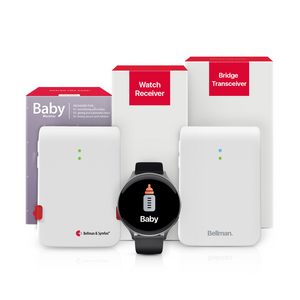
The Bellman Baby Monitor System with Bluetooth Bridge and Watch Receiver - purpose-built for deaf and hard of hearing parents, designed to scale from one nursery to a full household setup without changing systems.
Sources and references: Bellman & Symfon - Baby Monitor System with Bluetooth Bridge and Watch Receiver product specifications (us.bellman.com/products/baby-monitor-system-with-bluetooth-bridge-and-watch-receiver) · Bellman & Symfon - Bluetooth Bridge Transceiver BE1521 technical documentation: multi-transmitter support, 433 MHz RF architecture, Bluetooth 5 Watch Receiver pairing · Bellman & Symfon - Bluetooth Watch Receiver BE3330 specifications · National Institute on Deafness and Other Communication Disorders (NIDCD) - Hearing loss statistics · Gallaudet University Research Institute - Deaf and hard of hearing household and parenting safety data · National Association of the Deaf (NAD) - Deaf parenting and assistive technology resources · Hearing Loss Association of America (HLAA) - Home safety and alerting technology guidance · IEEE 802.15 - Bluetooth 5 specification: peer-to-peer range and simultaneous connections · FCC - 433 MHz ISM band specification and residential propagation.
This article is for informational purposes only. Product specifications including multi-transmitter support and icon differentiation should be confirmed at us.bellman.com, as product capabilities may be updated. For personalised hearing health or home safety guidance, consult a licensed audiologist or appropriate professional.

Baby Monitor for Twins and Large Families: Multi-Room Alert Setup Guide
This guide breaks down the practical choices, features, and considerations behind this topic. Use it to identify a setup that fits the listener, the environment, and the everyday moments that matter most.
The featured products below are current Bellman options discussed in the article or closely matched to its use case.