Baby Monitor for Deaf Parents: How Vibrating Wrist Alerts Change Everything

For deaf and hard-of-hearing parents, a standard audio baby monitor is not a monitor at all - it is background noise you cannot access. A vibrating wrist alert system changes that. Here is how it works, what to look for, and why wrist-based notification is the configuration that finally makes baby monitoring genuinely reliable for parents who cannot hear.
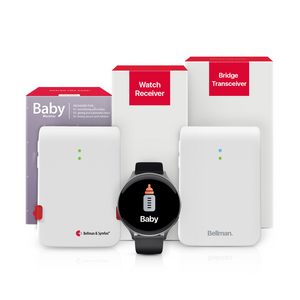
Deaf parents can stay connected to their baby using a vibrating baby monitor system that detects infant sounds and sends silent wrist vibrations and visual alerts - keeping parents responsive without needing to hear the baby cry. The Bellman Baby Monitor System with Bluetooth Bridge and Watch Receiver works this way: the Baby Monitor Transmitter detects your baby's sounds, signals the Bluetooth Bridge, and the Watch Receiver vibrates with a clear baby alert icon on your wrist - no Wi-Fi, no subscription, and no sound required on your end.
The Problem With Standard Baby Monitors for Deaf Parents
Every standard baby monitor on the market is built around the same assumption: you can hear. The monitor picks up sounds in the nursery and plays them back through a parent unit. Some add a camera feed. A few include a small LED bar that flickers with sound levels. But all of them rely on the parent hearing the audio - or, at best, watching a screen continuously - to know when the baby needs attention.
For deaf parents and hard-of-hearing parents, this design fails at the most fundamental level. The audio output is inaccessible. The LED bar requires constant visual attention to a fixed device. The camera feed requires you to be looking at the screen. None of these approaches delivers an alert - they deliver information you have to actively seek out. And seeking out information about whether your baby needs you, repeatedly, from a fixed screen, while trying to live your life, is not monitoring. It is surveillance with extra steps.
What deaf parents actually need is not louder audio or a bigger screen. They need an alert that comes to them, wherever they are in the home, the moment the baby needs attention. That shift - from passive output you check to active notification that finds you - is what makes a vibrating baby monitor with wrist alerts genuinely different, not just a variation on the same flawed design.
How a Vibrating Baby Monitor System Works
The signal path in the Bellman vibrating baby monitor system follows three steps, and understanding each one makes the whole thing much easier to set up, position correctly, and trust.
Step 1 - The Baby Monitor Transmitter Detects Sound
The Baby Monitor Transmitter is a small, tamper-proof device placed in your baby's room, near the crib. It has a sensitive microphone that listens continuously for sounds above an adjustable threshold. When crying or other baby sounds are detected for a set duration - also adjustable, to avoid false alerts from brief rustles or one-off sounds - the transmitter sends a wireless signal on the 433 MHz radio frequency band. This signal travels through walls and floors without needing line-of-sight to anything.
The adjustable sensitivity and delay settings are not a minor detail. They are what make the difference between a monitor that alerts you constantly for every small sound and one that alerts you reliably for genuine needs. Setting the sensitivity to match your baby's typical cry volume, and setting a short delay so brief self-settling sounds do not trigger alerts, makes the whole system dramatically more usable in the early months.
Step 2 - The Bridge Receives and Converts
The Bellman Bluetooth Bridge receives the 433 MHz signal from the Baby Monitor Transmitter and converts it into a Bluetooth signal that the Watch Receiver and the Bellman Assistant app understand. This happens in moments. The Bridge identifies the signal as a baby monitor alert specifically - not a doorbell, not a smoke alarm - and relays the correct notification with the right icon. No Wi-Fi is involved at any point. To understand more about how the Bridge processes and routes these signals, see our plain-English explainer on how the Bellman Bluetooth Bridge works.
Step 3 - Your Wrist and Phone Receive the Alert
The Bellman Watch Receiver vibrates with a distinct pattern and displays a baby alert icon the moment the Bridge relays the signal. You feel it on your wrist - in the kitchen, in the yard, in the bathroom, in any other room - wherever you are at home. Simultaneously, if your smartphone is paired via the free Bellman Assistant app (available on iOS and Android), your phone shows the same notification. You have two independent channels confirming the same alert at the same moment: wrist vibration plus phone notification. If you happen to miss one, you catch the other.
As a deaf parent, this has been essential. I trust it completely.
Verified Customer Review - Bellman & Symfon Baby Monitor SystemWhy "Wrist-Based" Is the Configuration That Actually Changes Daily Life
The core insight behind the Bellman Baby Monitor System with Watch Receiver is not technological - it is practical. It is the recognition that a parent does not stay in one room. You cook, clean, work, shower, and move through the house constantly. An alert that only fires in one fixed location covers one room. An alert that fires on your wrist covers everywhere you go.
Kitchen Coverage
Running water, a range hood, and background kitchen noise make a fixed flash receiver easy to miss unless it is directly in your sightline. The Watch vibrates on your wrist regardless of what your hands are doing or where your eyes are pointed - no line-of-sight required, no fixed location to keep watching.
Shower and Bathroom
A wearable receiver can be placed on the bathroom counter or shelf while you shower, keeping the alert within reach even in a room where a wall-mounted flash receiver would require an additional device. For parents who remove hearing aids before showering, this is often the most critical coverage gap that wrist alerts close.
Outdoor and Yard Coverage
With 650 feet of Bluetooth range (open field) between the Bridge and the Watch Receiver, brief trips to the yard, garage, or mailbox remain covered. The Watch travels with you; fixed receivers stay inside. This extended range is particularly useful for parents whose nursery is on a different floor from where they spend most of their day.
Working From Home
For parents who work from home with the baby napping in another room, the Watch Receiver provides silent, unobtrusive alerts that do not disrupt calls or concentration. A vibration on the wrist is private - colleagues on a video call do not see it, roommates do not hear it, and you respond on your own terms without any visible or audible disruption.
Multi-Caregiver Households
In households where both parents or a caregiver share monitoring responsibilities, the Bellman Assistant app on a second smartphone means both parties receive the alert simultaneously from the same Baby Monitor Transmitter and Bridge. No second receiver needed. Both caregivers - regardless of hearing status - get the same notification at the same time.
Overnight Monitoring
During the night, the Watch charges on the bedside table - and while the Watch is charging, the Bridge + Baby + Alarm Clock bundle provides overnight coverage through the Alarm Clock Receiver's flashing lights and a bed shaker that wakes you through physical vibration. You do not lose coverage when the Watch is off your wrist - overnight alerting is handled by a separate dedicated device. More on nighttime coverage below.
Managing Sensitivity: Responsive Without Being Relentless
One of the most common frustrations with any baby monitor - audio or vibrating - is false alerts. A monitor that fires for every small sound trains you to ignore it. A monitor that misses genuine cries is worse than useless. The Bellman Baby Monitor Transmitter addresses this with two adjustable settings that, once calibrated for your baby's specific patterns, make the system genuinely trustworthy.
Sensitivity Setting
The sensitivity control adjusts how loud a sound needs to be before the transmitter registers it. A higher sensitivity setting means quieter sounds trigger an alert - useful for newborns with soft cries or for nurseries with ambient noise that might partially mask crying. A lower sensitivity setting requires louder sounds before firing - useful for toddlers who talk and move in their sleep, where you want to filter out normal sleep sounds and respond only to clear distress. Start at a medium sensitivity and adjust based on real-world experience over the first week of use.
Delay Setting
The delay setting determines how long the sound needs to continue before the transmitter fires the alert. A very short delay means almost any sound triggers a notification - you will hear from every rustle and brief cry. A longer delay filters out the brief self-settling sounds that babies make throughout the night and only fires for sustained crying that genuinely requires your attention. For newborns who cannot yet self-settle, a shorter delay is appropriate. For older babies who can settle briefly, a longer delay reduces unnecessary alerts overnight and helps both parents and babies sleep better.
Day 1–3: Set sensitivity to medium-high and delay to minimum. This ensures you catch every alert while you learn your baby's specific sound patterns and volume levels.
Day 4–7: Adjust sensitivity down if you are receiving alerts from normal room sounds (HVAC, siblings, pets). Increase delay slightly if your baby makes frequent, brief sounds during light sleep phases that do not require your attention.
After week 1: Your settings should reflect your baby's actual patterns. Re-calibrate at developmental transitions - when your baby starts sleeping through the night, becomes more mobile, or moves to a different sleep phase.
Daytime vs. Nighttime Monitoring: Two Configurations, One System
Daytime and nighttime monitoring for deaf parents have fundamentally different requirements - and trying to use the same device for both usually means one or the other is compromised. The Bellman system handles this by giving you distinct but complementary configurations for each period.
If you rely on the Watch Receiver and smartphone app alone for overnight monitoring, you are dependent on the Watch being on your wrist while you sleep, the phone being close enough for a vibration to wake you, and neither device running low on battery overnight. Any one of these conditions failing means a missed alert. For safety-critical overnight monitoring of a newborn, this introduces unnecessary risk.
The Bridge + Baby + Alarm Clock bundle adds an Alarm Clock Receiver that works alongside the Watch during the day and takes over primary alerting overnight. The Alarm Clock Receiver produces flashing lights and connects to a bed shaker placed under the mattress or pillow, delivering physical vibration strong enough to wake a deep sleeper. You charge the Watch overnight while the Alarm Clock Receiver provides continuous coverage. Add the Watch Receiver separately for daytime wrist alerts when you want both channels.
The Complete Two-Shift Setup
The most reliable configuration for deaf parents combines both approaches: the Watch Receiver on your wrist during the day for whole-home wrist alerts, the Bellman Assistant app on your smartphone as a simultaneous backup, and the Alarm Clock Receiver with bed shaker on the bedside table overnight. All three run off the same Baby Monitor Transmitter and the same Bridge. There is no duplicate setup, no second pairing, and no second transmitter in the nursery. You simply have coverage during the day and coverage during the night from one unified system.
Vibrating Wrist Monitor vs. Other Alert Types: A Direct Comparison
Several approaches exist for baby monitoring for deaf parents in 2026. Understanding what each one actually delivers - and where it falls short - makes it much easier to choose the right configuration for your household.
| Alert Type | Fixed Flash / Lamp Receiver | Bellman Watch Receiver + App |
|---|---|---|
| Coverage area | One room only - must be in sightline of receiver | Whole home and yard - alert travels with you on your wrist |
| Alert channel | Visual only - flashing light | Wrist vibration + icon on Watch AND smartphone notification simultaneously |
| Requires active attention | Yes - must be looking at the receiver to catch the alert | No vibration finds you regardless of where you are looking |
| Works during shower / loud activity | Only if the receiver is in the bathroom and in direct view | Yes - Watch on the counter, phone in reach; vibration and notification both fire |
| Overnight coverage | Flash receiver needs to be in the bedroom and noticed | Alarm Clock Receiver + bed shaker provides strong physical waking vibration overnight |
| Wi-Fi required | No (RF-based) | No - operates entirely on RF + Bluetooth; no router, no subscription |
| Expandable to doorbell, smoke, phone | Requires separate receivers for each alert type | Yes - same Bridge and Watch receive doorbell, smoke, phone, and push button alerts |
Real Parenting Scenarios: How the System Performs When It Matters
Specs and comparison tables are useful, but what deaf parents actually want to know is: how does this work when the baby is crying at 2 AM, and I have my hearing aids out? Or when I am in the kitchen with water running and the baby wakes from a nap? Here is how the Bellman system handles the scenarios that come up most often.
Scenario: Nap Time, Kitchen
Baby is napping in the nursery. You are in the kitchen with the dishwasher running and the range hood on. The baby wakes and cries. The Baby Monitor Transmitter detects the cry after the set delay and fires a signal to the Bridge. The Watch on your wrist vibrates and displays the baby icon. Your phone shows the same notification. You know your baby is awake before you would have had any reason to check a camera or walk past the nursery door. Response time: as fast as any hearing parent with an audio monitor in the same room.
Scenario: Night Feed at 3 AM
The Watch is on the charger. The Alarm Clock Receiver on the bedside table detects the relay from the Bridge when the Baby Monitor fires. The bed shaker under the mattress begins vibrating. You wake. No audio disturbs a hearing partner. No light wakes anyone else in the household unless the Alarm Clock Receiver's flash is pointed toward you. The alert is private, physical, and reliable regardless of sleep depth or hearing aid status.
Scenario: Quick Trip to the Backyard
Baby is asleep inside. You step into the backyard for a few minutes. The Baby Monitor Transmitter fires. The Bridge relays via Bluetooth. The Watch on your wrist, now 80 feet from the Bridge, still receives the signal comfortably within the 650-foot open-field range. The app on your phone catches it simultaneously. You are back inside before the baby has been crying for more than a few seconds.
Scenario: Video Call While Baby Naps
You are on a work call. The baby wakes. The Watch vibrates on your wrist - silent, invisible to your video call. Your phone shows a notification at the same moment, but with a silent vibration. You see it, excuse yourself, and check on the baby. Nobody on the call noticed. No audio disrupted the meeting. The alert was entirely private.
Baby Monitoring as Part of a Whole-Home Alerting System
The Baby Monitor System with Bluetooth Bridge and Watch Receiver is built to be a starting point, not a ceiling. The same Bridge and Watch Receiver that alert you to your baby's cries can also alert you to the doorbell, a smoke alarm, a landline phone call, or a push button - using nothing more than an additional transmitter per alert type. No new pairing. No new Watch. No new Bridge.
This matters practically for new parents because the first months with a baby often reveal gaps in whole-home coverage that were not apparent before. You are home more. You are awake more. You realize the doorbell is ringing while you are nursing, and you cannot hear it. You realize the smoke alarm two rooms away is not something you check during a nighttime feed. The Bellman system is designed to grow with these realizations, one transmitter at a time.
- Add doorbell coverage: The Doorbell System with Bridge and Watch Receiver uses the same Bridge - the Watch gets a doorbell icon vibration when a visitor arrives, simultaneously with or independently from baby alerts. For an overnight doorbell solution, the Bridge + Door + Alarm Clock bundle covers nighttime visitors through the same Alarm Clock Receiver.
- Add smoke and fire safety: A Smoke Alarm Transmitter placed next to your existing smoke alarm means the Watch vibrates with a smoke icon instantly if the alarm fires - day or night. The Bridge + Smoke + Alarm Clock bundle provides full overnight coverage for fire alerts with the Alarm Clock Receiver and bed shaker.
- Add phone alerts: The Phone System with Bridge and Watch Receiver connects a Telephone Transmitter to your landline, sending a phone icon vibration to the Watch whenever a call comes in - useful when you are in another room caring for the baby and cannot hear the phone.
- Add a call-for-attention button: A Push Button Transmitter worn on a lanyard lets a partner, caregiver, or older child send a direct alert to your Watch from anywhere in the home. The Bridge + Push + Alarm Clock bundle adds overnight coverage for this as well.
For the complete picture of how all these transmitters work together as a whole-home alerting system, see The Complete Guide to Bluetooth Alerting Systems for Deaf & Hard of Hearing People.
Everything to Confirm Before Trusting the System
Work through each item after setup. An untested alert is a gap you may not discover until a moment that matters.
- Baby Monitor Transmitter placed near crib, within hearing range of baby sounds
- Sensitivity setting calibrated - tested with a sound matching baby's cry volume
- Delay setting adjusted - brief sounds do not trigger, sustained crying does
- Bridge plugged in centrally - signal reaches the transmitter and watch without interference
- Watch Receiver paired to Bridge - baby icon confirmed on test signal
- Bellman Assistant app installed and paired - notification confirmed on test signal
- Overnight receiver configured - Alarm Clock Receiver and bed shaker tested
- Watch battery routine established - charged overnight, on wrist during the day
- Kitchen and bathroom coverage confirmed - test from each room with water or appliances running
- Sensitivity re-checked at 2 weeks - adjusted based on real-world performance
- Placing the transmitter too far from the crib reduces detection reliability for soft cries
- Leaving sensitivity at maximum leads to false alerts from HVAC, doors, and siblings
- Relying on the Watch alone for overnight monitoring - charge it; use the Alarm Clock Receiver and bed shaker instead
- Not testing from multiple rooms - coverage gaps only appear when you check from the kitchen, bathroom, and yard
- Forgetting to enable app notifications in iOS or Android settings - the system pairs fine, but silent app notifications mean missed alerts
- Skipping the delay calibration - default settings may not match your baby's specific cry patterns
- Not re-calibrating as the baby grows - a newborn and a 6-month-old have very different sound profiles
- Assuming open-field range equals through-wall range - test specifically in your home layout
Stay connected to your baby - wherever you are at home.
The Bellman Baby Monitor System with Bluetooth Bridge and Watch Receiver alerts your wrist the moment your baby needs you - no Wi-Fi, no subscription, no sound required.
Sources and references: Bellman & Symfon - Baby Monitor System with Bluetooth Bridge and Watch Receiver product specifications (us.bellman.com/products/baby-monitor-system-with-bluetooth-bridge-and-watch-receiver) · Bellman & Symfon - Baby Monitor Transmitter: adjustable sensitivity and delay settings, tamper-proof design, wireless RF transmission · Bellman & Symfon - Bluetooth Watch Receiver: up to 1 week battery life, 2-hour charge, 650 ft Bluetooth range (open field), baby alert icon · Bellman & Symfon - Bluetooth Bridge Transceiver: 433 MHz RF input, Bluetooth 5 output, no Wi-Fi required · Bellman & Symfon - Baby Monitor System with Alarm Clock Receiver and Bed Shaker specifications (us.bellman.com) · Bellman & Symfon - Baby cry notification system collection overview (us.bellman.com/collections/baby-cry-notification-system) · Bellman & Symfon - Customer review: "As a deaf parent, this has been essential. I trust it completely." (us.bellman.com/collections/bluetooth-bridge) · Bellman & Symfon - Bellman Assistant App for iOS and Android: free, pairs via Bluetooth to Bridge, receives all alert types including baby monitor.
This article is for informational purposes only. Product specifications are subject to change; refer to current product pages at us.bellman.com for the most up-to-date technical details.

Baby Monitor for Deaf Parents: How Vibrating Wrist Alerts Change Everything
This guide breaks down the practical choices, features, and considerations behind this topic. Use it to identify a setup that fits the listener, the environment, and the everyday moments that matter most.
The featured products below are current Bellman options discussed in the article or closely matched to its use case.