Aging in Place with Hearing Loss: The Complete Home Technology Guide

Staying safely and independently in your own home with hearing loss requires more than good intentions - it requires the right technology. This guide covers every alert, device, and strategy that makes aging in place genuinely safe and sustainable for people who are deaf or hard of hearing.
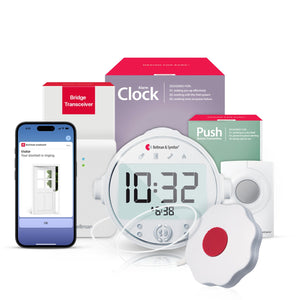
Aging in place with hearing loss is supported by a connected alert system that turns doorbells, smoke alarms, phone calls, and baby cries into wrist vibrations and app notifications - enabling independence and safety without relying on hearing. The core of this system is the Bellman Bluetooth Bridge, which connects to the Bellman Watch Receiver worn on the wrist, delivering instant, icon-based alerts for every household event - no Wi-Fi required.
Why Hearing Loss Changes Everything About Living Alone
The desire to stay home is nearly universal among older adults. Studies consistently show that more than 75% of adults over 50 want to remain in their own homes as they age - their neighborhood, their routines, their independence. But for the estimated 48 million Americans who live with some degree of hearing loss, the practical reality of staying home safely is more complicated than most planning conversations acknowledge.
Hearing loss does not just affect conversations. It affects every warning system in your home that relies on sound - and those systems are everywhere. Your doorbell rings. Your smoke alarm sounds. Your landline phone rings. Your phone rings on the kitchen counter from the other room. Your grandchild cries in the next room. A carbon monoxide detector goes off at 3 a.m. In a home designed for people with normal hearing, all of these events are communicated through sound. If you cannot hear that sound reliably - or at all - every one of those events becomes a safety gap.
This guide is about closing those gaps. Not with workarounds. Not with asking neighbors to check in. With technology designed specifically for people who are deaf or hard of hearing - technology that has matured significantly in the past decade and that now makes genuinely independent, genuinely safe home living possible for people who once might have felt they had no choice but to move into assisted care.
What Aging in Place with Hearing Loss Actually Requires
The term "aging in place" gets used loosely, but what it actually means is a combination of physical safety, functional independence, social connection, and household awareness. Hearing loss affects all four of those dimensions - not just the safety piece. Before jumping to specific products, it helps to understand the full landscape of what technology needs to address.
Home Event Awareness
The ability to know when someone is at the door, when an alarm sounds, when a phone rings, or when something needs your attention - without depending on hearing those events. This is the core safety layer.
Nighttime Safety
Smoke and CO alarms are most critical when you're asleep with hearing aids removed. Nighttime alerting requires a separate approach - bed shakers, flashing lights, and loud alarm receivers that work without wearable devices.
Communication Access
Staying connected to family, doctors, and emergency services through phone calls, texts, and alerts. This includes both incoming call awareness and the ability to make emergency contact quickly.
Environmental Monitoring
Knowing what is happening throughout the home - in other rooms, at the door, in the yard - especially when moving through the house without fixed visual receivers in every location.
Independence Preservation
Technology that works without constant caregiver involvement, without complicated setup, and without technical troubleshooting that requires outside help. The simpler and more reliable, the better.
Emergency Call Access
A fast, reliable way to summon help - whether it's a push-button transmitter for use within the home, a medical alert device, or a clear path to 911 for situations that require immediate emergency response.
Technology cannot address every dimension of aging in place alone, but the right alert and communication system addresses most of these areas simultaneously - and forms the foundation on which everything else is built.
Why Standard Home Alert Devices Fail People with Hearing Loss
Most homes are equipped with alert devices designed for people with normal hearing. Understanding precisely why those devices fail is important, because it defines what a replacement system needs to do differently.
Smoke alarms with 85 dB audible alerts. Doorbells that ring. Telephones that ring. Intercoms that broadcast. All rely entirely on the user hearing a sound and responding to it. Once hearing ability drops below a certain threshold - and particularly when hearing aids are removed during sleep - these devices provide no reliable warning at all.
Alert systems that communicate through vibration, flashing light, and visual icons rather than sound. A wrist-worn receiver that vibrates with a distinct pattern when the doorbell rings. An Alarm Clock Receiver with a bed shaker that activates when a smoke alarm sounds at 3 a.m. A smartphone notification that appears on screen when someone calls.
The critical insight here is that substituting one sensory channel for another - replacing sound with touch and vision - is not a downgrade or a compromise. It is a design choice, and when done well, it can deliver faster, more reliable, and more informative alerts than a 85-decibel buzzer that the user may or may not hear depending on the time of day, their hearing aid status, and where they are in the home.
The right alerting technology does not ask someone with hearing loss to try harder to hear. It meets them where they are - on their wrist, on their phone screen, in their pillow - and delivers the same household awareness that a person with normal hearing takes for granted.
Bellman & Symfon - Hearing Loss & Home AlertingThe Foundation: A Connected Home Alert System Explained
The most effective aging-in-place technology for people with hearing loss is not a collection of separate single-purpose devices - it is a connected system built around a central hub that handles every alert type in the home. The Bellman Bluetooth Bridge is that hub.
Here is how the system works at a high level: transmitters placed around the home monitor specific events - a doorbell, a smoke alarm, a baby's room, a landline phone, a push button. When any of those events occur, the transmitter sends a wireless signal to the Bridge. The Bridge instantly converts that signal into Bluetooth and delivers it to the Bellman Watch Receiver on your wrist and to the Bellman Assistant app on your smartphone. Each event produces a distinct vibration pattern and a clear icon, so you know not just that something happened, but what happened.
Consistent experience: Every alert - doorbell, smoke, phone, push button - arrives through the same Watch and the same app, with the same kind of wrist vibration and icon notification. You learn one system, not six different devices.
Expandable without replacement: Add a new transmitter type as needs change - a baby transmitter when a grandchild arrives, a push button for caregiver communication, a phone transmitter for landline calls - without replacing the Bridge, Watch, or app.
No Wi-Fi dependency: The system operates entirely over Bluetooth, with no internet connection required. Alerts fire during router outages, ISP disruptions, and power restoration events - when connected systems are most likely to fail.
Daytime and nighttime coverage: The Watch and app handle daytime coverage. The Alarm Clock Receiver with bed shaker handles nighttime safety alerts. Both work through the same Bridge.
The Three Layers of Whole-Home Awareness
A well-configured aging-in-place alert system operates in three layers:
- Layer 1 - Wrist: The Watch Receiver is the primary daytime channel. Worn on the wrist, it travels with you through every room, delivering vibration-plus-icon alerts wherever you are in the home - kitchen, yard, basement, bedroom. Up to a week of battery life per charge means daily recharging is not a concern.
- Layer 2 - Smartphone: The free Bellman Assistant app (iOS 15+, Android 8.0+) receives the same alerts simultaneously. If you happen to miss a Watch vibration, the phone notification is there as backup - and vice versa. Two simultaneous channels means significantly fewer missed alerts.
- Layer 3 - Nighttime receivers: When you remove your Watch and put your hearing aids away for bed, dedicated receivers take over. The Alarm Clock Receiver delivers 100 dB of sound, a flashing alarm light, and a bed shaker that vibrates your mattress. This layer handles the scenarios where life-safety alerts matter most: smoke and CO detection during sleep.
Every Home Alert Type Addressed - Room by Room
Most people think about replacing one or two alert devices when they start planning for hearing loss at home. The more useful approach is to audit every event your home currently communicates through sound, and then work through them systematically. The following covers the full range.
Front Door: Doorbell Alerts
Missing the doorbell is one of the most frequently reported frustrations for people with hearing loss - missed deliveries, visiting family members left waiting, service providers unable to reach you. The Bellman Doorbell System with Bridge and Watch Receiver addresses this directly. The Doorbell Transmitter detects your existing doorbell chime and relays the signal to the Bridge, which immediately vibrates your Watch with a doorbell icon. No rewiring. No new doorbell hardware. The existing chime stays in place; the transmitter simply listens to it.
The Missed Delivery Problem
Dorothy, 74, lives alone and wears hearing aids during the day, but her doorbell is still difficult to hear from the back of the house with the television on. Since adding the Doorbell Transmitter and Watch Receiver, she feels the vibration on her wrist wherever she is in the home. Her online pharmacy deliveries that require a signature no longer get returned to sender.
Fire and Safety: Smoke & CO Alerts
Smoke and carbon monoxide alarms are the most safety-critical alert system in any home. For people with hearing loss - particularly at night when hearing aids are removed - standard audible smoke alarms can be completely ineffective. The Bellman Smoke Alarm Collection provides a full solution. The Smoke Alarm Transmitter detects your existing smoke alarm's sound and relays an urgent signal to the Bridge, which then vibrates the Watch with a flame icon and triggers the app notification. For nighttime safety, the Bridge + Smoke + Alarm Clock bundle adds an Alarm Clock Receiver with a 100 dB alarm, bright flashing light, and bed shaker - designed specifically to rouse someone from deep sleep. Add the Watch Receiver separately for daytime wrist alerts.
For a full explanation of smoke alarm options for people with hearing loss, see our dedicated guide: Smoke alarm for seniors with hearing loss: visual and vibrating options explained.
Telephone: Never Miss an Important Call
Phone calls from doctors, family members, and emergency services are critical communication links - and a ringing phone heard from the next room is unreliable for many people with hearing loss. The Bellman Phone System with Bridge and Watch Receiver connects directly to a landline via the Bridge's built-in RJ11 input. When the phone rings, the Bridge detects it electrically - not by sound - and sends a phone icon alert to the Watch and the app. For mobile phone calls, the Bellman Assistant app forwards incoming call notifications from your smartphone through the Bridge to the Watch, giving you whole-home mobile call awareness without any additional transmitter.
Push Button: Call for Help or Attention
A push button transmitter serves multiple purposes in an aging-in-place context. It gives a senior resident a simple, wireless way to signal for attention or help within the home - pressing the button sends an immediate vibration alert to a family member's or caregiver's Watch Receiver. It can also serve as a secondary doorbell for rooms where the door transmitter signal may be weaker, or as a way for a family member staying in the home to signal from another room without shouting.
The Bellman Push Button System with Bridge and Watch Receiver is compact and wearable - the transmitter can be worn as a pendant or carried in a pocket, so it goes wherever the user goes within the home. For nighttime coverage, the Bridge + Push Button + Alarm Clock bundle ensures push button alerts also wake you through the Alarm Clock Receiver if pressed during sleeping hours.
Baby Monitoring for Grandparents
Grandparents who watch grandchildren at home - or parents who are hard of hearing - need baby monitoring solutions that do not depend on hearing the monitor's audio. The Bellman Baby Transmitter works with the Bridge to deliver sound-activated alerts directly to the Watch and app the moment infant sounds cross a sensitivity threshold in the baby's room. No audio feed needed on your end - just the vibration and baby icon on your wrist telling you to check in.
Nighttime Safety: The Layer That Cannot Be Optional
Nighttime is when the safety stakes are highest and hearing aids are most likely to be out of service. Most people remove their hearing aids before sleep - and many people who are profoundly deaf do not wear aids at all. This creates a window of several hours every night when the home's entire sound-based alert infrastructure is, for practical purposes, invisible to its occupant.
Handling this correctly requires understanding that nighttime alerting is a different challenge from daytime alerting. The Watch Receiver - while excellent during waking hours - sits on the charger at night. The smartphone may be face down or silenced. A different physical mechanism is needed: one that reaches a person who is deeply asleep, lying down, with hearing aids out.
The answer is the Alarm Clock Receiver. This device serves as a nightstand alarm clock and a home alert receiver simultaneously. When a smoke alarm, doorbell, push button, or any other connected transmitter fires during the night, the Alarm Clock Receiver delivers three simultaneous outputs:
- 100 dB audible alarm - far louder than a standard bedside alarm, designed to reach people with moderate to severe hearing loss who sleep without aids
- Flashing alarm light - a visible strobe alert for people who are completely deaf or who sleep in a position where tactile alerts might be missed
- Bed shaker / vibrating pad - a vibrating pad placed under the mattress or pillow that delivers a physical tactile alert directly to the sleeping person
Bellman's sleep bundles are built specifically around this need. Each bundle pairs the Bluetooth Bridge with the Alarm Clock Receiver and a specific transmitter - so you can start with the alert type that matters most to you and add others later. The Watch Receiver can always be added separately for daytime wrist coverage:
- Smoke and fire at night: Bridge + Smoke Alarm + Alarm Clock bundle - the most important nighttime safety configuration for anyone with hearing loss living alone
- Doorbell coverage overnight: Bridge + Doorbell + Alarm Clock bundle - for situations where an early-morning visitor or early delivery needs to be detected
- Push button alerts overnight: Bridge + Push Button + Alarm Clock bundle - for caregiving arrangements where a family member or patient may need to signal for help during the night
- Smoke alarm transmitter installed and tested
- CO detector transmitter or detector in bedroom area
- Alarm Clock Receiver on the nightstand
- Bed shaker pad positioned under pillow or mattress
- Alarm Clock Receiver tested with smoke alarm test button
- Smartphone notifications enabled and phone nearby
- Watch Receiver on charger and recharged each night
- All transmitters have fresh batteries
Building Your System Room by Room
The best approach to building a connected alert system for aging in place is room by room - identifying every sound-based alert in each space and deciding how to address it. The following walks through a typical home, though the order can be adjusted based on which rooms and which alert types feel most urgent.
| Room / Area | Typical Sound-Based Alerts | Recommended Bellman Solution |
|---|---|---|
| Front Door | Doorbell chime | Doorbell Transmitter → Bridge → Watch and app |
| Bedroom (night) | Smoke alarm, CO alarm, phone, push button | Alarm Clock Receiver with bed shaker - triggered by any connected transmitter via Bridge |
| Kitchen | Smoke alarm, timer, phone | Smoke Alarm Transmitter near kitchen smoke alarm; Watch handles timer awareness |
| Living Room | Doorbell (from across house), phone | Watch covers whole home; lamp flasher receiver optional for visual reinforcement |
| Home Office | Phone ring (landline), notifications | Phone System with Bridge via RJ11; mobile calls via app |
| Garage / Basement | Limited visibility/hearing of home events | Watch Receiver's 650 ft Bluetooth range covers detached garage in most cases |
| Baby's Room | Infant crying, sounds from the room | Baby Transmitter → Bridge → Watch vibration and baby icon alert |
| Yard / Garden | Doorbell, indoor alerts missed outside | Watch travels with you outside; 650 ft open-field Bluetooth range maintains coverage |
Why No Wi-Fi Is a Safety Advantage, Not a Limitation
Many people initially assume that a Wi-Fi-connected system is more capable or modern than an offline one. For home alert systems designed for people with hearing loss, the opposite is true - and understanding why helps you make a more informed decision when comparing options.
The Bellman Bluetooth Bridge operates entirely over Bluetooth 5, with no internet connection required. The Bridge communicates directly with the Watch Receiver, peer-to-peer, across up to 650 feet in open field. The Bellman Assistant app communicates with the Bridge over Bluetooth when you are at home. No router. No cloud server. No subscription. No login after initial setup.
For safety-critical alerts - smoke and fire in particular - that independence from the internet is not incidental. It is the design. Internet outages happen. Routers fail. ISPs have downtime. In each of those scenarios, a Wi-Fi-dependent alert system stops working. The Bellman system does not. For a deeper look at this comparison, see our dedicated guide: No Wi-Fi Hearing Alert Systems: Why Offline Bluetooth Beats Smart Home Devices.
Require a working internet connection to function. Alerts route through cloud servers, adding latency. Router failure, ISP outage, or power disruption disables the system. Often require ongoing subscription fees. Setup requires network password configuration and firmware updates.
No internet connection required. Bluetooth operates device-to-device, with no cloud routing. Continues functioning during internet outages, router failures, and ISP disruptions. No subscription fee for core alerting. Setup requires no network configuration - plug in, pair, done.
Common Mistakes When Setting Up Alerting Technology for Aging in Place
The right technology only works if it is configured correctly and used consistently. These are the most common missteps - and how to avoid them.
Mistake 1: Addressing only the most obvious alert (usually the doorbell) and stopping there
The doorbell is often the first thing people think about, but the smoke alarm - particularly at night - is the most safety-critical alert in the home. Nighttime smoke alarm coverage should be the first priority, not an afterthought added later. Build from life-safety outward.
Mistake 2: Assuming the Watch covers nighttime alerting
The Watch Receiver is primarily a daytime device. Most people remove it at night along with their hearing aids. A dedicated Alarm Clock Receiver with a bed shaker is required for reliable nighttime alerts - the Watch alone is not a complete nighttime safety solution.
Mistake 3: Not testing each transmitter individually after setup
It is easy to assume the system is working once initial pairing is done. Every transmitter should be tested individually - including the smoke alarm transmitter using the smoke alarm's own test button (not the transmitter's test button), which simulates a real alarm event more accurately.
Mistake 4: Placing the Bridge in a corner or low-traffic room
The Bridge works best when placed centrally in the home - at shelf height in a hallway, living room, or central bedroom - so it can receive RF signals from transmitters in all directions. A corner placement near one end of the home may create coverage gaps at the opposite end.
Mistake 5: Neglecting to enable app notifications on the phone
The Bellman Assistant app requires notification permissions on both iOS and Android. Many people pair the app and assume it is ready, only to discover later that system-level notifications were never enabled. Always verify in your phone's notification settings after setup.
Mistake 6: Using standalone, single-purpose devices instead of a connected system
Individual flashing doorbell alerts, separate smoke alarm strobes, and standalone phone ringers each solve one problem but create a fragmented experience. A single connected system delivers consistent, recognizable alerts for every event type through one Watch and one app - with far less to learn and maintain.
A Guide for Caregivers and Family Members
Many aging-in-place decisions involve family members or professional caregivers who want to support an older adult's independence while ensuring their safety is not compromised. If you are helping a parent, grandparent, or other family member plan their home alert technology, this section is for you.
What to Prioritize in a Technology Assessment
The most useful starting point is a room-by-room audit of every alert and communication system in the home. Walk through with the person who lives there and ask: what happens when this goes off? Can they reliably hear it? What about at night? What about in the back of the house? The gaps are usually more extensive than either of you expected.
Smoke and fire alerting at night is the non-negotiable first priority. After that, phone calls and doorbell alerts are typically the most impactful additions for social connection and daily independence. Push button call systems become relevant as mobility declines and the person may need a reliable way to signal for help without having to shout or find a phone.
The Push Button as a Caregiver Tool
The Bellman Push Button System is worth considering not just as an emergency call button, but as a general-purpose in-home communication tool. A wearable push button pendant allows a parent or grandparent to signal a caregiver or family member in the same home quietly and discreetly - without shouting across the house, which can feel undignified. The caregiver's Watch Receiver vibrates immediately, and they know to check in. It creates a communication channel that feels less medicalized and more natural.
Setting Up on Behalf of a Family Member
The Bellman system is designed for easy, self-service setup - but when setting it up on behalf of a family member, it helps to document the configuration. Note which transmitters are installed where, which alert icons correspond to which events, and where the Bridge is located. Leaving a simple one-page reference card near the Bridge removes the guesswork when the person needs to troubleshoot a missed alert or add a transmitter later.
For a comprehensive caregiver's guide to choosing the right home alert system, see: How to choose a home alert system for a parent with hearing loss: caregiver's checklist.
For emergency preparedness specifically - including natural disasters, power outages, and evacuation planning - see: Emergency preparedness for deaf and hard-of-hearing seniors: what every caregiver must know.
Buyer's Guide: Where to Start and How to Build Out Over Time
One of the most common questions from people new to hearing loss alerting technology is: " Where do I begin? The answer depends on your living situation, your most pressing safety concerns, and your budget - but the framework below works for most people.
Step 1: Start with Life-Safety Alerts
Smoke and carbon monoxide alerting is the starting point for anyone living alone with hearing loss. If there is one configuration to put in place first, it is the Bridge + Smoke Alarm + Alarm Clock bundle - giving you nighttime fire safety coverage with the bed shaker and Alarm Clock Receiver, plus the Bridge that you will build the rest of the system on. Add the Watch Receiver separately for daytime wrist alerts.
Step 2: Add the Doorbell
Once smoke safety is handled, the doorbell is typically the next priority for daily quality of life. The Doorbell Transmitter pairs with the existing Bridge - no new Bridge needed - and immediately gives you wrist vibration alerts whenever someone arrives at the front door. For more on doorbell alerts for people with hearing loss, see: Doorbell alert for elderly hearing impaired: help seniors never miss the door.
Step 3: Address Phone Calls
If missing landline calls is a problem - and for many older adults who receive calls from doctors, insurance providers, and family, it is - add the Phone System with Bridge and Watch Receiver. The Bridge connects directly to the landline via its built-in RJ11 input. Mobile call alerts come through the Bellman Assistant app automatically once the app is paired to the Bridge.
Step 4: Consider a Push Button
A push button transmitter is particularly valuable as an in-home communication and help-signaling tool. If you live with a family member or have regular caregiver involvement, the Push Button System gives you a wearable, wireless way to signal for attention or assistance within the home without needing to find a phone or shout.
Step 5: Expand as Life Changes
The Bellman system is designed to grow with you. Every additional transmitter you add - baby monitor, second smoke alarm transmitter, additional push button, sound monitor - works with the same Bridge, the same Watch, and the same app. You never need to replace the core system as your alerting needs evolve.
Everything Your Home Needs to Be Fully Alert-Covered
Work through each category. Every unchecked item is a gap in home awareness.
- Smoke alarm transmitter installed near every alarm
- CO alarm transmitter or combination detector in place
- Alarm Clock Receiver on nightstand with bed shaker
- Bridge plugged in at a central location
- Watch Receiver paired and charged
- Bellman Assistant app installed and notifications enabled
- Doorbell transmitter detecting existing chime
- Phone transmitter connected via RJ11 (if landline in use)
- Push button wearable and within reach
- All transmitters individually tested with correct icon verification
- Nighttime bed shaker tested with smoke alarm test button
- Battery replacement schedule noted for all transmitters
How to Choose the Right Configuration for Your Situation
Not everyone's needs are identical, and the right starting configuration depends on a few key factors. This comparison helps clarify which approach fits which situation.
| Situation | Primary Need | Recommended Starting Point |
|---|---|---|
| Living alone, any age | Fire safety and whole-home awareness without a backup listener | Bridge + Smoke + Alarm Clock bundle, add Watch Receiver for daytime |
| Living with family/caregiver | Independence within the shared home; reliable communication without shouting | Push Button System with Bridge and Watch; add doorbell and smoke transmitters |
| Recently diagnosed / early hearing loss | Future-proofing: build the system before gaps become dangerous | Start with the Bridge and Watch Receiver; add transmitters one at a time as needed |
| Parent receiving incoming support | Caregiver peace of mind; parents' dignity and independence maintained | Full system including smoke, doorbell, push button; caregiver can monitor via Bellman Assistant app |
| Severely or profoundly deaf | Complete non-auditory alert coverage; nighttime safety is the highest priority | Bridge + Smoke + Alarm Clock bundle plus Watch Receiver; build complete room-by-room coverage |
Beyond Alerting: Other Home Technology That Supports Aging in Place with Hearing Loss
A connected alert system is the foundation - but aging in place successfully with hearing loss often involves a broader set of technology choices across several areas of daily life.
Hearing Aids and Assistive Listening Devices
Modern hearing aids have become genuinely sophisticated over the past decade, with Bluetooth streaming, smartphone app controls, and rechargeable batteries eliminating much of the friction that made earlier generations of hearing aids frustrating. Pairing good hearing aids with a dedicated home alert system creates the strongest overall coverage: hearing aids handle amplification and speech clarity during active listening; the alert system handles home events and safety notifications at all times - including when the aids are off.
Captioned Phones and Real-Time Text
For phone conversations rather than just phone ring alerts, captioned telephone services and captioned phones provide real-time text transcription of phone calls. These services are available through the FCC-funded program and are free to eligible individuals with hearing loss. A captioned phone does not replace the need for a phone ring alert (the Watch and app handle that), but it does make the conversation itself more accessible once you know someone is calling.
Video Doorbells with Visual Alerts
Video doorbells can complement a vibrating doorbell alert system by adding a visual feed - allowing you to see who is at the door before deciding whether to answer. The Bellman Doorbell Transmitter handles the alert (wrist vibration when someone rings); a video doorbell adds the visual layer. These two systems work well together as complementary tools rather than substitutes for each other.
Smart TV Captioning and Hearing Loop Compatibility
Closed captioning is available on most television content, but hearing loop systems - also known as telecoils or T-coils - provide direct audio transmission to hearing aids without background noise. If you are evaluating television and entertainment options, checking whether your hearing aids support T-coil and whether your television or media room can accommodate a hearing loop pad is worth including in the larger home accessibility audit.
Smoke Detector Placement and Building Codes
Beyond the alert system, the physical placement of smoke alarms matters. Current building codes require smoke detectors in every bedroom, outside each sleeping area, and on every level of the home. If your home's smoke alarm coverage has gaps, addressing those first - and then adding a Smoke Alarm Transmitter to each detector - creates the most complete nighttime fire safety network.
Frequently Asked Questions
Can I use the Bellman alerting system if I already have a smart home setup (Alexa, Google Home, etc.)?
Yes. The Bellman system operates independently of smart home platforms, over Bluetooth rather than Wi-Fi. This means it runs alongside Alexa, Google Home, or similar systems without interference. Many users find that the Bellman system handles safety-critical alerts (smoke, CO, nighttime coverage) while smart home assistants handle convenience functions like music and timers - complementary tools, not competing ones.
Does the Watch Receiver work if my phone battery dies?
Yes. The Watch Receiver communicates directly with the Bluetooth Bridge, not through your smartphone. If your phone is dead, off, or out of range, the Watch continues to receive all alerts from the Bridge. The smartphone app is a secondary notification channel, not a dependency for the Watch to function.
How far does the Watch Receiver work from the Bridge?
The Watch Receiver uses Bluetooth 5 with a range of up to 650 feet in open field. Inside a typical home with walls, floors, and furniture, real-world range is typically sufficient for a two- or three-bedroom home from a centrally placed Bridge. The Watch travels with you through every room, yard, and attached garage.
What happens to my alerts during a power outage?
The Bridge requires mains power, so it will not operate if power to the home is completely cut. The Watch Receiver uses its own battery (up to a week per charge) and will continue to function during brief power interruptions while the Bridge is running on residual power or a UPS battery backup. For whole-home power outage scenarios, pairing the system with a small uninterruptible power supply (UPS) for the Bridge is an option for the most critical locations. Transmitters are battery-powered and continue to function during a power outage.
Does the system work in an apartment?
Yes - the Bellman system works well in apartments. Most of the transmitters are battery-powered and require no wiring, making them renter-friendly. The Doorbell Transmitter detects the existing apartment doorbell chime without any wiring modification. The smoke alarm transmitter clips near an existing detector. The only installation requirement is a power outlet for the Bridge.
How is this different from a medical alert system?
Medical alert systems (like Life Alert) are focused on emergency response - pressing a button to contact emergency services when you fall or have a medical event. The Bellman system is a home awareness system - it keeps you informed of what is happening in your home (doorbell, smoke alarm, phone, baby monitor) through wrist vibrations and app notifications. Many people use both: a Bellman system for home awareness and a separate medical alert device for emergency response. They serve different purposes and complement each other well.
Can a family member also receive alerts on their phone?
The Bellman Assistant app can be installed on multiple smartphones, and each phone pairs with the Bridge via Bluetooth. Family members who live in the same home can receive the same alerts on their own phones. For remote monitoring (a family member in a different location wanting to check in), the system is primarily designed for in-home Bluetooth range rather than remote access over the internet.
Is there a subscription fee?
No. The Bellman system does not require a monthly subscription for its core alerting functions. The Watch Receiver and Bellman Assistant app work with the Bridge without any ongoing fees after the initial hardware purchase.
The Bigger Picture: Independence Is the Goal
The conversation about aging in place with hearing loss is ultimately a conversation about independence - about the difference between choosing to stay home and feeling like you have no other option. Technology does not make that choice for anyone, but the right technology removes barriers that otherwise make independence unsafe.
A fully configured home alert system - smoke alarms that wake you, a doorbell that alerts your wrist, a phone that you know is ringing, a push button to signal for help if you need it - is not a collection of assistive devices. It is a home that works for you rather than around you. It is the difference between a household that is accessible and one that is not, on the terms that matter most: safety, dignity, and the ability to stay where you want to be.
For the full picture of how every component in the Bellman home alerting system fits together, see our pillar guide: Home Safety Alert Systems for Seniors with Hearing Loss: Complete Guide (2026).
Ready to build your aging-in-place alert system?
Browse the full Bellman Bluetooth Bridge collection - doorbell, smoke, phone, push button, and baby monitor bundles, with the Watch Receiver and Bellman Assistant app included.
Sources and references: Bellman & Symfon - Bluetooth Bridge Transceiver BE1521 product specifications and user manual (us.bellman.com/collections/bluetooth-bridge) · Bellman & Symfon - Bluetooth Watch Receiver BE3330 specifications (us.bellman.com/products/bluetooth-watch-receiver) · Bellman & Symfon - Alarm Clock Receiver specifications including 100 dB output, flashing light, and bed shaker (us.bellman.com) · Bellman & Symfon - Visit Transmitter product range: Doorbell Transmitter, Smoke Alarm Transmitter, Baby Transmitter, Push Button Transmitter, Phone Transmitter · National Institute on Deafness and Other Communication Disorders (NIDCD) - Quick Statistics About Hearing (2021) - 48 million Americans with hearing loss · AARP - Home and Community Preferences Survey (2021) - 75%+ of adults over 50 prefer to remain in their current homes as they age · National Fire Protection Association (NFPA) - Smoke Alarms in U.S. Home Fires: people with hearing loss are disproportionately affected by audible-only smoke alarms · FCC - Hearing Aid Compatibility and Captioned Telephone Service guidance (fcc.gov) · Bellman & Symfon - Bellman Assistant App compatibility: iOS 15+, Android 8.0+ (us.bellman.com)
This article is for informational purposes only. Product specifications are subject to change; refer to the current product pages at us.bellman.com for the most up-to-date technical details. Nothing in this article constitutes medical, safety engineering, or emergency preparedness professional advice.

Aging in Place with Hearing Loss: The Complete Home Technology Guide
This guide breaks down the practical choices, features, and considerations behind this topic. Use it to identify a setup that fits the listener, the environment, and the everyday moments that matter most.
The featured products below are current Bellman options discussed in the article or closely matched to its use case.