Best Dorm Room Alert Systems for Deaf and Hard of Hearing College Students

Moving into a dorm with hearing loss means solving three real problems: waking up on time, knowing when someone is at your door, and staying aware of fire or emergency alerts. This guide breaks down exactly which alerting tools work in a dorm room, how they fit together, and what to consider before move-in day.
- The three alerting problems every dorm student faces
- Door knock and doorbell alert systems
- Wake-up systems: vibrating alarms and bed shakers
- Fire and CO alerting in the dorm
- Wrist alerts and the Bellman app
- Setting up your system with a roommate
- Side-by-side: all dorm alert options compared
- Setup tips for dorm installation
- People also ask
The most practical dorm setup covers three needs: a wireless doorbell transmitter with a flash receiver or wrist alert for door knocks, a vibrating alarm clock or Bluetooth bed shaker for waking up, and a personal smoke alerting system as a supplement to the building's fire alarm. The Bellman alerting range covers all three. Each transmitter and receiver works wirelessly with no drilling required, so these systems are suitable for temporary dorm use. Always confirm installation rules with your resident advisor. For the full college context, see the pillar guide: Hearing Loss in College: Complete Guide to Dorm Alerts, Campus Safety & Academic Tools (2026).
The Three Alerting Problems Every Dorm Student Faces
A dorm room is not like a house. It is small, shared, and full of rules about what you can and cannot install. At the same time, it presents some specific challenges for students with hearing loss.
The three problems that come up most often are:
- Waking up on time. A phone alarm or a standard clock is unreliable if you sleep deeply or have moderate-to-profound hearing loss. A roommate waking earlier adds another complication
- Knowing when someone is at the door. Resident advisors do wellness checks. Friends knock. Delivery workers buzz. All of that goes unheard if you are inside with the door closed
- Fire and emergency awareness. Building fire alarms are often audible-only. Many dorms have or can install visual strobes, but students sometimes arrive to find their assigned room does not have one yet
Each problem has a different solution. A single device does not cover all three. The sections below go through each one in turn.
Before you buy: Contact your campus housing office and disability services before move-in. Many schools provide or fund alerting equipment for students with documented hearing loss. You may not need to purchase everything yourself.
Door Knock and Doorbell Alert Systems
Missing a knock at your dorm door is a daily frustration. It happens during naps, while you are wearing headphones, and whenever you are in the bathroom with the door closed. A wireless doorbell system solves this cleanly and without permanent installation.
These systems work by placing a small transmitter near the door. When someone presses the transmitter's button or knocks near it, it sends a radio signal to a receiver inside the room. The receiver responds with a flash of light, a vibration, or both. The whole exchange takes less than a second.
The National Association of the Deaf notes that architectural accommodation standards for dormitories include visible doorbell and other signaling devices. If your dorm room does not have one installed, a portable wireless system is the practical alternative while you work with housing to request a permanent solution.
Option 1: Flash receiver with bed shaker

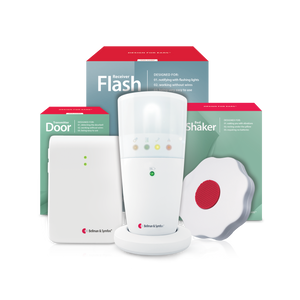
The Doorbell System with Flash Receiver and Bed Shaker is a two-piece setup. The doorbell transmitter goes near your door. The flash receiver sits on a desk or shelf anywhere in the room. When the transmitter is triggered, the flash receiver fires a rapid sequence of bright light pulses, accompanied by color-coded indicator icons that tell you what type of alert it is.
The bed shaker component connects to the flash receiver via cable. It goes under your pillow or mattress. If you are napping or sleeping, the vibration wakes you even when you would not see a flashing light. Both alert modes fire together when someone is at your door.
Bright flash alerts with color-coded icon panel and bed shaker
This is the most straightforward option for a dorm room. The flash receiver is visible from most positions in a small room. The bed shaker handles the times you cannot see it.
Option 2: Alarm clock receiver with bed shaker

The Doorbell System with Alarm Clock Receiver and Bed Shaker pairs the same doorbell transmitter with an alarm clock receiver, rather than a flash receiver. The alarm clock receiver produces sound, flashing lights, and bed shaker vibrations all at once. This is a good fit if you want the clock and the door alert in one bedside unit.
It works the same way as the flash receiver version. The doorbell transmitter sends a signal when triggered. The alarm clock receiver responds with all three alert modes. The difference is in form: the alarm clock receiver sits on a nightstand like a regular clock, making it less conspicuous in a shared room.
Option 3: Watch receiver for wrist alerts

The Doorbell System with Bridge and Watch Receiver adds a wearable layer. The setup includes the doorbell transmitter, the Bridge Transceiver, and the Watch Receiver. When someone presses the transmitter, the signal passes through the Bridge and reaches the Watch Receiver as a discreet vibration and a small icon on the watch face.
This option is particularly useful in a dorm because you can move around the room freely. If you are in the bathroom with the door closed, or sitting with your back to the flash receiver, the watch alert still reaches you. The watch is also discreet enough to wear in class or in common areas without drawing attention.
Discreet wrist vibration alerts with color-coded icons
The Watch Receiver requires the Bridge Transceiver to work. The Bridge plugs into a wall outlet near your transmitters and serves as the hub connecting the radio-frequency alerting network to Bluetooth. One Bridge handles multiple transmitters in the same room.
Which door alert option fits your situation?
| Your situation | Best fit |
|---|---|
| You are usually at your desk when someone knocks | Doorbell System with Flash Receiver and Bed Shaker |
| You want one device that works as clock and door alert | Doorbell System with Alarm Clock Receiver and Bed Shaker |
| You move around your room and hallway frequently | Doorbell System with Bridge and Watch Receiver |
| You want both a flash alert in the room and a wrist alert | Doorbell System with Bridge, Flash Receiver, and Bed Shaker |
Wake-Up Systems: Vibrating Alarms and Bed Shakers
Waking up for an 8 a.m. class is hard for most students. For students with hearing loss, a standard alarm clock or phone ringtone is often not enough. A vibrating bed shaker or multi-mode alarm clock is a far more reliable solution.
Alarm Clock Pro: sound, light, and vibration together
The Bellman Alarm Clock Pro fires three alert types simultaneously: an ascending multi-tone sound alarm up to approximately 100 dB, bright flashing lights, and a wired bed shaker. All three activate at the same time when the alarm goes off. Missing it is genuinely difficult.
It runs on a power cord with a rechargeable backup battery, so it keeps the alarm set if someone accidentally unplugs it. The display uses 12 or 24-hour format and has large dials that are easy to read in the dark.
Three-mode alarm: ascending sound, flashing lights, and bed shaker
Vibio Bed Shaker: Bluetooth and app-controlled
The Bellman Vibio Bed Shaker takes a different approach. It is a compact Bluetooth shaker that pairs with the free Vibio app on iOS and Android. You set alarms through the app on your phone. The shaker goes under your pillow and vibrates when the alarm fires. The app also sends vibration alerts for incoming calls and text messages.
The Vibio is USB-rechargeable and compact enough to pack in a bag for weekend trips home or travel. It does not produce any sound, which makes it particularly considerate toward roommates who have an earlier schedule.
Bluetooth bed shaker controlled by free smartphone app
Alarm Clock Classic: straightforward and loud
The Bellman Alarm Clock Classic is the original loud alarm with a bed shaker. It runs on a power cord and produces an extra-loud ascending alarm. It is a simpler device than the Alarm Clock Pro but covers the same core need: waking up a heavy sleeper who may not hear a standard alarm. The bed shaker is included.
Choosing between them
- Alarm Clock Pro fires sound, light, and vibration at once
- Vibio is silent and uses vibration only
- Alarm Clock Pro sits on a nightstand like a normal clock
- Vibio travels easily; ideal for students who go home on weekends
- Alarm Clock Pro needs a power outlet; keeps time without a phone
- Vibio needs a charged phone nearby for the app to work
- Alarm Clock Pro is better for deep sleepers who need multiple alert types
- Vibio is better when a roommate needs silence in the morning
Fire and CO Alerting in the Dorm
Building fire alarms are the campus's responsibility. The National Deaf Center states that dorms should have visual fire alarms with bright flashing lights and vibration-based alert options, hard-wired into the building's main alarm system.
In practice, not every room has this on arrival. The National Association of the Deaf confirms that architectural accommodation standards for dormitories include flashing light fire alarms. If your assigned room does not have one, contact your housing office and disability services office immediately. You have the right to request accessible alerting equipment or a room transfer to an accessible room.
A personal supplemental smoke alerting device adds an extra layer of awareness. It does not replace the building's required system. It fills the gap between when you make your accommodation request and when it is installed, and it adds coverage in moments when the building system alone might not be enough, such as during a nap with the door closed and headphones on.
The Smoke/Fire Alarm System with Alarm Clock Receiver and Bed Shaker combines a wireless smoke alarm transmitter with the alarm clock receiver and bed shaker. When the transmitter detects smoke, it sends a radio signal to the receiver. The receiver fires all three alert modes: a loud alarm, flashing lights, and bed-shaker vibration. It is entirely wireless. No hardwiring is needed.
For students who also want CO coverage, the Smoke/Fire and CO Alarm System with Alarm Clock Receiver and Bed Shaker adds a carbon monoxide transmitter to the same setup. Both transmitters link to the same alarm clock receiver and bed shaker.
Important: Personal alerting devices are supplemental tools only. They do not replace or satisfy any requirement that a building provide accessible fire alarm systems. Contact your campus disability services and housing offices to confirm what accessible equipment your assigned room includes. Do not rely on a personal device alone as your only fire alert.
Wrist Alerts and the Bellman App
A flash receiver works when you are in the room and looking in its direction. A wrist alert works wherever you are wearing the watch. The two are different tools, and they work well together.
The Bellman Watch Receiver is a fully functional watch that adds vibration and icon alerts on the wrist. It connects via Bluetooth through the Bridge Transceiver. Once set up, any Bellman transmitter in your room, including the doorbell transmitter, smoke transmitter, or push button, can send an alert directly to your wrist.
The Bridge Transceiver also connects to the free Bellman Assistant app on iOS and Android. When you are connected to the app, alerts from your dorm room transmitters arrive on your smartphone. This extends the system's range to anywhere your phone has a connection, so you can receive a door-knock alert from the common area down the hall or the building lobby.
One Bridge Transceiver acts as the central hub for your whole dorm alert system. Connect your doorbell transmitter, smoke transmitter, and any other transmitters to the same Bridge. All alerts route through it to both the Watch Receiver and the Bellman Assistant app. You get a wrist vibration and a phone notification at the same time, from one compact plug-in unit.
Setting Up Your System with a Roommate
Most dorm rooms are shared. Your alerting system will be visible and audible to your roommate. A brief conversation before you set anything up avoids confusion later.
- Explain what each device does. A flash receiver firing in the middle of the night can startle a roommate who does not know what it is. A quick explanation prevents this
- Place transmitters where both of you agree. The doorbell transmitter near the door makes sense for everyone. Confirm your roommate is comfortable with where the flash receiver sits and whether the light level bothers them at night
- Agree on a door-knock procedure. If your roommate sometimes knocks instead of pressing the button, show them where the transmitter is so they know to use it or knock close to it
- Talk about fire drill procedures. If the building alarm goes off at night, your roommate can help make sure you are awake. This is worth discussing regardless of your alerting setup
- Use the Vibio or wrist alert at night. If your roommate sleeps later than you, the Vibio produces no sound and causes no disturbance. The Watch Receiver delivers alerts silently to your wrist while they sleep
Side-by-Side: All Dorm Alert Options Compared
| Device | Alert type | Best for | Needs power outlet? |
|---|---|---|---|
| Doorbell System with Flash Receiver and Bed Shaker | Bright flashing light + bed shaker vibration | Door knock alerts; students at a desk or in bed | Yes (flash receiver); transmitter uses batteries |
| Doorbell System with Alarm Clock Receiver and Bed Shaker | Sound + flashing light + bed shaker | Students who want one bedside unit for door and clock | Yes (receiver); transmitter uses batteries |
| Doorbell System with Bridge and Watch Receiver | Wrist vibration + watch icon | Students who move around the room and hallway | Yes (Bridge); watch charges via USB |
| Alarm Clock Pro | ~100 dB sound + flashing light + bed shaker | Waking up; deep sleepers needing multiple alert types | Yes; backup battery included |
| Vibio Bed Shaker | Under-pillow vibration (silent) | Waking up without disturbing a roommate | No; USB rechargeable |
| Alarm Clock Classic | Extra-loud ascending alarm + bed shaker | Simple wake-up with a loud alarm and vibration | Yes |
| Smoke/Fire Alarm System with Alarm Clock Receiver and Bed Shaker | Sound + flashing light + bed shaker | Supplemental smoke alert while waiting for room upgrade | Yes (receiver); transmitter uses batteries |
| Bridge Transceiver + Watch Receiver | Wrist vibration + Bellman app notifications | Students who want alerts on wrist and phone anywhere on campus | Yes (Bridge); watch charges via USB |
Setup Tips for Dorm Installation
Most dorm contracts prohibit drilling holes or making permanent alterations. Bellman alerting transmitters are designed to work without any permanent installation. Here is how to set them up within typical dorm rules.
Doorbell transmitter placement
- Place the transmitter on a small shelf or ledge next to the door. No adhesive or mounting is required if it sits flat on a surface
- If you want to mount it on the door frame, use removable adhesive strips rated for the device's weight. Check with your RA that this is allowed before applying any adhesive to painted surfaces
- Position the transmitter button where a visitor can easily see and reach it. A small label or note on the door helps visitors know to press it
Flash receiver and alarm clock receiver placement
- Both receivers plug into a standard wall outlet. Use a power strip if you need to consolidate plugs on one wall
- Place the flash receiver where you can see it from your desk and from your bed. A high shelf angled toward the room gives the best coverage
- The alarm clock receiver works best on a nightstand or desk at eye level
Bridge Transceiver placement
- The Bridge plugs into any wall outlet. Place it centrally in the room for the best signal reach to all transmitters
- Keep it away from large metal objects and microwaves, which can interfere with radio signals
- Pair it with the Bellman Assistant app once and it stays paired. You do not need to repeat setup if you unplug and replug it
Before your first night in the dorm
Go through this list on move-in day, before you unpack anything else.
- Confirm with housing whether your room has a visual strobe fire alarm
- If not, submit an accommodation request to disability services and housing on day one
- Unbox and place your doorbell transmitter near the door
- Plug in flash receiver or alarm clock receiver and test it
- Connect bed shaker cable to the receiver and place it under the pillow
- Set up the Bridge Transceiver and download the Bellman Assistant app
- Pair the Watch Receiver to the Bridge following the included setup guide
- Test every transmitter: press the doorbell button and confirm alerts fire
- Set your wake-up alarm on the Alarm Clock Pro or pair the Vibio app
- Walk your roommate through what each device does and where it is placed
- Register for campus emergency text and app alerts at orientation
- Save your disability services coordinator's contact number in your phone
Get your dorm setup sorted before move-in day
Wireless door alerts, vibrating alarms, wrist receivers, and smoke alert systems. All ship ready to use with no installation required.
People Also Ask
What is the best door knock alert for a deaf college student in a dorm?
A wireless doorbell system with a flash receiver or a wearable watch receiver works well in a dorm. The Bellman Doorbell System with Flash Receiver and Bed Shaker alerts you with bright flashing lights and under-pillow vibration. The Doorbell System with Bridge and Watch Receiver sends a wrist vibration from up to a short distance away. No drilling or permanent installation is needed for either. For students who want both options, the Doorbell System with Bridge, Flash Receiver, and Bed Shaker covers all bases.
Can I use a personal alerting system in a college dorm room?
Yes, in most cases. Portable wireless systems that require no drilling are suitable for dorm use. Always confirm with your resident advisor before attaching anything to walls or door frames. Bellman transmitters and receivers can be placed on shelves and desks with no permanent installation. The Bridge Transceiver and flash receiver plug into standard wall outlets.
What is the best vibrating alarm clock for a deaf college student?
The Bellman Alarm Clock Pro combines a loud ascending alarm up to approximately 100 dB, bright flashing lights, and a wired bed shaker. All three fire at the same time. For students who need silence so a roommate can sleep, the Bellman Vibio Bed Shaker is compact, produces no sound, and is controlled by a free smartphone app. Both are solid options depending on your situation.
Is a wrist alert better than a flash receiver for dorm use?
They serve different moments. A flash receiver covers you when you are in the room and facing it. A wrist alert from the Watch Receiver reaches you when you are moving around or in a spot where you cannot see the flash. Many students use both: a flash receiver on a shelf for most of the day and the watch when they are moving around. One Bridge Transceiver powers both.
Do college dorms have to provide visual fire alarms for deaf students?
Yes. The National Association of the Deaf confirms that architectural accommodation standards for dormitories include flashing light fire alarms and visible signaling devices. The National Deaf Center states these must be hard-wired into the building's main alarm system. If your assigned room does not have accessible fire alerting, contact your housing office and disability services office on move-in day to request it. A personal supplemental smoke alert system adds an extra layer but does not replace the building's required system.
Will a Bellman alerting system work through a dorm room wall?
Bellman alerting transmitters use radio frequency signals. In most dorm settings, the signal reaches receivers placed within the room. The Bridge Transceiver connects the system to the Bellman Assistant smartphone app, extending awareness wherever you have a phone signal. The Watch Receiver works within Bluetooth range of the Bridge, which covers most dorm rooms and short adjacent spaces.
Can I connect multiple transmitters to one receiver?
Yes. The Bellman alerting system is designed to allow multiple transmitters to link to the same receiver. A doorbell transmitter, smoke transmitter, and push button can all alert the same flash receiver and the same Watch Receiver via a single Bridge Transceiver. This means you build one setup that covers all alerting situations in your dorm room.

Sources used in this article:
- National Association of the Deaf -- Private Colleges and Post-Secondary Institutions: Dormitory Accommodation Standards -- nad.org/knowledge-hub/education/higher-education/private-colleges-and-other-post-secondary-institutions
- National Deaf Center -- Campus Housing Accessibility and Emergency Alerting -- nationaldeafcenter.org/resources/access-accommodations/creating-welcoming-campuses/campus-facilities/housing
This article is for informational purposes only and does not constitute medical or legal advice. Personal alerting devices are supplemental tools and do not replace building-installed fire alarm or emergency notification systems required by law. Contact your campus housing and disability services offices for guidance on your specific room and accommodation rights.
More in This Series
Hearing Loss in College: Complete Guide (2026)
The full pillar guide covering dorm alerts, campus safety, academic accommodations, and personal listening tools.
Vibrating Alarm Clock for College Students: Never Sleep Through Class Again
A focused look at vibrating alarms and bed shakers for deaf and hard of hearing students.
Portable Bed Shaker for Dorm Rooms: Sleep Safely Without a Loud Alarm
Compact, travel-ready vibrating alarms that work quietly for you and your roommate.
How Deaf and Hard of Hearing Students Stay Alert on Campus
Wearable alerting tools and campus safety strategies for life beyond the dorm room.
Disability Accommodations for Hearing Loss at University: A Student's Checklist
How to register with disability services, what to document, and what to request before classes start.
Best Assistive Listening Devices for College Lectures & Classrooms (2026)
Personal amplifiers and FM systems compared for lecture halls and seminar rooms.
Deaf College Student Packing List: Essential Hearing Assistive Tech for Move-In
Everything to bring on move-in day, from bed shakers to Bluetooth bridges and documentation.
Hearing Loss in College: Campus Safety & Academic Tools
How to stay safe and succeed academically with hearing loss on a college campus.