Wearable Alert Devices vs Phone Apps: What Actually Works
Phone apps for hearing loss alerting have improved significantly. Dedicated wearable receivers have too. This guide cuts through the marketing language on both sides and gives you an honest, scenario-by-scenario answer to the question people with hearing loss actually need answered: which approach delivers the alert when it matters most?
Phone apps deliver real value for communication awareness - calls, texts, and message notifications - and supplemental in-room environmental sound detection through features like Apple Sound Recognition and Android Sound Notifications. Dedicated wearable receivers like the Bellman Watch Receiver deliver reliable, whole-home safety alerting for smoke alarms, doorbells, baby monitors, and phones - including during internet outages, when the phone is in another room, and when the alert must wake you from sleep. The honest answer: phone apps are a useful supplemental layer. Dedicated hardware is the correct primary safety system. Used together correctly, each covers what the other cannot. Used as substitutes for each other, each leaves critical gaps that only become visible when an alert fails to arrive.
Why This Comparison Is Hard to Make Fairly
The wearable device vs. phone app comparison is one that the hearing assistive technology industry has been reluctant to make honestly. Device manufacturers emphasize the limitations of apps. App developers emphasize the cost and complexity of dedicated hardware. Neither side is being entirely straight with the people who actually need to make this decision.
The reality is messier and more useful than either marketing narrative suggests. Phone apps have improved substantially in the past three years - Apple's Sound Recognition, Google's Sound Notifications, and an ecosystem of third-party accessibility apps now offer genuine value that would have seemed implausible in 2021. At the same time, dedicated wearable receivers have evolved from basic pager-style vibrators to integrated systems with smart alert identification, direct RF communication, and whole-home coverage that no smartphone app can replicate without physically placing a phone next to every alert source in the home.
The right framework is not "which is better" but "which does what, in which scenario, and what happens when each one fails." That is the framework this guide uses - twelve scenarios, evaluated honestly across both approaches, with a clear recommendation for each. If you have been trying to decide whether a phone app is enough for your situation, or whether a dedicated device is worth the investment, this is the guide that gives you the actual answer.
How Each Approach Works: The Honest Mechanics
Before comparing outcomes, it is worth being precise about what each approach actually does technically. The marketing descriptions of both are often vague in ways that obscure the specific failure modes of each - failure modes that matter a great deal for safety-critical alerts.
How phone app alerting works
Phone app alerting for deaf and hard of hearing users works through one of two mechanisms, and it is important to distinguish between them because they have fundamentally different reliability characteristics.
The first mechanism is notification mirroring: a digital event (an incoming call, a text message, a calendar alert, an app notification) occurs on the phone, the phone's notification system fires, and that notification is delivered to a paired smartwatch as a haptic vibration. This is reliable, fast, and works as well as the underlying phone connection - it is essentially a wrist-level notification for a digital event. No environmental sensing is involved. The failure mode is simply range: if the phone is more than roughly 30 feet from the smartwatch, the Bluetooth connection breaks and the notification does not arrive at the wrist.
The second mechanism is sound recognition: the phone's microphone continuously samples the audio environment, an on-device machine learning model analyzes each audio sample, and when a sound matches a target category (smoke alarm, doorbell, dog bark, baby cry), the phone fires a notification that can be pushed to a paired smartwatch. This is significantly less reliable than notification mirroring. Its accuracy depends on the phone's proximity to the sound source, background noise levels, the acoustic characteristics of the room, the specific sound pattern of the alarm being detected, and whether the OS has suspended the sound recognition process to conserve battery. Each of these variables introduces a failure probability that compounds across the full chain.
How dedicated wearable receiver alerting works
Dedicated wearable receiver alerting works through a purpose-built, two-stage RF and Bluetooth chain. A transmitter physically placed at or near the alert source - a Smoke Alarm Transmitter adjacent to the detector, a Doorbell Transmitter next to the chime - detects the event through a direct physical or acoustic mechanism and broadcasts a 433 MHz RF signal. The Bellman Bluetooth Bridge receives that RF signal and immediately relays it to the Watch Receiver via Bluetooth 5, with a range of up to 650 feet in an open field. The Watch vibrates with a distinct pattern and displays a clear icon identifying the alert source.
No smartphone is required. No internet connection is needed. No machine learning classification is running. The chain has two links - transmitter to Bridge, Bridge to Watch - and each link uses a mature, purpose-built wireless protocol operating at a dedicated frequency. The only meaningful failure modes are: the Watch being out of Bluetooth range of the Bridge (rare in residential settings), the transmitter battery being depleted (typically every 5–10 years for the smoke transmitter), or the Watch battery being depleted (recharged weekly).
Phone app sound alert chain: Sound occurs → Phone microphone hears it → OS sound recognition model correctly classifies it → App fires notification → Phone sends notification to paired watch via Bluetooth (within 30 ft) → Watch vibrates. That is five steps, each with its own failure probability.
Bellman Watch Receiver alert chain: Event occurs → Transmitter detects and broadcasts 433 MHz RF → Bridge receives and converts to Bluetooth → Watch Receiver vibrates. That is three steps, two of which are hardware radio links with no software classification involved.
Shorter chains fail less often. Simpler links fail less often. This is the fundamental reliability difference between the two approaches - and it is the reason a dedicated system is the correct primary safety layer, regardless of how good phone app sound recognition becomes in ideal conditions.
Where Phone Apps Genuinely Work Well
A fair comparison requires acknowledging what phone apps do well - and there are several areas where they deliver genuine, consistent value for people with hearing loss that dedicated hardware either cannot replicate or does not need to. The following are the use cases where a phone app is the correct tool, not a compromise.
Digital communication notifications
For incoming calls, texts, WhatsApp messages, emails, and any other digital communication arriving on the phone, a smartwatch notification is an excellent solution. The notification mirroring mechanism described above is highly reliable - it is a direct digital relay with no environmental sensing involved - and it covers the most common daily awareness need for most people with hearing loss. Pairing a smartphone with any Bluetooth-capable smartwatch for call and message awareness is a genuine, low-cost improvement over relying on the phone's own vibration alone. This use case does not require specialized hearing-loss-specific apps; it is a standard feature of every major smartwatch ecosystem.
In-room supplemental environmental awareness
When the phone is in the same room as the sound source and background noise is low, Apple Sound Recognition and Android Sound Notifications provide meaningful supplemental awareness. In a quiet apartment where the phone is on the kitchen counter and a smoke alarm fires in the kitchen, Sound Recognition has a good probability of detecting it and alerting the paired Apple Watch. This supplemental awareness is genuinely useful - it has likely enabled people to respond to events they would otherwise have missed. The caveat is that "in the same room, quiet environment" is a specific condition, not a general coverage claim, and it fails silently when conditions change.
Real-time speech captioning
Google Live Transcribe (Android) and Apple Live Captions (iOS) provide real-time speech-to-text captioning for in-person conversations. This is a communication support tool rather than an alerting tool, but it is one of the most meaningful hearing accessibility features that a smartphone platform currently offers - and it genuinely belongs in the toolkit of anyone with significant hearing loss. Neither dedicated wearable hardware nor any fixed alerting receiver replicates this capability. If you have hearing loss and you are not using your platform's live captioning features in conversations, this is worth enabling immediately, regardless of what other alerting hardware you use.
Out-of-home awareness in unfamiliar environments
In environments where no dedicated transmitter infrastructure exists - a hotel room, a workplace without a Bellman system, a public building - phone app sound recognition provides a baseline awareness layer. It will not reliably detect a fire alarm on the floor above, but it may detect one in the same corridor. This marginal coverage is better than no coverage, provided it is understood as marginal rather than complete. Combined with proactive disclosure to staff and positioning near visual emergency information, it forms a reasonable out-of-home supplemental strategy. For a complete guide to out-of-home alerting beyond apps, see Best Discreet Alert Devices for School, Work & Public Places.
Where Phone Apps Fail - and Why the Failures Are Predictable
Every phone app alerting failure has a structural cause - a specific condition that the technology was not designed to handle reliably. Understanding the failure modes in advance allows you to identify exactly which gaps in your current setup require dedicated hardware to close.
The smoke alarm fires on the upper floor. The phone is charging in the bedroom on the ground floor. The phone microphone does not hear the alarm. Sound Recognition never fires. No alert reaches the watch or smartwatch. The person in the upstairs home office misses the alert entirely.
The Smoke Alarm Transmitter on the upper floor detects the alarm directly - acoustically or via its own sensors - and broadcasts 433 MHz RF. The signal travels through the floor and walls to the Bridge. The Watch Receiver vibrates with a smoke icon wherever the person is in the home, including the ground floor home office.
The person is in the backyard. The phone is inside on the kitchen counter - 50 feet away, outside standard Bluetooth range. A call comes in. Sound Recognition detects a smoke alarm inside the house. Neither alert reaches the watch because the Bluetooth link is broken.
The Bellman Bridge communicates with the Watch Receiver directly at up to 650 feet in open field - the backyard is well within range. Transmitter signals reach the Bridge and are relayed to the Watch regardless of where the phone is. No phone proximity required at any point.
A power surge takes out the home router. Some app-based sound alerting features that use cloud processing fail. Smart home integrations stop receiving commands. A smoke event during an electrical storm - one of the most common fire scenarios - disables the internet-dependent alerting layer at precisely the moment it is most needed.
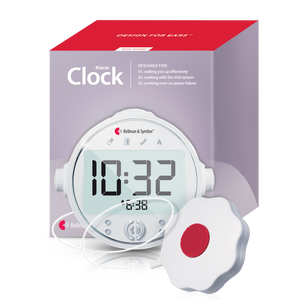
The Bellman system uses no internet, no Wi-Fi, and no cloud processing. 433 MHz RF and Bluetooth 5 operate independently of the internet. The Alarm Clock Receiver's battery backup maintains nighttime alerting during full power outages. The system is specifically designed to be more reliable when other systems fail.
The iOS or Android operating system has suspended the sound recognition process to conserve battery. The phone is in Low Power Mode. The app has not been opened in 24 hours and the OS has deprioritized its background audio processing. Sound Recognition may still appear to be "on" in Settings while functionally inactive.
Bellman transmitters run on batteries lasting 2–10 years and broadcast passively on 433 MHz - no app, no background process, no OS permission required. The Bridge and Watch Receiver are always listening. The system has no software layer that an OS can suspend.
Hearing aids are out. Smartwatch is on the charger. Phone is across the room. A smoke alarm fires at 2 a.m. The watch is not being worn - no wrist vibration. The phone is across the room and out of Bluetooth range. Even if Sound Recognition fires a notification on the phone screen, no alert reaches a person asleep in bed.
The Bellman Alarm Clock Receiver at the bedside activates simultaneously: 100 dB alarm + flashing lights + bed shaker under the mattress or pillow. The smoke transmitter signals reach the Alarm Clock Receiver directly via 433 MHz RF - no watch, no phone, no internet required. This is the scenario where dedicated hardware is the only reliable solution. For a full guide, see Daytime vs Nighttime Alerting: Building a 24-Hour System.
A phone app alert that does not arrive because the phone is in another room, the Bluetooth connection has broken, or the OS has suspended the background process is not a partial alert. It is no alert at all. The gap it leaves is identical to having no alerting system - and it is a gap that occurs silently, without warning, in exactly the conditions where alerting matters most.
Bellman & Symfon - Alerting System Reliability Design NotesWhere Dedicated Hardware Has Limitations - the Honest Accounting
A fair comparison requires acknowledging where dedicated alerting hardware has genuine limitations too. These are real constraints, not minor caveats - and understanding them helps you make an accurate decision about what combination of tools is right for your specific situation.
Upfront Cost
A complete Bellman alerting system - Bridge, Watch Receiver, and multiple transmitters - represents a meaningful upfront investment compared to enabling a free phone app feature. Phone accessibility features (Sound Recognition, Sound Notifications, Live Captions) cost nothing beyond the phone you already own. For people who are budget-constrained, starting with app-based tools while saving toward dedicated hardware is a reasonable approach, provided it is understood as a temporary measure with known gaps.
Installation and Setup
Dedicated hardware requires physical installation - transmitters mounted at specific locations, Bridge plugged in centrally, Watch paired via the Bellman Assistant app. The setup process is straightforward and takes under 10 minutes for most configurations, but it does require initial effort. Phone app features, by contrast, are enabled in a settings menu. For people who are not comfortable with basic hardware setup, this difference in friction is real and worth acknowledging.
Fixed Home Infrastructure
The Bellman alerting system is designed for a fixed home installation. The Bridge, transmitters, and Alarm Clock Receiver are placed at specific locations in the home and serve that home. When you travel, the home system does not travel with you. For out-of-home coverage, smartphone-based tools are more portable by nature. The Bellman Vibio provides travel-specific portable bed shaker functionality, but it does not replicate the full home transmitter network in a hotel room.
No Mobile Communication Awareness
The Bellman Watch Receiver, when away from the home Bridge, does not independently receive calls and texts from the phone. In the home, the Bridge relays phone call and message signals to the Watch via the Bellman Assistant app. Away from home - at work, at school, in public - the Watch mirrors smartphone notifications via the app when the phone is within Bluetooth range. For truly mobile communication awareness, the smartwatch ecosystem (Apple Watch, Galaxy Watch) has deeper integration with phone calls and messaging than the Watch Receiver was designed to provide.
No Speech-to-Text Captioning
Dedicated alerting hardware has no equivalent of Live Transcribe or Live Captions. These features use the phone's microphone and AI processing to provide real-time speech-to-text of in-person conversations - a genuinely different category of hearing accessibility from safety alerting. There is no transmitter-based hardware equivalent. If real-time captioning matters to you (and for many people with hearing loss, it matters a great deal in social and professional settings), this is a capability that lives entirely in the phone app ecosystem and cannot be replicated with dedicated alert hardware.
Requires Consistent Wear and Charging Habits
The Watch Receiver's one-week battery life minimizes the charging discipline required, but it does require the Watch to be consistently worn during waking hours. A forgotten watch on the nightstand during the day has the same gap as a phone app that fails to detect an alert - though the practical difference is that a habit of wearing the Watch is easier to maintain than trusting that five software dependencies are all functioning correctly simultaneously.
Scenario-by-Scenario: What Actually Works in Each Situation
The following table maps twelve specific alerting scenarios across both approaches. This is the honest comparison - no inflated app claims, no dismissed hardware limitations, no scenario selection designed to favor one side.
| Scenario | Phone App Approach | Dedicated Wearable System |
|---|---|---|
| Incoming call - phone in same room | Excellent - smartwatch notification mirroring is reliable and immediate. No special app needed. | Good - Telephone Transmitter + Bridge + Watch detects landline ring; Bellman app relays mobile calls to Watch when within Bridge range |
| Incoming call - phone in another room | Fails if phone is outside Bluetooth range of smartwatch (~30 ft indoors). Alert exists on phone but never reaches wrist. | Bellman system relays call signal to Watch via Bridge regardless of phone location - up to 650 ft Bluetooth range from Bridge to Watch |
| Smoke alarm - same room as phone | Moderate - Sound Recognition has ~80–85% accuracy in same room under ideal conditions. Background noise reduces this. | Excellent - Smoke Alarm Transmitter detects acoustically or via own sensors; 500 ft RF range to Bridge; Watch vibrates with smoke icon within seconds |
| Smoke alarm - phone on different floor | High failure risk - phone microphone cannot reliably detect an alarm through floors. Sound Recognition does not fire. No alert. | Transmitter on same floor as alarm detects immediately; RF signal penetrates floors; Watch vibrates on any floor. Install one transmitter per floor for complete coverage. |
| Smoke alarm at night - hearing aids out | Not viable - smartwatch typically charging; phone out of range; no wrist alert during sleep. Any notification on phone screen goes unseen. | Bellman Alarm Clock Receiver activates bed shaker + 100 dB alarm + flashing lights. This is the one scenario that requires dedicated hardware and cannot be adequately addressed by any phone app. |
| Doorbell - you are in the backyard | Fails - phone on kitchen counter is outside Bluetooth range of smartwatch in backyard (~50 ft). Sound Recognition may not detect doorbell sound from that distance. | Doorbell System + Bridge + Watch: 650 ft Bluetooth range covers backyard, garden, garage. Watch vibrates with doorbell icon. |
| Baby monitor alert - you are upstairs | Variable - some baby monitor apps push notifications to phone; notification mirrors to watch if within range. Phone must be near baby's room for microphone-based apps to work. | Baby Cry Transmitter detects sound directly in crib room; RF signal reaches Bridge on any floor; Watch vibrates with baby icon. No phone proximity required. |
| Internet outage | Smart home integrations and cloud-dependent apps fail. On-device Sound Recognition (Apple) continues; Android features vary. Reliability during outages is inconsistent. | Full function - 433 MHz RF and Bluetooth 5 operate with no internet dependency. Alarm Clock Receiver battery backup maintains function during full power outage. System designed for outage resilience. |
| Phone battery dead or turned off | Complete failure - all phone app alerting requires the phone to be powered and functional. Dead phone = no app alerts of any kind. | Watch Receiver communicates directly with Bridge - phone is not in the alert chain. Home transmitter alerts continue as long as Watch and Bridge are powered. |
| Morning wake-up alarm | Smartwatch alarm vibrates on wrist - reliable if watch is worn to bed and charged. Many people do not wear watch to sleep. Phone alarm requires phone nearby. | Bellman Alarm Clock Receiver fires bed shaker + 100 dB + flash at set time - designed for hearing-aids-removed wake-up without wearing any device to sleep |
| CO alarm | No major app platform includes CO alarm sound recognition as a reliable detection category. CO alarms have varied alert tones that differ between brands; app classification is unreliable. | Bellman CO Alarm Transmitter detects CO directly via electrochemical sensor; signals Bridge and Alarm Clock Receiver simultaneously; LED identifies CO with alternating color coding |
| Out-of-home alerting - workplace or school | Best use case for apps - call/text mirroring to smartwatch is excellent. Sound Recognition provides some supplemental in-room environmental awareness. | Watch Receiver mirrors smartphone notifications via Bellman app when within Bridge range. Away from home Bridge, Watch functions for smartphone notifications. For full out-of-home guidance, see the discreet devices guide. |
The Overall Scorecard: Where Each Approach Is the Right Tool
Collapsing the scenario analysis into a clear summary produces a scorecard that makes the decision framework visible at a glance. The ratings below reflect consistent performance across real-world conditions, not best-case ideal scenarios.
The pattern is clear: phone apps are the right tool for digital communication awareness and out-of-home contexts. Dedicated hardware is the right tool for home safety alerting - smoke, CO, doorbell, baby monitor - particularly across rooms, during internet outages, and during the overnight hearing-aids-removed window. The only scenario where apps have a plausible primary safety role is same-room daytime sound detection, and even there the accuracy and failure-mode profile makes it unsuitable as a primary safety layer for high-risk events like smoke detection.
The Correct Strategy: Using Both - Applied to the Right Contexts
The conclusion that emerges from this comparison is not that one approach wins. It is that each approach covers a specific set of use cases reliably, and the complete alerting strategy for a person with hearing loss uses both - not as alternatives to each other, but as complementary layers that together close all the gaps.
What your phone app ecosystem handles
Enable Apple Sound Recognition (iOS Settings → Accessibility → Sound Recognition) or Android Sound Notifications (Settings → Accessibility → Sound Notifications) and configure your preferred smartwatch for notification mirroring. These handle: incoming calls and messages throughout the day, calendar and app notifications, in-room supplemental awareness when the phone is nearby, speech captioning in conversations, and out-of-home awareness in environments without dedicated transmitter infrastructure. Keep these features active and configured correctly - they are free, they improve your coverage in ways that hardware cannot replicate, and they cost nothing to run alongside a dedicated hardware system.
What the Bellman wearable system handles
The Bellman Watch Receiver and Bluetooth Bridge, connected to the appropriate transmitters, handle: smoke and CO alarm alerting on all floors, doorbell alerts wherever you are in the home and garden, baby monitor coverage throughout the home, phone alerts when the phone is across the house, and all of the above during internet and power outages. The Bridge and Watch Receiver bundle is the starting point, expanded with transmitters for each specific alert type you need to cover. For the complete 24-hour architecture - including nighttime bed shaker coverage - see Daytime vs Nighttime Alerting: Building a 24-Hour System.
The transmitters that close each specific gap
- Smoke alarm gap: Bellman Smoke Alarm Transmitter on every floor - signals all receivers up to 500 ft; UL217 certified; up to 10-year battery
- Doorbell gap: Doorbell System with Bridge and Watch Receiver - dual-mic detection of any chime; 260 ft RF range; Watch vibrates from anywhere in the home
- Phone call gap: Phone System with Bridge and Watch Receiver - RJ11 landline detection; also relays mobile call signals via Bellman app
- Push button/caregiving gap: Push Button System with Bridge and Watch Receiver - wearable call-for-attention transmitter or mountable doorbell; Watch vibrates with push button icon
- Nighttime gap: Bellman Alarm Clock Receiver with Bed Shaker - the one gap no phone app can close; bed shaker under mattress/pillow for sleep-state arousal
- Apple Sound Recognition or Android Sound Notifications - turned on
- Live Captions (iOS) or Live Transcribe (Android) - enabled for conversations
- Smartwatch paired - call and message notification mirroring active
- Bellman Watch Receiver charged and worn during waking hours
- Bellman Bluetooth Bridge centrally placed - all transmitters paired
- Smoke Alarm Transmitter on every floor - tested weekly
- Doorbell Transmitter at each entrance - Watch vibration confirmed
- Alarm Clock Receiver with Bed Shaker at bedside - overnight layer active
- Phone/CO transmitters added as applicable for complete coverage
- Bellman Assistant app installed - all notification categories enabled
Decision Guide: Which to Prioritize First
If budget or time constraints mean you need to sequence these investments, here is the priority order that closes the most significant safety gaps first.
Priority 1: Nighttime smoke alarm coverage
No phone app reliably handles nighttime smoke detection when hearing aids are out and the smartwatch is charging. This is the gap where a missed alert has the most severe potential consequences. Start here, regardless of any other alerting configuration. The Bellman Alarm Clock Receiver and Bed Shaker, connected to a Smoke Alarm Transmitter, closes this gap completely without requiring the Bridge or Watch Receiver. It is the foundation that everything else builds on.
Priority 2: Daytime wearable coverage with the Watch Receiver and Bridge
Once overnight coverage is confirmed, the Watch Receiver and Bridge add whole-home daytime alert delivery. The Smoke/Fire Alarm System with Flash Receiver, Bed Shaker, Bridge, and Watch Receiver provides a complete day-and-night smoke alert configuration in a single bundle - the most comprehensive starting point for building a full 24-hour system. Additional transmitters for doorbell, phone, and baby monitor can be added one at a time to the same infrastructure.
Priority 3: Enable all free phone app features immediately
While building or waiting for the hardware investment, enable every free phone app accessibility feature now. Sound Recognition, Sound Notifications, Live Captions, smartwatch notification mirroring - these cost nothing, take 10 minutes to configure, and provide meaningful supplemental coverage in the gaps between hardware investments. They do not replace hardware for safety-critical alerts, but they are better than no coverage in the interim and remain valuable alongside hardware indefinitely.
Phone apps + dedicated hardware, both layers configured
Work through this list once - then your alerting strategy is complete.
- Sound Recognition (iOS) or Sound Notifications (Android) - turned on
- Live Captions or Live Transcribe enabled for conversations
- Smartwatch notification mirroring active for calls and messages
- Smoke Alarm Transmitter on every floor - tested via alarm test button
- Alarm Clock Receiver + Bed Shaker at bedside - overnight gap closed
- Watch Receiver charged - worn from morning to bedtime daily
- Bluetooth Bridge centrally placed - all transmitters paired and confirmed
- Doorbell Transmitter at main entrance - Watch vibration tested
- Phone Transmitter connected if landline in use
- CO Alarm Transmitter installed if separate from smoke coverage
- Bellman Assistant app installed - all notification categories on
- Nightly Watch charging routine established - overnight layer takes over
The Bigger Picture: What "What Actually Works" Really Means
The answer to "wearable devices vs. phone apps" is not a winner. It is a division of labor. Phone apps are free, immediately available, and excellent for digital communication and in-room supplemental awareness. Dedicated hardware is more expensive, requires setup, and is excellent for home safety alerting across rooms, floors, outages, and the overnight window. Neither approach is complete without the other. The person who relies only on apps is safe in the room with their phone and vulnerable everywhere else. The person who relies only on dedicated hardware misses the value that phone accessibility features provide for daily communication and out-of-home awareness.
What actually works is the combination - configured correctly, with a clear understanding of which layer covers which gap. Phone app features enabled and running. Watch Receiver worn and charged. Bridge centrally placed with the right transmitters connected. Alarm Clock Receiver and Bed Shaker providing the overnight layer. That combination closes every gap in the 24-hour alerting day, and it is the configuration this guide has been building toward from the opening section.
For the complete system architecture - how all components fit together from waking to sleeping - see the guide on Daytime vs Nighttime Alerting: Building a 24-Hour System. For the broader category overview that started this series, see the pillar guide: Best Wearable Alert Devices for Deaf & Hard of Hearing People (2026).
Ready to close the gaps that phone apps leave?
Explore the Bellman Watch Receiver, Bluetooth Bridge, and the full range of transmitters - the dedicated hardware layer that covers what no app reliably can.
Sources and references: Apple Inc. - Sound Recognition feature documentation and accuracy information (iOS 16+, watchOS 10); Live Captions accessibility documentation; Prominent Haptic and Haptic Strength settings (support.apple.com) · Google LLC - Android Sound Notifications feature documentation (Android 9+, Accessibility); Live Transcribe technical overview (android.com/accessibility) · Bellman & Symfon - Bluetooth Watch Receiver BE3330 product specifications: Bluetooth 5, 650 ft open-field range, up to one week battery life, distinct vibration patterns and icons per alert type (us.bellman.com/products/bluetooth-watch-receiver) · Bellman & Symfon - Bluetooth Bridge Transceiver BE1521 specifications: 433 MHz RF reception, Bluetooth 5 transmission, no Wi-Fi required, two-way signal relay (us.bellman.com/collections/bluetooth-bridge) · Bellman & Symfon - Smoke Alarm Transmitter: 500 ft open-field range, UL217/ULC S531 certified, optical and heat detection, up to 10-year battery life · Bellman & Symfon - Doorbell System with Bluetooth Bridge and Watch Receiver: dual-microphone detection, 260 ft RF range (us.bellman.com/products/doorbell-system-with-bluetooth-bridge-and-watch-receiver) · Bellman & Symfon - Telephone Transmitter: RJ11 ring detection, 2.5 mm and 3.5 mm accessory inputs, 5-year battery (us.bellman.com/products/phone-system-with-bluetooth-bridge-and-watch-receiver) · Bellman & Symfon - Alarm Clock Receiver: 100 dB maximum output, color-coded LED alerts, battery backup (us.bellman.com/products/alerting-signaling-device-alarm-clock-receiver) · National Institute on Deafness and Other Communication Disorders (NIDCD) - Assistive Devices for People with Hearing, Voice, Speech, or Language Disorders · Hearing Loss Association of America (HLAA) - Alerting and Signaling Devices overview.
This article is for informational purposes only. Product specifications are subject to change; refer to current product pages at us.bellman.com for the most up-to-date technical details. Sound Recognition and Sound Notification accuracy figures reflect independent and manufacturer-reported testing under ideal conditions; real-world accuracy varies by environment.

Wearable Alert Devices vs Phone Apps: What Actually Works
This guide breaks down the practical choices, features, and considerations behind this topic. Use it to identify a setup that fits the listener, the environment, and the everyday moments that matter most.
The featured products below are current Bellman options discussed in the article or closely matched to its use case.