Setting Up the Bellman Bluetooth Alerting System: Step-by-Step Guide

Setting up the Bellman Bluetooth alerting system takes under ten minutes - no Wi-Fi configuration, no technician, and no technical experience required. This guide walks you through every step from unboxing to your first confirmed alert, covering the Bridge, the Watch Receiver, the Bellman Assistant app, and every transmitter type in the system.
Setting up the Bellman Bluetooth Bridge takes under 10 minutes: plug the Bluetooth Bridge into a wall outlet, activate your transmitters and position them near the devices you want to monitor, then pair the Watch Receiver to the Bridge and download the free Bellman Assistant app on iOS or Android. No Wi-Fi account, no cloud setup, and no technician needed - the system works entirely over 433 MHz RF and Bluetooth 5, delivering simultaneous wrist vibrations and smartphone notifications from the moment you complete pairing.
Before You Start: What Comes in the Box and What You Need
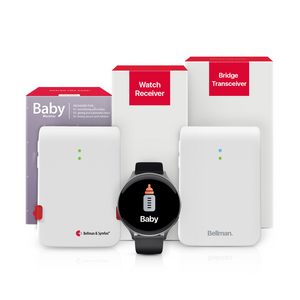
Every Bellman alerting bundle is a preassembled kit that includes everything needed to get alerts working from day one. The only decision before opening the box is where you want to place the Bridge and which transmitter you are setting up first. The rest follows naturally.
What Every Bundle Includes
- The Bellman Bluetooth Bridge Transceiver - the central hub that receives RF signals from transmitters and relays them to the Watch and app via Bluetooth. Requires a wall outlet. Includes power supply.
- The Bellman Watch Receiver - the wrist-worn alert device with up to one week of battery life per charge. Includes USB pocket charger and replaceable silicone wristband.
- One or more transmitters - specific to the bundle type (Door Transmitter, Smoke Alarm Transmitter, Baby Monitor Transmitter, Telephone Transmitter, or Push Button Transmitter). Battery-powered. Includes mounting hardware and batteries.
What You Need That Is Not in the Box
- A standard wall outlet for the Bridge (no Wi-Fi, no Ethernet, no network access needed)
- A smartphone with iOS 15+ or Android 8.0+ if you want to use the free Bellman Assistant app alongside the Watch
- Your existing doorbell, smoke alarm, phone, or baby's crib is already in place - the transmitters work with what you already have
Phase 1: The Core Setup - Bridge and Watch Receiver

The Bridge and Watch Receiver are the foundation of the entire system. Every other component pairs to this foundation. Get these two working together first, then add transmitters one by one. The whole process takes about five minutes.
Choose where to place the Bridge
Position the Bridge centrally in your home - a shelf, nightstand, or hallway table on the main floor works well for most homes. The Bridge needs to receive 433 MHz RF signals from your transmitters and send Bluetooth signals to the Watch Receiver, so central placement maximizes range in both directions. Keep it off the floor and away from microwaves, cordless phone bases, and other Bluetooth transmitters where possible. The Bridge must be within reach of a standard wall outlet.
Tip: For a two-story home, place the Bridge on the ground floor if most transmitters are on the main level, or on the upper floor if the bedroom and smoke alarm coverage is the priority.Plug in the Bridge
Connect the included power supply to the Bridge and plug it into the wall outlet. The Bridge powers on automatically - an indicator light confirms it is active. No buttons, no network configuration, no Wi-Fi password. The Bridge immediately begins listening on the 433 MHz RF band for transmitter signals. For a full explanation of what the Bridge is doing once it is powered on, see our plain-English guide to how the Bellman Bluetooth Bridge works.
Pair the Watch Receiver to the Bridge
Hold the Watch Receiver close to the Bridge - within a foot or two. Follow the pairing sequence described in the Watch's quick-start card: typically a press-and-hold on the Watch's button while the Bridge is in pairing mode (indicated by its light pattern). The pairing process takes under a minute. Once paired, the Watch displays a confirmation and is ready to receive alerts from all transmitters that signal the Bridge.
Tip: The Watch only needs to be paired to the Bridge once. After pairing, it reconnects automatically whenever it is within Bluetooth range - no repeat pairing after charging or restarts.Confirm the Watch and Bridge are communicating
With the Watch paired and the Bridge powered on, press the test button on the Bridge itself (refer to the quick-start card for the button location). The Watch should vibrate and display a test alert icon within a few seconds. This confirms the Bluetooth connection between the Bridge and Watch is working correctly. If the Watch does not respond, check that both devices are powered on and within range, then retry the pairing sequence.
The setup was fast, and now I get alerts on my phone and watch without worrying about missing a thing. It just works, and that's what I needed.
Verified Customer Review - Bellman & SymfonPhase 2: Setting Up the Bellman Assistant App

The free Bellman Assistant app runs on iOS and Android and pairs to the Bridge via Bluetooth - giving you a simultaneous second alert channel alongside the Watch. When any transmitter fires, both the Watch vibrates on your wrist, and the app shows a notification on your phone at the same instant. Setting it up takes about three minutes and requires no account creation, no subscription, and no Wi-Fi configuration for the app itself to deliver in-home alerts.
Download the Bellman Assistant app
Search "Bellman Assistant" on the App Store (iOS 15 or later) or Google Play (Android 8.0 or later) and install the free app. You will need an internet connection for the download itself - this is the only point in the entire setup where the internet is used. After installation, no ongoing internet access or cellular data is required for the app to receive in-home Bridge alerts via Bluetooth.
Pair the app to the Bridge
Open the Bellman Assistant app with your phone's Bluetooth enabled. The app will scan for the Bridge automatically. Select your Bridge from the list of discovered devices and follow the on-screen pairing prompt - typically a single confirmation tap. Once paired, the app immediately begins receiving the same alerts as the Watch Receiver. You will see the app's home screen populate with your connected devices.
Tip: Enable notifications for the Bellman Assistant app in your phone's iOS or Android settings (Settings → Notifications → Bellman Assistant). Without this, phone-level notification banners will not appear even when the app is receiving alerts.Confirm simultaneous alerts on Watch and app
Press the test button on the Bridge again. Both the Watch should vibrate, and the app should show a notification at the same moment. This confirms that the dual-channel alerting is working correctly. Going forward, every transmitter alert will reach your wrist via the Watch and your phone via the app simultaneously - two independent confirmation channels from one Bridge.
Notification history: A timestamped log of every alert the Bridge has relayed - review anything received during Do Not Disturb, overnight charging, or any time the Watch was off your wrist.
Device management: Name your transmitters (e.g., "Front Door Doorbell," "Baby's Room"), assign them to rooms, and manage settings without touching any hardware.
Independent alerts: Delivers Bridge notifications even when the Watch is charging - providing coverage during the brief 2-hour overnight charging window.
Phase 3: Setting Up Each Transmitter Type

Every transmitter is battery-powered and wireless - no wiring, no electrician, no drilling through walls required. Each one is preprogrammed to communicate with the Bridge the moment it is activated. The setup for each transmitter type follows the same basic pattern: insert batteries, position near the device to monitor, test, and confirm. The specific placement and any fine-tuning varies by transmitter type - here is a dedicated guide for each one.
Door Transmitter
Place the Door Transmitter close to your existing indoor doorbell chime - within a foot or two of the speaker. The transmitter uses dual microphone technology to listen for your chime's tone. It is preprogrammed to recognize most residential chimes out of the box.
If your doorbell is an intercom, an unusual tone, or a quiet electronic chime, use the "teach" function described in the transmitter's quick-start card to train it on your specific chime sound. Press your doorbell button, confirm the Watch vibrates with the doorbell icon and the app shows a doorbell notification.
Range: Up to 260 ft open field · Battery life: Up to 5 years
For a full guide to doorbell alert options and placement tips, see Bluetooth doorbell alerts for deaf people. System bundle: Doorbell System with Bridge and Watch Receiver.
Smoke Alarm Transmitter
The Smoke Alarm Transmitter can be set up in two ways. Method 1: Mount it on the ceiling or high on a wall as a standalone detector with its own advanced optical and heat sensing. Method 2: Place it next to an existing smoke alarm - it will detect that alarm's horn sound acoustically and relay the signal to the Bridge.
For testing: use the test button on your existing smoke alarm (not the transmitter's own test button) to simulate an actual alarm event. Confirm the Watch vibrates with the smoke alarm icon, the app shows the notification, and - if you have the Alarm Clock Receiver - the bed shaker activates.
Install on every floor and outside sleeping areas for complete coverage
See our full guide on Bluetooth smoke alarms for hearing-impaired people. Smoke alert collection: us.bellman.com/collections/smoke-alarm.
Baby Monitor Transmitter
Place the Baby Monitor Transmitter in the nursery, within a few feet of the crib. The transmitter has adjustable sensitivity and delay settings - two controls that make the difference between a monitor that alerts constantly and one that alerts reliably.
Sensitivity: Start at medium and adjust based on your baby's cry volume. Delay: Set a short delay so brief rustles do not trigger alerts, but sustained crying does. Test by making a sound at the typical volume of your baby's cry and confirming the Watch vibrates with the baby icon. Re-test with background noise (dishwasher, TV) running to confirm coverage through ambient sound.
Tamper-proof design · Adjustable sensitivity and delay
For calibration tips and daytime vs. overnight coverage, see our baby monitor guide for deaf parents. Bundle: Baby Monitor System with Bridge and Watch Receiver.
Telephone Transmitter
Connect the Telephone Transmitter to your landline phone jack using the included RJ11 cable - the same standard cable your existing landline phone uses. Both the transmitter and your existing phone plug into the same jack (a splitter is included if needed). The transmitter detects the incoming ring voltage electrically, not by sound, so it fires instantly and reliably regardless of your phone's ringer volume or ambient noise.
Test by calling your landline from a mobile phone and confirming the Watch vibrates with the phone icon, and the app shows the notification. The transmitter also has 2.5 mm and 3.5 mm accessory inputs for NOAA weather radio integration and other accessories.
Battery life: ~5 years (alkaline AA) · RJ11 + 2.5 mm + 3.5 mm inputs
Full details in our landline phone alert system guide. Bundle: Phone System with Bridge and Watch Receiver.
Push Button Transmitter
The Push Button Transmitter can be mounted as a wired doorbell replacement using the included hardware - visitors press it instead of your existing doorbell. It can also be worn on the included lanyard as a portable call-for-attention button, useful in caregiving situations where a family member needs to signal for help from anywhere in the home.
No microphone, no acoustic detection - the push button is entirely manual. Mount at a comfortable height for visitors (typically 48 inches from the floor per ADA guidelines) or adjust the lanyard to a comfortable length for the user wearing it. Test by pressing the button and confirming the Watch vibrates with the push button icon.
Mountable or wearable on a lanyard · Compact and easy to activate
CO Alarm Transmitter
The Carbon Monoxide Transmitter uses electrochemical sensing to detect CO concentration and fires its signal to the Bridge when levels rise above safe thresholds. Place it at breathing height - approximately 5 feet from the floor - near sleeping areas and adjacent to potential CO sources (gas furnace, garage, water heater room).
Test using the CO transmitter's own test button (do not attempt to create actual CO for testing). Confirm the Watch shows a CO-specific icon - distinct from the smoke alarm icon - and the app shows the CO notification. The distinct icon is critical: it tells you immediately whether the emergency involves fire or carbon monoxide, which affects the appropriate response.
Install near sleeping areas and potential CO sources · One per floor minimum
For the daytime Watch + app and overnight Alarm Clock Receiver setup, see our smoke and CO alarm guide.
Phase 4: Optimizing Placement for Maximum Coverage

Once all your transmitters are in place and tested individually, there are a few placement optimizations that make a meaningful difference in real-world reliability - especially in larger homes or homes with thick walls.
Bridge Placement Optimization
The Bridge sits at the center of the signal chain. Its position affects both how well it receives 433 MHz signals from transmitters and how reliably its Bluetooth signal reaches the Watch Receiver. A few rules for optimal placement:
- Height matters: A shelf or nightstand height (3–5 feet from the floor) outperforms floor-level placement behind furniture. Higher placement reduces the number of obstacles the Bluetooth signal must penetrate to reach the Watch.
- Avoid signal interference zones: Keep the Bridge at least 3 feet away from microwaves, cordless phone bases, and other Bluetooth devices that operate on the 2.4 GHz band. The Bridge's Bluetooth output operates on 2.4 GHz and can experience brief interference from nearby devices in that band.
- Test from the extremes: Once placed, walk to the farthest point you regularly occupy - the backyard, the basement, the far end of the top floor - and trigger a test alert. If the Watch receives it reliably from the farthest point, coverage is confirmed throughout the home.
Transmitter Placement Optimization
Each transmitter's effective range is up to 260 feet in open field, which in practice translates to reliable whole-home coverage in most single-family homes. For specific placement refinements:
- Door Transmitter: Position as close to the chime speaker as physically possible. The chime detects sound acoustically, so distance from the speaker is the primary variable affecting detection reliability. A few inches closer matters more than the overall room position.
- Smoke Alarm Transmitter: If placing next to an existing alarm, ensure the transmitter's microphone faces the alarm's speaker. If mounting as a standalone detector, follow standard smoke alarm placement rules - ceiling-center of the room, away from HVAC vents, at least 10 feet from cooking appliances.
- Baby Monitor Transmitter: Place within 6 feet of the crib at roughly crib-height, facing the crib opening. Too far from the crib, and soft cries may not reach the sensitivity threshold. Too close to an HVAC vent and background noise may trigger false alerts.
Phase 5: Establishing Your Daily Watch and App Routine
The Bellman Watch Receiver has up to one week of battery life per charge and charges fully in approximately two hours. Establishing a simple daily routine ensures you always have full Watch coverage during waking hours and seamless transition to other receivers at night.
The Recommended Daily Routine
Morning - Put the Watch on your wrist
The Watch reconnects to the Bridge automatically within seconds of being in Bluetooth range. No manual reconnection, no pairing step. From this moment, every transmitter alert reaches your wrist directly - doorbell, phone, smoke, baby, push button - with distinct vibration patterns and icons for each. The Bellman Assistant app on your phone receives the same alerts simultaneously.
During the day - Wear and go
The Watch follows you throughout the home. Kitchen, yard, basement, bathroom - the 650-foot Bluetooth range covers the full footprint of almost every residential home from a centrally-placed Bridge. No fixed receivers to check, no rooms where coverage drops. If you step further than Bluetooth range for a brief period (a large yard or an outbuilding), the Bellman Assistant app on your phone may continue receiving alerts over its own Bluetooth connection if the phone is closer to the Bridge than the Watch.
Overnight - Place on charger, activate overnight receivers
Place the Watch on the USB pocket charger at the bedside before sleep. While charging, the Bellman Assistant app continues receiving Bridge alerts over Bluetooth if your phone is nearby. For safety-critical overnight alerting - particularly for smoke, CO, or baby monitoring - configure the Alarm Clock Receiver and bed shaker as the primary overnight notification channel. The bed shaker under the mattress provides physical vibration strong enough to wake a deep sleeper reliably, regardless of hearing aid status.
Tip: The Watch charges in approximately 2 hours. Charging overnight on the 7-day battery means you will be at nearly full charge every morning with a very brief daily charge window at any other time.Setting Up Overnight Coverage: Alarm Clock Receiver and Bed Shaker
If your bundle includes an Alarm Clock Receiver and bed shaker - or if you are adding one to an existing setup - here is the setup sequence for overnight alerting. This is most critical for smoke and fire safety, where nighttime coverage is a life-safety requirement, not a convenience preference.
Place the Alarm Clock Receiver on the bedside table
The Alarm Clock Receiver communicates with transmitters via 433 MHz RF - the same as the Watch - and does not require pairing to the Bridge. It receives RF signals from all transmitters directly. Position it on the bedside table with its flash output directed toward your sleeping position. The 100 dB audio output and flashing lights fire the moment a transmitter alert reaches it.
Place the bed shaker under the mattress or pillow
The bed shaker connects to the Alarm Clock Receiver via a cable. Place the disc under the mattress - positioned under where you sleep - or under the pillow for a stronger vibration feel. When an alert fires, the bed shaker vibrates with enough physical force to reliably wake a deep sleeper. Test this during the day so you can feel the vibration strength and confirm it is positioned correctly before relying on it overnight.
Important: Test the overnight setup with your hearing aids removed, in your actual sleeping position. This is the only way to confirm the bed shaker will wake you in real overnight conditions.Test the complete overnight chain
Trigger a test alert from each transmitter that needs overnight coverage - typically the Smoke Alarm Transmitter using the smoke alarm's test button. Confirm the Alarm Clock Receiver flashes, the 100 dB tone activates, and the bed shaker vibrates. Then repeat the test from your actual sleeping position, with eyes closed, to confirm you would register the physical vibration during a realistic sleeping scenario.
The sleep bundles that include the Alarm Clock Receiver and bed shaker are available for each alert type: the Bridge + Smoke + Alarm Clock bundle for fire safety, the Bridge + Door + Alarm Clock bundle for overnight doorbell coverage, the Bridge + Baby + Alarm Clock bundle for overnight baby monitoring, and the Bridge + Push + Alarm Clock bundle for overnight caregiving coverage. The Watch Receiver can always be added separately to any bundle for daytime wrist notification.
Troubleshooting: The Most Common Setup Issues and How to Fix Them
| Symptom | Most Likely Cause | Fix |
|---|---|---|
| Watch does not vibrate on test | Watch not paired to Bridge, or out of Bluetooth range during test | Hold Watch within 12 inches of Bridge and repeat pairing sequence per quick-start card |
| App shows no notifications | App notifications disabled in iOS/Android settings, or app not paired to Bridge | Go to Settings → Notifications → Bellman Assistant → Enable; re-pair app to Bridge if needed |
| Door Transmitter misses chime | Transmitter too far from chime speaker; ambient noise masking the chime; transmitter not trained on chime tone | Move transmitter closer to chime speaker; use "teach" function to re-train; test with ringer volume at normal level |
| Baby Monitor fires constantly | Sensitivity set too high; ambient HVAC, siblings, or noise triggering alerts | Reduce sensitivity setting one level at a time; increase delay setting to filter brief sounds |
| Phone Transmitter does not fire | RJ11 not seated fully; VoIP or fiber line not maintaining standard ring voltage | Remove and reinsert RJ11 cable firmly; test ring voltage with a known landline call; contact ISP to confirm ring signal on VoIP/fiber line |
| Watch vibrates but wrong icon shows | Transmitter not labeled correctly in the Bellman Assistant app | Open Bellman Assistant app → device management → rename transmitter to match its location and function |
| Range drops in part of the home | Bridge too far from the coverage area; thick concrete or masonry walls reducing RF penetration | Move Bridge to a more central location; test transmitter placement closer to Bridge; consider adding a second Visit receiver in the affected area |
| Bed shaker does not activate overnight | Alarm Clock Receiver not within RF range of the transmitter; cable not fully connected to the receiver | Move Alarm Clock Receiver to a position with a clearer RF path to the transmitter; check cable connection at both ends |
Expanding the System: Adding More Transmitters and Receivers
One of the most practical advantages of the Bellman alerting system is that it is designed to grow. The Bridge and Watch Receiver you set up today can handle every additional transmitter you add - with no new pairing, no new Bridge, and no new receiver required. Each new transmitter joins the system and immediately begins delivering alerts to the same Watch and app through the same Bridge.
This matters because most households' alerting needs expand over time. You start with the most urgent need - a doorbell you keep missing, a smoke alarm that cannot reach you at night - and realize over the following weeks and months that coverage gaps exist elsewhere. The Bellman system is built for this pattern: start small, add as needed, maintain a single consistent notification experience across all alert types.
- Add a transmitter for a new alert type: Purchase the transmitter, position it near the device it monitors, activate it (insert batteries), and test from the Watch. The Bridge recognizes it automatically - no reconfiguration of any existing component.
- Add a second Watch Receiver: A second Watch can be paired to the same Bridge for a second household member or caregiver - both receive the same alerts simultaneously from all transmitters.
- Add fixed receivers to specific rooms: Flash receivers and lamp flashers can be placed in rooms - a basement workshop, a garage, a bathroom - where the Watch may not always be in reach. These receive 433 MHz RF signals directly from transmitters without requiring the Bridge.
- Add an Alarm Clock Receiver to a bundle that does not include one: Purchase the Alarm Clock Receiver separately, and it will receive all transmitter signals via 433 MHz RF immediately, without any pairing to the Bridge or Watch.
For a complete overview of how all transmitters, receivers, and configurations build into a full whole-home alerting system, see The Complete Guide to Bluetooth Alerting Systems for Deaf & Hard of Hearing People.
Every Step - Bridge, Watch, App, and All Transmitters
Work through every item that applies to your setup before relying on the system day-to-day.
- Bridge plugged in and powered on at central location
- Watch Receiver paired to Bridge - test alert confirmed
- Bellman Assistant app installed (iOS/Android) and paired to Bridge
- App notifications enabled in phone settings
- Watch + app simultaneous alert confirmed on test signal
- Door Transmitter placed near chime - doorbell icon confirmed on Watch
- Smoke Alarm Transmitter mounted - smoke icon confirmed via alarm test button
- Baby Monitor Transmitter placed - sensitivity and delay calibrated and tested
- Telephone Transmitter connected via RJ11 - phone icon confirmed via test call
- Push Button Transmitter mounted or on lanyard - push button icon confirmed
- CO Transmitter placed at breathing height - CO icon (distinct from smoke) confirmed
- Alarm Clock Receiver on bedside table - flash and 100 dB alert confirmed
- Bed shaker under mattress - vibration confirmed in sleeping position
- Overnight test performed with hearing aids removed - bed shaker wakes reliably
- Range tested from all rooms and yard - Watch receives in all coverage zones
- Monthly test reminder scheduled for all transmitter types
- Skipping the overnight test - the most important test, always done last and most often missed
- Placing the Door Transmitter at the front door instead of next to the indoor chime speaker
- Leaving Baby Monitor sensitivity at maximum creates constant false alerts within the first day
- Not enabling app notifications in iOS or Android settings - the app pairs fine but banners never appear
- Placing the Bridge on the floor behind furniture reduces both RF reception and Bluetooth range
- Testing smoke alerts with the transmitter's test button instead of the smoke alarm's test button - only the alarm button simulates a real alarm event
- Assuming open-field range equals real-world through-wall range - always test from actual usage positions
- Not scheduling monthly test reminders - transmitter batteries and detection sensors need regular verification
Everything you need to get started - in one preassembled bundle.
Browse the full Bellman Bluetooth Bridge collection - doorbell, smoke, baby, phone, and push button bundles - each including the Bridge, Watch Receiver, and everything needed for setup in under 10 minutes.
Sources and references: Bellman & Symfon - Doorbell System with Bluetooth Bridge and Watch Receiver setup description: "Setup is easy and requires only a quick pairing step between the Watch and the Bridge. No Wi-Fi connection is needed." (us.bellman.com/products/doorbell-system-with-bluetooth-bridge-and-watch-receiver) · Bellman & Symfon - Baby Monitor System with Bluetooth Bridge and Watch Receiver setup description: "Setup is simple and requires only minimal pairing between the Watch and Bridge. No Wi-Fi connection is needed." (us.bellman.com/products/baby-monitor-system-with-bluetooth-bridge-and-watch-receiver) · Bellman & Symfon - Phone System with Bluetooth Bridge and Watch Receiver: full-expandable, Telephone Transmitter with RJ11 and 2.5 mm/3.5 mm accessory inputs (us.bellman.com/products/phone-system-with-bluetooth-bridge-and-watch-receiver) · Bellman & Symfon - Push Button System with Bluetooth Bridge and Watch Receiver: "No Wi-Fi connection is needed. Pressing the Push Button sends a signal to the Bridge." (us.bellman.com/products/push-button-system-with-bluetooth-bridge-and-watch-receiver) · Bellman & Symfon - Smoke/Fire Alarm System with Alarm Clock, Bridge, and Watch Receiver: advanced early detection technology, Alarm Clock Receiver with 100 dB output, bed shaker, battery backup (us.bellman.com/products/smoke-fire-alarm-system-with-alarm-clock-bridge-and-watch-receiver) · Bellman & Symfon - Bluetooth Bridge collection page: "The Watch Receiver and smartphone app only receive alerts when they are within Bluetooth range of the Bluetooth Transceiver - typically up to 200 yards in open space." (us.bellman.com/collections/bluetooth-bridge) · Bellman & Symfon - Bluetooth Watch Receiver: up to 1 week battery life, 2-hour charge time, USB pocket charger, up to 650 ft Bluetooth range open field, Do Not Disturb / Call for Attention modes (us.bellman.com/products/bluetooth-watch-receiver) · Bellman & Symfon - Bellman Assistant App: free for iOS 15+ and Android 8.0+; pairs to Bridge via Bluetooth; no cellular data required after initial app setup for in-home alerts; notification history, device management, custom labels.
This article is for informational purposes only. Product specifications are subject to change; refer to current product pages at us.bellman.com for the most up-to-date technical details.
Setting Up the Bellman Bluetooth Alerting System: Step-by-Step Guide
This guide breaks down the practical choices, features, and considerations behind this topic. Use it to identify a setup that fits the listener, the environment, and the everyday moments that matter most.
The featured products below are current Bellman options discussed in the article or closely matched to its use case.