Push Button Call System for Elderly: Discreet Alerts Without Shouting Across the House
 Senior Safety · Hearing Loss · Caregiver Technology
Shouting across the house to get a family member’s attention is undignified. Waiting until someone happens to check on you is unsafe. A push-button call system gives an elderly person a quiet, private, instant way to signal for attention or help - wherever they are in the home. This guide covers how they work, who needs one, and how to choose the right setup.
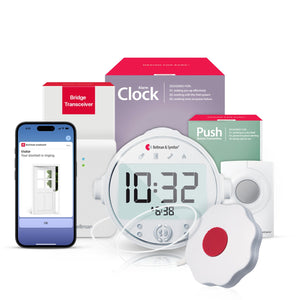
A push button call system for elderly people lets them press a portable, wearable button that immediately triggers a wrist vibration and a push button icon alert on a caregiver’s or family member’s watch receiver - working as a silent, dignified call-for-help solution anywhere in the home, without shouting, without searching for a phone, and without any Wi-Fi required. The Bellman Push Button System with Bluetooth Bridge and Watch Receiver delivers instant wrist alerts up to 650 feet, with a distinct push button icon so the caregiver knows exactly what the signal means the moment it arrives.
- Instant wrist vibration alert with push button icon on the Watch Receiver
- Wearable transmitter worn as pendant or carried in pocket - always within reach
- No Wi-Fi required - operates entirely over Bluetooth
- Works anywhere in the home and yard within 650 ft range
- Nighttime coverage via Bridge + Push Button + Alarm Clock bundle with bed shaker
- Expands into a full home alert system - same Bridge also handles smoke, doorbell, phone
The Quiet Problem With “Just Shout If You Need Me”
In many homes where an elderly parent lives with or near adult children or a caregiver, the informal system for getting attention is simple: shout. Call out from the bedroom. Knock on the wall. Hope someone is close enough to hear. It works, more or less, until it doesn’t - until the parent needs help at 2 a.m., or the caregiver is at the back of the house, or the parent’s voice is not strong enough to carry, or the act of shouting for help feels so degrading that they wait too long.
That last point is more significant than it sounds. Research on elderly care consistently shows that seniors underreport their need for assistance rather than ask in ways that feel undignified or burdensome. A parent who has to shout across the house to ask for a glass of water, or to say they cannot get up from a chair, or to signal that something is wrong, often chooses to wait. And waiting has consequences - for safety, for health, and for the emotional dynamics of the caregiving relationship.
A push-button call system addresses this directly. It gives an elderly person a quiet, private, one-press way to signal immediately, from wherever they are in the home, without raising their voice, without struggling to a phone, and without the emotional cost of calling out for help. The signal arrives silently on the caregiver’s wrist. Nobody else needs to know it happened. The parent maintains their dignity; the caregiver maintains their awareness.
How a Push Button Call System Actually Works
The Bellman push-button call system has three physical components: the Push Button Transmitter, the Bluetooth Bridge, and the Watch Receiver. Understanding how each piece works - and how they communicate with each other - clarifies why this approach is more reliable and more flexible than simpler alternatives.
The Push Button Transmitter
The transmitter is a small, lightweight button worn as a pendant around the neck, clipped to clothing, or placed on a table or nightstand within easy reach. When pressed, it sends a short-range radio frequency (RF) signal to the Bridge. The transmitter is battery-powered, requires no charging, and has no display or settings the user needs to manage. From the elderly person’s perspective, the entire operation is a single press of a large, clearly delineated button.
The Bluetooth Bridge
The Bridge is the central hub of the system. It sits plugged into a wall outlet in a central location in the home. When it receives the RF signal from the Push Button Transmitter, it instantly converts it to a Bluetooth signal and sends it to the Watch Receiver worn by the caregiver. The Bridge also relays the notification to the Bellman Assistant app on any paired smartphone simultaneously. The Bridge handles this translation in under two seconds from button press to wrist vibration - fast enough that the caregiver knows immediately, not after a noticeable delay.
The Watch Receiver
The Watch Receiver is worn on the caregiver’s wrist. When a push button signal arrives, it vibrates with a distinct vibration pattern and displays a push button icon on its face. The icon matters: if the caregiver is also wearing the Watch for doorbell alerts, smoke alarm monitoring, or phone call notifications through the same Bridge, the push button icon tells them immediately that their parent pressed the button - not that the doorbell rang or the smoke alarm fired. Each alert type has its own specific icon. There is no ambiguity about what happened or how urgently to respond.
Step 1: The elderly person presses the Push Button Transmitter pendant or table unit.
Step 2: The transmitter sends an RF signal to the Bluetooth Bridge - no Wi-Fi, no internet, no cloud routing involved.
Step 3: The Bridge instantly converts the RF signal to Bluetooth and sends it to the Watch Receiver.
Step 4: The Watch vibrates with a push-button icon. The Bellman Assistant app on the caregiver’s smartphone shows the same notification simultaneously.
Total time from button press to wrist vibration: under 2 seconds.
Who Needs a Push-Button Call System and When
The push-button call system solves several distinct problems that often coexist in elderly caregiving situations. Understanding which of these situations applies helps clarify whether this is the right solution, and which configuration makes most sense.
In-Home Caregiving Across Rooms
A caregiver or family member lives in or frequently spends time in the same home as an elderly parent. The parent needs a reliable way to signal for help or attention from any room without shouting across the house.
Nighttime Assistance Requests
An elderly person needs help during the night - getting to the bathroom, experiencing discomfort, or sensing something is wrong - but cannot easily reach a phone or shout loudly enough to wake a sleeping caregiver in another room.
Hearing Loss in the Senior
An elderly person with hearing loss cannot hear whether their shouts are being heard. A push button gives them a guaranteed, one-way signal channel that delivers an alert to the caregiver’s Watch regardless of ambient noise or distance.
Hearing Loss in the Caregiver
A caregiver or family member with hearing loss cannot reliably hear an elderly parent calling out. The Watch Receiver on the caregiver’s wrist vibrates instantly when the button is pressed, regardless of whether they can hear it.
Fall Risk or Limited Mobility
An elderly person who has experienced falls or has limited mobility needs a way to call for help quickly from the floor, from a chair, or from a room far from any telephone - without the delay of searching for a phone or waiting to be found.
Dignity and Independence
An elderly person who needs assistance but resists asking for it because calling out feels undignified. A discreet one-button signal to a wrist receiver removes the social friction from asking for help, making it easier to ask earlier and more often.
Push Button Call System vs. Medical Alert Device: Understanding the Difference
These two categories are frequently confused because both involve a button an elderly person presses when they need help. But they serve fundamentally different purposes - and understanding the distinction helps caregivers build a more complete safety strategy rather than assuming one replaces the other.
A Personal Emergency Response System (PERS) connects the user to an external monitoring center or directly to emergency services (911) when the button is pressed. It is designed for true emergencies: falls, cardiac events, strokes. It requires a cellular or landline connection, typically has a monthly monitoring fee ($25–$60+), and the response is external help arriving from outside the home. It does not communicate with a family member in the next room - it calls a monitoring center or emergency services.
The Bellman Push Button System is an in-home communication and alerting tool. Pressing it sends an instant alert to a family member’s or caregiver’s Watch Receiver. It is designed for the full range of situations where attention is needed - everyday requests, minor assistance, and early-stage safety concerns - not just emergencies. No subscription fee. No monitoring center. No cellular dependency. It works within the home over Bluetooth, communicating directly with the people who live there.
The practical implication: these systems complement each other rather than competing. A push-button call system handles the 99% of situations where what is needed is a family member’s attention. A medical alert system handles the 1% of situations that require emergency services. Many families use both, and doing so creates a more complete safety net than either system alone. For a deeper look at layering these approaches, see our guide on emergency preparedness for deaf and hard-of-hearing seniors.
| Feature | Medical Alert / PERS | Bellman Push Button System |
|---|---|---|
| Alert destination | External monitoring center or 911 | Family member or caregiver in the same home |
| Monthly fee | $25–$60+ per month typically | None - one-time hardware cost only |
| Network dependency | Cellular or landline connection required | No Wi-Fi, no cellular - Bluetooth only |
| Alert type | Emergency only | Any situation - everyday requests to emergencies |
| Response time | Minutes (monitoring center callback) | Under 2 seconds (instant wrist vibration) |
| Works without internet | Varies by model | Yes - always |
| Nighttime coverage | Button still functions; monitoring center responds | Alarm Clock bundle wakes caregiver via bed shaker |
| Expands to full home alert system | No | Yes - same Bridge handles smoke, doorbell, phone |
Nighttime Push Button Coverage: The Configuration That Changes Everything
The standard daytime push button setup - transmitter with elderly person, Watch Receiver on caregiver’s wrist - works well during waking hours. But at night, the Watch is off and on the charger, and the caregiver is asleep. A button press during the night needs a different delivery mechanism to be useful.
The Bridge + Push Button + Alarm Clock bundle is designed for exactly this scenario. It includes the Bluetooth Bridge and an Alarm Clock Receiver that sits on the caregiver’s nightstand. When the elderly person presses the push button pendant at any hour of the night, the Alarm Clock Receiver responds with three simultaneous outputs:
- 100 dB audible alarm - loud enough to wake a sleeping caregiver, even one with mild hearing loss
- Bright flashing strobe light - visual alert for caregivers with hearing loss who sleep without aids, or for anyone whose sleep environment is particularly sound-dampened
- Bed shaker / vibrating pad - placed under the caregiver’s mattress or pillow, this delivers a physical tactile alert that bypasses the auditory pathway entirely and is highly effective for deep sleepers
The Watch Receiver can be added separately for daytime use, so the complete day-and-night configuration uses the same Bridge for both: Watch on the caregiver’s wrist during the day, Alarm Clock Receiver on the nightstand at night. One Bridge handles both.
Ruth, 82, lives with her daughter Karen. Ruth has mild dementia and wakes two or three times per night disoriented. Before the push button system, she would wander the house looking for Karen, or call out in a way that neither of them found comfortable. Karen was sleeping lightly and waking to noises throughout the night.
After setting up the Bridge + Push Button + Alarm Clock bundle, Ruth has a pendant on her nightstand. When she wakes disoriented, she presses the button. The bed shaker under Karen’s mattress wakes her immediately and silently - no shouting, no wandering, no delay. Karen goes to Ruth’s room, helps her settle, and returns to bed. Both of them sleep better. Ruth feels less like a burden. Karen feels less anxious.
The Push Button as Part of a Whole-Home Alert System
The push button call system is one of several alert types the Bellman system handles through the same Bridge and Watch. This integration is one of the most practical advantages of the Bellman approach: rather than buying a separate push button intercom, a separate doorbell alert, a separate smoke alarm system, and a separate phone ringer - each with its own batteries, its own range limitations, and its own interface to learn - every alert type is delivered to the same Watch Receiver with its own distinct icon.
From the caregiver’s perspective, one vibration from the Watch could mean any of several things. The icon tells them which:
The icon-based system means the caregiver does not need to interpret a generic vibration or run to check what happened. They glance at their Watch and know within half a second whether they need to call 911, answer the phone, or walk to their parent’s room. For a full picture of the Bellman system and how all alert types work together, see the pillar guide: Home Safety Alert Systems for Seniors with Hearing Loss: Complete Guide (2026).
Setting Up the Push Button System: A Practical Guide
The Bellman push-button system is designed for a self-service setup that does not require technical knowledge or tools. The following covers the complete setup process from unboxing to first use, including the steps most commonly missed.
- Position the Bridge centrally. The Bluetooth Bridge should be placed at shelf height in the central area of the home - a hallway, living room, or central bedroom. Its Bluetooth signal needs to reach both the Push Button Transmitter and the Watch Receiver, so central placement maximizes coverage in all directions. Plug it into a wall outlet. It powers on automatically.
- Pair the Watch Receiver to the Bridge. Hold the Watch Receiver near the Bridge and follow the pairing sequence described in the Watch manual - typically a simultaneous button hold on each device for several seconds. Once paired, the pairing is permanent and does not need to be repeated after power cycles or routine charging.
- Register the Push Button Transmitter with the Bridge. The transmitter also needs to be registered with the Bridge so the Bridge recognizes it as a push button signal (as distinct from a doorbell, smoke, or phone event). Follow the registration steps in the Bridge manual - typically pressing the Bridge’s registration button, then pressing the Push Button Transmitter. Registration takes under 60 seconds.
- Install the Bellman Assistant app. Download the free app (iOS 15+, Android 8.0+) on the caregiver’s smartphone. Connect it to the Bridge via Bluetooth and enable notification permissions when prompted. This step ensures push-button alerts also show on the caregiver’s phone as a backup to the Watch vibration.
- Enable notification permissions explicitly. Both iOS and Android require explicit notification permission for the Bellman app to display alerts. Navigate to the phone’s Settings → Notifications → Bellman and confirm notifications are set to On. This is the most commonly missed step and the most common cause of app alerts not working after setup.
- Position the Push Button Transmitter for the elderly person. For nighttime and mobility use, the pendant worn around the neck keeps it within reach in any position. For table placement, position it on the nightstand, the armchair side table, or anywhere the person spends significant time. Test reach from a lying position to confirm the button can be pressed from bed.
- Test every channel. Have the elderly person press the button from their bedroom, from the living room, and from the farthest point in the home. Confirm the Watch vibrates with the push button icon and the app shows the notification. Test from the yard if relevant. If nighttime coverage is configured, test with the Alarm Clock Receiver and bed shaker active.
- Write a reference card. Leave a simple one-page card near the Bridge: what the push button icon looks like on the Watch, which charging cable belongs to which device, and who to call if something stops working. This eliminates the post-setup support call and ensures the elderly person also understands what happens when they press the button.
Placement, Range, and Practical Tips for Maximum Reliability
Where to Position the Push Button Transmitter
The goal is to ensure the transmitter is always within arm’s reach of the elderly person, even in positions of reduced mobility (lying in bed, sitting low in a chair, on the floor after a fall). The wearable pendant configuration achieves this automatically. For supplementary table units, consider placing one in every room where the person spends significant time - bedroom, living room, bathroom if possible. Multiple transmitters can be registered to the same Bridge, each sending the same push button alert.
Where to Position the Bridge for Maximum Range
The Push Button Transmitter communicates with the Bridge over short-range RF (not Bluetooth), and the Bridge communicates with the Watch over Bluetooth. Both links need to be within range. Place the Bridge centrally at shelf height - not in a corner, not behind thick concrete or metal walls, not inside a cabinet. A central hallway or living room position gives the strongest RF signal from the transmitter and the strongest Bluetooth signal to the Watch.
Bluetooth Range: Watch Receiver to Bridge
The Watch uses Bluetooth 5 with up to 650 feet of open-field range from the Bridge. In typical two-story residential construction, this covers the entire home from a centrally placed Bridge, including most attached garages and backyards. Large homes or homes with dense concrete construction may see reduced range; in those cases, testing the Watch in the farthest room confirms whether the placement is adequate before finalizing it.
Battery Life and Maintenance
The Push Button Transmitter runs on standard batteries (typically AA or AAA depending on the model) and has a battery life measurable in months under normal use. The Bridge runs on mains power. The Watch Receiver has a rechargeable battery with up to approximately one week of battery life per charge. Establishing a consistent weekly charging routine - Sunday evenings, for example - ensures the Watch is never unexpectedly depleted during a caregiving day.
Common Mistakes That Undermine Push Button System Effectiveness
- Placing the transmitter on a table out of reach from the bed - test from lying position before finalizing placement
- Not enabling app notification permissions after setup - silent failure that looks like the app is working but sends no alerts
- Forgetting to check permissions after an iOS or Android operating system update, which can silently reset them
- Placing the Bridge in a far corner of the home rather than centrally, reducing Bluetooth range to the Watch
- Not testing the system from the farthest rooms in the home before considering setup complete
- Using the push button system at night without the Alarm Clock Receiver, the Watch on the charger cannot deliver the alert
- Assuming a medical alert device substitutes for an in-home push button system (they serve different purposes)
- Not having a spare transmitter battery on hand - a dead transmitter is a missed alert during a genuine need
- Handing the system to the elderly person unset up and expecting them to pair it themselves
- Not establishing a weekly Watch charging routine - a depleted Watch receives no push button alerts
Why Dignity Is the Feature Most Product Reviews Miss
Most reviews of push-button call systems focus on technical specifications: range, battery life, wireless protocol, response time. These things matter. But the most important feature of a well-designed push button system for elderly people is one that almost no product spec sheet mentions: dignity.
Needing help as we age is universal. Feeling like a burden when we need it is the emotional experience that shapes how people relate to that need. An elderly parent who has to shout “CAN SOMEONE HELP ME” across the house experiences that need as public, loud, and exposing. Over time, many will stop asking until the need is urgent enough to overcome that discomfort - by which point a minor issue has become a crisis.
The push button gives my father the ability to ask for help without feeling like he is making an announcement. He presses it, I feel it on my wrist, I go to him. No one else in the house even knows it happened. That changed how willing he is to use it.
Adult daughter, caregiver - from Bellman customer feedbackThe Bellman push button system delivers this dignity by design. The signal is silent - no intercom voice, no buzzer in the room, no visible light that tells others in the home something happened. Only the caregiver’s Watch vibrates. The communication is direct and private. The elderly person retains the sense that they are asking for attention, not broadcasting vulnerability.
Over time, families who use this system consistently report that the elderly person asks for help earlier - before minor difficulties become falls or injuries. That earlier ask is one of the most valuable safety outcomes the system produces, and it is made possible entirely by removing the social cost of asking.
Buyer’s Guide: Choosing the Right Push Button Configuration
The right push button configuration depends on the specific living arrangement and the primary use case. The following maps the most common situations to the recommended setup.
| Living Situation | Primary Need | Recommended Configuration |
|---|---|---|
| Elderly parent and adult child in same home | Daytime and nighttime in-home communication across rooms | Bridge + Push Button + Alarm Clock bundle for night; add Watch Receiver for daytime |
| Professional caregiver visits daily but does not live in | Elderly person needs call-for-help capability when alone; caregiver needs awareness when present | Push Button System with Bridge and Watch; caregiver brings Watch on each visit |
| Elderly couple where one cares for the other | The less mobile partner signals the more mobile one without shouting across the home | Push Button System with Bridge and Watch; one Watch per person if both need to receive alerts |
| Elderly person in separate in-law suite or ADU | Wireless signaling across the distance between buildings or across property | Confirm Bluetooth range covers the distance; Bridge placed centrally; test before committing |
| Both elderly person and caregiver have hearing loss | Push button signals need to reach a caregiver who also cannot hear conventional alerts | Full setup with Watch Receiver for daytime and Alarm Clock Receiver with bed shaker for nighttime |
| Starting a broader home alert system from scratch | Push button as first component of a system that will expand to smoke, doorbell, and phone | Push Button System with Bridge and Watch Receiver; add transmitter types as needed - same Bridge, same Watch |
Everything to Confirm Before Going Live
Complete every item before handing the system to the elderly person. Every unchecked item is a potential gap.
- Bridge positioned centrally at shelf height
- Bridge plugged into stable wall outlet
- Watch Receiver fully charged and paired to Bridge
- Push button transmitter registered with Bridge
- Bellman app installed on caregiver’s phone
- App notification permissions enabled in phone settings
- App connected to Bridge via Bluetooth
- Transmitter tested from every room in the home
- Watch vibrates with push button icon on each test
- App notification appears simultaneously with Watch alert
- Transmitter reachable from lying position in bed
- Alarm Clock Receiver on nightstand (if nighttime setup)
- Bed shaker positioned under mattress or pillow
- Nighttime test: button press wakes through bed shaker
- Weekly Watch charging routine established
- Spare transmitter battery available in a known location
Frequently Asked Questions
-
Is a push-button call system the same as a panic button or medical alert?
No. A push button call system like the Bellman sends an alert to a family member or caregiver in the same home - it is an in-home communication tool. A medical alert or PERS (Personal Emergency Response System) connects to an external monitoring center or emergency services. Both serve valuable purposes, but they are distinct: the push button system handles the full range of everyday attention requests and minor assistance needs, while a medical alert handles true emergencies requiring outside help. Many families use both.
-
What if the elderly person forgets to wear the pendant transmitter?
This is the most common practical challenge with wearable transmitters. The most effective strategies are: placing the pendant on the nightstand next to the bed so it is immediately visible when waking; using a light wristband transmitter instead of a pendant if the person finds it easier to remember; and placing multiple transmitters (one pendant, one table unit in the bathroom) so there is always one within reach regardless of where the person is. Habits form quickly when the system is used daily and the person feels its value.
-
Can more than one caregiver receive the push-button alert?
Yes. Multiple Watch Receivers can be paired to the same Bridge, and the Bellman Assistant app can be installed on multiple smartphones. If two family members share caregiving responsibilities and are both sometimes in the home simultaneously, both can receive the alert at the same time. Each Watch Receiver is a separate purchase but pairs to the same Bridge without any additional configuration of the transmitter or Bridge.
-
Does the push button work if the internet or Wi-Fi goes out?
Yes. The Bellman Bluetooth Bridge operates entirely over Bluetooth and RF - no internet connection is required. Push button alerts fire normally during internet outages, router failures, and ISP disruptions. This is a significant practical advantage in situations where a Wi-Fi outage (a weather event, a power interruption, a router failure) coincides with a genuine need for help.
-
How long does the push-button transmitter battery last?
The Push Button Transmitter runs on standard batteries with a life of several months under typical use. Battery life varies depending on how frequently the button is pressed, but for most household use patterns, battery replacement is a semi-annual or quarterly task rather than a monthly one. The Bridge has an audible low-battery indicator for connected transmitters, and the Bellman Assistant app also surfaces low-battery warnings when available. Keeping one spare battery in a drawer near the Bridge ensures a replacement takes seconds when needed.
-
Will the push-button alert disturb everyone in the house or only the caregiver?
Only the caregiver wearing the Watch Receiver and anyone with the Bellman app installed on their smartphone will receive the alert. The push button signal is entirely silent from the perspective of anyone else in the home. No buzzer sounds in the room. No intercom activates. No visible light flashes. This discretion is one of the system’s most important features for household harmony and for the elderly person’s dignity.
-
Can the push button be used as a secondary doorbell for someone who cannot hear the front door?
Yes. The Push Button Transmitter can be placed near the front door as a secondary or alternative doorbell - a visitor who knows the system presses the button instead of ringing the bell. This is particularly useful for regular visitors like home health aides, family members, or delivery services who need a reliable way to signal arrival without the resident relying on hearing the door chime. For a dedicated doorbell alert system, the Bellman Doorbell System with Bridge and Watch Receiver is designed specifically to detect an existing doorbell chime automatically. See our full guide on doorbell alerts for elderly hearing impaired.
-
Is there a subscription fee for the push-button call system?
No. The Bellman system has no monthly subscription fee for any of its core alerting functions, including the push button. The hardware is a one-time purchase. The Bellman Assistant app is free on iOS 15+ and Android 8.0+. The only ongoing costs are standard battery replacements for the transmitter, which typically cost less than a few dollars per year.
-
How does the push button system work if the elderly person also needs smoke alarm and doorbell coverage?
All of these alert types are handled through the same Bluetooth Bridge and delivered to the same Watch Receiver with distinct icons for each. Adding a Smoke Alarm Transmitter, a Doorbell Transmitter, or a Phone Transmitter to the same Bridge is straightforward - each registers with the Bridge independently and delivers its alert through the Watch icon system. The push-button system is typically the starting point for in-home communication; smoke and doorbell coverage are natural next additions. For a comprehensive guide to building out the complete system, see: How to choose a home alert system for a parent with hearing loss: caregiver’s checklist.
The Smallest Button Can Make the Biggest Difference
A push-button call system is, in its physical form, a small thing: a lightweight pendant, a bridge on a shelf, a Watch on a wrist. But what it enables is not small at all. It gives an elderly person a private, instant, dignified way to ask for help without the emotional cost of making that need public. It gives a caregiver the awareness to respond quickly, without the anxiety of not knowing whether their parent is safe. And it removes the one barrier - the friction of asking - that causes so many minor difficulties to become serious problems.
The Bellman Push Button System with Bluetooth Bridge and Watch Receiver does this without Wi-Fi, without a monthly subscription, and with a setup that takes under twenty minutes. For nighttime coverage, the Bridge + Push Button + Alarm Clock bundle extends that coverage through a bed shaker that wakes the caregiver at 3 a.m. as reliably as it does at 3 p.m. And because the same Bridge handles smoke alarms, doorbells, and phone calls, the push button is not a standalone device - it is the first step in a home that communicates with everyone who lives in it.
For a broader view of how aging in place technology supports independent, safe home living for people with hearing loss, see: Aging in place with hearing loss: the complete home technology guide.
Give your parent a quiet, dignified way to reach you - anytime, anywhere in the home.
The Bellman Push Button System with Bluetooth Bridge and Watch Receiver delivers instant wrist alerts with no Wi-Fi, no subscription, and no shouting required.
Sources and references: Bellman & Symfon - Bluetooth Bridge Transceiver BE1521 product specifications and user manual (us.bellman.com/collections/bluetooth-bridge) · Bellman & Symfon - Bluetooth Watch Receiver BE3330 product specifications (us.bellman.com/products/bluetooth-watch-receiver) · Bellman & Symfon - Push Button System with Bluetooth Bridge and Watch Receiver product specifications (us.bellman.com/products/push-button-system-with-bluetooth-bridge-and-watch-receiver) · Bellman & Symfon - Alarm Clock Receiver specifications: 100 dB audible alarm, visual strobe, bed shaker pad (us.bellman.com) · Bellman & Symfon - Bellman Assistant App: free on iOS 15+, Android 8.0+ (us.bellman.com) · National Institute on Deafness and Other Communication Disorders (NIDCD) - Quick Statistics About Hearing (2021): approximately 48 million Americans with some degree of hearing loss · Centers for Disease Control and Prevention (CDC) - Older Adult Falls: approximately 36 million falls reported among older adults each year in the U.S.; 70%+ occur in or around the home · National Fire Protection Association (NFPA) - Smoke Alarms in U.S. Home Fires (2021): elevated risk from audible-only alarms for people with hearing loss during sleep · AARP Home and Community Preferences Survey (2021): approximately 77% of adults 50+ prefer to remain in their current homes as they age
This article is for informational purposes only. Product specifications are subject to change; refer to current product pages at us.bellman.com for the latest technical details. Nothing in this article constitutes medical, legal, or professional safety engineering advice.

Push Button Call System for Elderly: Discreet Alerts Without Shouting Across the House
This guide breaks down the practical choices, features, and considerations behind this topic. Use it to identify a setup that fits the listener, the environment, and the everyday moments that matter most.
The featured products below are current Bellman options discussed in the article or closely matched to its use case.