How Vibrating Baby Monitors Work: A Guide for Deaf and Hard-of-Hearing Parents

Standard audio baby monitors are built around one assumption: that you can hear your baby crying from another room. For deaf and hard-of-hearing parents, that assumption breaks down completely. Here is a plain-English explanation of how vibrating baby monitors actually work - the technology behind them, what each component does, and why a truly effective system does a lot more than just alert you to a crying baby.
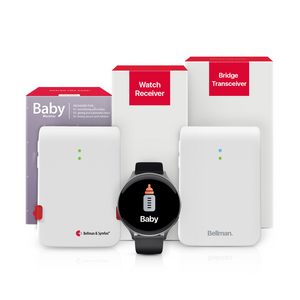
A vibrating baby monitor detects sound or movement in the nursery and instantly transmits a signal to a bridge transceiver - the Bellman Bluetooth Bridge - that alerts a wrist receiver with a distinct vibration and a baby icon, providing silent, immediate awareness for deaf and hard-of-hearing parents. No audio is required at the parents' end. The same bridge also handles doorbell, smoke alarm, and phone alerts through the same watch and app - so everything from your baby's cry to the front door rings silently on your wrist, without disturbing your baby.
The Problem With Standard Baby Monitors for Deaf and Hard-of-Hearing Parents
Walk into any baby store, and you will find row after row of audio baby monitors. Some stream live audio. Some add a high-definition video feed. Some connect to a smartphone app. But virtually all of them share one foundational design assumption: the parent is listening.
For deaf parents and hard-of-hearing parents - especially those who remove their hearing aids or cochlear implant processors at night - that assumption makes the product essentially useless. You can have a $300 monitor on your bedside table and still sleep through every single cry your baby makes. The monitor did its job. The alert just never reached you in a form your body could perceive.
Vibrating baby monitors solve this not by amplifying the audio, but by changing the output channel entirely. Instead of sending sound to your ears, they send vibration to your wrist, flashing light to your eyes, or physical movement to your bed. The information is the same - your baby needs you - but it arrives in a form that hearing loss cannot block.
But here is something that often goes unsaid: a vibrating baby monitor system done properly does a lot more than alert you to a crying baby. It also means your doorbell can ring silently on your wrist without a loud chime waking your sleeping infant. A phone call can trigger a light flash in another room instead of a ringtone that disturbs the nursery. Your smoke alarm can alert you on your wrist without an ear-splitting siren startling a newborn. The right system protects your whole home, silently and simultaneously, while your baby sleeps - and this guide explains exactly how that works.
The Core Technology: How a Vibrating Baby Monitor Actually Works
At its simplest, a vibrating baby monitor has two parts: something that listens in the baby's room, and something that alerts the parent without sound. Everything else - wireless protocols, smartphone apps, wrist receivers, bed shakers - is built on top of that fundamental loop. Understanding it makes the whole system much easier to set up, trust, and expand.
Part 1 - The Baby Transmitter (What Listens)
The transmitter is a small, battery-powered device placed in or near your baby's crib. It contains a microphone that continuously monitors sound levels in the room. When sound rises above a set sensitivity threshold - a baby crying, fussing, or making distress sounds - the transmitter detects the change and immediately fires a wireless signal toward the receiver hub elsewhere in your home.
The sensitivity threshold is adjustable, and this matters more than it might seem at first. Set it too high and the transmitter fires every time a car passes outside or a sibling walks down the hall. Set it too low and it misses quiet but urgent fussing. A well-designed vibrating monitor lets parents tune this threshold to their specific room - accounting for ambient noise, crib distance, and the baby's typical cry volume - so the system is both reliable and trustworthy.
Part 2 - The Wireless Signal (How the Alert Travels)
When the transmitter detects a sound event above threshold, it sends a wireless signal to the hub that manages your alerting system. The Bellman Baby Monitor System uses 433 MHz radio frequency for this transmitter-to-hub link - a frequency that penetrates walls, floors, and doors effectively without requiring line-of-sight or a Wi-Fi network. This signal reaches the Bellman Bluetooth Bridge, which then relays the alert via Bluetooth to the wrist receiver and smartphone app simultaneously.
Part 3 - The Alert Output (How You Know)
This is the most important part for deaf and hard-of-hearing parents. Instead of playing audio, the system converts the incoming signal into physical alerts that bypass hearing entirely:
- Wrist vibration with an icon: The Watch Receiver worn on your wrist vibrates with a baby-specific pattern and displays a clear baby icon on its screen - distinct from the doorbell icon, the smoke alarm icon, and the phone icon. You know at a glance exactly what triggered the alert, wherever you are in the home.
- Smartphone notification: The free Bellman Assistant app on your phone receives the same alert simultaneously - a labeled push notification that identifies the event type. Two independent channels alerting you at the same time means the chance of missing a cry approaches zero.
- Lamp or strobe flasher: A plug-in receiver flashes a lamp or strobe in any room you choose. Useful when you are in a fixed location, or as an additional layer of coverage for parents who respond quickly to visual signals.
- Bed shaker: A flat pad placed under the mattress vibrates firmly enough to rouse a sleeping adult, even without hearing aids or cochlear implants in. This is the critical nighttime alert method - and it fires without making any sound that could startle the baby.
The goal of a vibrating baby monitor is not to make the cry louder. It is to convert that cry into a signal that travels through touch, light, or movement rather than through air and sound waves - reaching the parent regardless of hearing ability.
Bellman & Symfon - Hearing Alert System Design PrinciplesHow the Bellman System Works, Step by Step
The Bellman approach to baby monitoring is built on a platform that handles your entire home's alerting needs - not just the nursery. The Baby Monitor System with Bluetooth Bridge and Watch Receiver pairs a sensitive Baby Transmitter with the Bellman Bluetooth Bridge and the Bellman Watch Receiver. Here is exactly what happens from the moment your baby makes a sound to the moment you feel it on your wrist.
Step 1 - Baby Makes a Sound
Your baby cries, fusses, or makes a sound above the sensitivity threshold set on the Baby Transmitter. The microphone inside the transmitter picks it up immediately - no delay, no polling interval.
Step 2 - Transmitter Fires
The Baby Transmitter sends a 433 MHz RF wireless signal through walls and floors to the Bellman Bluetooth Bridge, wherever it is placed in your home. No Wi-Fi. No cloud. Direct radio signal.
Step 3 - Bridge Translates and Relays
The Bridge receives the 433 MHz signal, identifies it as a baby monitor alert, and relays it simultaneously as a Bluetooth signal to the Watch Receiver on your wrist and as a push notification to the Bellman Assistant app on your smartphone.
Step 4 - You Feel It on Your Wrist
The Watch Receiver vibrates with a baby-specific pattern and displays the baby icon on screen. Your phone shows the same notification at the same instant. Two channels. One alert. Nothing missed.
The entire sequence - from your baby crying to the vibration on your wrist - takes moments. The Bridge-to-Watch Bluetooth link is direct and persistent, which means alerts arrive in real time, not after a cloud-server round trip or Wi-Fi polling delay. For a deeper look at how the Bridge manages all these signals across the home, see our full explainer on the best baby monitors for deaf parents.
It's More Than a Baby Monitor - The Whole-Home Benefit
Here is the part that surprises most new parents: once you have a Bellman Bluetooth Bridge in your home for baby monitoring, you are not limited to baby alerts. The same Bridge handles every other alerting need in your home - and this has a specific benefit that parents of newborns will immediately appreciate.
Your Doorbell Won't Wake the Baby
When someone rings your doorbell, a traditional setup means a loud chime rings through the house - potentially waking a sleeping newborn right at the moment you finally got them down for a nap. With the Bellman system, the doorbell alert travels silently to your Watch Receiver as a vibration and a doorbell icon. No audible chime needed. You know someone is at the door. Your baby keeps sleeping. The doorbell icon on the Watch tells you it is a visitor, not the baby - so you are never confused about which room needs your attention.
Phone Calls Reach You Without Disturbing the Nursery
A mobile phone call can also route through the Bellman Bridge to trigger a light flash on your connected receivers - so an incoming call alerts you visually in the living room without a ringtone echoing down the hallway toward the nursery. You answer on your phone privately. The baby sleeps on. One system handling two problems simultaneously.
Smoke and CO Alerts Come to Your Wrist, Day and Night
Perhaps most critically, a smoke or carbon monoxide alarm can connect to the same Bridge so that a dangerous event fires a wrist vibration, a bed shaker, and a room-flashing alarm - without relying on you hearing a siren. At 3 a.m. with hearing aids out and your baby in the next room, a wrist vibration and a shaking mattress can be the difference between catching a fire early and not catching it at all. We cover this in detail in our companion guide on baby monitoring and smoke safety for deaf parents.
Baby cries in the nursery: Baby icon vibrates on your wrist. You go to your baby. No noise needed.
Doorbell rings: Doorbell icon vibrates on your wrist. You answer the door. No chime wakes the baby.
Smoke alarm fires: Smoke icon vibrates urgently on your wrist, bed shaker activates, room flashes. No siren required. Even with hearing aids out, you are awake and responding.
Phone call arrives: Phone icon appears on your Watch and app. Flash receiver activates. You answer. The ringtone never disturbs the nursery.
All of this runs through the same Bridge, the same Watch, the same app - with distinct icons telling you exactly which room and which event requires your attention.
Daytime Monitoring vs. Nighttime Monitoring: Two Different Problems
One thing that trips up many parents when shopping for a vibrating baby monitor is assuming that one device handles all situations equally. It does not. The challenge of monitoring your baby during the day - when you are awake, wearing your Watch, and moving through the house - is genuinely different from the challenge at night, when hearing aids come out, the Watch goes on the charger, and you need something physical enough to wake you from deep sleep.
Daytime: The Watch Is Your Primary Tool
During the day, the Bellman Watch Receiver is the primary solution. You wear it on your wrist, and wherever you are - cooking in the kitchen, working in a home office, gardening in the backyard - the Watch receives the alert from the Bridge and vibrates with a baby-specific pattern. The 650-foot open-field Bluetooth range means the Watch stays connected even when you step outside, as long as the Bridge is centrally placed inside the home.
The Bellman Assistant app acts as a simultaneous backup during the day. If you happen to miss the Watch vibration, the phone notification is there on your screen. Two independent channels alerting you at the same time means coverage is as close to continuous as technology can offer.
Nighttime: The Alarm Clock Receiver Is Non-Negotiable
At night, the Watch goes on the charger, hearing aids come out, and the situation changes completely. Wrist-only systems have a real gap here - if the receiver is charging, there is no alert. The Bellman system addresses this with a dedicated nighttime layer built around the Alarm Clock Receiver, which combines a bed shaker, flashing lights, and a 100 dB alarm to rouse a sleeping parent without any reliance on hearing.
For parents who want full day-and-night baby monitoring coverage, the Bridge + Baby + Alarm Clock bundle is the right starting point. The Alarm Clock Receiver handles nighttime alerts - the moment your baby cries, the Bridge relays the signal, the mattress shakes beneath you, the room flashes, and the Alarm Clock fires its audio output for household members with residual hearing. The Watch Receiver can be added separately to extend coverage to daytime wrist alerts, so parents have both layers in one complete system.
The Watch Receiver is charging on the bedside table. Hearing aids are out. A wrist-only system has no way to alert a sleeping parent at this point. The baby cries. The Bridge processes the alert. Nothing reaches the parent.
The Alarm Clock Receiver by the bed fires the moment the baby cries. The mattress shakes. The room flashes. No hearing aid required. No wrist receiver required. The Watch is charging, but nighttime coverage is uninterrupted.
The parent unit broadcasts audio. For a deaf or hard-of-hearing parent away from the unit - in another room, in the yard, in the basement - the audio alert is inaudible. A visual bar on the monitor unit only helps if you are actively watching it.
The Watch vibrates wherever you are in the home, at up to 650 feet from the Bridge. You are in the backyard. You are in the garage. You are in the basement. The vibration and the baby icon reach your wrist. You know immediately.
Sensitivity Settings: Catching Every Real Cry Without Constant False Alerts
Managing sensitivity is the most practical skill in operating a vibrating baby monitor reliably. A parent who starts ignoring false alerts - because the transmitter fires every time a sibling runs past the nursery door - is a parent who risks dismissing a real one. Getting sensitivity right protects both your baby and your trust in the system.
Start With a Middle Setting and Test Against Real Conditions
Begin at a middle sensitivity setting. Simulate your baby's typical cry at the distance from which you normally place the transmitter, and confirm the Watch vibrates and the app notifies. Then let the room run with its normal ambient sounds - white noise machine, HVAC, street noise from an open window - and confirm the transmitter stays quiet under normal background conditions. Adjust from there until you find the threshold that catches crying reliably without constant ambient firing.
White Noise Machines and Ambient Sound
Many parents run white noise machines in the nursery to help babies sleep. This is perfectly compatible with the Bellman Baby Transmitter, but the sensitivity dial needs to be set so the white noise sits just below the trigger threshold while a real cry clears it comfortably. Place the transmitter so the white noise machine is not directly between it and the crib - the microphone should face the crib, not the noise source.
- Setting sensitivity too high in a noisy environment - ambient sounds trigger constant false alerts
- Pointing the microphone away from the crib, toward noise sources like fans or white noise machines
- Placing the transmitter more than 6 feet from the crib - quiet fussing may not reach the microphone reliably
- Not testing with hearing aids removed - confirm nighttime alerting works before you need it
- Forgetting to retest after moving furniture or the transmitter - placement changes affect reliability
- Relying on wrist-only monitoring overnight, the Watch needs a nighttime companion
Range and Placement: Covering Your Whole Home Reliably
A vibrating baby monitor is only as useful as its reliable range across your specific home. Understanding how the two wireless links in the Bellman system work helps you place equipment for maximum coverage and confidence.
Link 1 - Baby Transmitter to Bridge (433 MHz RF)
The Baby Transmitter communicates with the Bellman Bluetooth Bridge using 433 MHz radio frequency. This frequency penetrates walls, floors, and interior doors far more effectively than 2.4 GHz Wi-Fi - concrete and masonry that degrades a Wi-Fi signal significantly have far less effect on 433 MHz RF. In a typical two- or three-bedroom home, this link is reliable across multiple rooms and a full floor change from a single centrally placed Bridge. For a detailed look at how range works across different home layouts, see our guide on baby monitor range and whole-home coverage.
Link 2 - Bridge to Watch Receiver (Bluetooth)
The Watch Receiver connects to the Bridge via Bluetooth with up to 650 feet of open-field range. Practical indoor range is shorter due to walls and structural materials, but covers virtually all residential layouts from a single Bridge placed centrally - including multi-story homes in most cases.
Where to Place the Baby Transmitter
Place the Baby Transmitter within 3 to 6 feet of the crib, at roughly crib height or slightly above - not on the floor where the mattress absorbs sound from the microphone's direction, and not so close to the crib that it can eventually be reached by a growing baby. A shelf, dresser top, or wall bracket works well. Keep the microphone facing toward the crib, away from white noise machines and air vents.
Where to Place the Bridge
Place the Bridge centrally - in a hallway, living room, or main bedroom - so RF signals from transmitters in multiple rooms reach it without passing through more walls than necessary. A shelf or nightstand height is better than floor-level placement. Keep it a few feet away from other Bluetooth transmitters, microwaves, and cordless phone bases to maintain a clean Bluetooth connection to the Watch.
No Wi-Fi Required - Why That Matters for a Baby Monitor
One of the most overlooked features of the Bellman baby monitoring system is that it does not depend on your home's internet connection. The Bridge uses Bluetooth 5 to communicate directly with the Watch Receiver - peer-to-peer, without routing through your router, a cloud server, or a cellular data plan. This is not just a nice-to-have feature. For a baby monitor, it is a genuine safety consideration.
Internet outages happen. Router firmware updates restart the network at inconvenient hours. ISP service disruptions can last for hours at a time. A Wi-Fi-dependent baby monitor goes offline during all of these events. The Bellman system does not. The Bridge-to-Watch link stays active regardless of what your internet connection is doing, because it does not use the internet at all. For more on why offline Bluetooth outperforms cloud-dependent monitoring for safety-critical alerts, see our guide on baby monitors without Wi-Fi for deaf parents.
- Baby alerts still fire during internet outages - including outages caused by storms or power events
- No router password changes, ISP problems, or network reconfiguration can break the monitor link
- No subscription fee or cloud account required for core alerting to function
- No server-side delays - Bluetooth is a direct, real-time device-to-device link
- System resumes immediately after a power restoration, without waiting for router reconnection
- No cellular data required after initial app setup - the app communicates via Bluetooth, not mobile data
What to Look for in a Vibrating Baby Monitor: The Features That Actually Matter
Not all vibrating baby monitors are built with the same level of care for deaf and hard-of-hearing parents. Here is a plain-English breakdown of the features that make a real difference - with honest context on why each one matters.
| Feature | Why It Matters | What Good Looks Like |
|---|---|---|
| Wrist vibration with alert icons | The only alert that reaches you anywhere in the home during the day, regardless of where you are looking or what room you are in | Distinct vibration pattern for baby alerts - separate from doorbell, smoke, and phone icons on the same Watch |
| Bed shaker | Essential for waking a sleeping parent without hearing aids - especially critical for nighttime infant monitoring | Strong enough to wake through a memory foam or thick mattress; fires silently so it does not disturb the baby |
| Flashing light alert | Critical for parents who sleep lightly and respond to light, or who are in a room where a wrist device is charging | Bright enough to register through closed eyelids in a dark room at nighttime |
| Adjustable sensitivity | Controls false alert rate - a monitor you can trust is one you actually rely on at 3 a.m. | Physical dial or clearly labeled settings; adjustable without needing to reconfigure an app or re-pair devices |
| No Wi-Fi required | Wi-Fi-dependent monitors fail during outages - including outages that happen in the middle of the night | Direct Bluetooth or RF link; all core alerting functions work offline without any cloud dependency |
| Whole-home alert integration | Doorbell, smoke, and phone alerts on the same watch mean nothing disrupts the baby, and nothing is missed by the parent | Single Bridge handles baby, doorbell, smoke, and phone alerts with distinct icons - no separate systems to juggle |
| Setup simplicity | A system that needs IT-level setup knowledge to install fails when you need it most - tired, with a newborn | Battery-powered transmitter is plug-and-play; Bridge pairs to Watch without complex app configuration; under 10 minutes total |
Setting Up the System: What It Actually Takes
One of the most consistent pieces of feedback from Bellman parents is that setup is simpler and faster than expected. Here is the realistic sequence for getting the baby monitoring system running from scratch - plain steps, no jargon.
- Position the Baby Transmitter. Place it on a shelf or dresser within 3 to 6 feet of the crib, microphone facing the crib. It is battery-powered - no outlet, no wiring needed. Keep it out of the baby's future reach.
- Plug in the Bridge centrally. The Bellman Bluetooth Bridge connects to a standard wall outlet. Place it in a central room - a hallway, living room, or main bedroom - at shelf or nightstand height for the best RF and Bluetooth coverage.
- Pair the Watch Receiver. Hold the Watch Receiver close to the Bridge and follow the pairing sequence - typically a button hold on each device. Takes about 60 seconds. The Watch is now ready to receive all alerts from the Bridge.
- Download the Bellman Assistant app. Free on the App Store (iOS 15+) and Google Play (Android 8.0+). Open the app, pair it to the Bridge via Bluetooth, and your phone becomes a simultaneous second alert channel - with labeled push notifications for every event type.
- Set up the Alarm Clock Receiver for nighttime. If you have the Bridge + Baby + Alarm Clock bundle, plug the Alarm Clock Receiver into a bedside outlet, slide the bed shaker pad under your mattress, and pair it to the Bridge. Test it with hearing aids out to confirm the bed shaker wakes you reliably.
- Calibrate sensitivity and run a full test. Simulate a baby cry at normal distance and confirm the Watch vibrates with the baby icon and the app notifies. Run the room with its typical background sounds and confirm the transmitter stays quiet. Test the nighttime configuration (Watch charging, hearing aids out) to confirm the Alarm Clock Receiver fires, and the bed shaker is perceptible through your mattress.
Before You Rely on the System, Confirm Every Item
Test each component as if your baby's safety depends on it - because it does. Every gap found in testing is a gap closed before it matters.
- Baby Transmitter placed 3–6 ft from crib, microphone facing crib
- Bridge plugged in at central location, shelf height or above
- Watch Receiver paired - baby icon confirmed on transmitter test
- Bellman Assistant app installed and paired - notification confirmed
- Sensitivity calibrated - fires on real cry, quiet in ambient noise
- Alarm Clock Receiver plugged in at bedside (if using the bundle)
- The bed shaker is connected and positioned under the mattress
- Nighttime test run with hearing aids removed
- The bed shaker confirmed to be perceptible through your mattress
- Room flash confirmed - bright enough in a darkened room
Common Questions From Deaf and Hard of Hearing Parents
Does the Baby Transmitter Record or Stream Audio?
No. The Bellman Baby Transmitter is a sound detector, not an audio streaming device. It detects when sound exceeds the sensitivity threshold and sends a wireless trigger signal - it does not capture, record, or transmit the audio itself. There is no live audio feed, no cloud recordings, and no streaming video. For parents with privacy concerns about continuous nursery monitoring, this is an important distinction: the system alerts you that your baby needs attention, without broadcasting audio or video from your child's room.
Can I Monitor Multiple Children in Separate Rooms?
Yes. The Bellman Bridge supports multiple transmitters simultaneously. You can place a Baby Transmitter in each child's room, and each transmitter has a different icon, so the Watch tells you which room triggered the alert. For families with twins or children in separate rooms, the system delivers distinct, labeled wrist alerts for each room from a single Bridge. For a full setup guide for multi-room families, see our dedicated guide on baby monitors for twins and large families.
Can I Use the Baby Monitor Without the Watch Receiver?
Yes - the Bridge + Baby + Alarm Clock bundle includes the Alarm Clock Receiver for nighttime coverage, which operates independently of the Watch. The Bellman Assistant app on your smartphone also works without the Watch for daytime notifications when your phone is nearby. The Watch Receiver is the recommended addition for parents who want reliable daytime wrist alerts while actively moving through the home - it is the piece that makes the system truly hands-free and whole-home during waking hours.
What Happens During a Power Outage?
The Baby Transmitter is battery-powered and continues operating during an outage. The Bridge requires mains power, as does the Alarm Clock Receiver. For backup coverage during power outages, a small UPS (uninterruptible power supply) connected to the Bridge maintains the alerting system until power is restored. The Watch Receiver's battery provides several days of operation on a charge, so brief outages do not interrupt wrist alerts if the Bridge has backup power. This is also why some families keep a battery-powered strobe or vibrating clock as a secondary nighttime backup during severe weather events.
Is the System Hard to Set Up?
No. The Baby Transmitter requires no wiring and no app pairing - it is battery-powered and communicates with the Bridge automatically once powered on. The Bridge plugs into a standard outlet. Pairing the Watch takes about 60 seconds. Most parents complete the full setup, including the Bellman Assistant app and Alarm Clock Receiver, in under 15 minutes. For a step-by-step walkthrough, see the complete baby monitor setup guide for deaf parents.
The Bigger Picture: A System That Grows With Your Family
One of the strongest practical advantages of the Bellman approach is that the system you start with for baby monitoring is the same system you expand as your family's needs change - without replacing any of the core equipment.
A family that starts with the Bridge + Baby + Alarm Clock bundle can add a smoke alarm transmitter when they move into a new home, add a second Baby Transmitter when another child arrives, add a doorbell transmitter so a visitor's knock reaches their Watch without waking the baby, and add a push button transmitter later for a family member who needs a call-for-attention option. All of these additions connect to the same Bridge, alert through the same Watch, and notify through the same app. One system. Every need. No learning curve when new components are added.
This is the real argument for a Bridge-centered system over a collection of standalone single-purpose monitors. Each standalone device solves one problem in isolation. The Bellman system solves every problem through one hub - with a consistent, icon-labeled alert experience across all event types, and the flexibility to add new transmitters as your household evolves. For an overview of how deaf and hard-of-hearing parents can stay fully connected and safe at home using this kind of integrated alert system, see our guide on deaf parenting, home safety, and connected technology.
Ready to set up baby monitoring that works without hearing?
The Bridge + Baby + Alarm Clock bundle covers nighttime with a bed shaker and room flash. Add the Watch Receiver for full daytime wrist alerts. Simple to set up - non-technical parent-friendly.
Sources and references: Bellman & Symfon - Baby Transmitter product specifications and Bluetooth Bridge Transceiver BE1521 technical documentation (us.bellman.com/products/baby-monitor-system-with-bluetooth-bridge-and-watch-receiver) · Bellman & Symfon - Bluetooth Watch Receiver BE3330 specifications including Bluetooth 5, battery life, and icon-based alert display (us.bellman.com/products/bluetooth-watch-receiver) · Bellman & Symfon - Alarm Clock Receiver specifications: 100 dB audio output, integrated bed shaker, flashing light output · Bellman & Symfon - Bellman Assistant App platform compatibility: iOS 15+, Android 8.0+ · National Institute on Deafness and Other Communication Disorders (NIDCD) - Quick Statistics About Hearing, nidcd.nih.gov/health/statistics/quick-statistics-hearing · ADCO Hearing Products - Bellman Visit Baby Transmitter technical specifications including 433 MHz wireless frequency, adjustable sensitivity dial, and open-field range · Bellman & Symfon - Bridge + Baby + Alarm Clock bundle product page (us.bellman.com/products/doorbell-monitoring-system-with-bluetooth-bridge-and-alarm-clock).
This article is for informational purposes only. Product specifications are subject to change; refer to the current product pages at us.bellman.com for the most up-to-date technical details. This content does not constitute medical or audiological advice. Consult a qualified audiologist or healthcare provider for guidance specific to your hearing loss and assistive device needs.

How Vibrating Baby Monitors Work: A Guide for Deaf and Hard-of-Hearing Parents
This guide breaks down the practical choices, features, and considerations behind this topic. Use it to identify a setup that fits the listener, the environment, and the everyday moments that matter most.
The featured products below are current Bellman options discussed in the article or closely matched to its use case.