How to Choose a Home Alert System for a Parent with Hearing Loss: Caregiver’s Checklist

Choosing the right home alert system for a parent with hearing loss is one of the most practical things a caregiver can do - but it is easy to get wrong without the right framework. This guide gives you the complete evaluation process, from assessing your parent’s specific safety gaps to selecting and setting up a system that actually works long-term.
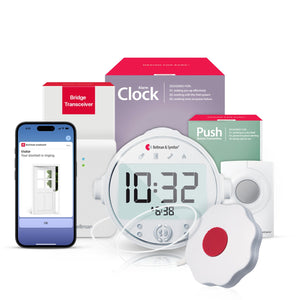
When choosing a home alert system for a parent with hearing loss, caregivers should look for six non-negotiable features: no Wi-Fi dependency, wrist vibration delivery, icon-based alert identification, smoke and CO coverage, doorbell detection, and phone call integration. The Bellman Bluetooth Bridge system meets all six criteria - delivering every household alert to the Watch Receiver on the wrist and the Bellman Assistant app on the smartphone, with no subscription, no Wi-Fi required, and one wearable device covering the entire home.
- No Wi-Fi dependency - alerts fire during internet outages
- Wrist vibration delivery - reaches your parent wherever they are in the home
- Icon-based identification - they know exactly what alert fired without searching
- Smoke and CO coverage - the most life-critical alert type, especially at night
- Doorbell detection - missed visitors and deliveries are a daily frustration
- Phone integration - landline and mobile call alerts through the same Watch
Why Getting This Decision Right Matters More Than It Seems
For most caregivers, the conversation about home alert technology for a parent with hearing loss starts with a specific incident. A missed delivery that became a missed prescription pickup. A smoke alarm that went off while the parent was asleep with their hearing aids out. A doorbell rung three times by a visiting home health aide who finally left. These incidents feel like inconveniences in the moment, but they point to a structural gap: a home built on sound-based alerts is quietly failing a person who cannot rely on hearing.
The right alert system does not just fix the specific incident that triggered the conversation. It closes every gap simultaneously - doorbell, smoke alarm, phone, push button for help - through a single wearable device your parent puts on in the morning and takes off at night. The wrong system addresses one gap poorly while leaving others open, requires ongoing technical management that falls back on you, or stops working when the internet goes down. This guide helps you tell the difference.
Step One: Assess the Specific Safety Gaps Before Buying Anything
The most common caregiver mistake is skipping the assessment phase and going straight to product research. That approach leads to buying a system that solves the most visible problem while missing the more serious ones. A structured assessment takes twenty minutes and prevents a much larger set of problems down the road.
Walk through the home with your parent and work through every sound-based alert system in each room. For each one, ask: can they reliably hear this? Can they hear it from every room in the house? Can they hear it at night with their hearing aids removed? The answers will almost always reveal a more extensive set of gaps than either of you expected.
The most life-critical system in the home. Standard 85 dB audible alarms are often inaudible to someone sleeping without hearing aids. Ask whether they can hear it from the bedroom at night.
Can they hear the doorbell from every room? From the backyard? With the television on? Missed doorbells cause missed deliveries, missed visitors, and missed home health aide arrivals.
Are they missing calls from their doctor, pharmacy, or family? Missed phone calls are a major health risk and a daily source of frustration for seniors with hearing loss.
If they need assistance in a room far from a phone, how do they signal for help? Shouting across the house is unreliable; a push-button wearable transmitter solves this quietly and immediately.
If they watch grandchildren, can they hear an infant crying through a baby monitor? Sound-based monitors are ineffective for someone with significant hearing loss.
Once you have mapped the gaps, you have the information you need to prioritize. Life-safety alerts (smoke and CO) always come first. Daily independence alerts (doorbell and phone) come next. Communication tools (push button) follow. This sequence also maps neatly to how you can build out the system over time if the budget requires a phased approach.
The Six Non-Negotiable Criteria for Any Home Alert System
Not all home alert systems are equally suited to elderly people with hearing loss. The six criteria below are the minimum requirements - any system that fails one of them has a meaningful gap that will cause real-world problems for your parent or for you as a caregiver.
1. No Wi-Fi Dependency
A system that requires a working internet connection to deliver alerts will fail during exactly the moments when reliability matters most: internet outages, router failures, ISP disruptions. For a smoke alarm or CO detector, that failure can be life-threatening. The system must operate independently of the internet - ideally over Bluetooth or RF, device-to-device, without cloud routing.
2. Wrist Vibration Delivery
Fixed visual receivers (lamp flashers, room strobes) only work in the room where they are installed. A parent who is in the kitchen when the doorbell flashes in the living room misses the alert. A wearable Watch Receiver travels with them through every room, every yard, and every floor of the home, delivering every alert as a vibration on the wrist wherever they are.
3. Icon-Based Alert Identification
When the Watch vibrates, your parent needs to know immediately whether it is the doorbell, the smoke alarm, a phone call, or a push button signal. A system that delivers only generic vibrations - without specific icons for each alert type - creates confusion and delayed response. Each alert must have its own recognizable icon on the Watch display.
4. Smoke and CO Coverage
This is non-negotiable for anyone living alone with hearing loss. The system must include or be compatible with a smoke alarm transmitter that delivers alerts through the Watch and, critically, through a bedside Alarm Clock Receiver with a bed shaker for nighttime coverage when the Watch is on the charger.
5. Doorbell Detection
Missed doorbells affect daily quality of life and practical independence. A system with doorbell transmitter capability - detecting the existing chime without rewiring - that delivers a wrist vibration with a visitor icon is the baseline requirement for a home alert system worth recommending.
6. Phone Call Integration
The system should handle both landline and mobile incoming call detection. Direct RJ11 landline detection is the most reliable method. Mobile call forwarding via a smartphone app paired to the same Bridge is the most practical approach. Both should deliver the same wrist vibration and phone icon through the same Watch your parent already wears.
How Bellman Compares to Other Home Alert Approaches
There are several categories of home alert solution for people with hearing loss, ranging from simple standalone devices to integrated connected systems. Understanding how they compare helps you make a more informed choice rather than defaulting to the most visible or most promoted option.
| Approach | How It Works | Whole-Home Coverage | Nighttime Safety | No Wi-Fi Needed | Multi-Alert Types |
|---|---|---|---|---|---|
| Amplified phone / doorbell | Louder sound output from existing device | Room only | No | Yes | Single type |
| Fixed room flashers / strobes | Flashing light in specific room triggered by event | Room only | Partial | Yes | Limited |
| Smart home systems (Alexa, Google) | Wi-Fi-connected hub routes alerts to smart speakers and app | Partial | Poor | Requires Wi-Fi | Multiple |
| Medical alert / PERS devices | Wearable button that calls emergency services when pressed | Whole home | Partial | Varies | Emergency only |
| Bellman Bluetooth Bridge system | Bluetooth hub receives RF from transmitters; sends to Watch + app; no Wi-Fi | Whole home (650 ft) | Yes - bed shaker + Alarm Clock | No Wi-Fi required | Smoke, door, phone, push button, baby |
The key insight from this comparison is that most simpler solutions fail on whole-home coverage and nighttime safety simultaneously - the two dimensions that matter most for an elderly person living alone. Room-based flashers and amplified ringers improve awareness in the room where they are installed; they do nothing for the person who is in a different part of the house. The Bellman system is the only approach in the comparison that delivers whole-home coverage, works without Wi-Fi, and handles nighttime scenarios with a dedicated bed shaker solution.
The Nighttime Problem: Why It Deserves Its Own Section
The single most dangerous gap in home alerting for elderly people with hearing loss is nighttime smoke and CO coverage. It deserves detailed attention because it is both the most serious risk and the one most commonly underaddressed by caregivers who focus on daytime convenience issues first.
Here is the scenario: your parent removes their hearing aids before bed, as nearly all hearing aid users do. Their Watch Receiver goes on the charger on the nightstand. Their phone is face-down or on silent. In this state, the home’s entire sound-based alert infrastructure - the 85 dB smoke alarm across the hall, the CO detector in the hallway, the phone ringing on the kitchen counter - is effectively invisible. Not because the alerts are not sounding, but because there is no path from those sounds to your parent’s awareness.
The solution requires a fundamentally different approach to nighttime alerting - one that does not depend on the Watch Receiver or the phone:
- The Alarm Clock Receiver on the nightstand serves as both a bedside clock and a nighttime alert hub. When a connected transmitter fires, it delivers three simultaneous outputs: a 100 dB audible alarm (far louder than the transmitter itself), a bright flashing strobe light, and a bed shaker pad that vibrates the mattress or pillow directly.
- The bed shaker pad is the most effective delivery mechanism for someone in deep sleep without hearing aids. Physical vibration applied directly to the body is a reliable wake signal regardless of hearing ability - it bypasses the auditory pathway entirely.
- The nighttime bundles are pre-configured for this: the Bridge + Smoke + Alarm Clock bundle covers fire safety; the Bridge + Push Button + Alarm Clock bundle covers nighttime call-for-help and caregiver alerting. Both include the Bridge and Alarm Clock Receiver. The Watch Receiver can be added separately for daytime coverage.
Gerald, 80, lives alone and removes his hearing aids at 9 p.m. His daughter Linda, who lives 20 minutes away, had been giving him a flashing smoke alarm strobe for the living room. One evening a kitchen fire started at 11:30 p.m. The strobe flashed in the living room. Gerald was asleep in his bedroom at the opposite end of the house with the door mostly closed. He did not wake up.
After that incident, Linda replaced the standalone strobe with the Bridge + Smoke + Alarm Clock bundle and placed the Alarm Clock Receiver on Gerald’s nightstand with the bed shaker under his mattress pad. She tested it personally the following weekend. When she pressed the smoke alarm test button in the kitchen, Gerald was awake and out of bed within 12 seconds, while asleep in his bedroom.
The Complete Caregiver’s Checklist
Use this checklist as a structured guide through the evaluation, selection, setup, and maintenance phases. It is designed to be worked through in order, but you can also use it to audit a system already in place.
Phase 1: Assessment
Phase 1: Safety Gap Assessment
Walk through the home with your parent. Every unchecked item is an active safety gap.
- Smoke alarm - audible from bedroom at night without hearing aids?
- CO detector coverage in sleeping areas confirmed?
- Doorbell - heard from all rooms including backyard?
- Landline phone - ring detected from all rooms?
- Mobile phone - incoming calls noticed reliably?
- Call-for-help option available in every room?
- Nighttime alerting covered beyond just the Watch?
- Baby / grandchild monitoring needed?
- Hearing aids typically removed for sleep - confirmed?
- Current ringer / alarm volume sufficient for hearing loss level?
- Internet / Wi-Fi stability at the home evaluated?
- Parent’s comfort with technology assessed honestly?
Phase 2: System Selection
Phase 2: System Selection Criteria
Confirm every item before committing to a system. Missing any item creates a gap.
- No Wi-Fi dependency for core alert delivery
- Wrist-worn receiver that travels whole-home
- Distinct icon per alert type (smoke ≠ doorbell ≠ phone)
- Smoke alarm transmitter compatible with existing detectors
- Doorbell transmitter requires no rewiring
- Landline call detection via direct RJ11 connection
- Mobile call forwarding via app also supported
- Nighttime Alarm Clock Receiver with bed shaker available
- Push button wearable transmitter available for expansion
- No monthly subscription fee for core alerting
- App available on both iOS and Android
- Battery-powered transmitters (no wiring required)
Phase 3: Setup and Configuration
Phase 3: Setup and Installation
Complete all setup yourself before your parent begins using the system. Do not hand over an unsetup device.
- Bridge placed centrally in the home at shelf height
- Bridge plugged into a stable power outlet
- Watch Receiver fully charged and paired to Bridge
- Bellman Assistant app installed on parent’s smartphone
- App notification permissions enabled in phone settings
- App connected to Bridge via Bluetooth
- Smoke transmitter positioned within 3 metres of detector
- Doorbell transmitter positioned near existing chime
- Phone cable connected from wall jack to Bridge RJ11 input
- Push button pendant positioned within parent’s reach
- Alarm Clock Receiver placed on nightstand
- Bed shaker pad positioned under mattress or pillow
Phase 4: Testing
Phase 4: Testing Every Alert Channel
Test each transmitter individually. Confirm both Watch vibration AND app notification fire correctly.
- Smoke alarm test: press detector test button - Watch shows flame icon
- Doorbell test: ring the doorbell - Watch shows visitor icon
- Phone test (landline): call the landline - Watch shows phone icon
- Phone test (mobile): call the cell - Watch shows phone icon
- Push button test: press the button - Watch shows push button icon
- App notification test: all of the above also show on smartphone
- Nighttime test: test smoke transmitter with Alarm Clock Receiver active
- Bed shaker test: confirm vibration is felt through mattress during test
- Range test: confirm Watch receives alerts from farthest room in home
- Yard test: confirm Watch receives alerts from outdoor areas if applicable
- Post-test: confirm parent can identify each icon correctly
- Post-test: confirm parent knows how to acknowledge an alert on the Watch
Phase 5: Ongoing Maintenance
Phase 5: Ongoing Maintenance Schedule
A home alert system only works if it is maintained. Set calendar reminders for each item.
- Watch Receiver charged weekly (suggest: Sunday evenings)
- Transmitter batteries checked every 3–6 months
- Smoke alarm test button pressed monthly to confirm transmitter fires
- Doorbell ring test performed monthly
- Bellman app notification permissions checked after any phone OS update
- Bridge power connection confirmed during any visit
- Alarm Clock Receiver backup battery (if applicable) replaced annually
- Full system test performed at each caregiver visit (quarterly minimum)
- Watch wristband or charging cradle inspected for wear annually
- Parent’s hearing loss progression checked - expand system if needed
How to Have the Conversation With Your Parent
Many caregivers find that choosing the right system is easier than getting their parent to accept it. Hearing loss carries a degree of stigma for many older adults, and introducing a home alert system can feel to them like an acknowledgment of decline, loss of independence, or “being handled.” Framing matters enormously here.
“We need to put this system in because we’re worried about you.” This frames the system as a response to incapacity. It positions the senior as someone who needs managing rather than someone whose home needs improving.
“You missed the doorbell again and we can’t keep having this happen.” This frames a technology gap as a personal failure.
“Just let me set this up for you - you don’t need to understand how it works.” This removes agency and guarantees under-use.
“I found a system that means you never have to worry about missing a call or the smoke alarm at night. I’d like to show it to you.” This frames the system as an upgrade, not a response to limitation.
“I want to set this up so I stop worrying when I’m not with you.” This makes the caregiver’s peace of mind the reason, which is true, without implying the parent is incapable.
“It is just a watch and a bridge. You put the watch on in the morning and charge it on Sundays.” Simplicity is reassuring. Complex descriptions create resistance.
The most effective approach in practice is to set the system up yourself in advance and let the experience of using it do the persuading. Most parents who initially resist the idea become enthusiastic after two weeks of never missing a doorbell and knowing they will wake up if the smoke alarm sounds. The Watch becomes associated with independence, not limitation.
Building the System Over Time: A Phased Approach
Not every family has the budget for a complete system at once, and not every situation requires every component from day one. The following phased approach prioritizes by urgency and impact, and is designed so each phase builds on the previous one without requiring any hardware to be replaced.
- Phase 1 - Nighttime Fire Safety First. The Bridge + Smoke + Alarm Clock bundle covers the most life-critical gap: a smoke alarm that fires at night when hearing aids are out. This bundle includes the Bridge (the foundation of everything that follows), the Smoke Alarm Transmitter, and the Alarm Clock Receiver with bed shaker. This is the right starting point for any parent who lives alone.
- Phase 2 - Add Daytime Coverage. Add the Watch Receiver to give your parent wrist vibration alerts for every transmitter already connected to the Bridge - the smoke alarm during the day, and the doorbell and phone once those transmitters are added. The Watch costs less than adding a whole new system and immediately covers the whole home.
- Phase 3 - Doorbell and Phone. The Doorbell Transmitter pairs with the existing Bridge and immediately delivers wrist vibration alerts for every visitor. The Phone System transmitter connects to the landline and forwards both landline and mobile call notifications through the same Watch. Both add to the existing Bridge - no new hub required.
- Phase 4 - Push Button for Help and Communication. The Push Button System adds a wearable pendant your parent can press anywhere in the home to send an instant vibration alert to your Watch Receiver or to any other Watch in the home. For families with in-home caregiving, the Bridge + Push + Alarm Clock bundle ensures nighttime push button signals also wake through the Alarm Clock Receiver.
- Phase 5 - Additional Smoke Transmitters and Expansion. If the home has multiple smoke alarms (as it should - building codes require one per bedroom and per floor), additional Smoke Alarm Transmitters can be paired to the same Bridge. Each fires through the same Watch with the same flame icon regardless of which detector it came from.
Common Mistakes Caregivers Make When Choosing Home Alert Systems
- Skipping the assessment and buying based on the most visible problem
- Prioritizing the doorbell over nighttime smoke coverage (inverting the urgency)
- Buying a Wi-Fi-dependent system without evaluating the home’s internet reliability
- Handing over an unsetup system and expecting the parent to configure it
- Buying standalone single-purpose devices instead of one integrated system
- Forgetting to enable app notification permissions - the most common silent failure
- Not testing every alert channel individually before considering setup complete
- Placing the Bridge in a far corner instead of centrally for maximum Watch range
- Not accounting for nighttime hearing aid removal in the alert strategy
- Choosing a system with subscription fees that may lapse or be cancelled
- Failing to build in a maintenance schedule - systems degrade without upkeep
- Choosing a medical alert system (for falls) as a substitute for a home awareness system
Special Situations: Tailoring the System to Specific Living Arrangements
Parent Living Completely Alone
This is the highest-priority situation. The most critical gap is nighttime fire safety - there is no household member to hear the smoke alarm on their behalf. Start with the Bridge + Smoke + Alarm Clock bundle and add the Watch Receiver for daytime coverage. The Bellman system’s offline Bluetooth operation is particularly important for parents who live alone in areas with unreliable internet. For a comprehensive picture of all the technology that supports independent living with hearing loss, see our detailed guide on aging in place with hearing loss.
Parent Living with a Spouse or Roommate
Even when a parent is not alone, their hearing-hearing spouse should not be the sole alert backup. If the spouse also has hearing loss, the gap is identical to living alone. If the spouse hears normally, the risk is lower - but the parent’s independence still benefits from not depending on a partner to relay every doorbell and phone call. The system also works as a household upgrade: both the parent and the spouse can wear a Watch Receiver, each paired to the same Bridge.
Parent in an Apartment or Rented Home
The Bellman system is entirely renter-friendly. The Bridge plugs into a wall outlet. The Doorbell Transmitter clips near the existing chime without touching wiring. The Smoke Alarm Transmitter attaches near the existing detector magnetically or with adhesive. The Phone transmitter connects to the wall jack with a standard cable. No modifications. No landlord permissions required. No installation costs. For a deeper look at apartment-specific considerations, see our guide on doorbell alerts for elderly hearing impaired.
Parent Who Shares Caregiving with Multiple Family Members
Multiple Watch Receivers can be paired to the same Bridge. If two adult children share caregiving responsibilities and are sometimes both present, both can wear a Watch and receive the same alerts simultaneously. The Bellman Assistant app can also be installed on multiple smartphones, each of which receives the same notifications from the Bridge over Bluetooth.
Parent with Progressive or Severe Hearing Loss
For parents with severe or profound hearing loss, the Watch Receiver’s wrist vibration and the bed shaker’s physical vibration are more reliable alert mechanisms than any audible component. The Alarm Clock Receiver’s 100 dB alarm is valuable for people with moderate loss; the flashing strobe light and bed shaker are the critical components for severe or profound loss. Configure the system with both visual and tactile outputs active for maximum coverage.
Expert Tips for Long-Term System Reliability
A home alert system that works perfectly on setup day but fails six months later because of a dead transmitter battery or a reset app notification permission is worse than no system - it creates false confidence. These practical tips keep the system running reliably over the long term.
- Set a recurring calendar reminder for the monthly smoke test. The National Fire Protection Association recommends testing smoke alarms monthly. The Bellman smoke transmitter test doubles as a monthly system check - if the Watch vibrates with the flame icon, the full signal chain is working.
- Check app notification permissions after every smartphone OS update. Both iOS and Android can silently reset notification permissions during major system updates. The Bellman Assistant app requires notification access to forward alerts to the phone screen. Build a ten-second check into your routine after any update: Settings → Notifications → Bellman → confirm On.
- Label the charging cradle. Place a simple label near the Watch charging cradle that says “Charge Sunday nights.” This removes the cognitive load of remembering. The Watch’s up-to-one-week battery life makes Sunday-only charging a realistic routine rather than a daily obligation.
- Keep a spare battery for each transmitter type. Transmitters run on standard batteries (typically AA or AAA depending on the model). Keeping a spare in a drawer near the Bridge means a low-battery replacement takes 60 seconds rather than a trip to the hardware store.
- Test the system at every caregiver visit. A quick ring of the doorbell, a press of the smoke alarm test button, and a call to the landline during each visit confirms the system is working and reinforces the parent’s familiarity with the icons and vibrations.
- Review alert gaps as hearing loss progresses. Hearing loss typically progresses over time. A system configured for mild-to-moderate loss may need to be expanded - additional transmitters, a second nighttime Alarm Clock Receiver in a different room, or increased Watch vibration sensitivity settings - as the hearing loss worsens.
Frequently Asked Questions from Caregivers
-
My parent refuses to wear anything on their wrist. What are the alternatives?
The Watch Receiver is the most effective whole-home alert solution, but there are alternative approaches for parents who resist wearables. Fixed receivers like lamp flashers can be positioned in frequently-used rooms, providing visual alerts in those specific locations. The Bellman Assistant app on their smartphone also receives all alerts if they keep the phone with them. For nighttime coverage, the Alarm Clock Receiver with bed shaker requires nothing to be worn. For parents who resist the Watch initially, starting with the app and bed shaker while they get accustomed to the system often leads to voluntary Watch adoption within a few weeks.
-
What happens to alerts when my parent’s internet goes out?
The Bellman Bluetooth Bridge operates entirely over Bluetooth, not Wi-Fi or the internet. All alerts - smoke, doorbell, phone, push button - continue to fire normally during internet outages, router failures, and ISP disruptions. This is one of the most important practical advantages of the system for elderly parents who may not notice or be able to resolve internet connectivity issues.
-
Can I monitor alerts remotely when I am not at my parent’s home?
The Bellman system is primarily designed for in-home Bluetooth range rather than remote internet-based monitoring. The Bellman Assistant app delivers alerts over Bluetooth when a smartphone is within range of the Bridge. For remote monitoring (a caregiver wanting to know if alerts are firing from a different location), the app’s Bluetooth-based design means this is not a native feature. The system’s strength is reliable, offline, in-home alerting rather than remote visibility.
-
My parent already has a medical alert / PERS device. Do they still need a home alert system?
Yes - they solve different problems. A medical alert device (like Life Alert or similar PERS systems) is an emergency response tool: your parent presses a button and a monitoring center calls for help. A home awareness system like Bellman is a household alerting tool: it keeps your parent aware of what is happening in their home (smoke alarm, doorbell, phone, push button). Many families use both simultaneously. The Bellman system is not a substitute for emergency response; it is a complement to it. See our overview of emergency preparedness for deaf and hard-of-hearing seniors for more on layering both types of coverage.
-
Is there a subscription fee for the Bellman system?
No. The Bellman system has no monthly subscription fee for core alerting functions. The hardware is a one-time purchase. The Bellman Assistant app is free on iOS 15+ and Android 8.0+. The only ongoing costs are battery replacements for the transmitters (which run on standard batteries lasting several months to over a year depending on usage).
-
My parent is not comfortable with smartphones. Can the system still work for them?
Yes. The Watch Receiver operates independently of the smartphone. Once paired to the Bridge during initial setup (which you do yourself), the Watch receives all alerts without any smartphone interaction. The Bellman Assistant app is optional additional coverage - useful if your parent does carry their phone, but not required for the Watch to function. Parents who do not use smartphones at all can still use the Watch and Alarm Clock Receiver fully.
-
How do I know if the push button is the right addition for my parent’s situation?
The Push Button System is worth adding in any situation where your parent may need to signal for attention or help from a room where they cannot reach a phone - particularly if mobility is limited, if they live with an in-home caregiver, or if they have expressed feeling isolated in parts of the home. The push button pendant is worn or placed on a table. Pressing it sends an immediate vibration to your Watch (or any other paired Watch in the home). For nighttime coverage, the Bridge + Push Button + Alarm Clock bundle routes the signal through the Alarm Clock Receiver with bed shaker instead. For more on this topic, see our guide on the push button call system for elderly.
-
My parent lives in a two-story home. Will the Watch Receiver work upstairs if the Bridge is downstairs?
Yes, in most cases. The Watch Receiver uses Bluetooth 5 with up to 650 feet of open-field range. In typical two-story residential construction, the Bluetooth signal passes through floors and ceilings with sufficient strength for whole-home coverage when the Bridge is placed centrally. Placing the Bridge on the main floor in a central hallway, living room, or stairwell landing gives the best coverage both upstairs and downstairs. If range is a concern in a particularly large or construction-dense home, the Bridge can be positioned on a mid-level shelf to split coverage more evenly.
The Goal: A Home That Communicates With the Person Who Lives in It
Choosing the right home alert system for a parent with hearing loss is ultimately about one thing: making sure the home communicates reliably with the person who lives in it, on terms that work for them. That means not depending on their ability to hear every alert, not depending on the internet to route safety notifications, and not creating a burden of daily technical management that falls back on you or on them.
The Bellman system - Bridge, Watch, Alarm Clock Receiver, and the full range of transmitters - is designed to be the last home alert system a caregiver needs to buy. Every transmitter you add builds on the same Bridge and Watch. The system grows with your parent’s needs rather than being replaced when those needs change. And because it requires no Wi-Fi and no subscription, its reliability does not depend on infrastructure that can fail or costs that can be cancelled.
For a complete understanding of the Bellman system components and how they work together, see the pillar guide: Home Safety Alert Systems for Seniors with Hearing Loss: Complete Guide (2026). For guidance on specific alert types, the supporting guides in this series cover each in depth.
Ready to build the right system for your parent?
Browse the full Bellman Bluetooth Bridge collection - smoke, doorbell, phone, and push button bundles, each built on the same Bridge and Watch your parent will use for years.
Sources and references: Bellman & Symfon - Bluetooth Bridge Transceiver BE1521 product specifications and user manual (us.bellman.com/collections/bluetooth-bridge) · Bellman & Symfon - Bluetooth Watch Receiver BE3330 product specifications (us.bellman.com/products/bluetooth-watch-receiver) · Bellman & Symfon - Alarm Clock Receiver specifications: 100 dB audible alarm, visual strobe, and bed shaker output (us.bellman.com) · Bellman & Symfon - Smoke Alarm Transmitter, Doorbell Transmitter, Phone Transmitter, Push Button Transmitter product specifications (us.bellman.com) · Bellman & Symfon - Bellman Assistant App: free on iOS 15+, Android 8.0+ (us.bellman.com) · National Institute on Deafness and Other Communication Disorders (NIDCD) - Quick Statistics About Hearing (2021): approximately 48 million Americans with some degree of hearing loss; 1 in 3 adults over 65 · National Fire Protection Association (NFPA) - Smoke Alarms in U.S. Home Fires (2021 edition): disproportionate risk for people with hearing loss from audible-only smoke alarm systems during sleep · AARP Home and Community Preferences Survey (2021): approximately 77% of adults age 50+ wish to remain in their current homes as they age · FCC - Telecommunications Relay Service and Captioned Telephone guidelines (fcc.gov)
This article is intended for informational purposes. Product specifications are subject to change; refer to current product listings at us.bellman.com for the latest technical details. Nothing in this article constitutes medical, legal, or professional safety engineering advice.

How to Choose a Home Alert System for a Parent with Hearing Loss: Caregiver’s Checklist
This guide breaks down the practical choices, features, and considerations behind this topic. Use it to identify a setup that fits the listener, the environment, and the everyday moments that matter most.
The featured products below are current Bellman options discussed in the article or closely matched to its use case.