How Smartwatch Alerts Work for People with Hearing Loss

Smartwatches have become a meaningful tool in the hearing loss alerting toolkit - but understanding exactly what they do, how they do it, and where they fall short is essential before deciding how one fits into your alerting strategy. This is the complete, honest guide.
Smartwatch alerts for hearing loss work by delivering vibration (haptic) notifications to the wrist when a paired smartphone receives a notification - a call, text, app alert, or sound recognition event. Apple Watch uses Sound Recognition to identify environmental sounds like smoke alarms and doorbells. Samsung Galaxy Watch mirrors notifications from Android's Accessibility Sound Notifications. Both are genuinely useful as a supplemental daytime awareness tool. However, both depend on a chain of four technology links - smartphone proximity, Bluetooth connectivity, app compatibility, and internet connection - any one of which can break the alert. For safety-critical home alerts, smartwatches work best alongside a dedicated RF-based wearable like the Bellman Watch Receiver, which communicates directly with home transmitters over a reliable, Wi-Fi-free connection.
Start Here: Why This Question Matters More Than Ever
Walk into any conversation about hearing loss and technology in 2026 and smartwatches will come up quickly. Apple Watch, Samsung Galaxy Watch, Google Pixel Watch - these devices have grown into capable notification hubs, and for people with hearing loss, the wrist vibration they deliver for incoming calls and messages has been genuinely useful for years. But the category has evolved significantly, and the claims being made about what smartwatches can do for people with hearing loss have expanded alongside the marketing.
Today, Apple Watch includes a feature called Sound Recognition that is specifically marketed for people who are deaf or hard of hearing. Samsung Galaxy Watch mirrors Android's Accessibility Sound Notifications. Third-party apps have emerged claiming to turn any smartwatch into a safety alerting device. Understanding what is real, what works reliably, what works inconsistently, and what cannot be relied upon for safety-critical alerts requires getting into the actual mechanics - the technology underneath the marketing language.
This guide does exactly that. It explains the four layers of how smartwatch alerts work, where each layer can fail, what the best current devices actually offer, how the technology compares to dedicated alerting hardware, and how to combine both correctly for the most reliable 24-hour alerting strategy. If you are deciding whether a smartwatch is enough on its own - or whether you need something more - this is the guide that gives you the honest answer.
How Smartwatch Alerts Actually Work: The Four-Layer Chain
Every smartwatch alert that reaches your wrist passes through four distinct technology layers. Each layer works reliably under certain conditions and fails under others. Understanding the full chain is the only way to evaluate what a smartwatch can realistically deliver as a hearing loss alerting tool.
Layer 1 - Sound Detection or Event Trigger
The alert process begins with something happening that the system needs to detect. For communication alerts - incoming phone calls, texts, app notifications - detection is straightforward: the smartphone receives the event digitally and passes it to the watch. For environmental sound alerts - smoke alarms, doorbells, crying babies - detection is far more complex. The smartphone's microphone must physically hear the sound, an on-device machine learning model must classify it correctly as the target sound type, and the classification must pass the confidence threshold the system requires before it fires an alert. Background noise, distance from the source, and similar-sounding environmental sounds all affect how reliably this works in practice.
Layer 2 - Smartphone Processing
Once a sound is detected or an event occurs, the smartphone processes it. For digital events like calls and texts, this is nearly instantaneous. For sound recognition, the processing time adds a delay - typically 1 to 3 seconds after the sound begins before the alert fires. For safety events like a smoke alarm, that delay matters. The smartphone must also be powered on, not in Low Power Mode, and have the relevant app or system feature running in the foreground or background. A phone with a depleted battery, an app that has been force-closed by the operating system, or a Do Not Disturb setting that blocks the notification can each break the chain at this layer.
Layer 3 - Bluetooth Transmission to the Watch
Once the smartphone has the alert, it sends it to the paired smartwatch via Bluetooth. Bluetooth in consumer devices - including Apple Watch and Samsung Galaxy Watch - operates over a range of roughly 30 feet (10 metres) in open air under ideal conditions. In a real home, with walls, floors, and the interference that comes from microwaves, other Bluetooth devices, and structural materials, this range is typically reduced to 15 to 25 feet in practice. If your smartphone is on the kitchen counter and you are in the backyard, the chain fails at this layer. The alert exists on the phone - but it never reaches the watch.
Layer 4 - Haptic Delivery on the Watch
The final layer is the watch vibrating on your wrist strongly enough to be noticed. Consumer smartwatches are designed to be discreet - their haptic motors are intentionally subtle so they do not disturb people in professional or social settings. For some people with hearing loss, particularly those who are accustomed to noticing subtle signals, the standard haptic strength is sufficient. For others, particularly during physical activity, while sleeping (if wearing the watch to bed), or in situations where attention is elsewhere, the vibration may not register. Apple Watch offers a setting called Prominent Haptic that fires a pre-alert tap before each notification - this can meaningfully improve detection rates.
A smartwatch alert that depends on your phone being nearby, your app being active, and your Bluetooth connection being stable is a notification system. A dedicated RF alerting receiver that communicates directly with a home transmitter is a safety system. The distinction matters when the alert is a smoke alarm at 3 a.m.
Bellman & Symfon - Wearable Alerting Design PrinciplesApple Watch Sound Recognition: What It Does and How Well It Works
Apple Watch's Sound Recognition is the most widely discussed smartwatch hearing accessibility feature currently available. Introduced in watchOS 6 and significantly improved through watchOS 10 and 11, it uses an on-device Core ML model running on the iPhone (not the watch itself) to continuously analyse audio from the iPhone microphone. When a recognised sound is detected, a notification is pushed to the paired Apple Watch, which vibrates and displays a visual notification identifying the sound.
What sounds it can detect
As of 2026, Apple Watch Sound Recognition can detect the following categories: smoke alarm, fire alarm, carbon monoxide alarm, siren, car horn, dog bark, doorbell, knock on door, water running, appliances, and baby crying. The smoke alarm and CO alarm categories are the ones most directly relevant to hearing safety - and they represent the most genuinely useful application of this technology for people with hearing loss who live alone or who cannot rely on a household member to relay emergency alerts.
How accurate is it in real conditions?
Apple reports accuracy of approximately 85% for well-established sound categories under ideal conditions. Independent testing by accessibility researchers and consumer technology reviewers has produced more variable results in real home environments. Smoke alarm detection accuracy in rooms adjacent to the smoke alarm (with one wall in between) tends to be significantly lower than in the same room, because the microphone capture quality diminishes with distance and physical obstruction. False positives - alerts triggered by a TV commercial featuring a siren, or a whistle that sounds similar to an alarm - do occur, though they have decreased substantially with each model iteration.
The proximity limitation in practice
The most significant practical limitation is that the iPhone must be in the same room as - or very close to - the sound source to reliably detect it. If your smoke alarm is in the hallway on the upper floor and your iPhone is charging in the bedroom on the lower floor, the system is unlikely to detect the alarm. This is not a flaw in the technology; it is a fundamental constraint of microphone-based detection. It is also why Sound Recognition, as genuinely useful as it is for in-room awareness, cannot replace a system with dedicated transmitters physically wired to or placed adjacent to each alert source.
On iPhone: Settings → Accessibility → Sound Recognition → turn on Sound Recognition → select which sounds to detect. The feature runs on the iPhone and pushes notifications to the paired Apple Watch automatically when a sound is recognised.
Optimise for hearing loss: Also enable Prominent Haptic under Settings → Sounds & Haptics → Haptics to increase the physical intensity of watch notifications. Set your Apple Watch haptic strength to maximum under Watch app → Sounds & Haptics → Haptic Strength.
Important: Sound Recognition requires iPhone 12 or later running iOS 16 or later. It is not available on older iPhone models, regardless of watchOS version.
Samsung Galaxy Watch and Android: Sound Notifications Explained
On the Android side of the market, accessibility hearing features for smartwatches work through Android's built-in Sound Notifications feature (found under Accessibility settings on Android 9 and later) and through Samsung's own hearing accessibility layers in One UI. Understanding the distinction between these two systems matters because they have different capabilities and different device requirements.
Android Sound Notifications
Android Sound Notifications, available natively on Android 9 and later, uses the phone's microphone to detect sounds and converts them into visual alerts on the phone screen - including text descriptions, icons, and a decibel indicator that shows real-time noise levels. On compatible Wear OS devices, these notifications can also be mirrored to the watch as haptic vibrations. The sound categories Android can detect are similar to Apple's: alarms (smoke, CO, fire), doorbells, sirens, dogs barking, and baby crying. As with Apple, detection accuracy is higher when the phone is close to the sound source and decreases significantly with distance or obstruction.
Samsung Galaxy Watch hearing features
Samsung Galaxy Watch 6 and Watch 7 include several accessibility features specifically for users with hearing loss. Samsung DeX Notifications can push phone notifications to the watch as vibrations with customizable patterns. The Galaxy Watch Ultra and Watch 7 support what Samsung calls Hearing Enhancements - including amplification and background noise reduction for the watch microphone, which can help with real-time environmental awareness beyond notification-based alerts. For detecting specific environmental sounds and alerting to them via wrist vibration, Samsung relies on Android's Sound Notifications infrastructure rather than an independent on-watch system. This means the same proximity constraint applies: the phone must be near the sound source.
Google Pixel Watch
Google Pixel Watch (both generations) runs Wear OS and integrates directly with Android's accessibility features, including Sound Notifications. For users of Google's ecosystem, the Pixel Watch provides the cleanest integration with Sound Notifications and Live Transcribe - the latter being a speech-to-text captioning tool that runs on the phone and can provide real-time text of spoken conversation, which is a distinct and genuinely useful awareness tool for the hard of hearing, though it is not a sound alerting system.
Where Smartwatch Alerts Fail: The Four Failure Modes
The four-layer dependency chain described above creates four corresponding failure modes. Each one represents a scenario where a safety-critical alert exists - a smoke alarm is sounding, a doorbell is ringing - but the alert never reaches the person who needs it. Understanding these failure modes is not about discouraging smartwatch use; it is about building an alerting strategy that does not have silent gaps.
Smoke alarm fires upstairs. Phone is charging downstairs, beyond Bluetooth range of the watch. Sound Recognition never hears the alarm. No alert reaches the watch.
Smoke Alarm Transmitter detects the alarm acoustically. RF signal travels through walls and floors to the Bridge. Bellman Watch Receiver vibrates regardless of phone location.
Power outage takes out the home router. Smart home integrations that rely on cloud servers for sound detection fail silently. Some app-based sound detection systems stop functioning.
Bellman Bluetooth Bridge operates entirely over 433 MHz RF and Bluetooth 5. No internet connection required. Alerts continue during any outage.
iOS or Android has suspended the sound recognition app to conserve battery. Phone is in Low Power Mode. App has not been opened in 24 hours and the OS has deprioritised its background processes.
Bellman transmitters run on long-life batteries (up to 10 years) and communicate via RF - no app, no background process, no battery dependency on the phone. The system is always listening.
Hearing aids removed. Smartwatch placed on charger beside the bed. Phone is across the room. A smoke alarm fires. The watch is charging - no wrist vibration. The phone is out of Bluetooth range of the watch. No alert.
Bellman Alarm Clock Receiver with bed shaker delivers a powerful under-mattress vibration and 100 dB flashing light alert - designed specifically for the nighttime hearing-aid-removed window when all audio-based and wrist-based alerts fail.
Smartwatch Alerts vs. Dedicated Wearable Receivers: Full Comparison
The most useful framing for choosing between smartwatch alerts and a dedicated wearable receiver is not either/or - it is understanding precisely what each covers and what each misses. The comparison below covers every scenario that matters for a person with hearing loss building a reliable home alerting strategy.
| Scenario | Smartwatch Alert | Dedicated Wearable Receiver |
|---|---|---|
| Incoming call alert | Excellent - direct digital notification, highly reliable on both iOS and Android | Requires telephone transmitter; available as a complete bundle with Watch Receiver and Bridge |
| Text message alert | Excellent - direct digital notification, works reliably within Bluetooth range | Not applicable - Watch Receiver is for home sensor alerts, not message notifications |
| Doorbell alert (same room as phone) | Good - Sound Recognition detects at close range with ~80–85% accuracy | Excellent - Doorbell Transmitter detects chime directly via microphone or electromagnetic sensor; triggers Watch regardless of phone location |
| Doorbell alert (phone in another room) | Unreliable - phone must be near doorbell for Sound Recognition to detect; Bluetooth range limits alert delivery | Excellent - RF transmission covers whole home; Watch Receiver vibrates wherever you are |
| Smoke alarm (same floor as phone) | Moderate - Sound Recognition can detect at close range; less reliable through walls or at distance | Excellent - Smoke Alarm Transmitter covers up to 500 ft open field; detects at first sound of alarm |
| Smoke alarm (different floor from phone) | High failure risk - phone microphone unlikely to detect alarm through floors; no alert fires | Excellent - RF penetrates floors; transmitter on same floor as alarm ensures detection wherever you are |
| Baby monitor alert | Limited - some third-party apps bridge baby monitor to phone; accuracy and reliability vary by app | Excellent - Baby Monitor Transmitter dedicated to this use case; adjustable sensitivity; direct RF signal to Watch |
| Nighttime alerting (hearing aids removed) | Poor - watch typically on charger; phone out of Bluetooth range; no wrist vibration | Covered by bed shaker layer - Bellman Alarm Clock with bed shaker handles overnight coverage independently of Watch and phone |
| Internet outage | Variable - Apple's on-device Sound Recognition continues; some Android features rely on cloud processing and fail | Full function - 433 MHz RF and Bluetooth 5 are Wi-Fi and internet independent; system works during any outage |
| Phone battery low or off | System fails - all smartwatch alerts depend on smartphone being powered and functional | Full function - Watch Receiver communicates directly with Bridge; phone not required for wrist alerts |
The pattern that emerges from this comparison is consistent: smartwatches handle digital communication alerts very well, and they provide a useful supplemental layer for environmental sound awareness when the phone happens to be near the sound source. Dedicated wearable receivers like the Bellman Watch Receiver handle home safety alerts reliably across every scenario, independent of phone location, internet connectivity, and time of day.
Where Smartwatches Genuinely Help - and the Right Way to Use Them
Giving an honest account of what smartwatches cannot do reliably does not mean dismissing what they do well. For people with hearing loss, several smartwatch features deliver genuine, consistent value - and knowing which ones those are helps you build a complete strategy rather than an either/or choice.
Incoming calls and texts
The original use case for smartwatch notifications - and still the most reliable one. A vibration on your wrist when your phone receives a call or text is consistent, low-latency, and works anywhere within Bluetooth range of the phone. For someone who frequently misses calls because they cannot hear their phone ring from another room, or who cannot feel the phone vibrate in a bag or pocket, a smartwatch changes this immediately. This use case requires no special accessibility configuration - it is the core function of any smartwatch paired to a phone.
Workplace notification awareness
In office and workplace environments where calendar reminders, meeting alerts, Teams or Slack notifications, and email alerts all arrive on the phone, a smartwatch provides wrist-level awareness that does not require checking a screen. For people with hearing loss who work in open-plan environments where audio signals from a phone or computer are easy to miss, this is a genuinely practical tool. Many people with hearing loss report that smartwatch notifications have meaningfully reduced the social friction of missing messages in group settings.
Real-time speech captioning via Live Transcribe
Google's Live Transcribe app (Android) provides real-time speech-to-text captioning for in-person conversations. While this is a phone-screen feature rather than a watch feature, it is often part of the same hearing technology stack. Mentioning it here because it represents a different category of smartwatch-adjacent hearing technology - communication support rather than safety alerting - where smartphone and wearable platforms have made genuine, meaningful progress. Microsoft's Azure AI captioning, available through apps on both iOS and Android, offers a similar capability with strong accuracy in quiet to moderate background noise.
Health monitoring and fall detection
For older adults with hearing loss, fall detection on Apple Watch (Series 4 and later) and Samsung Galaxy Watch (Watch 6 and later) provides an additional safety layer that dedicated alerting systems do not address. Automatic fall detection - which calls emergency services and designated contacts if no response is given within 30 seconds of a detected fall - is a meaningful capability for people who live alone. This is a context where smartwatch technology offers something a home alerting transmitter network cannot, and it is worth acknowledging in any complete comparison.
- Sound Recognition (Apple Watch, iOS 16+) - smoke alarm, doorbell, baby cry detection
- Prominent Haptic (Apple Watch) - pre-notification tap for more noticeable alerts
- Haptic Strength set to maximum (Apple Watch, Samsung Galaxy Watch)
- Sound Notifications (Android 9+) - environmental sound alerts mirrored to Wear OS watches
- Live Transcribe (Android) - real-time speech captioning for conversations
- Fall Detection enabled (Apple Watch Series 4+, Samsung Galaxy Watch 6+)
- Wrist-raise-to-wake enabled - so alert notifications display immediately when you raise your arm
- Critical Alerts enabled (iOS) - allows certain alerts to override Do Not Disturb and Silent mode
The Bellman Watch Receiver: What a Dedicated Wearable Receiver Looks Like
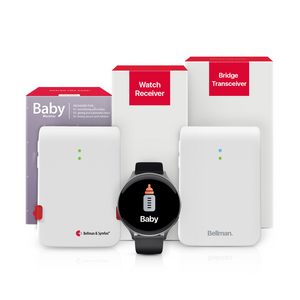
Understanding what a dedicated wearable alerting receiver does differently - and why those differences matter - is easier when you have a concrete example. The Bellman Watch Receiver is the dedicated wearable component of the Bellman & Symfon home alerting system, and it represents a fundamentally different design philosophy from a consumer smartwatch adapted for hearing loss use.
No phone required
The Bellman Watch Receiver communicates directly with the Bellman Bluetooth Bridge via Bluetooth 5, with a range of up to 650 feet in open field. No smartphone needs to be nearby. No app needs to be running. The Watch receives alerts directly from the Bridge, which in turn receives them from dedicated RF transmitters placed at each alert source in the home. The dependency chain is two links long - transmitter to Bridge, Bridge to Watch - rather than four. This simplicity is a reliability feature, not a limitation.
Distinct vibration patterns per alert type
Consumer smartwatches typically use the same or similar vibration patterns for all incoming notifications, differentiated only by the visual notification on screen. The Bellman Watch Receiver uses distinct, event-specific vibration patterns for each alert type - a different vibration for a doorbell versus a smoke alarm versus a baby monitor versus a phone call. You can identify what triggered the alert from the vibration alone, without looking at the watch face. This is particularly valuable in situations where you cannot immediately look at the watch, or where the visual notification might not be visible.
Icon-based display for instant identification
The Watch Receiver's display shows a clear, large icon identifying the alert source - a house icon for the doorbell, a flame icon for a smoke alert, a baby icon for the baby monitor. The iconography is designed for immediate recognition at a glance, without requiring you to read text. This is a design consideration that matters when the alert is urgent, and you are moving quickly.
Up to one week of battery life
Consumer smartwatches - Apple Watch, Samsung Galaxy Watch, Pixel Watch - typically require daily or every-other-day charging, depending on usage. The Bellman Watch Receiver is designed for long wear between charges, with up to one week of battery life per charge. This reduces the cognitive load of maintaining the device and eliminates the risk of the watch being uncharged during a critical alert window.
Works as part of an expandable home system
The Watch Receiver is a component in a complete home alerting system, not a standalone device. It works alongside the Bellman Bluetooth Bridge, which connects to every transmitter in the home - doorbell, smoke alarm, baby monitor, telephone, push button - and delivers each alert to the Watch with the appropriate icon and vibration pattern. The system is fully expandable: adding a new transmitter for a new alert type does not require reconfiguring the Watch or the Bridge. For the complete picture of how the system fits together, see our pillar guide: Best Wearable Alert Devices for Deaf & Hard of Hearing People (2026).
The Best Strategy: Using Both Smartwatch and Dedicated Receiver Together
The right answer for most people with hearing loss is not smartwatch or dedicated receiver - it is both, applied correctly to the contexts each handles best. A well-designed 24-hour alerting strategy uses each tool where it performs reliably and does not rely on either tool outside its effective range.
What your smartwatch handles well
Use your smartwatch for communication notification awareness throughout the day: incoming calls, texts, calendar reminders, meeting alerts, and app notifications. Enable Sound Recognition (on Apple Watch) or Sound Notifications (on Android) as a supplemental environmental awareness layer - particularly in the room where you are spending time with your phone nearby. Think of Sound Recognition as an in-room awareness layer, not a whole-home safety layer. It is valuable when it works. Do not depend on it when it cannot work.
What the dedicated receiver handles
Use the Bellman Watch Receiver for home safety alerts - smoke alarm, doorbell, baby monitor, telephone - anywhere in the home, regardless of where your smartphone is. The Watch Receiver covers you in the kitchen, the garden, the garage, and any room where you might be away from your phone. This is the layer you depend on for safety-critical alerts.
What the bed shaker handles at night
Neither a smartwatch nor a wrist-worn dedicated receiver covers the overnight period when hearing aids are removed and wearable devices are typically charging. This is the highest-risk window for missed safety alerts, and it requires its own dedicated solution. The Bellman Alarm Clock Receiver with integrated bed shaker - placed under the mattress or pillow - delivers a powerful tactile vibration and flashing light alert for smoke alarm, doorbell, and other transmitter signals while you sleep. This nighttime layer is not optional for a complete alerting strategy; it is the layer that makes the system genuinely 24-hour.
Three layers for 24-hour coverage
Every item here closes a specific gap - do not skip any layer.
- Smartwatch notifications enabled for calls, texts, and app alerts
- Sound Recognition (Apple) or Sound Notifications (Android) turned on
- Haptic strength set to maximum on smartwatch
- Prominent Haptic enabled (Apple Watch)
- Bellman Watch Receiver paired and charged - worn during waking hours
- Smoke Alarm Transmitter installed on every floor
- Doorbell Transmitter installed at main entrance
- Baby Monitor Transmitter installed if applicable
- Telephone Transmitter connected for landline coverage
- Bellman Alarm Clock with bed shaker installed for nighttime coverage
- All transmitters tested with hearing aids removed at night
- Watch Receiver charged daily routine established
Practical Setup: Getting the Most from Smartwatch Hearing Features
If you own or are considering an Apple Watch or Samsung Galaxy Watch for hearing loss alerting, these are the specific steps to configure the devices to perform as well as possible for this use case. This is not a general smartwatch setup guide - it focuses specifically on hearing accessibility configuration.
Apple Watch (watchOS 10 and later)
- Sound Recognition: iPhone → Settings → Accessibility → Sound Recognition → turn On → select all sounds relevant to your home (smoke alarm, CO alarm, doorbell, baby cry at minimum)
- Prominent Haptic: Watch app on iPhone → Sounds & Haptics → Haptics → select Prominent. This adds a pre-notification tap before each alert.
- Haptic strength: Watch app on iPhone → Sounds & Haptics → Haptic Strength → slide to maximum
- Critical Alerts: For apps that support Critical Alerts (like some emergency alert apps), these override Do Not Disturb and Silent mode. Approve them when prompted.
- Wrist detection: Watch app on iPhone → Passcode → turn on Wrist Detection - required for the watch to know when it is being worn and deliver haptics correctly
- Crown haptics: Settings (on Watch) → Sounds & Haptics → Crown Haptics → On - adds tactile feedback to Crown rotation that can help orient attention
Samsung Galaxy Watch (One UI Watch 6 and later)
- Sound Notifications (Android): Android phone → Settings → Accessibility → Sound Notifications → turn On → select which sounds to detect. This mirrors the paired Galaxy Watch as wrist vibrations.
- Vibration intensity: Galaxy Watch → Settings → Sound & Vibration → Vibration Intensity → set to maximum
- Long vibration: Galaxy Watch → Settings → Sound & Vibration → Long Vibration → On - extends the duration of vibration for notifications
- Samsung Accessibility features: Galaxy phone → Settings → Accessibility → Hearing Enhancements - enable relevant features including amplification and flash notification (LED flash on phone when notification fires)
- Watch face: Choose a watch face that displays notification banners prominently - the Watch4 and Watch6 series support large-format notification displays that are easier to read at a glance
What to Look for When Buying a Smartwatch for Hearing Loss
If you are choosing a smartwatch with hearing loss alerting as a key requirement, these are the specifications and features that differentiate devices meaningfully for this use case. Not all smartwatches are equal in terms of haptic motor strength, Sound Recognition quality, or accessibility feature integration.
Haptic Motor Strength
The physical intensity of the vibration motor is the single most important hardware specification for hearing loss use. Apple Watch Ultra 2 and Watch Series 9/10 have stronger haptic motors than earlier models. Samsung Galaxy Watch Ultra has a notably powerful vibration motor. Check independent reviews specifically mentioning haptic strength - manufacturer specifications rarely quantify this in useful terms.
Sound Recognition Quality
Apple Watch with Sound Recognition (via iPhone) offers the most mature and consistently accurate environmental sound detection available on a consumer smartwatch platform in 2026. If environmental sound detection via the watch is important to you, the Apple Watch + iPhone ecosystem is currently the most capable option. Android sound detection varies significantly by phone model and OS version.
Battery Life
Longer battery life reduces the risk of the device being uncharged during a critical moment. Apple Watch Ultra 2 offers up to 60 hours in Low Power Mode. Samsung Galaxy Watch Ultra offers up to 48 hours. Standard Apple Watch Series 10 is 18 hours. Consider whether you will remember to charge daily - and if not, prioritise devices with longer life or the ability to charge quickly.
Accessibility Feature Depth
Apple's accessibility ecosystem - VoiceOver, Sound Recognition, Live Listen, Made for iPhone hearing aid integration - is more mature and deeply integrated than any other smartwatch platform. If you use Made for iPhone hearing aids or cochlear implant accessories, Apple Watch is the platform with direct audio streaming integration through Live Listen.
Fall Detection
For older adults or those who live alone, automatic fall detection - which calls emergency services and contacts if no response is given after a detected fall - is a meaningful safety feature that no dedicated alerting transmitter provides. Apple Watch Series 4 and later, Samsung Galaxy Watch 6 and later, and Google Pixel Watch 2 all include this capability.
Hearing Aid Compatibility
If you wear Made for iPhone hearing aids, Apple Watch pairs seamlessly and can stream audio directly from the watch microphone to your hearing aids via Live Listen - useful for amplifying speech in meetings and conversations. Samsung Galaxy Watch supports some Android-compatible hearing aids but the integration is less comprehensive. If you use a cochlear implant, check with your audiologist for device-specific compatibility.
The Honest Summary: What Smartwatches Are, and What They Are Not
Smartwatches are excellent communication hubs and increasingly capable sound awareness tools for people with hearing loss. The technology has improved meaningfully in the past three years - Sound Recognition is more accurate, haptic motors are stronger, and the accessibility feature integration on both Apple and Samsung platforms is more thoughtful than it was in earlier generations. For daily digital communication awareness - calls, texts, calendar alerts, workplace notifications - a smartwatch is close to ideal.
But a smartwatch is not a home safety alerting system. It is a notification delivery device for a smartphone, with an added environmental sound detection layer that works well within approximately 10 to 15 feet of the sound source and fails meaningfully beyond that. Any alerting strategy that relies on a smartwatch alone for smoke alarm, doorbell, or baby monitor coverage in a full-size home has silent gaps - gaps that may not become apparent until a critical moment reveals them.
The correct approach is layered. A smartwatch for communication awareness and in-room sound supplementation. A dedicated wearable receiver - the Bellman Watch Receiver paired with the Bellman Bluetooth Bridge - for whole-home safety alerting during waking hours. A bed shaker system for overnight coverage when neither device is being worn. Each layer covers a specific window. Together, they close all the gaps.
Ready to add the dedicated wearable layer?
Explore the Bellman Watch Receiver and Bluetooth Bridge bundles - designed to cover the whole-home safety alerts your smartwatch cannot reliably reach.
Sources and references: Apple Inc. - Sound Recognition feature documentation (watchOS 10, iOS 16+); Accessibility → Sound Recognition technical specifications; Prominent Haptic and Haptic Strength settings documentation (support.apple.com) · Google LLC - Android Sound Notifications feature documentation (Android 9+, Accessibility); Live Transcribe technical overview (android.com/accessibility) · Samsung Electronics - Galaxy Watch 6 and Watch Ultra accessibility features; One UI Watch 6 Sound and Haptics settings documentation (samsung.com/accessibility) · National Institute on Deafness and Other Communication Disorders (NIDCD) - Assistive Devices for People with Hearing, Voice, Speech, or Language Disorders · Hearing Loss Association of America (HLAA) - Assistive Listening Devices; Alerting and Signaling Devices overview · Bellman & Symfon - Watch Receiver BE3330 product specifications including Bluetooth 5, 650 ft open-field range, battery life, and vibration pattern documentation (us.bellman.com/products/bluetooth-watch-receiver) · Bellman & Symfon - Bluetooth Bridge Transceiver BE1521 product specifications (us.bellman.com/collections/bluetooth-bridge) · Bellman & Symfon - Smoke Alarm Transmitter, Baby Monitor Transmitter, Telephone Transmitter, and Doorbell Transmitter product specifications.
This article is for informational purposes only. Product specifications are subject to change; refer to current product pages at us.bellman.com for the most up-to-date technical details. This guide does not constitute medical advice. Consult a licensed audiologist for hearing evaluation and personalized device recommendations.

How Smartwatch Alerts Work for People with Hearing Loss
This guide breaks down the practical choices, features, and considerations behind this topic. Use it to identify a setup that fits the listener, the environment, and the everyday moments that matter most.
The featured products below are current Bellman options discussed in the article or closely matched to its use case.