Emergency Preparedness for Deaf and Hard of Hearing Seniors: What Every Caregiver Must Know

Standard emergency alerts - smoke alarms, doorbells, phone calls, a shout from across the house - rely entirely on sound. For seniors with hearing loss, that reliance creates gaps that caregivers often don't see until it's too late. This guide closes every one of those gaps, room by room and risk by risk.
Emergency preparedness for deaf and hard-of-hearing seniors requires layered, non-auditory alerting: vibrating smoke and CO alarms connected through a Bluetooth bridge, a push-button call-for-help system, a wrist receiver that delivers clear icon-based alerts for every household event, and an emergency communication plan that accounts for when hearing aids are out. Together, these create a silent but comprehensive safety net - for both everyday household events and true emergencies.
Why Standard Emergency Plans Fail Deaf and Hard-of-Hearing Seniors
Emergency preparedness guides are almost universally written with one assumption baked in: that the people following them can hear. Hear the smoke alarm. Hear someone knocking. Hear the phone ring. Hear a caregiver calling from the next room. For the roughly 37.5 million American adults who have some degree of hearing loss - a figure that rises sharply with age - that assumption makes most standard emergency advice dangerously incomplete.
Among adults aged 65 to 74, approximately one in three has significant hearing loss. Among those 75 and older, that figure climbs to nearly one in two. Many of these seniors live alone or live with a spouse who also has hearing loss. Many remove their hearing aids at night - precisely the hours when smoke, CO poisoning, and medical emergencies most often go undetected until they become catastrophic.
Caregivers - whether family members managing a parent's home from a distance or in-home aides - often have no idea how large these gaps are until a close call happens. The smoke alarm that nobody heard. The fallen family member who couldn't call for help. The delivery of critical medication left at the front door all day. The emergency notification that arrived as an audible alert on a phone sitting across the room.
This guide is built specifically for caregivers who want to close those gaps before a close call becomes a crisis. It covers every category of household emergency, every time-of-day risk, and every layer of alerting - from wrist vibrations to sleep-safe bed shakers - with specific product guidance, caregiver action steps, and real-world scenarios.
The Core Problem: Sound-Based Safety in a Silent World
Emergency alerting systems in the United States are built around sound. Smoke alarms emit an 85-decibel horn. CO detectors beep. Landline phones ring. Doorbells chime. Emergency broadcast systems use audio. Even the default emergency alert on smartphones is an audible tone.
For a senior with moderate-to-severe hearing loss who has removed their hearing aids to sleep, shower, or rest - which is most of the day for most seniors - none of these alerts are reliable. Even with hearing aids in, significant background noise, distance from the sound source, age-related changes in frequency perception, or a different room in the house can mean the alert goes completely unnoticed.
The solution is not to make sounds louder. It is to add alert channels that do not depend on sound at all: wrist vibration, visual icons, flashing lights, and physical bed shakers. These channels work regardless of whether hearing aids are in, regardless of what room the senior is in, and regardless of whether the original alert was designed for someone with hearing loss.
Relies on the senior being awake, having aids in, being within earshot, and not being distracted. Fails silently - the senior has no indication they missed anything. Only as reliable as the noisiest household moment.
Delivers wrist vibration, icon notification, visual flash, and bed shaker in parallel. Works with hearing aids out. Works across the home. Works during sleep. A missed alert on one channel still fires on the others.
Fire and Carbon Monoxide: The Highest-Stakes Gap
Of all the emergency preparedness gaps for seniors with hearing loss, fire and carbon monoxide detection is the most critical. A standard smoke alarm gives a house approximately two to three minutes of survivable egress time once it sounds - and that window starts the moment the alarm fires, not the moment the occupant hears it. Every second of delayed awareness reduces the available escape time.
For a senior with hearing loss sleeping in a back bedroom with hearing aids removed, a standard audible smoke alarm in the hallway may never be perceived at all. Carbon monoxide is even more dangerous in this context: CO poisoning progressively impairs consciousness and motor function, meaning a senior who does not receive an early-stage alert may lose the ability to escape or call for help as the situation worsens.
What Effective Fire and CO Alerting Looks Like
An effective fire and CO alert system for a senior with hearing loss has three layers: a daytime wrist layer, a nighttime sleep layer, and a smartphone backup layer - all connected through a single hub that works offline.
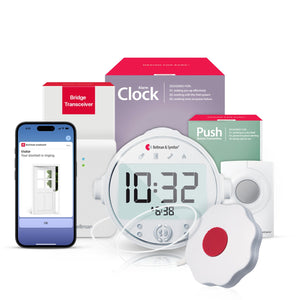
The Bellman Bluetooth Bridge receives a wireless signal from a smoke alarm transmitter the moment the existing smoke alarm sounds. It instantly relays that signal to the Bellman Watch Receiver on the senior's wrist - delivering a distinct vibration pattern and a smoke alarm icon - and to the Bellman Assistant app on a paired smartphone. During waking hours with hearing aids out, the wrist alert catches what the ear does not.
At night, the wrist receiver is typically charging. This is where the sleep safety layer becomes essential. The Bridge + Smoke Alarm + Alarm Clock bundle includes an Alarm Clock Receiver that delivers 100 dB sound output, a flashing light, and a bed shaker - a physical vibrating pad placed under the mattress. When the smoke alarm fires at 2 a.m., the bed shaker wakes the senior without requiring hearing, vision, or any pre-waking awareness. The Watch Receiver can be added separately to this bundle for full daytime wrist coverage.
3 a.m. Kitchen Fire - Two Outcomes
Without a layered system: A grease fire starts on the stove. The smoke alarm in the hallway sounds at 85 dB. The senior in the back bedroom has hearing aids on the nightstand. The alarm is too distant and too high-frequency to penetrate sleep without amplification. By the time the smoke reaches the bedroom and becomes perceptible, escape time is severely reduced.
With the Bridge + Smoke + Alarm Clock bundle: The smoke alarm fires. The Bridge detects it within seconds and sends the signal to the Alarm Clock Receiver. The bed shaker activates immediately under the mattress. The senior wakes - without needing to hear anything - with full egress time available. The Bellman Assistant app also notifies any family member with the app installed, even if they're not in the home.
For caregivers, the single most important action item in this guide is ensuring this fire and CO alerting layer is in place. Everything else matters, but nothing matters as much as this. For a deeper look at how visual and vibrating smoke alarm systems work, see our full guide on smoke alarms for seniors with hearing loss.
Calling for Help: When the Senior Needs to Alert Others
Emergency preparedness is not only about the home alerting the senior - it is also about the senior being able to alert others. A fall in the bathroom. A sudden health episode in the living room. A moment of confusion or distress. In any of these situations, the ability to call for help quickly and without relying on voice or a phone within arm's reach can be the difference between a manageable situation and a tragedy.
The Bellman Push Button System with Bluetooth Bridge and Watch Receiver addresses exactly this need. A small, portable push button transmitter - wearable around the neck or wrist, or placed on a table or wall - sends an instant signal to the Bridge when pressed. The Bridge relays that signal as a wrist vibration and icon to the Watch Receiver worn by a caregiver or family member in the same home, and as a notification to the Bellman Assistant app on any paired smartphone.
Unlike monitored personal emergency response systems (PERS) that require a monthly subscription and a cellular network to function, the Bellman push button system works entirely within the home network via Bluetooth - with no subscription, no call center, and no internet connection required. For in-home caregiving situations, this makes it a faster and more reliable option for close-range help calls.
Who Benefits Most from the Push-Button System
- Seniors living with an in-home caregiver who needs to be alerted silently without shouting across rooms
- Households where both the senior and caregiver have hearing loss - voice-based communication is unreliable in an emergency
- Seniors who are mobile but have fall risk - the button worn around the neck can be pressed immediately after a fall without reaching a phone
- Seniors with cognitive impairment who may not be able to operate a smartphone but can press a simple button
- Any situation where privacy and dignity matter - the push button is discreet, wearable, and does not require the senior to shout or be seen in distress
For overnight situations where a family member needs to be alerted if a senior requires assistance during the night, the Bridge + Push Button + Alarm Clock bundle includes the Alarm Clock Receiver, ensuring the caregiver is woken even with hearing aids out.
Doorbell and Visitor Alerts: Safety at the Front Door
A missed doorbell is an inconvenience for most people. For a senior with hearing loss, it can be a safety issue. A missed delivery of prescription medication. A visiting home health aide who can't get in and marks the appointment as a no-show. A neighbor checking in after an injury. A first responder who gives up and leaves. These are not edge cases - they happen routinely in households without doorbell alerting for seniors with hearing loss.
The Bellman Doorbell System with Bluetooth Bridge and Watch Receiver places a transmitter near the existing doorbell chime - no rewiring, no electrician - and uses the Bridge to relay a doorbell icon and wrist vibration to the Watch Receiver the moment someone rings. The senior feels the alert on their wrist wherever they are in the home.
For caregivers managing a parent's care remotely, the Bellman Assistant app receives the same doorbell notification - so if a home health aide is expected between 10 and 11 a.m., a caregiver in another state can verify arrival from their phone. This is a meaningful addition to any remote caregiving arrangement.
For complete coverage including overnight hours - for example, ensuring the senior is alerted if a caregiver arrives early in the morning - the Bridge + Doorbell + Alarm Clock bundle pairs the doorbell transmitter with the Alarm Clock Receiver for sleep-safe alerting.
Daytime vs. Nighttime: Why the Alert Strategy Must Change at Bedtime
One of the most common mistakes caregivers make when setting up an alert system for a senior with hearing loss is treating daytime and nighttime as interchangeable. They are not. The risk profile, the available alert channels, and the physical situation of the senior change dramatically between waking hours and sleep.
| Factor | Daytime (Waking Hours) | Nighttime (Sleep Hours) |
|---|---|---|
| Hearing Aids | Usually in some residual hearing present | Removed - no auditory awareness at all |
| Watch Receiver | Worn on wrist - wrist vibration reaches the senior anywhere in the home | On charger - wrist alert not available |
| Smartphone | Usually nearby app notification visible on screen | On nightstand - screen notification may not wake a sleeping person |
| Primary Alert Channel | Watch Receiver wrist vibration + app notification | Alarm Clock Receiver: bed shaker + 100 dB sound + flashing light |
| Smoke / CO Risk | Moderate - more likely to notice secondary signs (smell, visual) | High CO especially dangerous during sleep; smoke may not be noticed until late stage |
| Recommended Setup | Bridge + Watch Receiver + paired smartphone | Bridge + Alarm Clock Receiver with bed shaker - smoke, CO, push button, doorbell all connected |
The practical implication for caregivers: the senior's alert system needs to be set up in two layers. The daytime layer centers on the Watch Receiver. The nighttime layer centers on the Alarm Clock Receiver with its bed shaker. The Bluetooth Bridge serves both layers through a single hub - one device, two coverage windows, no gaps.
Phone and Communication Alerts: Never Miss a Critical Call
For many seniors with hearing loss, the telephone is a persistent source of anxiety. They know they miss calls. They check their phone constantly. They worry about missing a call from a doctor, a pharmacy, a family member, or an emergency contact. This anxiety is not unfounded - landline ring signals, and even the vibration of a smartphone on a hard surface, are easy to miss with significant hearing loss.
The Bellman system addresses phone alerting from two directions. For landline phones, a telephone transmitter connects directly to the phone jack and detects the ring signal electrically - not by sound - relaying it through the Bridge to the Watch Receiver as a phone icon vibration alert. For mobile phones, the Bellman Bluetooth Bridge forwards incoming call notifications from a paired smartphone to both the Watch Receiver and the other Visit receivers in the home, including lamp flashers or the Alarm Clock Receiver.
For caregivers who rely on being able to reach a senior by phone in an emergency, confirming that phone alerts are part of the senior's system setup is a critical step. A senior who consistently misses calls is also a senior who may be impossible to reach during a welfare check.
Remote Caregiver Communication: What the App Makes Possible
When a family member installs the Bellman Assistant app and is paired with the Bridge at the senior's home, they receive real-time notifications of every alert that fires in the house - doorbell, smoke alarm, push button press - on their own smartphone. This creates a passive monitoring layer for remote caregivers: not surveillance, but confirmation that the system is working and that alerts are being generated as expected. If the doorbell fires at 10:15 a.m. and the expected home health aide was scheduled for 10 a.m., the caregiver knows arrival happened. If the push button fires at 3 a.m., the caregiver knows something needs attention - and can call or follow up immediately.
Building a Complete Emergency Communication Plan
Hardware is only one part of emergency preparedness for seniors with hearing loss. The other part is a communication plan - a documented, practiced set of protocols that every caregiver, household member, and key contact understands and can execute under stress. A senior with the best alerting system in the world is still vulnerable if the people around them don't know what to do when an alert fires or when they lose contact.
The Five-Part Emergency Communication Plan
1. Document Communication Needs
Create a one-page document that emergency responders can access quickly: degree and type of hearing loss, whether the senior uses hearing aids or cochlear implants, preferred communication method (written notes, lip reading, text), and any secondary disabilities that affect emergency response. Keep a copy on the refrigerator, in a wallet card, and with the senior's medical records.
2. Register with Local Emergency Services
Many counties and cities maintain voluntary registries of residents with disabilities, including hearing loss. Registration allows emergency dispatchers to flag the address so first responders know to announce themselves visually, not just by knocking or shouting. Contact your local fire department, police non-emergency line, or county emergency management office to find out if a registry exists in your area.
3. Set Up Emergency Text Alerts
Wireless Emergency Alerts (WEA) - the federal system that sends emergency notifications to smartphones - deliver as both sound and vibration, so they do reach seniors with vibration-enabled phones. Ensure the senior's smartphone has emergency alerts enabled in settings. For local weather and community alerts, register for text-based alert systems rather than relying solely on radio or TV broadcasts.
4. Establish a Neighbor Check-In Protocol
Identify one or two neighbors who understand the senior's hearing loss and are willing to serve as a first line of in-person welfare checks. Give them the caregiver's contact number and a clear protocol: if they haven't seen the senior by a certain time, or if they observe something concerning, they know who to call and how to approach the front door in a way that doesn't rely on being heard from inside.
5. Practice the Evacuation Plan
Walk the senior through the evacuation plan at least twice a year - including from the bedroom, where disorientation from sleep is most dangerous. Practice with hearing aids out. Confirm the senior knows two exit routes from every room they regularly use, where the meeting point outside is, and how to signal for help if exits are blocked. The plan should account for the physical limitations that often accompany age-related hearing loss.
6. Backup Power Planning
The Bellman Bluetooth Bridge requires mains power. During a power outage - which may accompany the very emergencies the system is meant to address - a battery backup (UPS) can keep the Bridge running for several hours. Identify which alert channels remain active without mains power, and ensure the senior knows what to do if the power goes out. Fully charged smartphones with emergency contacts saved locally are a critical backup layer.
Room-by-Room Risk Guide for Caregivers
Emergency risks for seniors with hearing loss are not evenly distributed across the home. Certain rooms carry significantly higher risk, and certain activities - showering, sleeping, cooking - create predictable windows of vulnerability. This room-by-room guide helps caregivers identify where alerting gaps are most likely to exist.
Bedroom - Highest Risk Window
The bedroom is where hearing aids come out and where the senior is most vulnerable to delayed emergency response. The primary alert requirement here is the Alarm Clock Receiver with bed shaker. Every alert that can reach the bedroom through the Bridge - smoke alarm, push button press, doorbell, phone - should be configured to activate the Alarm Clock Receiver during nighttime hours. For smoke and CO specifically, this is life-critical. For push button and doorbell, it ensures the senior is not left completely isolated from household events during sleep.
For fire and CO bedroom coverage at night, the Bridge + Smoke Alarm + Alarm Clock bundle is the recommended starting configuration. The Watch Receiver can be added separately for daytime wrist alerts throughout the home.
Bathroom - Isolation Risk
The bathroom creates a specific isolation risk: running water masks any remaining hearing ability, the door is typically closed, and the senior is often without hearing aids. A fall or medical episode in the bathroom - where slick surfaces make falls more likely - may go completely undetected by others in the home. A wearable push button worn on a lanyard in the shower ensures the senior can call for help even in this isolated environment. The Push Button System transmitter is waterproof for splash resistance in these situations.
Kitchen - Fire Risk Zone
The kitchen is where residential fires most commonly originate. It is also where seniors may be distracted by cooking tasks and less likely to notice a developing situation in another part of the home. Ensure the smoke alarm nearest the kitchen is connected to the Bridge's transmitter network, and that the senior's Watch Receiver is worn during cooking hours. The Watch's distinct smoke alarm icon and vibration pattern will cut through kitchen distraction in a way that a distant audible alarm cannot.
Living Areas - The False Safety Zone
Living rooms and sitting areas feel safe because the senior is typically awake and mobile. But hearing aids may be out for comfort, the TV may be loud, and the senior may be focused on reading or a screen. Doorbell alerts, phone alerts, and push-button calls from another room all fire without being heard. The Watch Receiver's wrist vibration is the alert channel that works in this environment - it cuts through background noise and distraction because it is physical, not auditory.
Yard and Outdoor Spaces
When a senior is in the yard or on a porch - away from the indoor smoke alarms, beyond earshot of a knocked door, with hearing aids potentially removed - indoor alert systems provide no coverage. The Watch Receiver's 650-foot open-field Bluetooth range typically covers a backyard, patio, or driveway. Ensuring the senior wears the Watch whenever they are outside closes this coverage gap.
Common Mistakes Caregivers Make - and How to Avoid Them
- Relying on louder alarms alone - Amplified auditory alarms are not sufficient for seniors with severe hearing loss or those who sleep without aids. Always add a physical alert channel.
- Forgetting the nighttime layer - A wrist receiver the senior removes at bedtime leaves a critical coverage gap during sleep. The Alarm Clock Receiver with bed shaker is the only reliable sleep alert.
- Using a Wi-Fi-dependent system - Router outages, internet disruptions, and power cuts often accompany emergencies. Systems that require Wi-Fi to function can fail exactly when they are needed most.
- Skipping the push button - An alert system that only notifies the senior of external events misses the most common in-home emergency: the senior needing to alert a caregiver.
- Not testing the system regularly - Alert systems that are set up and never tested develop quiet failures. Test every transmitter monthly. Replace batteries on schedule. Confirm app notifications are still enabled.
- No backup for smartphone alerts - App notifications require the smartphone to be charged, Bluetooth-connected, and with notifications enabled. These conditions break down silently. The Watch Receiver and Alarm Clock Receiver are the primary channels; the app is the backup, not the other way around.
- Assuming the senior will ask for help - Many seniors with hearing loss have learned to mask their communication gaps. They may not volunteer that they've been missing doorbells, smoke alarms, or phone calls - because they've adapted around those gaps for years. Caregivers should proactively assess and not wait to be told there's a problem.
Setting Up the Complete Alert System: A Caregiver's Step-by-Step
For caregivers who want to set up a comprehensive, layered alert system for a senior with hearing loss, here is the recommended configuration sequence - from the most critical alert type to the most complete coverage.
Step 1 - Start with Fire and CO (Non-Negotiable)
The Bridge + Smoke Alarm + Alarm Clock bundle is the starting point. Install the Bridge in a central location. Place the Smoke Alarm Transmitter next to an existing smoke alarm. Set up the Alarm Clock Receiver with bed shaker in the bedroom. Test with the smoke alarm's test button. Confirm the bed shaker activates. This layer must work before anything else is added.
Step 2 - Add the Watch Receiver for Daytime Coverage
The Bellman Watch Receiver pairs directly to the Bridge and gives the senior wrist-level alerts for every connected transmitter during waking hours. Pair it to the existing Bridge - no additional hub required. Walk the senior through what each icon means. Make sure they know to wear it consistently, including during cooking, gardening, and time in the yard.
Step 3 - Add the Push Button for Call-for-Help
The Push Button Transmitter adds to the existing Bridge network without reconfiguration. Place one near the bed, one in the bathroom (on a lanyard for shower use), and one in the living area. Test each by pressing the button and confirming the caregiver's Watch or app receives the alert. For overnight coverage, confirm the push button signal also activates the Alarm Clock Receiver.
Step 4 - Add the Doorbell Alert
Place the Doorbell Transmitter near the existing doorbell chime. No wiring required - it detects the chime electronically. Confirm the Watch Receiver shows the doorbell icon when the bell is pressed. If overnight doorbell coverage is needed (for early-morning home health aide arrivals, for example), confirm the Alarm Clock Receiver is also configured to respond to doorbell signals.
Step 5 - Install the Bellman Assistant App on Caregiver Phones
Download the free Bellman Assistant app (iOS 15+ or Android 8.0+) on every caregiver's smartphone. Pair each phone to the Bridge. Confirm that each paired phone receives notifications for smoke alarms, push button presses, and doorbells. This remote notification layer allows caregivers who are not in the home - whether in the next room or in another city - to be aware of any alert that fires.
Everything to Confirm Before Calling the System Complete
Work through each item after setup. Every gap in this list is a gap in protection.
- Bridge plugged in and powered on centrally
- Smoke Alarm Transmitter placed and tested
- Alarm Clock Receiver with bed shaker in bedroom - tested overnight
- Watch Receiver paired, charged, and worn by senior daily
- Push button placed bedside and tested
- Push button on lanyard for bathroom use
- Doorbell Transmitter installed and tested
- Caregiver app installed and receiving notifications
- Emergency communication plan documented and shared
- Local emergency services registry completed
- Neighbor check-in protocol established
- Battery backup (UPS) for Bridge considered
- Monthly test schedule calendared
- All alert icons reviewed with senior - they know what each vibration means
How the Bellman System Compares to Other Emergency Alert Options
| Alert Option | Limitations for Seniors with Hearing Loss | Bellman System Advantage |
|---|---|---|
| Louder / Amplified Smoke Alarms | Still entirely sound-based. Ineffective when hearing aids are out. No wrist or bed alert. | Bellman adds vibration + bed shaker + icon - works without hearing aids, without sound awareness |
| Smart Home Systems (Wi-Fi Based) | Fail during internet outages and router disruptions - exactly when emergencies occur. Cloud-dependent. | Bridge operates entirely over Bluetooth. No Wi-Fi, no cloud dependency, no outage risk |
| Medical Alert / PERS Devices | Require monthly subscription. Cover only the senior's call for help - not smoke, doorbell, or phone alerts. | Bellman covers call-for-help AND smoke, doorbell, phone, and baby alerts in one system. No subscription. |
| Smartphone Emergency Apps | Require smartphone to be charged, unlocked, nearby, and with notifications enabled. Easily missed. | App is a backup channel. Primary alerts go to wrist and bed shaker - not dependent on phone screen awareness |
| Standard Flashing Alarm Receivers | Visual-only. Must be in the senior's line of sight. Ineffective if looking away, in another room, or sleeping. | Watch Receiver adds wrist vibration for wherever the senior is; bed shaker adds sleep coverage |
Emergency Preparedness as Part of Aging in Place Safely
For most seniors with hearing loss, the goal is to stay in their home as long as possible - independently, safely, and with dignity. Emergency preparedness is not a separate topic from aging in place; it is central to it. A senior who cannot reliably receive fire alerts, cannot call for help without voice, cannot hear the doorbell when a home health aide arrives, and cannot catch a critical call from their doctor is a senior whose independence is quietly eroding, even if nothing dramatic has happened yet.
The Bellman alerting system is, in this sense, more than an emergency device. It is what we call a "more than a monitor" solution - a connected home alerting system that restores full situational awareness to a senior with hearing loss across every category of household event. Not just emergencies, but daily life: knowing when someone is at the door, when the phone rings, when the laundry is done, when a family member is calling - all delivered silently to the wrist.
For caregivers building a longer-term plan for a parent or loved one aging in place with hearing loss, the Home Safety Alert Systems for Seniors with Hearing Loss: Complete Guide covers the full picture - every product category, every alert type, and how to build a system that grows as needs evolve.
Frequently Asked Questions
What is the most important emergency preparedness step for a senior with hearing loss?
Fire and carbon monoxide alerting that works during sleep - specifically, a bed shaker connected to a smoke alarm transmitter. This is the scenario where auditory alerts fail most completely and where the consequences are most severe. The Bridge + Smoke Alarm + Alarm Clock bundle with a bed shaker covers this need without requiring any auditory awareness.
Will the Bellman system work if the internet goes out?
Yes. The Bellman Bluetooth Bridge operates entirely over Bluetooth - it does not use Wi-Fi or require an internet connection to deliver alerts to the Watch Receiver or Alarm Clock Receiver. Internet outages, router failures, and broadband disruptions do not affect the core alerting function. The Bellman Assistant app on a smartphone communicates with the Bridge via Bluetooth, not via the internet, when you are at home.
Can a caregiver in another city receive alerts from the senior's home?
Yes, with the Bellman Assistant app installed on the caregiver's smartphone and paired with the Bridge in the senior's home. When the caregiver's phone is within Bluetooth range of the Bridge (when visiting, for example), they receive all alerts in real time. The app also retains notification history, so a caregiver can review which alerts fired and when - useful for monitoring patterns over time.
Is the push button waterproof for bathroom use?
The Bellman Push Button Transmitter is designed for use in environments where moisture is present. Wearing it on a lanyard in the shower is a supported use case. Check the specific product specifications at the product page for current IP rating details.
What is the difference between the Watch Receiver and the Alarm Clock Receiver?
The Watch Receiver is worn on the wrist and delivers alerts as vibrations and icon notifications during waking hours. The Alarm Clock Receiver sits on the bedside table and delivers alerts via 100 dB sound, flashing light, and a physical bed shaker - designed to wake a sleeping person who has removed their hearing aids and their Watch. The two devices cover different time windows and should be used together for 24-hour protection.
How many transmitters can connect to one Bellman Bridge?
The Bellman Bluetooth Bridge can receive signals from the full range of Bellman Visit transmitters - smoke alarm, doorbell, baby monitor, phone, push button, and sound monitor - all through one Bridge. You do not need a separate Bridge per transmitter or per room. One Bridge serves as the central hub for the entire home alerting network.
Should I register my parent with local emergency services?
Yes, if your county or city offers a voluntary disability registry for emergency responders. Registration flags the address in the dispatch system so first responders know to approach the door visually, allow extra time for response, and not assume the absence of a sound response means the occupant is not home. Contact your local fire department or county emergency management office to find out what is available in your area.
How often should the emergency alert system be tested?
Monthly testing of every transmitter is the recommended minimum. Test the smoke alarm transmitter using the smoke alarm's test button. Test the push button by pressing it and confirming the Watch and Alarm Clock Receiver both respond. Test the doorbell by ringing it. Replace transmitter batteries on a set schedule - at least annually, or whenever a low-battery warning fires. An alert system with a dead battery provides no protection.
Which Bundle Is Right for This Situation?
Every senior's household is different. Here is a quick guide to choosing the right starting bundle based on the most urgent alerting need, with the understanding that all bundles share the same Bridge and can be expanded with additional transmitters over time.
Build the right safety layer for your senior at home.
Browse the complete Bellman Bridge collection - smoke alarm, doorbell, push button, and more - all working through one hub, no Wi-Fi required.
Sources and references: National Institute on Deafness and Other Communication Disorders (NIDCD) - Statistics on hearing loss prevalence in adults aged 65+ (nidcd.nih.gov) · Centers for Disease Control and Prevention (CDC) - Hearing loss in older adults: facts and data · U.S. Fire Administration (USFA) - Residential fire escape planning guidance including egress time data · Federal Emergency Management Agency (FEMA) - Emergency preparedness resources for people with disabilities (ready.gov/disability) · Bellman & Symfon - Bluetooth Bridge BE1521, Watch Receiver BE3330, Alarm Clock Receiver, Smoke Alarm Transmitter, Push Button Transmitter BE1240, Doorbell Transmitter product specifications (us.bellman.com) · Federal Communications Commission (FCC) - Wireless Emergency Alerts (WEA) system overview and accessibility requirements.
This article is for informational and educational purposes only. Emergency preparedness needs vary by individual, home, and local jurisdiction. Consult your local fire department, emergency management office, and relevant healthcare providers for guidance specific to your situation. Product specifications are subject to change; refer to current product pages at us.bellman.com for the most up-to-date technical details.
Emergency Preparedness for Deaf and Hard of Hearing Seniors: What Every Caregiver Must Know
This guide breaks down the practical choices, features, and considerations behind this topic. Use it to identify a setup that fits the listener, the environment, and the everyday moments that matter most.
The featured products below are current Bellman options discussed in the article or closely matched to its use case.