Deaf Doorbell Systems for Apartments: What Works When You Can't Drill

A practical guide for renters who are deaf or hard of hearing - covering every no-damage, no-drill alerting option that works in apartments, condos, and rental properties, and exactly how to set each one up.
The Renter's Problem Is Different
If you own your home, installing a deaf doorbell system is largely a technical question: which system fits your layout, your alerting needs, and your daily routines? But if you rent an apartment, a condo, a studio, a room in a shared house, the question comes with an extra layer of constraint. Most landlords prohibit permanent modifications. You cannot drill into walls, run new wiring, or replace existing doorbell hardware without written permission. In many cases, you cannot even change the doorbell button at the front door.
The good news is that the best deaf doorbell systems available today were designed - almost by accident - to work perfectly within those constraints. They are wireless. They require no drilling. They install with adhesive tape and a power outlet. They are fully portable when you move. And they work just as well in a studio apartment as in a detached house. This guide explains what works, what does not, and exactly what to set up for full deaf doorbell coverage in a rental home - including overnight alerting, so you are covered when you are asleep and your phone is charging on the other side of the room.
Wireless deaf doorbell systems are inherently renter-friendly. The door transmitter detects your existing doorbell chime using a built-in microphone - no wiring into the existing doorbell, no changes to the door hardware, and no landlord permission required. The Bluetooth Bridge plugs into a standard power outlet. The Watch Receiver clips to your wrist. When you move, you unplug everything, pack it in a bag, and set it all up again in the new place in under ten minutes.
What about the apartment's existing doorbell button? You do not touch it. The transmitter simply listens for the sound of the chime and triggers your alert. The building's doorbell system stays exactly as it was.
How a Wireless Deaf Doorbell System Works in an Apartment
Understanding the basic architecture of a wireless system clarifies why it is rental-safe and helps you make the right setup decisions for your specific apartment.
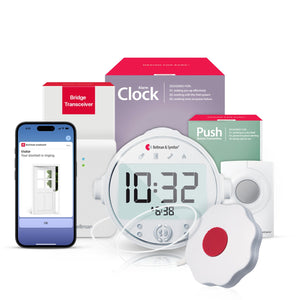
A complete deaf doorbell alerting setup for a renter has three components. The door transmitter sits near your existing doorbell chime - inside your apartment, close enough to detect the sound when someone presses the button outside. When it hears the chime, it sends a wireless Bluetooth signal. The Bluetooth Bridge receives that signal and routes the alert to your chosen output devices: a Watch Receiver on your wrist, your smartphone via the Bellman app, or a bed shaker for overnight coverage. The Watch Receiver vibrates and displays a visual icon on your wrist - no sound required, no Wi-Fi dependency for the core alert.
The Bellman doorbell system with Bluetooth Bridge and Watch Receiver follows exactly this architecture. The transmitter detects the existing doorbell chime acoustically, the Bridge relays the alert via Bluetooth, and the Watch Receiver delivers a wrist vibration and distinctive icon so you know a visitor has arrived - whether you are in the kitchen, the bathroom, or asleep in the bedroom.
What Doesn't Work in Rentals (and Why)
Before covering what works, it is worth being specific about the solutions that apartment renters commonly encounter but that create problems in a rental context.
Wired visual doorbells require connecting wires to the existing doorbell circuit - standard installation practice for homeowners, but a direct modification of the apartment's electrical system. Most leases prohibit this without written landlord consent, and undoing the wiring when you move out is an added hassle.
Replacement doorbell buttons require removing the existing push button and installing a new one - again, a hardware modification to the building's systems. In a multi-unit building, the doorbell button at street level may not even be inside your apartment and, therefore completely off-limits to tenants.
Hardwired strobe lights require an electrician and permanent wall fixtures. These are absolutely off the table in any standard rental agreement.
Acoustic transmitters listen for the existing chime sound using a microphone. They sit on a shelf or stick with removable adhesive, require no connection to the building's wiring, and leave zero trace when removed.
Plug-in receivers and bridges use standard electrical outlets - no drilling, no wall fixtures, no modifications. They look like any other plug-in device and are indistinguishable from a phone charger to a landlord doing a walk-through.
Wrist receivers are personal wearable devices that need no installation at all. They travel with you throughout the apartment and outside, and they come with you when you move.
The Complete Renter Setup: Step by Step
Here is exactly how to configure a fully functional deaf doorbell system in a rental apartment, with no drilling, no permanent modifications, and no landlord conversation required.
Step 1 - Place the Door Transmitter
- Find your apartment's doorbell chime box - this is the small box inside your apartment that makes the sound when someone presses the button outside. In many apartments it is mounted near the front door or in a hallway. In some units the chime is built into the intercom panel.
- Position the transmitter within about 12 inches of the chime - close enough that the microphone reliably picks up the sound. Use the removable adhesive strips included with the device (3M Command-style adhesive) or simply set it on a nearby shelf or ledge. No drilling required.
- Test the placement before committing - have someone press your doorbell button (or simulate the chime sound) while you confirm the transmitter detects it. If detection is unreliable, move the transmitter closer to the chime speaker. A few inches of repositioning usually resolves it.
- For intercom-only buildings (where the buzzer is integrated with a video intercom panel): the transmitter still works the same way - it listens for the audio sound of the intercom alert, not for a physical button press. Position it near the intercom speaker.
Step 2 - Set Up the Bluetooth Bridge
The Bluetooth Bridge plugs into any standard wall outlet and pairs with both the transmitter and your watch receiver. Place it somewhere with a clear path to both devices - central in the apartment is ideal for consistent range across all rooms. The Bridge requires no configuration beyond the initial pairing, which takes about two minutes following the included instructions.
Step 3 - Pair the Watch Receiver
The Bluetooth Watch Receiver pairs with the Bridge and delivers wrist vibration plus a visual icon when the doorbell is triggered. Wear it during the day for full apartment coverage - it travels with you to the kitchen, bathroom, balcony, and anywhere else in the unit. Unlike a lamp flasher or a phone notification, the wrist receiver works wherever you are without requiring line-of-sight to a fixed device or a charged smartphone nearby.
Step 4 - Add Overnight Coverage (Optional but Recommended)
Daytime coverage via the wrist receiver is straightforward. Overnight coverage requires one additional decision: how do you want to be alerted when you are asleep, and the watch is charging? The most effective solution for renters is to keep the Watch Receiver on or next to the bed while sleeping, or to use the smartphone app via the Bluetooth Bridge to receive alerts - provided your phone is nearby and not silenced. For those who want a dedicated sleep-time alert, a bed shaker can be integrated through the same Bridge. See the section below on overnight configuration for details.
Apartment-Specific Challenges and How to Solve Them
Apartment environments introduce a few practical challenges that are less common in detached houses. Here is how to address each one.
Background Noise from Neighbors
Dense apartment buildings mean shared walls - and shared sound. A neighbor's TV, music, or a different floor's doorbell can occasionally trigger a doorbell transmitter set to high sensitivity. The solution is to position the transmitter as close to your chime as possible (reducing sensitivity to distant sounds) and to test during active hours to confirm the alert pattern is consistent. The Bellman system's icon display on the watch receiver also helps: each alert type shows a distinct icon, so you can immediately confirm it was your doorbell and not a false positive.
Range in Larger or Oddly Shaped Units
Studio apartments present no range challenges. Larger multi-room apartments, loft-style units, or apartments with long corridors can occasionally push the limits of Bluetooth range between the transmitter, Bridge, and Watch Receiver. The Bridge's placement matters most: positioning it in a central location - rather than at one end of the apartment - maximizes consistent range across all rooms. For very large apartments, checking that the Bridge has a clear line-of-sight to both the transmitter and the areas you frequent most solves most range issues.
Building Intercom Systems
Many apartment buildings use a video intercom panel rather than a traditional doorbell chime - particularly in newer buildings and urban high-rises. These systems still produce an audio alert inside the unit when a visitor buzzes. The door transmitter detects this alert acoustically just as it would a traditional chime. Position it near the intercom panel's speaker. One consideration unique to intercom buildings: you may still need to buzz the visitor in via the intercom panel, so the system alerts you to their presence, but access control remains with the building's system.
No Doorbell at All (Knock-Only Buildings)
Some older apartment buildings - particularly those with individual unit doors opening directly from a shared hallway - have no doorbell system whatsoever. Visitors knock. In this case, a door-knock sensor or vibration detector placed on the door itself can detect knocking and trigger the same Bridge-and-watch alert. Alternatively, a wireless push button system can be placed outside the apartment door with a small sign asking visitors to press it - the push button transmitter sends an alert directly to the Bridge and watch. No existing doorbell required.
Overnight Alerting in an Apartment: The Configuration That Matters
Being alerted to a doorbell while awake and wearing your watch is one problem. Being alerted when you are asleep - without hearing aids, phone possibly silenced on the nightstand - is a different and more important one. For many deaf and hard-of-hearing apartment renters, a late-night delivery, a neighbor who needs help, or an emergency contact trying to reach them at the door is a genuine concern that daytime-only coverage does not solve.
The most practical overnight configuration for apartment renters depends on what else you need alerts for at night. If doorbell alerting is your primary need, keeping the Watch Receiver on your wrist or on the nightstand within reach during sleep is often sufficient - the vibration is strong enough to rouse most sleepers from normal sleep. For heavier sleepers, or for those who also want overnight smoke alarm coverage in the same system, the Bridge + Door + Alarm Clock bundle provides a combined solution: the Alarm Clock unit delivers a louder, more physical wake alert alongside the watch vibration, giving you two simultaneous channels for overnight coverage without any additional drilling or installation.
The renter's advantage is that the best wireless deaf doorbell systems are also the most technically capable ones. No drilling does not mean compromising on alerting effectiveness - it means you have a system that travels with you for life, apartment to apartment, decade to decade.
Bellman Hearing Health EditorialOvernight Bundle Options for Apartment Renters
If your nighttime alert needs go beyond the doorbell - particularly if you also want smoke alarm coverage while you sleep - these bundles are designed around that use case and include the Alarm Clock for bed-level overnight alerting. You can add a Watch Receiver separately for daytime notifications if you prefer not to rely on your smartphone during the day.
- Door + overnight alerting: Bridge + Door + Alarm Clock - covers doorbell detection with the Bluetooth Bridge, plus the Alarm Clock unit for a strong overnight alert when the doorbell is pressed while you sleep.
- Smoke + overnight alerting: Bridge + Smoke + Alarm Clock - if fire safety overnight is your primary concern (and it should be), this bundle covers smoke alarm detection with bed-level alerting via the Alarm Clock. Add a door transmitter to the same Bridge to cover the doorbell as well.
- Push button + overnight alerting: Bridge + Push + Alarm Clock - for knock-only buildings or when you want a dedicated call-button outside your door for visitors, combined with overnight coverage from the Alarm Clock.
Comparing Doorbell Alert Options for Renters
| Factor | Smart Doorbells (Ring, Nest) | Bellman Wireless Deaf Doorbell System |
|---|---|---|
| Installation for renters | Requires replacing existing doorbell button - a modification most leases prohibit | Transmitter uses adhesive or shelf placement - zero modifications to building |
| Alert delivery | Push notification to phone - fails if phone is silenced, charging, or out of range | Wrist vibration + icon on Watch Receiver - works without phone, without Wi-Fi |
| Wi-Fi dependency | Core function requires reliable home Wi-Fi - outages break alerting | Bluetooth-based - functions independently of internet connection |
| Overnight coverage | Phone-based only - requires phone nearby, charged, and not silenced | Watch Receiver on wrist or nightstand; Alarm Clock bundle for additional bed-level alerting |
| Portability when moving | Hardwired to door - must be removed and reinstalled, or left for next tenant | Fully portable - unplug, pack, set up in new apartment in minutes |
| Coverage area | Phone-dependent - wherever your phone is | Wrist receiver goes wherever you go - kitchen, bathroom, outdoor balcony |
| Expandability | Additional cameras and sensors via same app ecosystem | Same Bridge handles smoke, push button, and door transmitters - one system for all alert types |
Do You Even Need to Tell Your Landlord?
For a standard wireless deaf doorbell setup - transmitter placed with removable adhesive near the chime, Bridge plugged into an outlet, Watch Receiver on your wrist - the honest answer is: probably not. Nothing is modified, damaged, or permanently altered. The transmitter's adhesive strips are the same type used by picture hangers and phone holders; they peel off cleanly without damage to paint or drywall. The Bridge plugs in like any device. There is nothing here that a landlord doing a move-out inspection would identify as a modification.
That said, if you want to add a visual strobe lamp as a secondary alert - a plug-in lamp flasher that flashes when the doorbell is pressed - that is also fully non-invasive: it simply replaces a floor lamp plugged into an outlet, with no wiring changes. Again, no modification to the apartment itself.
Where you would want to involve your landlord is if you want to add a doorbell button outside your apartment door (for knock-only buildings) and prefer to mount it with a screw rather than adhesive. In that case, a brief conversation with your landlord, framed as a small accessibility device that improves your ability to be aware of visitors, is usually productive. Wireless push button systems like the Bellman push button system can also be mounted with strong double-sided tape rather than screws if you prefer to avoid that conversation entirely.
- Door transmitter on removable adhesive near chime
- Bluetooth Bridge in any wall outlet
- Watch Receiver - worn, no installation needed
- Plug-in lamp flasher replacing an existing lamp
- Push button transmitter on double-sided tape outside door
- Smartphone app alerts via Bridge - no hardware at all
- Alarm Clock unit on nightstand - plugged into outlet, no mounting
- All components pack into a single bag when you move out
Set Up Guidance by Building Type
Not all apartments are the same. The right configuration depends on how your building's doorbell and entry system works.
Traditional Apartment with Wired Chime Inside Unit
This is the simplest configuration. The existing chime box inside your apartment makes an audible sound when a visitor presses the button outside. Place the door transmitter near the chime box (removable adhesive or a shelf), and the system works exactly as described throughout this guide. The Bellman doorbell system with Bluetooth Bridge and Watch Receiver is designed for precisely this setup.
Building with Video Intercom System
The intercom panel produces an audio alert inside your apartment when a visitor buzzes. The door transmitter detects this alert acoustically - position it near the intercom panel's speaker. You will still need to physically buzz the visitor in through the intercom, but you will never miss the initial alert. One practical note: if your intercom alert is very brief (some systems produce a short buzz rather than a sustained chime), test that the transmitter picks it up reliably before finalizing placement.
No Doorbell - Knock-Only Entry
Older buildings, rooming houses, and some converted apartments have no doorbell system. The most effective solution is the Bellman push button system: a small wireless push button transmitter placed outside your apartment door with a polite sign asking visitors to press it, connected to the same Bridge and Watch Receiver. For building entry doors you cannot reach, a door vibration sensor placed on your apartment door can detect the physical knock and trigger an alert - no push button required, no visitor action required.
Shared House with Multiple Tenants
In a shared house where there is a common front doorbell and multiple residents, the transmitter is placed near the common chime and functions the same way. The Watch Receiver vibrates only for you - other residents are not affected. If multiple deaf or hard-of-hearing residents share the same space, each can have their own Watch Receiver paired to the same Bridge.
Deaf Doorbell System - No-Drill Configuration
Work through each step. Check off what is in place. Everything here requires zero drilling and leaves zero permanent trace.
- Identify your apartment's doorbell chime location (or intercom panel)
- Door transmitter placed within 12 inches of chime - adhesive or shelf
- Bluetooth Bridge plugged in centrally for best whole-apartment range
- Watch Receiver paired to Bridge and tested with doorbell press
- Test with multiple doorbell presses at different times of day
- Overnight coverage method decided: watch on nightstand or Alarm Clock bundle
- If knock-only building: push button transmitter outside door or knock sensor on door
- If large apartment: Bridge positioned centrally; range tested in all rooms
- Intercom buildings: transmitter tested with actual buzzer, not just chime
- Confirm all adhesive surfaces are clean and dry before sticking transmitter
- Test entire system - both awake (watch) and simulated sleep scenario
- Pack instructions and cables in a labeled bag - ready for next move
What to Set Up First
If you are setting up deaf doorbell alerting in a rental apartment for the first time, the order of operations is clear.
First: the door transmitter and the watch receiver. This is your core daytime coverage layer. The Bellman doorbell system with Bluetooth Bridge and Watch Receiver is a complete starter kit for this: transmitter, Bridge, and watch in one package, set up in under ten minutes. No drilling, no landlord conversation, fully portable. Test it with ten doorbell presses across the different rooms in your apartment to confirm consistent range and detection.
Second: overnight coverage. Once daytime alerting is working, decide how you want to handle overnight alerting when the Watch Receiver is charging. Keeping it on or next to the bed is the lowest-friction option. If you want a more robust overnight alert - or if you also need smoke alarm coverage at night - the Bridge + Door + Alarm Clock bundle adds a second physical alert channel for sleeping hours.
Third: address any building-specific gaps. Knock-only entry? Add a push button outside your door. Intercom system? Confirm transmitter placement covers the intercom audio. Large apartment with coverage gaps? Adjust Bridge placement to a more central outlet.
For a broader look at the full range of deaf doorbell options - including wired vs. wireless comparisons, installation guides, and how these systems compare to smart doorbell alternatives - see our Best Doorbell Systems for Deaf and Hard of Hearing People: Complete Buyer's Guide.
Ready to set up doorbell alerting in your apartment?
The Bellman doorbell system with Bluetooth Bridge and Watch Receiver requires no drilling, no modifications, and sets up in under ten minutes - fully portable for renters.
Sources and references: National Institute on Deafness and Other Communication Disorders (NIDCD) - Quick Statistics About Hearing (2026); Age-Related Hearing Loss · Hearing Loss Association of America (HLAA) - Assistive Listening Devices; Alerting and Notification Systems · Americans with Disabilities Act (ADA) - Title III Accessibility Requirements for Places of Public Accommodation; Fair Housing Act Guidance on Reasonable Modifications for Tenants with Disabilities · U.S. Department of Housing and Urban Development (HUD) - Fair Housing Act: Reasonable Accommodations and Modifications (2025) · Federal Communications Commission (FCC) - Hearing Aid Compatibility; Accessibility for People with Disabilities · Bellman & Symfon - Doorbell System with Bluetooth Bridge and Watch Receiver product specifications; Bluetooth Bridge product documentation (us.bellman.com/collections/bluetooth-bridge) · 3M - Command Strip adhesive load ratings and surface compatibility guidance.
This article is for informational purposes only and does not constitute legal or tenancy advice. Lease terms vary by property and jurisdiction. Review your lease agreement or consult your landlord before making any modifications to a rental property, even those described here as non-invasive.
Deaf Doorbell Systems for Apartments: What Works When You Can't Drill
This guide breaks down the practical choices, features, and considerations behind this topic. Use it to identify a setup that fits the listener, the environment, and the everyday moments that matter most.
The featured products below are current Bellman options discussed in the article or closely matched to its use case.