Bluetooth Watch Receiver for Hearing Loss: What It Does and Who Needs One

The Bellman Bluetooth Watch Receiver is a wrist-worn alert device that vibrates and displays clear icons when your doorbell, smoke alarm, baby monitor, or phone rings - pairing wirelessly with the Bellman Bridge up to 650 feet away. This guide explains exactly what it does, how it works, who it is designed for, and when it is - and is not - the right choice.
The Bellman Bluetooth Watch Receiver is a discreet wrist wearable that vibrates and displays clear icons when your doorbell, smoke alarm, baby monitor, or phone is triggered - pairing wirelessly with the Bellman Bridge up to 650 feet away. It works alongside the free Bellman Assistant app on iOS and Android, giving you simultaneous wrist vibration and smartphone notification for every alert type - no Wi-Fi, no subscription, and no sound required at any point.
What the Watch Receiver Actually Is - and What It Is Not
The Bellman Watch Receiver (model BE3330) looks like a modern smartwatch - and it functions as one, with a customizable watch face, alarm, and timer. But its defining purpose is not telling the time. It is the wearable receiver in the Bellman alerting system: the device that puts every home alert directly on your wrist, in the form of a distinct vibration and a clear visual icon, wherever you are in the home.
It is not a hearing aid. It does not amplify sounds or assist with speech understanding. It does not work as a standalone device - it requires the Bellman Bluetooth Bridge to connect to the alerting system. And it is not primarily a smartwatch that happens to vibrate - it is primarily an alert receiver that happens to have full watch functionality built in.
The distinction matters because it defines the problem it solves. The Watch Receiver is for people who need to know something is happening in their home - a visitor at the door, a smoke alarm, a baby waking up, a phone ringing - without depending on hearing that thing. The solution is a notification that arrives on the body rather than in the ears: a vibration you feel, and an icon you see, instantly, wherever you are.
 - Full Specifications
Every specification below is confirmed from current Bellman & Symfon product pages. These are the figures to reference when comparing the Watch Receiver to other wearable alert devices or when assessing whether it suits your home layout.
| Specification | Detail |
|---|---|
| Model | BE3330 (Bellman Bluetooth Watch Receiver) |
| Connectivity | Bluetooth 5 - pairs to Bellman Bridge; does not connect directly to transmitters |
| Range | Up to 650 ft / 200 m open field (Bluetooth, Bridge to Watch) |
| Battery | Rechargeable 3.7V, 200 mAh lithium-polymer |
| Battery life | Up to 1 week per charge |
| Charge time | Approximately 2 hours |
| Charger | Included USB pocket charger |
| Band | Replaceable black silicone wristband |
| Alert output | Vibration + on-screen icon (event-specific, distinct per alert type) |
| Modes | Do Not Disturb, Call for Attention, Bright theme, Dark theme |
| Watch functions | Time display, alarm, timer, customizable watch faces |
| Call for Attention | Dedicated button on Watch sends alert to compatible Bellman receivers |
| App pairing | Works alongside free Bellman Assistant app (iOS 15+, Android 8.0+) |
| Requires | Bellman Bluetooth Bridge (sold in bundles or separately) |
| Wi-Fi required | No - Bluetooth only |
| Subscription required | No |
How the Watch Receiver Works: The Alert Delivery Chain
The Watch Receiver is the final link in a three-part signal chain. Understanding the full chain makes it much easier to set up, troubleshoot, and trust in daily use.
Part 1 - The Transmitter Detects an Event
A transmitter positioned near whatever you want to monitor - your doorbell chime, a smoke alarm, a baby's crib, a landline phone jack - detects the event using its specific sensing method: acoustic detection for doorbells and baby monitors, electrical detection for the phone, optical and heat sensing for smoke and fire, or a button press for push button alerts. When an event is detected, the transmitter sends a wireless signal on the 433 MHz radio frequency band. For a full breakdown of each transmitter type and how they work, see our guide to how the Bellman Bluetooth Bridge works.
Part 2 - The Bridge Converts and Relays
The Bellman Bluetooth Bridge receives the 433 MHz signal and converts it into a Bluetooth signal - identifying which transmitter sent it and routing the correct icon and vibration pattern to the Watch. The Bridge is the essential intermediary: the Watch does not receive signals directly from transmitters. It only receives signals from the Bridge. This is why every Watch purchase requires a Bridge.
Part 3 - The Watch Vibrates and Displays
The Watch Receiver feels the Bluetooth signal from the Bridge and immediately produces a distinct vibration and displays the event-specific icon on its screen. You see exactly what happened - and you feel it on your wrist before you have had time to consciously process what the alert might be. Simultaneously, if your smartphone is paired via the free Bellman Assistant app (iOS and Android), your phone shows the same notification at the same instant. Two channels, one event, no gap.
Receive Bellman Alerts directly on your wrist with crisp icons and gentle vibrations designed for quick awareness. Pair the watch with the Bellman Assistant App to receive mobile alerts and notifications as you move throughout your home.
Bellman & Symfon - Watch Receiver Product DescriptionThe Icons: How the Watch Tells You What Is Happening
One of the Watch Receiver's most practically useful features is one that rarely gets explained clearly: the dedicated, event-specific icons that appear on the screen when an alert fires. Each alert type produces a different vibration pattern and a different icon - so even before you look at the screen, you can train yourself to recognize a doorbell vibration from a smoke alarm vibration by feel. And when you do glance at the Watch, the icon tells you immediately what you are dealing with.
All transmitters route through the same Bridge and vibrate the same Watch - with distinct icons and distinct vibration patterns for each. This is the practical payoff of the Bridge-centered design: one receiver on your wrist, one consistent notification experience, and immediate clarity about what triggered each alert without switching between apps or checking multiple devices.
Who the Watch Receiver Is Designed For
The Watch Receiver is a broadly useful device, but it is designed for specific needs. Understanding who it serves best makes it easier to decide whether it is the right fit - or whether a different receiver configuration makes more sense for your situation.
People with Mild to Severe Hearing Loss
For anyone whose hearing loss makes standard audio-based alerts unreliable - doorbells missed in another room, phone rings missed in noisy environments, smoke alarms that may not be audible without hearing aids - the Watch Receiver provides a non-audio notification channel that is accessible regardless of hearing status, hearing aid use, or ambient noise level. This is the primary use case the device is designed around.
Deaf Parents
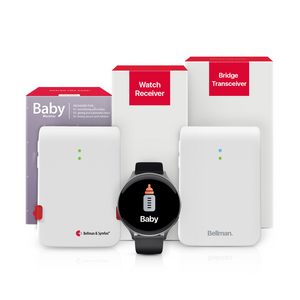
For deaf parents monitoring an infant, the Watch Receiver provides wrist-level baby alerts that travel with you through the home - in the kitchen, the yard, the bathroom - rather than being fixed to a room with a flash receiver. The Baby Monitor System with Bluetooth Bridge and Watch Receiver is the dedicated bundle for this use case. See our full guide on baby monitors for deaf parents for details.
Active Home Users Who Move Through the House
Anyone who moves through the home throughout the day - between floors, between the house and the yard, between a noisy kitchen and a quiet office - benefits from a wearable alert rather than a fixed receiver. Fixed receivers (lamp flashers, alarm clocks) cover the room they are in. The Watch covers everywhere you go. This is true regardless of hearing status: even people with normal hearing may prefer a silent wrist vibration to being startled by a loud flash receiver in a quiet room.
Work-From-Home Professionals
For people who work from home with the baby napping, the doorbell ringing, or the phone calling during meetings, the Watch Receiver delivers silent, private wrist alerts that do not disrupt video calls, client conversations, or focused work sessions. No audio, no visible flash, no disruption - just a vibration on the wrist that you respond to on your own terms.
People Who Remove Hearing Aids at Night
The Watch is a daytime device - worn during waking hours, charged overnight. For nighttime coverage when the Watch is charging and hearing aids are out, the appropriate configuration is the Alarm Clock Receiver with a bed shaker. The Watch and the Alarm Clock Receiver work together through the same Bridge: the Watch handles daytime whole-home coverage, and the Alarm Clock Receiver handles overnight safety alerting. See the nighttime coverage section below for specifics.
Older Adults and Caregiving Situations
The Watch's dedicated Call for Attention button sends a direct alert to compatible Bellman receivers - allowing a household member or patient to signal a caregiver from anywhere in the home. Combined with push button alert coverage from a caregiver's Watch, the system creates a two-way alert relationship: the care recipient calls for attention, the caregiver is notified on their wrist. The Push Button System with Bridge and Watch Receiver is built for this use case.
Do Not Disturb and Call for Attention: The Two Modes That Matter Most
The Watch Receiver has four modes: Do Not Disturb, Call for Attention, Bright theme, and Dark theme. Two of them - Do Not Disturb and Call for Attention - deserve a close look because they change the Watch's behavior in ways that significantly affect how you use it day to day.
Do Not Disturb Mode
Do Not Disturb silences Watch vibrations for a set period - useful during medical appointments, religious services, formal events, or any situation where unexpected wrist vibrations would be disruptive or inappropriate. While Do Not Disturb is active, the Watch still logs incoming alerts, which are visible in the Bellman Assistant app's notification history. You can review everything you received during the Do Not Disturb window when you are ready. For safety-critical alerts like smoke alarms, consider whether Do Not Disturb is appropriate for your specific situation before activating it.
Call for Attention Mode
The Call for Attention button on the Watch sends a signal to other compatible Bellman receivers in the home - effectively turning the Watch Receiver into a transmitter when you need to reach someone. This is particularly useful in caregiving situations: a person who is deaf or hard of hearing and alone in a room can press the button on the Watch to alert a caregiver with a flash receiver or another Bellman alerting device elsewhere in the home. The Watch is both a receiver that notifies the wearer and, in this mode, a transmitter that notifies others.
Watch and App Together: Why Two Channels Beat One
The Watch Receiver and the Bellman Assistant app are designed to work together - not as alternatives, but as simultaneous, independent confirmation channels. When an alert fires, both receive the notification at the same instant through the Bridge. This matters because any single channel has a failure mode.
- Watch alone: If the Watch is off the wrist during a brief charging break, alerts go unnoticed until you put it back on. The app catches these in real time.
- App alone: If your phone is silenced, in another room, or face-down on a desk, a smartphone notification may be missed. The Watch vibration on your wrist is impossible to overlook by comparison.
- Both together: You receive the alert through whichever channel you are more attentive to at that moment - wrist, phone, or both simultaneously. The dual-channel design is not redundancy for its own sake; it is a practical acknowledgment that real daily life involves situations where one channel is temporarily less accessible than the other.
The Bellman Assistant app (free for iOS 15+ and Android 8.0+) also provides notification history - a log of every alert the Bridge has relayed, with timestamps and event types. This is useful for reviewing what you missed during a Do Not Disturb period, during sleep, or during any time the Watch was not on your wrist. It is also the control interface for customizing the Watch and Bridge settings - notification labels, icons, room assignments, and device management - without touching the Watch itself.
Notification history: A log of every alert, with date, time, and event type - review anything missed during sleep or Do Not Disturb.
Custom notification labels: Rename alert types and assign rooms to transmitters - "Front Door Doorbell" instead of generic doorbell icon, for example.
Device management: Add, remove, and configure transmitters and receivers without touching any hardware - from the app on your phone.
Independent smartphone alerts: Receives all Bridge notifications even if the Watch is charging - providing continuous coverage between charging cycles.
Daytime Coverage vs. Nighttime: When to Use the Watch and When Not To
The Watch Receiver is the right device for daytime coverage - waking hours when you wear it on your wrist and it delivers instant, private, whole-home alerts wherever you go. It is not the right device for overnight coverage, and this distinction matters for safety.
At night, the Watch charges on a bedside table. Even if you wear it to sleep, wrist vibration during deep sleep is not a reliable method for waking a deaf or hard of hearing person. The bed shaker - a flat vibrating disc placed under the mattress or pillow - delivers physical vibration through the sleeping surface and is significantly more reliable for waking from deep sleep. This is the role of the Alarm Clock Receiver in the Bellman system.
The night-specific bundles that include the Alarm Clock Receiver are designed precisely for this two-shift approach - the Watch handles the day, the Alarm Clock Receiver handles the night, and both operate through the same Bridge and transmitters:
- Smoke and fire overnight: The Bridge + Smoke + Alarm Clock bundle - Alarm Clock Receiver with 100 dB alert, bright flashing lights, and bed shaker for deep-sleep fire alerting. Add the Watch Receiver separately for daytime wrist alerts.
- Doorbell overnight: The Bridge + Door + Alarm Clock bundle - Alarm Clock Receiver handles early-morning or overnight doorbell alerts; Watch covers daytime when added separately.
- Baby monitoring overnight: The Bridge + Baby + Alarm Clock bundle - Alarm Clock Receiver and bed shaker handle overnight baby alerts; Watch covers daytime monitoring when added separately.
- Push button overnight: The Bridge + Push + Alarm Clock bundle - for caregiving situations where overnight call-for-attention coverage is needed alongside daytime Watch coverage.
Watch Receiver vs. Fixed Receivers: Choosing the Right Configuration
The Watch Receiver is the most flexible receiver in the Bellman system - but it is not the only one, and it is not always the best choice for every situation or every room. Understanding how it compares to fixed receivers helps you configure the right combination for your household.
| Feature | Fixed Receivers (Flash, Alarm Clock) | Bellman Watch Receiver |
|---|---|---|
| Coverage area | One fixed room - alert only visible/audible from within that room | Whole home and yard - alert travels on your wrist wherever you go |
| Requires wearing | No - always on and always covering the room | Yes - must be worn on the wrist to receive wrist alerts |
| Overnight alerting | Alarm Clock Receiver + bed shaker - most reliable for waking from deep sleep | Wrist vibration during sleep is unreliable - use Alarm Clock Receiver overnight instead |
| Daytime whole-home coverage | No - fixed to one location; no coverage when you leave the room | Yes - 650 ft Bluetooth range from Bridge covers entire home and yard |
| Private alert | Flash receivers are visible to everyone in the room | Wrist vibration is private - nobody else sees or feels it |
| Multiple alert types | Yes - fixed receivers respond to all transmitters, with color-coded icons | Yes - Watch displays distinct icons for each transmitter type on the same screen |
| Best for | Fixed-location coverage: bedroom nightstand, living room lamp, specific rooms | Active daytime use; people who move through the home; anyone wanting private wrist alerts |
For most households, the ideal configuration combines both: the Watch for daytime whole-home wrist coverage, and fixed receivers (Alarm Clock Receiver, Flash Receiver) in specific rooms for overnight safety and room-based visual coverage. One Bridge handles all of them simultaneously - no tradeoffs between coverage types, no choosing between the Watch and a fixed receiver.
The Watch Receiver as Part of a Whole-Home Alerting System
The Watch Receiver is available standalone or as part of any Bellman bundle - and the system it connects to is fully expandable from day one. Starting with a doorbell bundle and adding a smoke alarm transmitter later does not require a new Watch, a new Bridge, or any re-pairing. The new transmitter joins the existing system, and the Watch begins receiving the new alert type automatically.
This expandability is one of the most practically important aspects of the Bellman system for people with hearing loss. Alerting needs change over time: a new baby arrives, an aging parent moves in, a new home layout reveals a coverage gap. The Watch Receiver grows with these changes because it receives from all transmitter types through the same Bridge - doorbell, smoke, baby, phone, push button, CO, and any future transmitters added to the system.
- Starting with a doorbell bundle: The Doorbell System with Bridge and Watch Receiver is one of the most common entry points - the Watch vibrates with a doorbell icon when visitors arrive. Add other transmitters at any time; the Watch handles them all. For a full guide to doorbell alert options, see Bluetooth doorbell alerts for deaf people.
- Adding smoke coverage: A Smoke Alarm Transmitter adds smoke icon wrist alerts through the same Watch - daytime fire safety without any new setup. For overnight coverage, the Bridge + Smoke + Alarm Clock bundle extends this to overnight bed shaker alerting. See our guide to Bluetooth smoke alarms for hearing impaired people.
- Adding phone alerts: The Telephone Transmitter adds a phone icon wrist alert the moment the landline rings - through the same Watch, the same Bridge. Full details in our landline phone alert system guide.
- Adding baby monitoring: The Baby Monitor Transmitter adds a baby icon wrist alert the moment your baby stirs. See our baby monitor guide for deaf parents for the full picture.
For the complete overview of how all these transmitters, receivers, and configurations fit into a full whole-home alerting system, see The Complete Guide to Bluetooth Alerting Systems for Deaf & Hard of Hearing People.
Everything to Confirm Before Your First Full Day of Use
Work through these items after pairing the Watch to the Bridge. An untested setup is an unreliable one.
- Watch Receiver paired to Bellman Bridge - confirmed with test signal
- Each alert type tested - doorbell, smoke, phone, baby icons all confirmed on Watch screen
- Bellman Assistant app installed on smartphone - notifications enabled in iOS/Android settings
- App paired to Bridge - test alert received simultaneously on Watch and phone
- Charging routine established - USB pocket charger position confirmed at bedside
- Overnight coverage configured - Alarm Clock Receiver and bed shaker tested if applicable
- Do Not Disturb settings reviewed - understand which alerts are silenced and which are not
- Call for Attention button tested - signal confirmed on target Bellman receiver
- Watch band fitted comfortably - silicone wristband adjusted for all-day wear
- Range confirmed in all rooms and yard - Walk to each coverage zone during a test alert
Every alert. On your wrist. Wherever you are at home.
The Bellman Bluetooth Watch Receiver pairs to the Bridge for whole-home wrist alerts - doorbell, smoke, baby, phone, and push button - plus simultaneous smartphone notification through the free Bellman Assistant app.
Sources and references: Bellman & Symfon - Bluetooth Watch Receiver BE3330 product specifications (us.bellman.com/products/bluetooth-watch-receiver): Rechargeable 3.7V 200 mAh lithium-polymer battery; up to 1 week battery life; 2-hour charge time; USB pocket charger; replaceable black silicone wristband; Bluetooth 5; 650 ft / 200 m open field range; Do Not Disturb, Call for Attention, Bright/Dark themes; customizable watch faces, alarm, timer; requires Bellman Bridge · Bellman & Symfon - Bellman Assistant App: free for iOS 15+ and Android 8.0+; notification history, custom labels, device management, independent smartphone alerts via Bluetooth · Bellman & Symfon - Baby Monitor System with Bluetooth Bridge and Watch Receiver product description (us.bellman.com/products/baby-monitor-system-with-bluetooth-bridge-and-watch-receiver) · Bellman & Symfon - Doorbell System with Bluetooth Bridge and Watch Receiver product description (us.bellman.com/products/doorbell-system-with-bluetooth-bridge-and-watch-receiver) · Bellman & Symfon - Phone System with Bluetooth Bridge and Watch Receiver product description (us.bellman.com/products/phone-system-with-bluetooth-bridge-and-watch-receiver) · Bellman & Symfon - Push Button System with Bluetooth Bridge and Watch Receiver product description (us.bellman.com/products/push-button-system-with-bluetooth-bridge-and-watch-receiver) · Bellman & Symfon - Bluetooth Bridge Transceiver: 433 MHz RF receiver input, Bluetooth 5 output, no Wi-Fi required · FCC ID 2APAKBE3330 - Watch Receiver regulatory filing confirmation, Bellman & Symfon Group AB.
This article is for informational purposes only. Product specifications are subject to change; refer to current product pages at us.bellman.com for the most up-to-date technical details.

Bluetooth Watch Receiver for Hearing Loss: What It Does and Who Needs One
This guide breaks down the practical choices, features, and considerations behind this topic. Use it to identify a setup that fits the listener, the environment, and the everyday moments that matter most.
The featured products below are current Bellman options discussed in the article or closely matched to its use case.