Bellman Watch Receiver: Full Review and Setup Guide

We put Bellman's Bluetooth Watch Receiver through its paces - the design, the battery life, the vibration-and-icon alert system, and the real setup process from box to first test alert. Here is what it does well, what to know before you buy, and exactly how to get it running on your wrist.
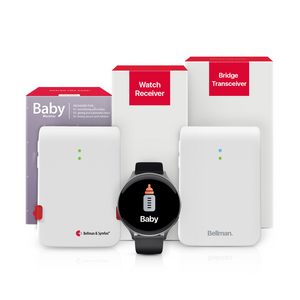
The Bellman Watch Receiver (model BE3330) is a $199.95 wrist-worn alert device built for people who are deaf or hard of hearing. It delivers icon-based, vibrating notifications for doorbells, smoke alarms, baby monitors, phone calls, and more - but it requires the Bellman Bluetooth Bridge to connect to the alerting system. It runs up to one week per charge, covers up to 650 feet (open field) from the Bridge, and carries a splash-resistant IP67 rating. It is sold on its own for $199.95 or bundled with the Bridge for $299.95.
Start Here: What Is the Bellman Watch Receiver, and Who Needs One?
The Bellman Watch Receiver is the wrist-worn member of Bellman's Visit alerting lineup - the device that turns a doorbell chime, a smoke alarm, a crying baby, or a ringing phone into a vibration you actually feel, no matter which room you are in. Where a lamp flasher or a fixed receiver only alerts you when you are within sight or earshot of it, the Watch goes wherever you go. That mobility is the entire point, and it is also the gap this device was built to close in our guide to the best wearable alert devices for deaf and hard-of-hearing people.
One thing to understand before buying: the Watch Receiver does not talk directly to your doorbell, smoke alarm, or baby monitor transmitters. It pairs with the Bellman Bluetooth Bridge, which receives those signals on 433 MHz and relays them to the Watch over Bluetooth. If you do not already own a Bridge, you will need one - and Bellman sells the two together as a bundle, which we cover in the pricing section below.
If you are choosing between this dedicated Watch and simply using an Apple Watch or Galaxy Watch you already own, it is worth reading our companion piece on how smartwatch alerts work for people with hearing loss first. The short version: a mainstream smartwatch can receive Bellman alerts through the free Bellman Assistant app and the Bridge, but the dedicated Watch Receiver does not depend on a paired phone, has a simpler dedicated interface, and is purpose-built for this one job.
First Impressions: What's in the Box
The Watch Receiver ships as a complete, ready-to-pair kit rather than a bare device you need to source accessories for separately. Out of the box, you get everything required to charge it, wear it, and start pairing the same day it arrives.
Watch Receiver
The watch itself - a fully functional timepiece with an alarm, customizable faces, and a dedicated call-for-attention button, alongside its core job of displaying alert icons and vibrating on cue.
Pocket Charger
A compact USB charger purpose-built for the Watch. A full charge takes about two hours and is rated for up to a week of use, so most owners end up charging it roughly once every several days rather than nightly.
Wristband (Black)
A soft, skin-friendly silicone band in black. It is replaceable, which matters for long-term ownership - bands wear out long before the electronics do on most wearables.
The build feels closer to a purpose-made medical-alert wearable than a consumer fashion smartwatch, and that is intentional. The case is a straightforward ABS-and-polycarbonate shell rather than metal and glass, which keeps the unit light and keeps the price well under what a comparable feature set would cost from a mainstream smartwatch brand.
Design, Fit & Comfort
At 1.97 × 1.77 × 0.39 inches and 1.5 ounces, the Watch Receiver sits closer in size to a mid-size fitness band than a chunky smartwatch. On the wrist, it is genuinely easy to forget you are wearing it, which is exactly what you want from a device meant to stay on for the entire waking day. The 45 mm watch face is large enough to read alert icons at a glance without being so wide that it catches on sleeves or doorframes.
Modes: Do Not Disturb, Call for Attention, Bright and Dark display themes
Battery: Rechargeable 3.7V, 200 mAh lithium-polymer
Battery life: Up to one week per charge; about 2 hours to fully recharge
Coverage: Bluetooth range up to 650 ft (open field) from the Bridge
Water resistance: Splash-proof, rated IP67
Size & weight: 1.97 × 1.77 × 0.39 in; 1.5 oz
You can choose between several watch faces - including a classic dark theme and a minimalist light theme - and the display brightness adjusts to match. This is a small detail, but it is the difference between a device that feels purpose-built and one that feels clinical. A person wearing this all day, including in social or professional settings, benefits from a watch face that looks like a watch first and a medical device second.
The replaceable silicone band is a practical touch for households where the Watch might be shared, handed down, or simply worn for years - a worn-out band does not mean replacing the whole unit. Combined with Bellman's two-year warranty, the hardware is built with the expectation that it stays on your wrist for the long haul, not just through a single product cycle.
How the Watch Receiver Actually Works
Every alert that reaches the Watch follows the same basic path. A transmitter - on your doorbell, your smoke alarm, your baby's room, or your landline - detects an event and sends a signal to the Bellman Bluetooth Bridge over 433 MHz radio. The Bridge identifies which transmitter fired and instantly relays a Bluetooth signal to the Watch, which displays a distinct icon and vibrates in a pattern specific to that alert type. The whole sequence happens in a moment, fast enough that you typically feel the alert before someone with normal hearing has consciously registered the sound. For the full mechanics of that signal path, see our explainer on how the Bellman Bluetooth Bridge works.
The reason the icon system matters as much as the vibration is simple: a vibration alone tells you something happened, but not what. Distinct icons remove the guesswork, so you are not checking three different rooms to find out whether it was the doorbell or the smoke alarm.
| Alert Type | What Triggers It | What You See & Feel on the Watch |
|---|---|---|
| Doorbell | Doorbell Transmitter detects your existing chime | Doorbell icon + distinct vibration pattern |
| Smoke / Fire | Smoke Alarm Transmitter detects your alarm's sound | Smoke alarm icon + urgent vibration |
| Baby Monitor | Baby Transmitter detects sound above sensitivity threshold | Baby monitor icon + vibration |
| Landline Phone | Telephone Transmitter detects the ring electrically via RJ11 | Phone icon + vibration |
| Push Button | Push Button Transmitter pressed by a visitor or caregiver | Push button icon + vibration |
| Mobile Phone Calls | Bridge detects an incoming call on your paired smartphone | Call notification relayed through the Bridge |
A different vibration for a doorbell versus a smoke alarm versus a phone call means you can identify what happened without breaking your focus to look down - and a clear icon confirms it the moment you do.
Bellman & Symfon - Watch Receiver Product DocumentationModes That Matter: Do Not Disturb, Call for Attention & Watch Faces
Three modes shape how the Watch behaves day to day. Do Not Disturb lets you mute non-critical notifications during a meeting or a movie without powering the Watch off entirely - useful, since you generally do not want to disable a smoke alarm alert just because you silenced a doorbell ping. Call for Attention flips the Watch's role: instead of only receiving alerts, you can use the dedicated button to send a signal outward to other Visit receivers in the home, which is genuinely useful for caregiving situations where the wearer needs to summon a partner or family member. And the Bright/Dark theme toggle adjusts the display for visibility in different lighting, from a sunlit kitchen to a dim bedroom.
Alerts are tied to fixed receivers - a lamp flasher in the living room, a pager on your belt. Move to the garage, the yard, or a different floor, and you are outside that receiver's range until you return.
The alert travels with you. Whether you are in the kitchen, the yard, or a back bedroom, the same icon-and-vibration system reaches you as long as you are within Bluetooth range of the Bridge.
Battery Life in Real-World Use
The Watch runs on a rechargeable 3.7V, 200 mAh lithium-polymer cell rated for up to a week per charge, recharging fully in about two hours through the included USB pocket charger. In practice, "up to a week" is the kind of spec that depends on how often the Watch is actually vibrating - a household with a newborn triggering frequent baby-monitor alerts will see the battery drain faster than a quieter household that mostly relies on it for the occasional doorbell or phone call. Either way, this is firmly in daily-wearable territory rather than a device you need to babysit with a charger every night.
Most owners find it easiest to build charging into an existing routine - for example, charging the Watch during a morning shower once a week, rather than waiting for a low-battery warning. Because the Bridge itself runs on mains power and does not need charging, the Watch is the only component in the system you need to think about at all.
Setting Up the Bellman Watch Receiver: Step-by-Step
Setup is genuinely fast - most people are fully paired and tested within ten minutes, and the bulk of that time is spent on the app pairing step rather than anything mechanical. Here is the full sequence.
- Charge the Watch fully before first use. Connect it to the included Pocket Charger for about 2 hours. Starting from a full charge gives you an accurate sense of real-world battery life going forward.
- Confirm your Bridge is plugged in and powered on. The Watch cannot connect to anything without the Bellman Bluetooth Bridge already running. Place it centrally in the home, plugged into a wall outlet, away from the floor.
- Pair the Watch to the Bridge. Hold the Watch near the Bridge and follow the pairing sequence in the included instructions - typically a button hold on each device. This is a one-time step; the pairing persists after the initial setup.
- Set your watch face and modes. Choose a Bright or Dark theme, and decide how you want Do Not Disturb and Call for Attention configured for your daily routine.
- Download the Bellman Assistant app (optional but recommended). Free on iOS 15+ and Android 8.0+. Pairing the app to the Bridge gives you a second notification channel on your phone as a backup to the Watch.
- Test every transmitter you own. Press the test button on each transmitter and confirm the Watch shows the correct icon and vibration. For a smoke alarm transmitter, use the smoke alarm's own test button rather than the transmitter's button, since only the alarm's button simulates a genuine alarm event.
For placement tips specific to each transmitter type - doorbell, smoke alarm, baby monitor, and more - see the full Bellman Bluetooth alerting system setup guide.
Confirm Every Item Before You Rely on It Daily
A missed step here is the most common reason an alert gets missed later.
- Watch fully charged before first use
- Bridge plugged in and powered on centrally
- Watch paired to Bridge - confirmed with a test signal
- Watch face and Bright/Dark theme set
- Do Not Disturb and Call for Attention configured
- Bellman Assistant app installed and paired (if using)
- Each transmitter tested and icon confirmed on the Watch
- Smoke alarm tested using the alarm's own test button
- Band fit checked for comfortable all-day wear
- Charging routine established (e.g., weekly during a shower)
Buying Options & Pricing
The Watch Receiver is sold two ways, and which one you need depends entirely on whether you already own a Bridge.
If you are building a system from scratch, the bundle is almost always the better starting point - it is the only way to get the Watch functioning at all, and Bellman also sells several preassembled day-use bundles that pair a single transmitter with the Bridge and Watch together:
- Doorbell System with Bridge and Watch Receiver - for visitor alerts on your wrist throughout the day.
- Baby Monitor System with Bridge and Watch Receiver - for parents who need to feel a crying baby's alert wherever they are in the home.
- Phone System with Bridge and Watch Receiver - for landline call alerts delivered straight to the wrist.
- Push Button System with Bridge and Watch Receiver - useful as a wireless doorbell or a wearable call-for-attention button for a caregiving situation.
One important distinction: the Watch Receiver is a daytime, on-the-move device. It is not designed to replace your nighttime safety setup. At night, when the Watch is on the charger and hearing aids are out, the system relies on the Alarm Clock Receiver's 100 dB sound, flashing light, and bed shaker instead. Bellman's sleep bundles are built around that component, not the Watch:
- Bridge + Smoke Alarm + Alarm Clock bundle - for overnight fire and smoke safety.
- Bridge + Baby Monitor + Alarm Clock bundle - for overnight baby monitoring.
- Bridge + Doorbell + Alarm Clock bundle - for round-the-clock visitor coverage.
- Bridge + Push Button + Alarm Clock bundle - for overnight call-for-attention coverage.
The Watch Receiver can be added to any of these sleep bundles as a separate purchase, extending the same alert types to daytime wrist notifications once you are up and moving.
Pros and Cons: Our Honest Take
Genuinely all-day comfortable
At 1.5 ounces with a soft silicone band, it disappears on the wrist the way a good fitness tracker does - easy to forget you're wearing it.
Clear, unambiguous alerts
The icon-plus-vibration combination means you know what happened without hunting for context, even across six or more alert types.
A week of battery, not a day
Charging once every several days, instead of nightly, is a meaningfully lower-maintenance experience than most smartwatches offer.
HSA/FSA eligible, two-year warranty
Backed by a real warranty period and eligible for health-spending-account reimbursement, which is not always true of consumer wearables.
- Requires the Bridge - an added cost if you don't already own one
- Splash-resistant (IP67), not swim-proof or fully waterproof
- No heart rate, GPS, or fitness tracking - this is a dedicated alert device, not a health smartwatch
- Best paired with an Alarm Clock Receiver for nighttime, not a standalone sleep solution
- Indoor range can be shorter than the 650 ft open-field spec, depending on walls and floors
- A newer product line, so the public review base is still smaller than mainstream smartwatch brands
Who Should Buy the Bellman Watch Receiver?
This is the right choice for anyone who is deaf or hard of hearing and wants whole-home alert coverage that follows them around - not just in the room where a lamp flasher happens to be installed. It is a particularly strong fit for parents who need to feel a baby's cry while doing chores in another room, for people who want a discreet way to know someone is at the door without checking every few minutes, and for anyone who prefers a dedicated, simple interface over learning a full smartwatch ecosystem.
If you already wear an Apple Watch or a Galaxy Watch and do not want a second device on your wrist, it is worth reading our breakdown of how smartwatch alerts work for people with hearing loss before buying - the same Bridge can forward alerts to a mainstream smartwatch through the Bellman Assistant app, which may suit you better than adding a dedicated unit. For most people building a Bellman system from the ground up, though, the dedicated Watch Receiver's simplicity, battery life, and purpose-built alert icons make it the easier daily-use choice.
The Bigger Picture: Building a 24-Hour Alerting System
The Watch Receiver is one layer of a system designed to cover an entire day, not a single moment. During waking hours, the Watch and the Bellman Assistant app give you whole-home, on-the-move coverage. Overnight, when the Watch is charging and hearing aids are removed, the Alarm Clock Receiver's sound, light, and bed shaker take over. Neither layer is optional if you want genuinely round-the-clock coverage - they are designed to complement each other, not substitute for one another.
The system is also built to grow. A household that starts with a single bundle can add new transmitters at any time - a smoke alarm transmitter when fire safety becomes a priority, a baby transmitter when a new child arrives - without replacing the Bridge or the Watch already in place. And because the whole architecture runs on Bluetooth and 433 MHz RF rather than Wi-Fi, it keeps working through internet outages and router failures, which matters most for the smoke and fire alerts that genuinely cannot afford to fail. For more on why that matters, see why offline Bluetooth beats smart home devices for safety-critical alerting.
Ready to add the Watch Receiver to your system?
Buy it on its own if you already have a Bridge, or get the bundle to start your whole-home alerting system from scratch.
Sources and references: Bellman & Symfon - Bluetooth Watch Receiver BE3330 product page, specifications, pricing, and datasheet (us.bellman.com/products/bluetooth-watch-receiver) · Bellman & Symfon - Bridge Transceiver and Watch Receiver bundle (model BE8301-A) product page and specifications (us.bellman.com/products/bluetooth-bridge-transceiver-and-watch-receiver) · Bellman & Symfon - Bluetooth Bridge Transceiver BE1521 specifications and user manual (us.bellman.com/collections/bluetooth-bridge) · Bellman & Symfon - Bellman Assistant App compatibility (iOS 15+, Android 8.0+).
This article is for informational purposes only. Product specifications and pricing are subject to change; refer to the current product pages at us.bellman.com for the most up-to-date details.

Build the Right Watch-Alert Setup
The Bellman Watch Receiver provides vibrating, icon-based daytime alerts for important sounds and events. It works with a Bridge Transceiver, which connects compatible Bellman Visit transmitters and sends their alerts to the watch.
Choose the Watch Receiver when a Bridge is already in place, or start with the Bridge and Watch Receiver bundle. Doorbell and baby-monitor bundles add a matching transmitter for the notification that matters most.