Baby Monitor Without Wi-Fi for Deaf Parents: Why Offline Is Safer

Wi-Fi-based baby monitors are marketed as the smart choice - but for deaf and hard-of-hearing parents, they carry a hidden reliability gap that matters most at 3 a.m. This is a plain-English breakdown of why offline Bluetooth alerting outperforms cloud-dependent monitors when it counts.
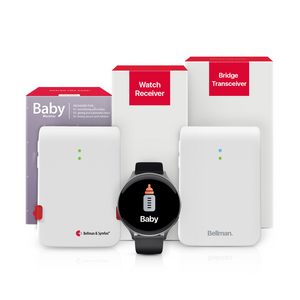
Wi-Fi-free baby monitors for deaf parents use direct Bluetooth transmission between a nursery sensor and a bridge transceiver, ensuring wrist alerts are delivered even during internet outages - a critical safety advantage over cloud-dependent smart monitors. The Bellman Baby Monitor System uses a local Bluetooth path - nursery transmitter → Bluetooth Bridge → Watch Receiver on your wrist - that works independently of your internet connection, router, or any cloud server.
The Problem With "Smart" Baby Monitors for Deaf Parents
Smart baby monitors - Wi-Fi cameras with live video, two-way audio, and app-based alerts - are the dominant product category in 2026. Walk into any baby retailer and the premium shelf is filled with them. They look impressive: HD cameras, sleep tracking, lullaby players, room temperature sensors. For hearing parents who use them primarily to listen in on a sleeping baby and occasionally glance at a live feed, many of them work fine.
For deaf and hard-of-hearing parents, however, the smart monitor category has a structural problem that no amount of premium features can paper over: its core alert mechanism depends on a chain of internet infrastructure that can break at any point - and when it breaks, you get no alert at all.
This is not a minor inconvenience when you rely on an alert system the way deaf parents do. Hearing parents who miss a Wi-Fi-based app notification because their router rebooted can still hear their baby through the monitor's speaker or directly through the wall. A deaf parent who misses that same notification because of a router issue has nothing. No backup. No sound to fall back on. Just silence - and a baby who needed attention ten minutes ago.
Understanding exactly why this happens - and why an offline Bluetooth system solves it - is what this guide covers.
The Cloud Alert Chain - and Every Place It Can Break
When a smart Wi-Fi baby monitor detects your baby crying, it does not simply send a signal from the camera to your phone. It routes that signal through a series of infrastructure layers, each of which is a potential failure point. Here is the exact chain - step by step - and the specific ways each link can fail.
That is six steps - and five potential failure points - between your baby crying and you feeling an alert. On a good night, all six steps work fine. But when any one of them fails - and over the course of months of continuous use, at least one eventually will - a deaf parent receives no alert and has no audio fallback to compensate.
For hearing parents, a missed app notification is a minor inconvenience - they can still hear the baby. For a deaf parent, it is a complete gap in coverage. The system either works or it doesn't, and there is no in-between.
Bellman & Symfon EditorialHow Offline Bluetooth Alerting Works - and Why the Chain Is Shorter
The Bellman Baby Monitor System replaces that six-step chain with a three-step local signal path. No cloud. No router. No internet. Here is how it works.
Camera → Home Wi-Fi → Your router → Internet connection → Manufacturer cloud servers → Apple/Google push servers → Your phone app → Vibration alert (if phone is nearby, charged, and not silenced)
Baby monitor transmitter (nursery) → Bellman Bluetooth Bridge (local, no internet) → Watch Receiver on your wrist. Three steps. All local. No cloud, no router, no ISP required.
Step 1 - The Transmitter Detects Sound in the Nursery
The Bellman baby monitor transmitter is placed in the nursery, close to where the baby sleeps. Its sensitive microphone detects crying or fussing above a set threshold and immediately sends a 433 MHz radio frequency signal. This step - like the camera's detection step in a smart monitor - is entirely local and does not depend on any connectivity.
Step 2 - The Bluetooth Bridge Receives and Relays Locally
The Bellman Bluetooth Bridge receives that 433 MHz signal and instantly converts it into a Bluetooth alert, which it sends directly to paired devices. This conversion happens locally - the Bridge does not send data to any server, does not require an internet connection, and does not route through your router. The Bridge is plugged into a wall outlet in your home, and its signal path never leaves your home. If your internet goes down, the Bridge continues to function exactly as normal.
Step 3 - Your Watch Receiver Vibrates on Your Wrist
The Bellman Watch Receiver, paired to the Bridge, receives the Bluetooth alert and responds with a strong wrist vibration and a clear baby icon on its face. The Watch Receiver is on your wrist - it travels with you through the home, it alerts you while you sleep, and it does not depend on your phone's notification settings, battery state, or placement. The Bluetooth connection between Bridge and Watch is direct and peer-to-peer, with a range of up to 650 feet in open field.
When we say the Bellman system operates locally, we mean every part of the alert chain - detection, transmission, and delivery - happens within the physical boundaries of your home, using hardware you own, without routing through any third-party server or internet connection.
Your baby monitor alerts are not processed in a data center in another state. They are not held in a queue waiting for your ISP to route them to Google's push notification servers. They travel from a transmitter in the nursery to a Bridge in your hallway to a Watch on your wrist - end to end in seconds, entirely within your four walls.
When Offline Alerting Makes All the Difference: Real Scenarios
Abstract reliability arguments are useful, but concrete scenarios make the distinction clearer. Here are the specific situations where an offline Bluetooth system continues working while a cloud-dependent monitor fails.
Severe weather / power fluctuations
Storms cause power surges that can knock out routers and modems even when the rest of the house has power. A Wi-Fi monitor loses connectivity immediately. The Bellman Bridge, powered directly from the wall, continues to operate. The Watch Receiver, which is battery-powered, continues to receive alerts. No outage needed - even a brief router reboot is enough to interrupt cloud-based alerts for several minutes during reconnection.
Router reboots and firmware updates
Modern routers automatically download and install firmware updates, often overnight. During a reboot, which can take 2–5 minutes, your home Wi-Fi goes offline. Any cloud-dependent device loses connectivity. This is not a rare event - most routers do this monthly. With a Bellman offline system, the Watch Receiver never notices because it is not connected to your router at all.
ISP outages
Internet service provider outages happen more often than most people realise - the average US household experiences several internet disruptions per year. During an ISP outage, even a perfectly functioning router and Wi-Fi camera cannot deliver cloud-based alerts. For a deaf parent relying on an app notification, an ISP outage at any hour of the night creates a complete monitoring gap.
Cloud server outages
Major consumer technology companies have experienced high-profile cloud outages that affected millions of connected devices simultaneously - including smart home devices and baby monitors. These outages can last hours, are entirely outside your control, and typically happen with no warning. The Bellman system's local architecture means no third-party server failure can interrupt your baby alerts.
Phone notification failures
Even when the cloud chain works perfectly, the final step - your phone alerting you - can fail. iOS and Android both aggressively manage background app activity to preserve battery. App notification settings can be changed accidentally. "Do Not Disturb" or "Focus" modes can silence everything. The Bellman Watch Receiver bypasses all of this - it is a dedicated device that does one thing and does it reliably.
Overnight, while you sleep without hearing devices
This is the highest-stakes scenario. You are asleep, your hearing devices are off, and you have no audio fallback. A cloud failure at 2 a.m. leaves a Wi-Fi monitor user - deaf or hearing - without alerts. A Bellman Watch Receiver worn to bed continues to vibrate with every nursery alert, cloud or no cloud, internet or no internet, throughout the entire night. For more on overnight alerting for deaf parents, see our guide on sleep and parenting with hearing loss.
Wi-Fi Baby Monitor vs. Bellman Offline System: A Complete Comparison
For deaf and hard-of-hearing parents, the differences below are not just feature preferences - several of them are direct safety implications. Read this as a reliability and safety evaluation, not a feature checklist.
| Criteria | Wi-Fi Smart Monitor | Bellman Offline Bluetooth System |
|---|---|---|
| Alert delivery method | App notification via cloud server chain | Local Bluetooth - Bridge to Watch Receiver directly |
| Internet required for alerts | Yes - all alerts route through cloud | No - wrist alerts work without any internet connection |
| Alert during router reboot | No - Wi-Fi down = no alerts | Yes - Bridge operates independently of router |
| Alert during ISP outage | No - cloud unreachable | Yes - local Bluetooth unaffected |
| Alert during cloud server outage | No - manufacturer server down | Yes - no cloud server involved in wrist alert path |
| Primary alert channel for deaf parents | Phone app (depends on phone proximity, charge, notification settings) | Watch Receiver on wrist - vibrates directly, always with you |
| Overnight wrist alert without hearing devices | Not designed for this - audio-first product | Watch worn to bed vibrates on your wrist when baby needs attention |
| Alert icon identification | App notification text | Distinct icon per transmitter type - baby, smoke, doorbell, push button - on Watch face |
| Expandability | Baby camera only - separate systems for doorbell, smoke, etc. | Same Bridge handles all alert types - one Watch covers the whole home |
| Monthly subscription | Often required for full features, cloud storage, or alert history | No subscription - one-time hardware purchase |
| Privacy - nursery audio/video | Audio and video routed through manufacturer cloud servers | No audio or video transmitted - sound-trigger only, stays local |
| Setup required | Wi-Fi pairing, app account, cloud configuration | Under 10 minutes - no account required for core wrist alerts |
The Privacy Difference: Your Baby's Nursery Is Not on a Cloud Server
There is a privacy dimension to the Wi-Fi vs. offline question that deserves its own section, because it affects parents of all hearing levels - but it is worth understanding clearly before buying.
A Wi-Fi baby monitor with live video and audio streaming routes the feed from your baby's nursery to servers operated by the product manufacturer. In most cases, this data is encrypted in transit. But the fact remains: audio and in many cases video of your baby's nursery is being processed by a company's cloud infrastructure, stored in some form, and potentially accessible to that company's employees for support, moderation, or debugging purposes. Several well-known baby monitor brands have experienced security vulnerabilities in recent years that exposed nursery feeds to unauthorized access.
The Bellman baby monitor transmitter works on a fundamentally different principle. It is a sound-trigger device - not a camera, not a microphone stream. When it detects sound above a threshold, it sends a simple binary signal: "sound detected in nursery." That signal travels to the Bridge and then to the Watch. No audio recording. No video. No stream routed through a server. The interior of your nursery never leaves your home.
- Cloud monitors route nursery audio/video through manufacturer servers - Bellman sends only a local trigger signal
- Wi-Fi cameras have experienced documented security breaches - local 433 MHz RF + Bluetooth has no cloud exposure
- Cloud providers can change data policies after purchase - Bellman's local system is unaffected by any third-party policy
- Some cloud monitors require an account and terms-of-service acceptance that includes data usage clauses - Bellman wrist alerts require no account
- Manufacturer insolvency or server shutdown ends cloud monitor functionality - Bellman's local hardware operates indefinitely
- Router passwords, Wi-Fi credentials, and network security are irrelevant for Bellman's offline alert path
Does the Bellman System Use Wi-Fi at All?
This is one of the most common questions about the Bellman system, and it deserves a precise answer rather than a simple yes or no.
The Bellman Bluetooth Bridge can connect to your home Wi-Fi - but Wi-Fi is used only for the smartphone app notification, which is a secondary, optional alert channel. The core alert path - nursery transmitter → Bridge → Watch Receiver - operates entirely over 433 MHz radio frequency and Bluetooth. These are local wireless protocols. They do not use your router. They do not require internet connectivity. They work whether or not your Bridge is connected to Wi-Fi at all.
When the Bridge is connected to Wi-Fi, the Bellman app on your smartphone receives a notification whenever the Bridge fires an alert. This is genuinely useful - particularly for a second caregiver who is in a different part of the house, or for daytime situations where you prefer to keep the Watch off and rely on your phone. But it is additive coverage, not the primary channel. The Watch Receiver is the primary channel. The app is the backup.
This architecture is intentional. Bellman designed the system so that the most reliable alert channel - the Watch Receiver - never depends on infrastructure you cannot control. The smartphone app is there for convenience. The Watch is there for safety.
Nighttime: The Use Case Where Offline Reliability Is Non-Negotiable
Baby monitor reliability matters during the day. At night, it is critical. When you are asleep, hearing devices off, with no audio fallback of any kind, the alert system you are relying on has to be bulletproof. This is where the offline architecture of the Bellman system makes the biggest practical difference.
Cloud-dependent monitors have their highest failure rate at night - not because the technology is different at night, but because the combination of factors that cause missed alerts is more likely to align: routers on auto-update schedules reboot overnight, ISPs perform maintenance during low-traffic hours, and phone Do Not Disturb modes are most commonly enabled during sleep. Any one of these factors during overnight hours means no alert for a deaf parent relying solely on an app notification.
The Bellman Watch Receiver worn to bed does not have any of these failure modes. It vibrates directly on your wrist. It is Bluetooth-connected to the Bridge at a distance that is measured in the width of your bedroom, not the length of a cloud server chain. It has no Do Not Disturb mode. It does not care whether your router is up or down.
For overnight monitoring, pairing the baby monitor system with a vibrating alarm clock completes the picture. The Bridge + Baby Monitor + Alarm Clock bundle gives you wrist vibration for baby alerts throughout the night and a silent vibrating wake-up at your set time - no audible alarm needed, no baby disturbed, no partner woken unnecessarily. If you also want to add smoke and CO coverage to the same Bridge for complete overnight safety, the Bridge + Smoke/CO + Alarm Clock bundle covers both emergency alerting and overnight wake-up through a single integrated system. You can add a Watch Receiver separately to either bundle for daytime wrist notifications.
Overnight coverage checklist for deaf parents
Every item confirmed before first overnight use.
- Bridge plugged in centrally - same floor as nursery
- Baby transmitter placed within 3–5 ft of sleep spot
- Watch Receiver fully charged before bed
- Watch Receiver paired - test alert confirmed
- Smoke/CO transmitter connected to same Bridge
- Test alert received in sleeping position, door closed
- Bridge NOT required to be on Wi-Fi for wrist alerts
- Alarm Clock bundle set if using silent wake-up
- App installed as secondary alert for partner or caregiver
- No router reboot scheduled during overnight hours
But What About the Video? Do You Lose Anything Going Offline?
This is the honest question to ask, and it deserves a direct answer. Yes - the Bellman baby monitor is a sound-trigger device, not a camera. You will not have a live video feed of the nursery in the Bellman app. If you wake to a wrist vibration and want to see what is happening before getting up, you will need to go to the nursery or use a separate camera for that purpose.
For many deaf parents, this is an acceptable trade-off - and a deliberate one. The alert tells you the baby needs attention. The vibration on your wrist is reliable. Going to the nursery is a minor cost compared to the confidence of knowing the alert will always arrive, regardless of your internet connection. Many parents in the deaf and hard of hearing community who have tried both approaches report that the reliability of the wrist alert matters far more to them in practice than the convenience of a remote camera feed.
If live video monitoring is something you want in addition to reliable wrist alerts - a completely reasonable preference - the two approaches can be combined. A separate IP camera (used only for viewing, not relying on for alerts) gives you visual access to the nursery, while the Bellman system handles all alerting. This gives you the best of both: visual confirmation when you want it, and guaranteed wrist alerts that do not depend on any cloud service to reach you.
Monitoring means observing what is happening in the nursery - video, audio feed, temperature, breathing patterns. Alerting means notifying you the moment something requires your attention. For deaf parents, alerting is the safety-critical function. A beautiful video feed is worthless if the notification telling you to look at it never arrives.
The Bellman system is purpose-built for alerting. It does that one job - reliably, locally, offline - and it does it better than any cloud-dependent smart monitor for the specific needs of deaf and hard-of-hearing parents.
One Bridge, Whole-Home Offline Coverage
The offline advantage of the Bellman system extends beyond the baby monitor - and this is where the architecture truly differentiates itself from any Wi-Fi product category.
The same Bluetooth Bridge that receives your baby monitor transmitter's signals also receives signals from your doorbell transmitter, your smoke alarm transmitter, your push button transmitter, and your phone transmitter - all independently, all simultaneously, all offline. Every alert from every transmitter in your home reaches the same Watch Receiver on your wrist, identified by its own distinct icon.
- Doorbell alerts, silently: A visitor rings the doorbell. The doorbell transmitter fires. The Bridge relays it to your Watch. You feel a doorbell icon vibration and go to the door - no audible chime in the house, no startled baby. See our guide on doorbell alerting for deaf parents.
- Smoke and CO alerts, day and night: A smoke transmitter connected to the same Bridge means fire and CO emergencies create immediate, strong wrist vibrations even while you sleep - no cloud, no internet required. Learn more in our guide on why baby monitoring for deaf parents is more than just the nursery.
- Push button for silent household communication: A co-parent or caregiver can alert you silently with a push button transmitter - useful when everyone is trying to move quietly around a sleeping baby. The Bridge + Push Button + Alarm Clock bundle covers household communication and overnight wake-up in one package.
- Phone call alerts: When your phone rings, the Bridge can forward a phone alert to the Watch - meaning you never miss an important call because you were focused on the baby and your phone was across the room.
All of this runs offline, locally, through one Bridge, to one Watch on your wrist. No cloud, no subscriptions, no failure modes inherited from third-party infrastructure. For a complete picture of how the whole-home system fits together, see our pillar guide: Best baby monitors for deaf parents: vibrating and visual alert systems (2026).
Who Should Choose an Offline Baby Monitor?
The offline Bluetooth architecture of the Bellman system is the right choice for a specific set of parents, and being honest about who benefits most helps you make the right decision.
Deaf and hard-of-hearing parents - primary recommendation
The core use case. If you do not wear hearing devices at night, or you have significant hearing loss that makes an audio monitor ineffective, the Bellman offline system is the most reliable alerting option available. The wrist vibration is your primary channel, and it must work every time.
Households with unreliable internet
Rural areas, older housing, or ISPs with frequent service disruptions make cloud-dependent monitors risky. If your internet goes out regularly, you need a monitoring system that does not care.
Privacy-conscious parents
If you are uncomfortable with nursery audio or video being processed by a third-party cloud service, the Bellman system's local trigger-only architecture keeps everything inside your home.
Parents who want whole-home alerting on one system
If you want doorbell, smoke, push button, and baby monitoring all routed through one Watch on your wrist - without maintaining separate apps, separate subscriptions, and separate devices - the Bellman Bridge architecture is purpose-built for exactly this.
Reliable wrist alerts - no Wi-Fi, no cloud, no gaps.
The Bellman Baby Monitor System with Bluetooth Bridge and Watch Receiver. Local offline alerting designed for deaf and hard of hearing parents - setup in under 10 minutes.
Sources and references: Bellman & Symfon - Baby Monitor System with Bluetooth Bridge and Watch Receiver product specifications (us.bellman.com) · Bellman & Symfon - Bluetooth Bridge Transceiver BE1521 technical documentation: local Bluetooth operation, 433 MHz RF input, no cloud dependency for Watch Receiver alerts · IEEE 802.15 - Bluetooth 5 specification: peer-to-peer local operation, no internet dependency · FCC - 433 MHz ISM band allocation and usage · National Institute on Deafness and Other Communication Disorders (NIDCD) - Hearing loss statistics for adults · Internet Society - Internet disruption statistics for US residential broadband (2025) · Consumer Reports - Smart baby monitor security and privacy assessment (2024–2025) · Gallaudet University Research Institute - Deaf and hard of hearing household safety needs · National Association of the Deaf (NAD) - Assistive technology guidelines for deaf parents · Apple - iOS push notification service (APNs) architecture and limitations · Google - Firebase Cloud Messaging (FCM) architecture and delivery guarantees.
This article is for informational purposes only. For personalised hearing health or home safety guidance, consult a licensed audiologist or appropriate professional. Product specifications are subject to change - refer to current listings at us.bellman.com.
Baby Monitor Without Wi-Fi for Deaf Parents: Why Offline Is Safer
This guide breaks down the practical choices, features, and considerations behind this topic. Use it to identify a setup that fits the listener, the environment, and the everyday moments that matter most.
The featured products below are current Bellman options discussed in the article or closely matched to its use case.